Modern CSS Code Snippets; ASCII Silhouettify; CSS Doodle
Tis a feast for the eyes, in today’s themed Drop. We sandwich a super cool new tool I found in between two CSS-focused sections.
Note the model change in the TL;DR. I’ve got access to a DGX Spark, now, so can go a bit bigger and crazier with local inference.
TL;DR
(This is an LLM/GPT-generated summary of today’s Drop. Ollama and Qwen3 Next 80b.)
Took ~40 seconds vs. the ~4 second average MiniMax M2.1 has been sporting.)
- Modern CSS Code Snippets catalogs 71 legacy-to-modern CSS pattern comparisons with browser compatibility data across categories like Layout, Animation, and Typography at https://modern-css.com/
- ASCII Silhouettify converts images to monochrome, ANSI, or HTML ASCII art using silhouette-based filling algorithms with precise character cell matching at https://meatfighter.com/ascii-silhouettify/spa/index.html#/
- CSS Doodle is a web component for generative art creation using CSS-like rules with per-cell context and randomization features at https://css-doodle.com/
Modern CSS Code Snippets
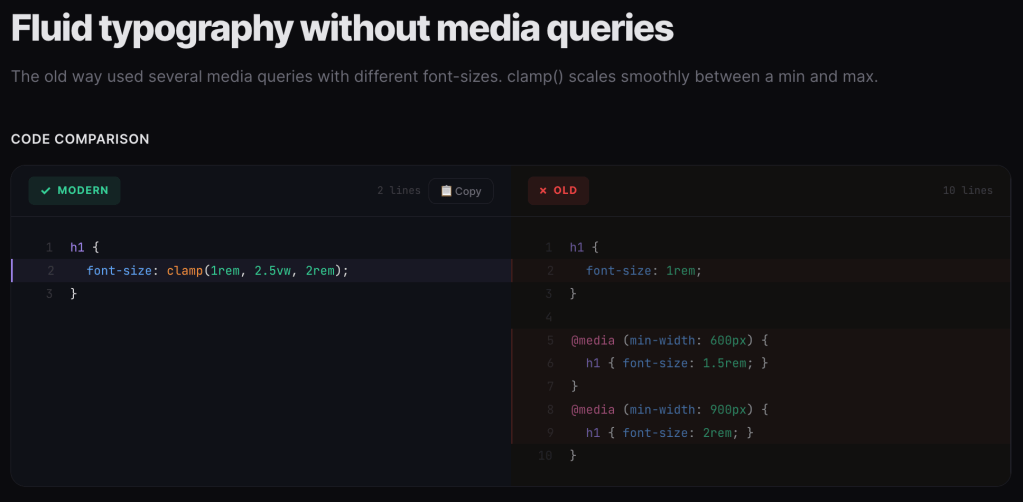
I do not (thankfully) write CSS every day, and while I do try to keep up with every new update to the standards, I inevitably miss some pretty cool quality of life (and code) improveents. Which is why I am fond of sites like Modern CSS Code Snippets which try to select the more useful (or just plain cool) legacy-to-modern CSS idioms to migrate to.
Naeem Noor has (so far) cataloged 71 side-by-side comparisons of legacy CSS patterns versus their modern native replacements. The format is welcomingly consistent: here’s the old hack, here’s the clean modern way, along with a browser compatibility percentage.
The site is organized across several categories: Layout, Animation, Color, Typography, Workflow, and Selectors. Each snippet is tagged by difficulty (Beginner, Intermediate, Advanced) and includes a compatibility indicator showing how widely available the modern approach is. Each snippet has zero dependencies and is not tied to any “framework”. The playground and articles sections also make it more than “just another reference site”.
It is especially helpful in surfacing CSS features that have landed in browsers but haven’t made it into most developers’ muscle memory yet. Alot of these replace JavaScript-dependent patterns or preprocessor workarounds with pure CSS. Some highlights worth knowing about:
Naeem joins similar niche sites, such as to Stephanie Eckles’ “Modern CSS Solutions” or Jen Simmons’ older layout demos, but with a tighter editorial focus on the “old vs new” comparison format.
Just make sure to keep an eye on the browser compatibility percentages. I think anything above 85% should be safe for production.
ASCII Silhouettify
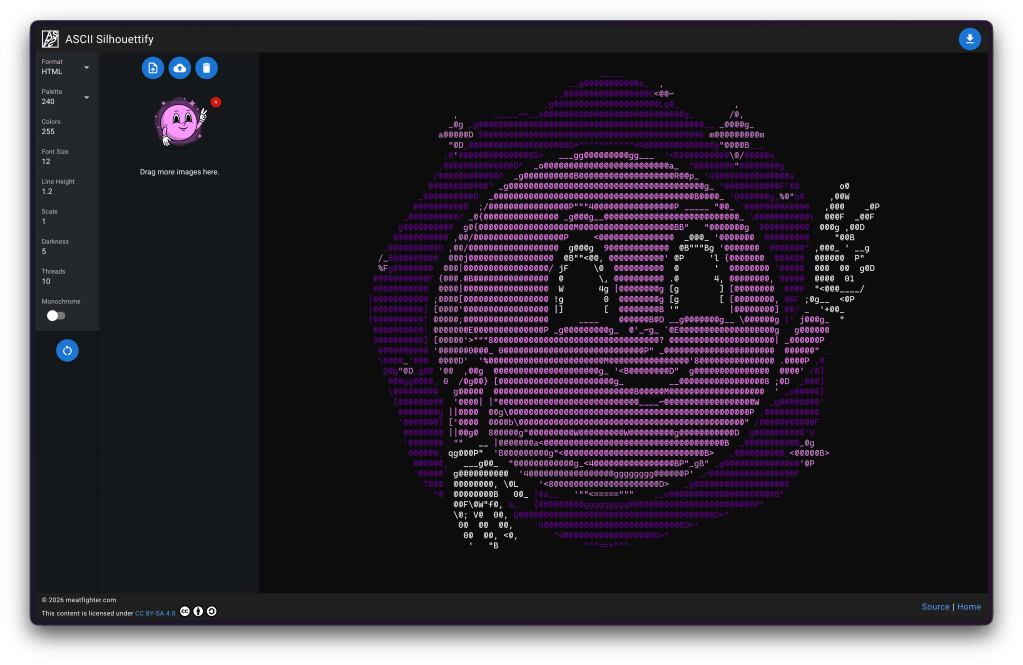
NOTE: AI Vegans can just hit up the resource if you don’t want to see short blather about “AI”.
At work, we’ve been building an autonomous “AI”-based threat-hunting agent for our Global Observation Grid. There’s just too much data and too few humans to keep up with the billions of packets that hit our sensors every day. It needed a name, and “Orbie” stuck (the “all knowing orb”, with an ie tacked on the end to keep the convention of our other mascots Ghostie and Taggie). Then, it needed an avatar. Fellow GNoid (one of the ways we refer to fellow GreyNoise teammates) Austin Price is one of the most talented designers I’ve encountered in my 5 decades on this big blue marble of ours, and came up with an amazing likeness for our little buddy.
Images are great, but most of my team lives at the command line, so we needed to ASCII-ify Orbie, which sent me on a quest to see what the latest and greatest exists out there in this tool category.
That led me to find ASCII Silhouettify (GH) by Meat Fighter. The tool outputs monochrome plaintext, ANSI-colored text, HTML (with or without color), or Neofetch’s custom ASCII art format. It’s available as both a Node.js CLI (npm install -g ascii-silhouettify) and a browser-based SPA (the link goes to the Quasar/Vue app).
Input images need black or transparent backgrounds, and should be pre-scaled to roughly the desired output size in character cells. Font size and line height settings let you calibrate aspect ratio to match your specific terminal’s character dimensions.
While I’m fairly confident the section header says everything that might need to be said about how spiffy this tool is, I will blather a bit more as there is some seriously cool stuff under the hood (I highly encourage folks to read the GH code).
As implied by the name, the tool uses a silhouette-filling approach. Silhouette methods use outlines and contours to represent forms against a contrasting background. The technique traces back to 18th-century portraiture, where artists cut detailed profiles from black paper, but has evolved considerably. The technique (and this tool) is fundamentally different from the typical “map brightness to character density” ASCII art generators you’ve seen a gazllion times.
Instead of approximating shading/gradients by picking characters based on how “dark” they look (the classic approach where @ = dark, . = light), this tool treats each colored region of the input as a binary silhouette and finds the largest ASCII characters that fit within the outline without any white pixels bleeding outside the shape boundary. The result is filled geometric shapes rather than textured approximations.
The algorithm operates on 9×19 pixel character cells (matching a typical monospaced font rendering). Every printable ASCII character (95 total) is pre-rendered as a binary black/white bitmap at that cell size, thresholded at 50% intensity.
For a given input image, the process is pretty straightforward:
- Color plane separation: The image is decomposed into per-color binary planes (white silhouette on black background) using CIEDE2000 perceptual color distance to map input colors to the selected ANSI palette.
- Region partitioning: Each plane is divided into a grid of 9×19 cells.
- Character fitting: For each cell, every ASCII character image is compared pixel-by-pixel against the region. If any white pixel in the character image lands on a black pixel in the region, that character is rejected (it would extend beyond the silhouette). Among all remaining valid characters, the one with the most white pixels wins. This maximizes fill density while strictly respecting the boundary.
- Plane merging: After converting all color planes independently, the final output is assembled by picking the character at each position that had the highest white-pixel match count, colored according to its source plane.
- Origin optimizationL: The grid origin matters, so the algorithm brute-forces all integer offsets within one character cell (171 possible origins) and picks the best overall result. This is parallelized across available CPU cores.
The bitmask trick is super clever! Rather than doing a naive pixel-by-pixel comparison loop, the algorithm precomputes 171 bitmasks (one per pixel position in the 9×19 cell). Each bitmask is 95 bits wide, where each bit represents one ASCII character. A set bit at position N in a bitmask means character N has a black pixel at that coordinate.
During conversion, a 95-bit accumulator starts as all-ones. For each black pixel in the input region, the accumulator is AND’d with the corresponding bitmask, which eliminates characters that have white pixels where the region is black. After processing all pixels, the highest set bit (found via a CLZ/count-leading-zeros hardware instruction) indexes the best-fitting character. This collapses what would be a nested loop into a series of bitwise ANDs and a single CLZ, which makes the whole thing super fast.
Note that you cannot drop in a photograph or anything with gradients/shading. This is purely a shape-filler for flat graphics. The CIEDE2000 color mapping is computationally expensive but produces perceptually accurate palette matching. This absolutely matters when you’re constrained to 8/16/240/256 ANSI colors.
CSS Doodle
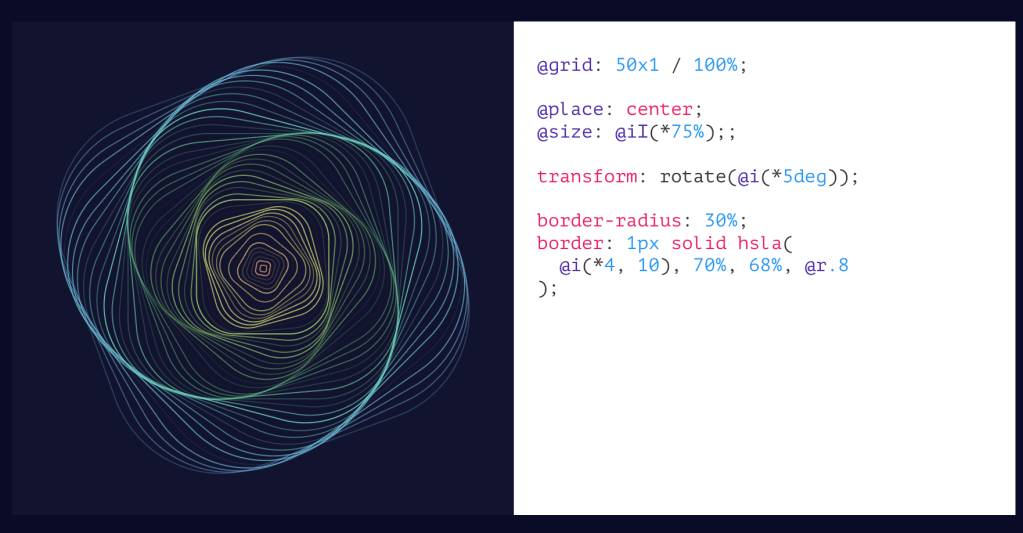
We’ll double-down on CSS, today, and talk about CSS Doodle (GH). It’s a web component (aptly named <css-doodle>) created by Yuan Chuan for generative art and pattern creation. Under the hood is framework-less and is ultimately just a single custom element built on Shadow DOM v1 and Custom Elements v1. Thus, it works in all modern browsers without polyfills.
To use it, just drop a <css-doodle> element on a page, give it a grid size (up to 64×64, or 4096 for 1D grids), and write CSS-like rules inside it. The component generates a grid of divs and applies your rules to each cell. The twist is a rich set of @-prefixed functions and selectors that give you per-cell awareness of position, randomness, and iteration, which are all things CSS alone cannot do.
Yuan’s custom DSL (domain-specific langauage) extends CSS with several categories of additions. Selectors like @nth, @at(col, row), @random(ratio), @row(n), @col(n), and @match(expression) let you target specific cells or groups. The @match selector is particularly interesting as it accepts math expressions where x, y, i, X, Y, I are available as variables, so you can do things like @match(tan.cos.sin(x*y) > 1) for complex patterns.
Functions provide per-cell context: @index (aliased @i), @row/@col (aliased @x/@y), @size-row/@size-col (aliased @X/@Y), and the randomness (a technique used across many generative art projects) comes from @rand(start, end) and @pick(v1, v2, ...) with variants @pick-n (sequential) and @pick-d (distinct random order). There’s @last-pick and @last-rand for referencing the previous random value, which is useful for coordinating colors or angles.
Between the tomes in the two sections and that short spelunk into the code, you’ve likely had enough technical exposition for one Drop. So, I’ll leave you to your own devices to explore the “properties,” how deterministic seeding (since generative art designers do need to control the randomness), JS API, production use patterns, and other more advanced features.
FIN
Remember, you can follow and interact with the full text of The Daily Drop’s free posts on:
- Mastodon via
@dailydrop.hrbrmstr.dev@dailydrop.hrbrmstr.dev - Bluesky via
<https://bsky.app/profile/dailydrop.hrbrmstr.dev.web.brid.gy>
☮️

 hrbrmstr's Daily Drop
Leave a comment