daff; MDXport; GrAIphViz
I’m taking advantage of “nap time” to crank out a Drop today. If we could only bundle the vast stores of energy in these little ones.
TL;DR
(This is an LLM/GPT-generated summary of today’s Drop. We’re back to local Ollama and Qwen 3.)
- daff provides a command‑line and library tool for diffing, patching, and merging tabular data such as CSV and SQLite files, enabling row‑aware comparisons and git integration (https://paulfitz.github.io/daff/)
- MDXport is a browser‑based converter that uses a WebAssembly‑compiled Typst engine to transform Markdown into high‑quality PDFs locally, supporting advanced features like Mermaid diagrams and LaTeX math (https://www.mdxport.com/)
- GrAIphViz showcases how using GraphViz DOT language to express Claude.md instruction sets creates clearer, flowchart‑style rules that reduce ambiguity and improve AI behavior (https://blog.fsck.com/2025/09/29/using-graphviz-for-claudemd/)
daff
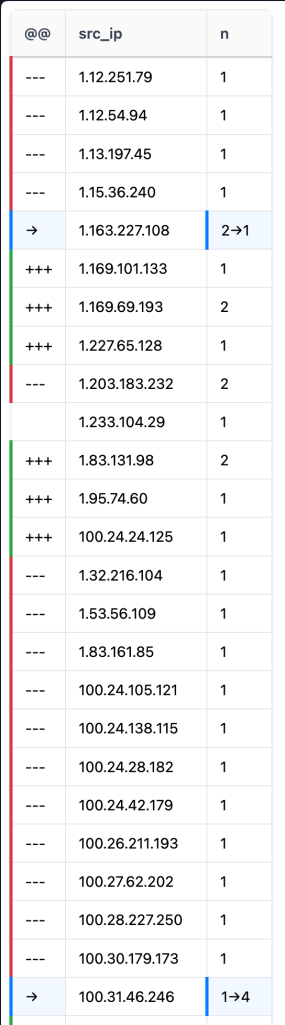
Understanding how data evolves over time can be a nightmare when you are dealing with large spreadsheets or database exports. Standard text comparison tools treat data as individual lines of text, which means if you add a single column or reorder your rows, every single line shows up as a change. This is essentially noise that hides the actual updates you need to see. This is where daff (GH) comes in as a dedicated library and command line tool designed specifically for diffing, patching, and merging tabular data like CSV, TSV, SQLite, and ndjson files.
I stumbled upon daff as we’re trying to come up with clever/fast ways to show differences between intelligence captured by our entire Global Observation Grid vs. that of sensors customers and researchers have stood up in their environs.
Think of daff as git diff but with a deep understanding of rows and columns. Instead of looking for character changes, it aligns tables to identify exactly which cells were modified, which rows were deleted, and where new columns were inserted. It uses a sophisticated alignment algorithm to ensure that even if your data is shuffled, it can still find the connections between the original and the updated versions.
One of the spiffier aspects of this tool is its highlighter diff format. When you run a comparison, daff generates a new table that acts as a map of the changes. This map uses specific symbols in an initial action column to tell you the story of the data. A plus sign indicates an inserted row, a minus sign shows a deletion, and an arrow symbol points from an old value to a new value within a single cell. This format is so well-defined that it is part of the Frictionless Data specification, making it a reliable standard for data versioning.
Getting started with the tool is straightforward because it is available across almost every major programming environment. You can install it via various package managers depending on your preferred language.
For Node.js:
install.packages('daff')           # R
npm install daff -g                # Node.js
pip install daff                   # Python
gem install daff                   # Ruby
composer require paulfitz/daff-php # PHP
Once installed, the command line interface provides immediate utility. You can compare two files and view the results in your terminal, or export them to a structured file or a styled HTML report.
daff a.csv b.csv
daff --output diff.html a.csv b.csv
The tool also supports three-way merges, which is helpful when two different people make changes to the same base dataset. By providing a common ancestor file, daff can intelligently combine the changes or highlight conflicts where the same cell was edited differently:
daff merge parent.csv a.csv b.csv
For those who rely on version control, the killer feature is the git integration. By running a simple command, you can configure git to use daff as the default driver for CSV files.
daff git csv
After setting this up, running git diff on a data file will no longer show a confusing mess of comma-separated text. Instead, you get a clean, row-aware summary of what actually changed in your data. This makes it possible to treat data with the same rigor and clarity that software engineers treat source code.
Beyond the command line, you can use the library programmatically. In a JavaScript environment, you can load your tables into a TableView, align them, and then generate a highlighter diff.
const daff = require('daff');
const table1 = new daff.TableView(data1);
const table2 = new daff.TableView(data2);
const alignment = daff.compareTables(table1, table2).align();
const data_diff = [];
const table_diff = new daff.TableView(data_diff);
const flags = new daff.CompareFlags();
const highlighter = new daff.TableDiff(alignment, flags);
highlighter.hilite(table_diff);
This programmatic approach let us build data auditing into our apps.
Our use cases for “diff” views are designed to help folks track changes in indicators of compromise, version-control malware sample metadata, or audit other components to see exactly what has been updated between snapshots. Because it supports SQLite, we can even diff entire database tables without exporting them to flat files first.
The tool is super flexible, offering flags to ignore certain columns, handle case-insensitivity, or specify primary keys for more accurate alignment. Whether you are a data scientist, a threat intelligence analyst, or a developer, it turns the chaotic process of data comparison into a structured and readable workflow.,
I gave it a go on scads of IPs associated with React2Shell activity between a couple workspaces. It worked fine, but I’m not sure if This Is The Way for Ioc list comparisons.
MDXport
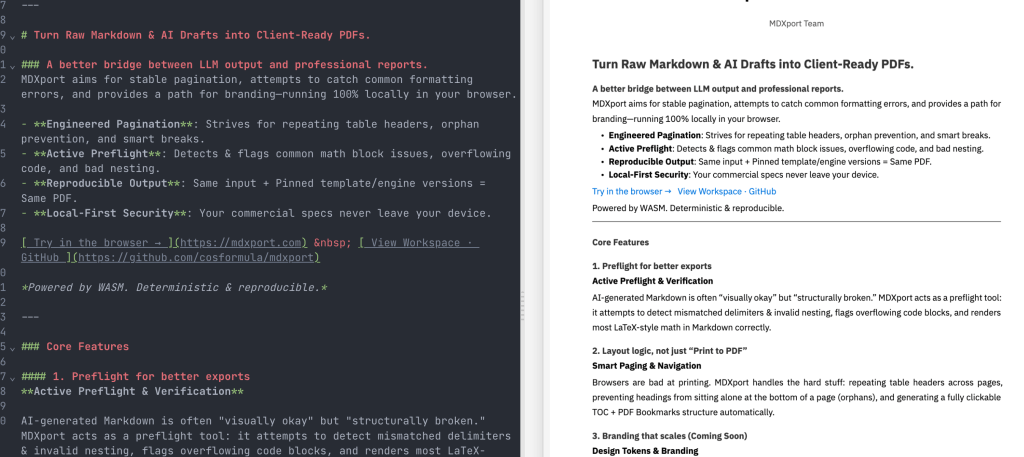
Creating high-quality [PDF] documents from simple text files often feels like a choice between two extremes. You either use basic Markdown and end up with a PDF that looks like a printed webpage, or you succumb to the need to need to pay homage to the complex world of the LaTeX gods and deal with massive software installations and obscure error messages. MDXport (GH) offers a middle ground by functioning as a browser-based converter that produces classy, modern PDFs without requiring you to install a single thing.
The heavy lifting is all done by Typst, the modern typesetting system we’ve covered before that’s designed to be a faster and more user-friendly alternative to LaTeX. By compiling the Typst engine into WebAssembly (WASM), the tool can run a full professional typesetting pipeline directly inside your browser. This means that all the processing happens locally on your computer. Your sensitive data never leaves your browser, and you can even use the tool while completely offline once the page has loaded.
The conversion process follows a structured pipeline. It takes your Markdown text and parses it into an abstract syntax tree using the unified (remark) ecosystem. This tree is then translated into Typst markup, which the WASM-powered engine renders into a high-fidelity PDF. Because it uses a real typesetting engine rather than a web-to-print approach, it handles complex layout tasks like page breaks, footnotes, and mathematical formulas with much higher precision.
It even has native support for advanced content types that usually break lesser converters. It includes Mermaid support for generating flowcharts and sequence diagrams directly from text. It also handles LaTeX-style math notation for technical formulas and provides full GitHub-Flavored Markdown support, including tables and task lists. For folks who struggle with messy input, the tool includes a smart formatting feature that automatically attempts to fix common issues found in AI-generated Markdown, such as overflowing tables or inconsistent heading hierarchies.
For more technical folks, the stack is built on Svelte 5 and Vite, ensuring a fast and responsive editor experience. The interface provides a live side-by-side preview so you can see exactly how your document will look as you type. It also functions as a Progressive Web App, meaning you can save it to your device and use it like a desktop application.
While the project is still in its early stages, it is a neat approach to handling document generation. It eliminates the heavy lifting of traditional typesetting while maintaining the privacy and security of a local-first workflow, and is particularly well-suited for anyone who needs to quickly turn technical notes into polished reports without fighting with software dependencies.
GrAIphViz
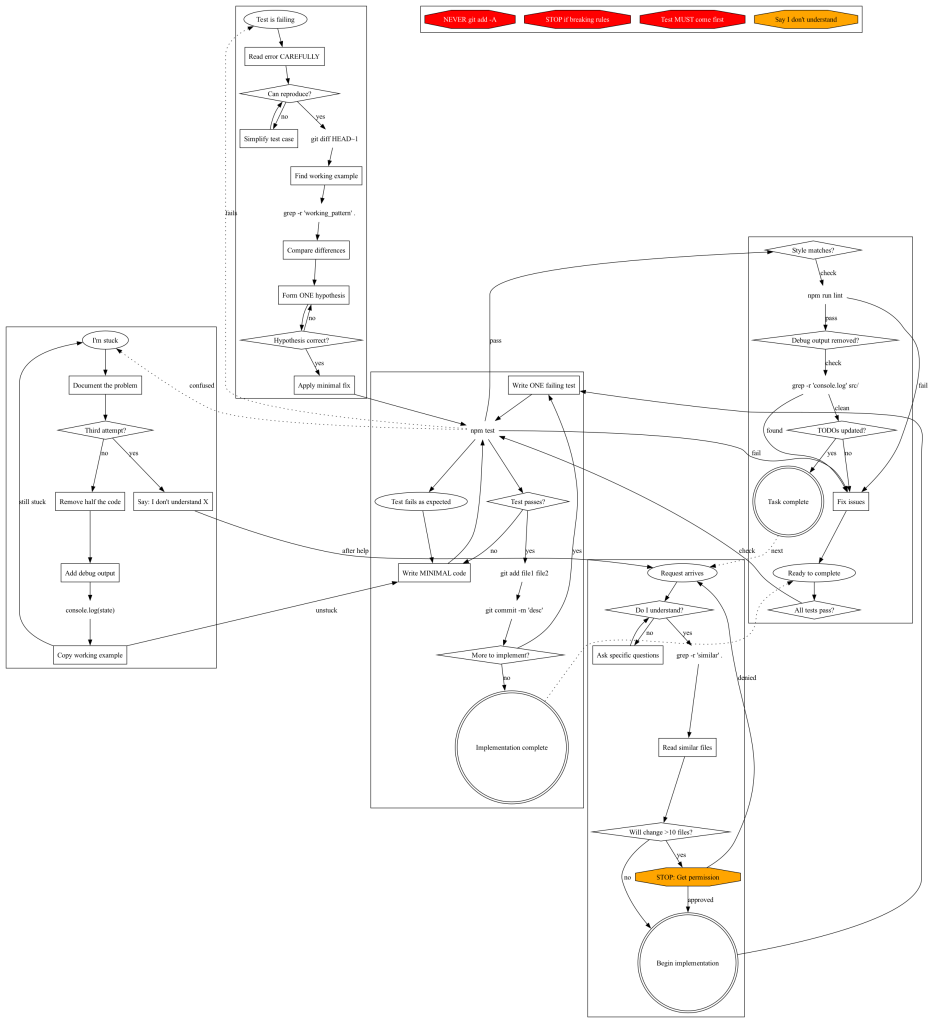
I try to keep “AI”/LLM content to a minimum since it already has enough hype oot-and-aboot, plus I know how many of you feel about the topic. This apprach to providing instructions to Claude was just unqiue enough that I felt it deserved a sction. It’s invovled enough that I don’t mind shunting you directly to the post, but has also done some justice, below, in a quick summary.
Jesse Vincent has been documenting an experiment where he uses the GraphViz DOT language to structure CLAUDE.md files (the instruction sets that guide the behavior of Claude Code). His main realization is that converting process rules into flowchart notation is more effective than using standard prose. The DOT format requires explicit decision points and triggers. This structure makes any hidden ambiguities in the original rules easy to identify.
He discovered several specific benefits during his testing. Trigger based processes are more successful than single large flowcharts. He further uses separate subgraphs for specific situations like being stuck or starting new work so the AI can jump to the relevant context. Using quoted strings for node IDs allows the source code to remain readable as documentation. He also uses specific shapes to represent different actions. Diamonds represent decisions and octagons represent warnings while plaintext indicates direct commands.
The transition to this format revealed inconsistencies in his previous instructions that were not visible in text form. He found that Claude follows these structured rules very well. There is less room for misinterpretation compared to standard writing. His post and experiments include examples of the transition from text heavy files to structured graphs and outlines a process for adding new rules. This approach offers a more rigorous method for managing AI agent instructions.
If you use “AI” for anything, it’s worth a peek.
FIN
Remember, you can follow and interact with the full text of The Daily Drop’s free posts on:
- 🐘 Mastodon via
@dailydrop.hrbrmstr.dev@dailydrop.hrbrmstr.dev - 🦋 Bluesky via
https://bsky.app/profile/dailydrop.hrbrmstr.dev.web.brid.gy
☮️
 hrbrmstr's Daily Drop
Leave a comment