The Errant Champions; a11y.css; Faster Dates
I spent most of the weekend resting this plague out of me, plus researching a new PHP exploit + cryptominer campaign (that I’ll link to once we post it on the $WORK blog), hence no Bonus Drop.
Random recent resources today since I obsessed on curating tomorrow’s Typography Tuesday Drop (ZOMGOSH THE FONTS ARE SO COOL).
TL;DR
(This is an LLM/GPT-generated summary of today’s Drop. This week, I continue to play with Ollama’s “cloud” models for fun and for $WORK (free tier, so far), and gave gpt-oss:120b-cloud a go with the Zed task. Even with shunting context to the cloud and back, the response was almost instantaneous. They claim not to keep logs, context, or answers, but I need to dig into that a bit more.)
- Ghostty’s Unicode‑first design outperforms legacy terminals like iTerm2 and GNOME, highlighting widespread Unicode handling flaws and envisioning more flexible terminal rendering (https://www.jeffquast.com/post/state-of-terminal-emulation-2025/)
- a11y.css provides a lightweight, drop‑in stylesheet (and browser extension) that instantly visualizes accessibility issues such as missing alt text and heading order on any webpage (https://ffoodd.github.io/a11y.css/)
- Ben Joffe’s fast‑date algorithm maps Gregorian dates to a padded Julian calendar, delivering 2‑10% speed gains over the standard Neri‑Schneider method (https://www.benjoffe.com/fast-date)
The Errant Champions
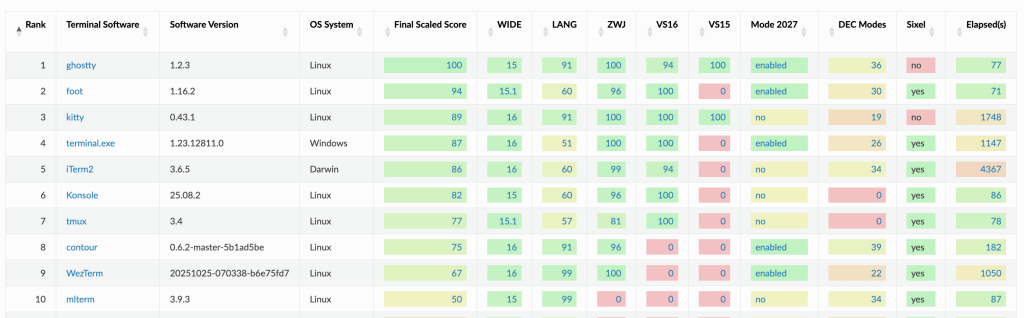
When Mitchell Hashimoto dropped Ghostty in 2024, it landed like a mic on marble. Developers immediately noticed something different: for once, a terminal didn’t screw up Unicode. Jeff Quast dug into why that’s such a big deal—because most terminals, even the ones we trust, still botch the simple act of drawing text. They guess wrong about character widths, forget that emoji come in families, and choke on zero-width joiners. The result is what you may have seen a bazillion times: misaligned cursors, broken prompts, and text that looks like it came through a meat grinder. Ghostty sidestepped all of it because Hashimoto didn’t bolt on fixes. The Unicode engine baked into the emulator was built from first principles in Zig, actually parsing grapheme clusters instead of pretending to.
But the real surprise is who’s struggling. Kitty holds its ground, but others are face-planting in ways that explain every “why is my terminal lagging?” moment you’ve ever had. iTerm2 and Extraterm grind through Unicode tests so slowly they melt CPU for hours. GNOME Terminal and its VTE-based cousins crawl for five hours barely touching the processor—a sign of serious design debt in their event loops. That weird half-second delay after you paste something complicated? That’s what it looks like when a 21st-century Unicode world collides with 1990s terminal logic.
Quast also sketches a future that sounds almost revolutionary: terminals that drop their monospace shackles. Kovid Goyal’s text sizing protocol hints at a world where markdown headers actually look like headers, and scripts like Khün render with grace instead of compromise. If you’ve ever built a CLI tool, or just wondered why the thing that prints “hello world” can be this hard, Quast’s post is worth your time: “State of Terminal Emulators in 2025: The Errant Champions”.
I am sad WezTerm scored as low as it did, but I won’t be giving it up any time soon.
a11y.css
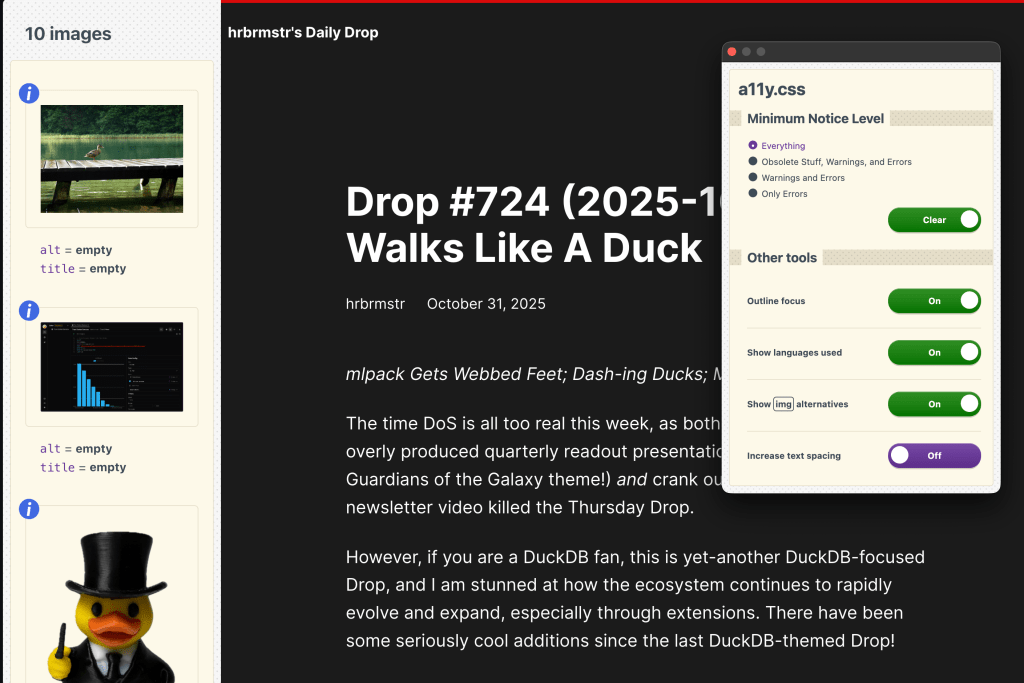
a11y.css(pronounced “Alix”) is a small and spiffy diagnostic stylesheet that turns your browser into a live accessibility checker. Drop it into your HTML like any other stylesheet, and it immediately starts pointing out potential issues right on the page. You’ll see visual callouts for missing alt text, bad heading order, empty links, and other things that might make your site harder to use or maintain. It doesn’t need a build pipeline or plugins. You can use a basic link tag in your own HTML and hit “refresh”. It works in multiple languages and severity levels so you can choose how noisy or strict you want it to be. (The section header is last Friday’s Drop in Arc using the about-to-be-mentioned browser extension.)
You can use it on any site by loading up their extension in Firefox, Chrome, and Edge. The extension is the route I took since it works on any site and lets me toggle checks on and off, highlight focus states, show language attributes, or reveal alt text directly on images. Each tab remembers your preferences, so you can keep it running without it getting in your way. It’s a simple, human-first tool that fits right into your everyday workflow instead of demanding a new one. The project’s open source and active, with a community that treats accessibility not as a checklist, but as part of good web craftsmanship.
Faster Dates

Every time you check your phone or your computer displays a date, something remarkable happens beneath the surface. Your device is performing a calculation that’s trickier than it seems. It’s converting a single number that represents the count of days since some arbitrary starting point into the familiar Year, Month, and Day (hopefully YYYY-MM-DD unless you are a monster) we all recognize. For decades, programmers have been refining this conversion, shaving microseconds here and there. In 2021, two researchers named Neri and Schneider published what became the gold standard: an algorithm so elegant it was adopted by major programming libraries and even the Linux kernel itself. It seemed like the last word on the subject.
Ben Joffe looked at this problem from a slightly different angle and discovered something clever hiding in plain sight. Instead of laboriously accounting for the Gregorian calendar’s quirky leap year rules (every 100 years loses a leap day, except every 400 years which keeps it) he found a shortcut. What if you just pretended those missing leap days existed? By padding the timeline with fake February 29ths in the right places, the messy Gregorian calendar suddenly transforms into the much simpler Julian calendar, where leap years happen every four years without exception.
By mapping to Julian dates first, the algorithm can skip several expensive computational steps that previous methods required. The result? Joffe’s technique benchmarks 2-10% faster than the Neri-Schneider algorithm across various computers. That might not sound earth-shattering, but in a calculation performed billions of times across the world’s computing infrastructure, those percentage points add up. More importantly, it’s a reminder that even in problems we think we’ve solved, there’s always room for one more elegant insight—one more way to see the pattern hiding in what looks like chaos.
FIN
Remember, you can follow and interact with the full text of The Daily Drop’s free posts on:
- 🐘 Mastodon via
@dailydrop.hrbrmstr.dev@dailydrop.hrbrmstr.dev - 🦋 Bluesky via
https://bsky.app/profile/dailydrop.hrbrmstr.dev.web.brid.gy
☮️
 hrbrmstr's Daily Drop
Leave a comment