meson; qman; mpv
I wanted to talk about qman today, but to do so meant forcing folks to use a build system called “Meson”, so we’ll dig into that first, showcase qman in the middle, and round out the corners with another cool project that also uses Meson as its build system.
TL;DR
(This is an LLM/GPT-generated summary of today’s Drop using Qwen/Qwen3-8B-MLX-8bit with /no_think via MLX, a custom prompt, and a Zed custom task.)
- Meson’s evolution from a physicist’s Christmas project to a default build system for major open-source projects, leveraging a Python-based meta-system with clean syntax and cross-platform support (https://github.com/mesonbuild/meson)
- qman reimagines traditional Unix man pages with modern usability features like clickable TOCs, hyperlinks, and customizable themes, while maintaining terminal simplicity (https://github.com/plp13/qman)
- mpv is a minimalist, powerful media player built on FFmpeg, offering advanced playback features, scriptability via Lua/JavaScript, and extensibility through a vibrant community (https://mpv.io/)
meson
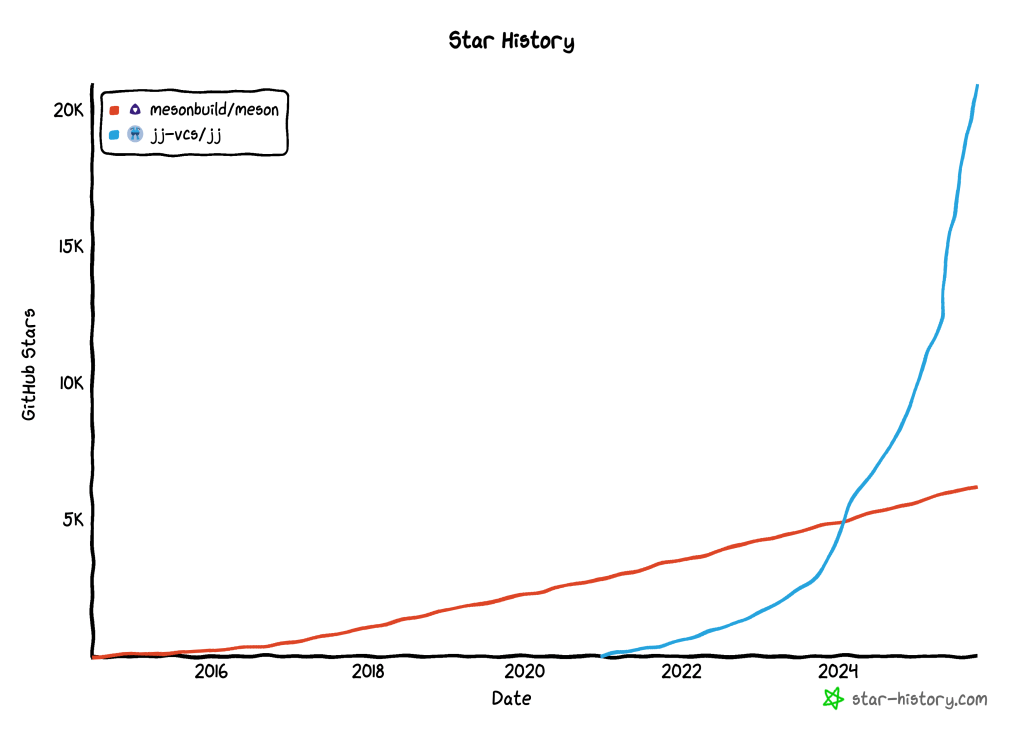
Meson’s story starts in Finland, around Christmas 2012, when Jussi Pakkanen — a physicist by training — decided he’d had enough of the messy, inconsistent world of build systems. Existing tools were powerful but painful, riddled with obscure syntax and mysterious failures. So, over the holidays, he wrote something new: a system that would be fast, dependable, cross-platform, and—above all—friendly to us humans. By February 2013, the first version was out. He called it Meson, after the subatomic particle, a nod to his physics background.
Meson is actually a “meta-build system”. It doesn’t compile your code directly but generates build files for tools like Ninja, (ugh) Visual Studio, or Xcode. It’s written in (ugh) Python, but its own language isn’t Python! It does, however (and, unfortunately), look a lot like it. That language is intentionally not Turing complete, which means you can’t accidentally turn your build script into a program. This design choice keeps things predictable and makes debugging much less painful. The language is also strongly typed, so whitespace or filenames with spaces won’t ruin your day. You have to list your source files explicitly, too (i.e., no wildcard matching), which means if you delete a file, Meson will notice.
It’s the kind of tool that quietly does the right thing. It caches intelligently, links only what’s changed, and knows how to talk to tools like Valgrind, ccache, and various sanitizers without making you jump through hoops. Likewise, it can cross-compile cleanly via configuration files, and its built-in WrapDB can automatically fetch and build dependencies for you. Meson’s motto might as well be “boring builds are good builds.”
Still, it took years before the open-source world caught on. By 2018, the tide had turned: big Linux ecosystem projects like X.org, Wayland, GStreamer, GNOME, and systemd had all migrated to Meson. What they found was a system that compiled faster, produced cleaner build definitions, and made contributors happier. Getting there, though, meant convincing entrenched communities to leave behind tools they’d been using for decades—no small feat.
Fast forward to 2025, and Meson isn’t just “that new build system” anymore; it’s the default for much of the open-source world. Git made the switch in version 2.48, joining a long list of adopters that includes PostgreSQL, QEMU, Mesa, GTK, GLib, GStreamer, GIMP, NumPy, SciPy, PipeWire, and FreeType. The freedesktop.org and GNOME ecosystems are practically all-in. GNOME Shell even dropped Autotools entirely back in 2017, a move that felt radical at the time but now seems prescient.
There are some interesting details hiding in its history. “Meson” is a registered trademark of Pakkanen himself, and over the years, others have reimplemented its language in C (“muon”) and C++ (“Meson++”), showing that Python is (thankfully) just one possible vessel. Its support for Fortran and Cython came about largely to help scientific computing projects like SciPy escape the gravitational pull of the mega-horrible setuptools. And yes, you in the back, at one point someone suggested rewriting it in Perl. That didn’t happen.
Ask developers why they like Meson, and you’ll hear the same themes repeated: the documentation actually makes sense; the syntax is readable; it’s fast and keeps getting faster; and you spend dramatically less time debugging build scripts. It’s a tool that stays out of your way and lets you get back to what you actually want to be doing.
From one frustrated physicist’s Christmas project to the backbone of modern open-source infrastructure, Meson’s rise feels like the software equivalent of a well-tuned compile: fast, smooth, and surprisingly satisfying.
qman
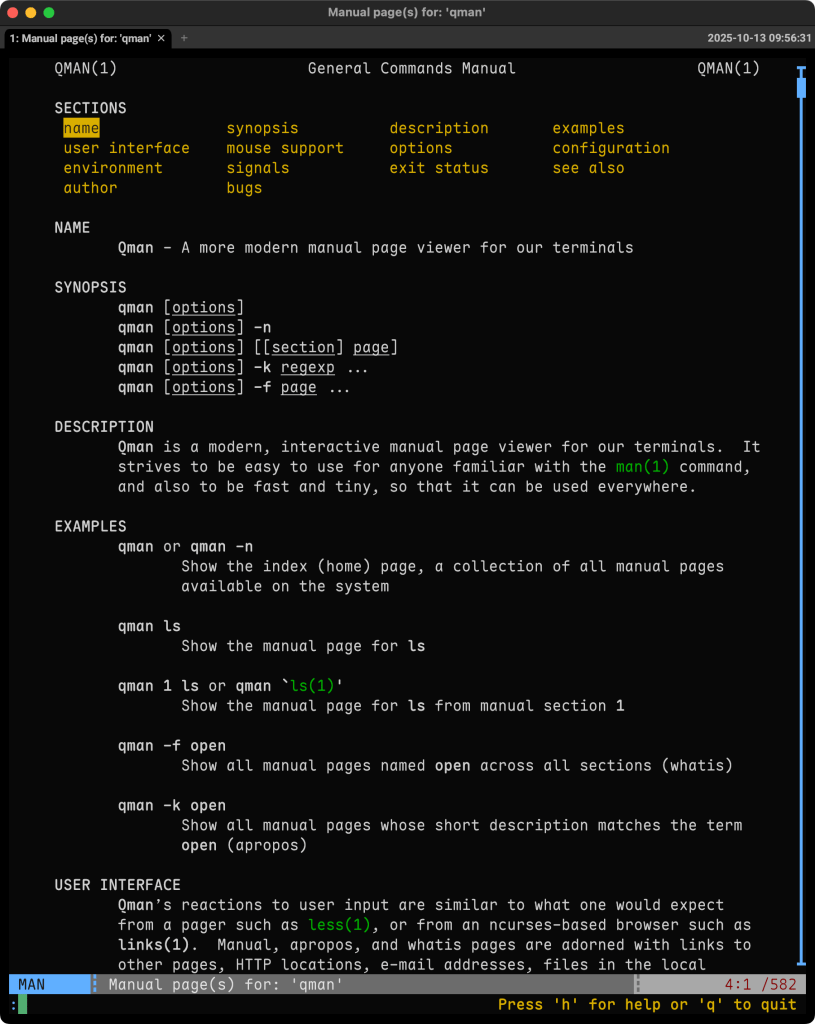
Now that the Meson ’splainer is out of the way, we can dig into qman, since, on some systems, you may need to use it to build the tool (brew install qman works just fine tho).
qman is what you’d get if the traditional Unix man command were reimagined by someone who actually likes using software built after 1985. It’s a manual page viewer that keeps everything you love about man—speed, text-based simplicity, that comforting terminal aesthetic—but adds the kind of usability you expect from modern tools.
Where man gives you walls of text and a “good luck” pat on the back, qman gives you structure. There’s an index that lets you browse every installed manual page by section, a clickable table of contents, and even hyperlinks that actually work. That means when one man page references another or includes a URL or email, you can follow it like you would in a browser. Navigation feels intuitive, too: you can jump back and forward through history, use your mouse if you like, and search incrementally as you type to find what you need almost instantly. I am quite impressed with the scrollbar implementation, and the fact that it is always visible if the manual page is long enough.
It’s designed to feel natural for anyone who lives in the terminal. Keyboard shortcuts mimic less, command-line flags that match what you’d expect from man (so you don’t have to unlearn habits), and there’s built-in help when you need a reminder. You can tweak themes — dark, light, or something in between — and everything from the interface to the indexing behavior is configurable via clean INI-style files. Under the hood, it’s plain C: no bloat, no fuss, and fast enough to run anywhere.
Version 1.5.0 has been fairly recently released, and development’s still active with new improvements and bug fixes rolling in. It’s documented properly too and has a solid README.
If you spend a lot of time reading documentation from the command line, qman makes it a better experience without breaking the Unix philosophy. It helps you move through related topics faster, discover what’s already on your system, and read more comfortably without ever leaving your terminal.
mpv
Pre-built packages are available for pretty much every operating system, but this is a great example repo to see the power of Meson if you’re game to try to build it.
mpv (GH) a free, open-source media player built around the command line, focused on doing one thing exceptionally well: playing just about any video or audio file you can throw at it. It is bonkers brutalist: there’s no cluttered interface or endless settings panels — just a clean, minimal experience that puts performance and control front and center.
Despite its spartan appearance, mpv is remarkably sophisticated under the hood. It delivers spiffy video output through OpenGL, Vulkan, and D3D11, supports HDR, color management, interpolation, and a host of high-quality scaling algorithms. You can even turn on hardware acceleration with --hwdec to offload video decoding to your GPU. Videophiles swear by it for the kind of playback precision and fidelity one rarely finds outside of professional tools.
mpv’s design philosophy is equal parts minimalism and extensibility. It’s primarily driven by the keyboard, though it does include a teensy, unobtrusive on-screen controller for basic playback. The player is fully scriptable, too. You can extend it endlessly with Lua or JavaScript, automating tasks, building custom UIs, or creating clever shortcuts for your workflow. There’s an active community maintaining scripts that can do everything from fetching subtitles automatically to integrating with streaming services.
Technically speaking, mpv is built on good ol’ FFmpeg, which gives it near-universal format support. It also exposes a clean C API, making it easy to embed into other software. You’ve likely seen it in media-related applications and video player wrappers but had no idea it was mpv. Licensing is pragmatic too: GPLv2 or later by default, but you can build it under LGPLv2.1 or later if you prefer more permissive terms.
The section header is me being boring and using mpv on my recently-obtained Wokyis to feed the insanity of our day right into my veins. It handles C-SPAN URLs super well since it has all the smarts of yt-dlp under the hood for content access.
FIN
Remember, you can follow and interact with the full text of The Daily Drop’s free posts on:
- 🐘 Mastodon via
@dailydrop.hrbrmstr.dev@dailydrop.hrbrmstr.dev - 🦋 Bluesky via
https://bsky.app/profile/dailydrop.hrbrmstr.dev.web.brid.gy
☮️
 hrbrmstr's Daily Drop
Leave a comment