Browser MCP; Arc Export; Zed D2 & Ark + R 4.5.0
I managed to create the jankiest of themes for today’s Drop that weaves between Arc/Ark & Zed.
TL;DR
(This is an LLM/GPT-generated summary of today’s Drop using Ollama + llama 3.2 and a custom prompt.)
- (https://browsermcp.io/) Browser MCP connects AI applications with web browsers, automating tasks like form filling and website navigation while maintaining private data and avoiding cloud-based delays.
- (https://github.com/ivnvxd/arc-export) Arc Export provides a script to convert pinned tabs in the Arc Browser to standard HTML bookmarks file for import into other browsers.
- Zed D2 & Ark + R 4.5.0 (https://github.com/dacort/zed-d2)
Browser MCP
(For a primer on Model Context Protocol that includes how to build a tiny Star Wars API MCP server, hit up Drop #365.)
Browser MCP is a tool that connects AI applications with web browsers, allowing automation of tasks that would normally require manual interaction. It lets AI tools like Cursor or Claude work directly in your browser to complete tasks such as filling out forms, navigating websites, and running tests within your existing browser environment. This is especially helpful for developers and researchers who need to automate repetitive tasks while maintaining access to their logged-in sessions and personal browser profiles.
The system works through the Model Context Protocol (MCP), which creates a bridge between AI models and external applications. Setting it up involves installing a browser extension and configuring an MCP server within your AI application. This creates a local connection that avoids cloud-based delays and keeps your data private. Because everything runs locally on your device, your browser activity remains private (well as private as any browser session is these days), and the system uses your actual browser fingerprint to help avoid basic bot detection systems.
Browser MCP includes various automation tools like navigation, click simulation, text input, and screenshot capture that can be combined to create complex workflows. For example, you could set up automated data collection from research websites by programming sequential form submissions, or test a web application by automatically running through user pathways.
By enabling AI-powered browser automation, Browser MCP reduces manual effort in scenarios such as end-to-end testing, large-scale data entry, and gnarly scraping scenarios. This makes it a practical tool for academic and development work where accuracy and reproducibility are important. Its design focuses on both efficiency and security, ensuring automation happens without exposing sensitive browser information to third-party servers.
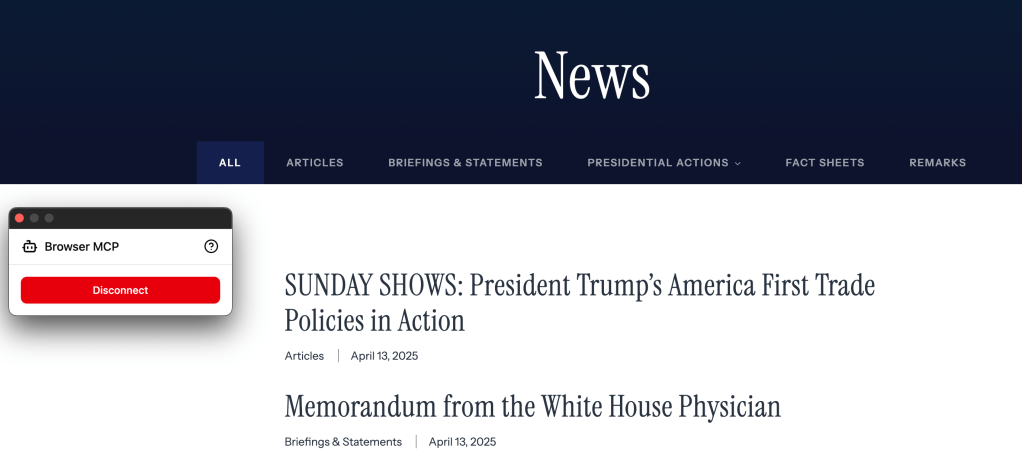
The section header is me wiring up Browser MCP to my always-pinned White House executive actions tab and Claude Desktop. I asked Claude to “Extract the title and link into a JSON array for all the visible H2 links on the connected browser tab.” and this is the result (I truncated the JSON after the image):

[
  {
    "title": "Military Mission for Sealing the Southern Border of the United States and Repelling Invasions",
    "url": "https://www.whitehouse.gov/presidential-actions/2025/04/military-mission-for-sealing-the-southern-border-of-the-united-states-and-repelling-invasions/"
  },
  {
    "title": "Clarification of Exceptions Under Executive Order 14257 of April 2, 2025, as Amended",
    "url": "https://www.whitehouse.gov/presidential-actions/2025/04/clarification-of-exceptions-under-executive-order-14257-of-april-2-2025-as-amended/"
  },
  –
]
Yes, that was easily doable via puppeteer (if it needed a JS-enabled browser environment), but I did it on the fly without any coding, and kept working on other things (like this Drop!) while it was cranking away.
There are some projects that can wire up local-first LLMs to MCP servers, but none have baked in the “groking” of MCP servers like Anthropic seems to have done, so to get similar utility without using a corporate LLM, you’ll likely need to make a pretty good system prompt (or see if you can convince Claude to give up its prompt).
Arc Export
This past week, a friend of the Drop pointed me to Arc Export.
If you use the Arc browser, one nit-picky frustrating thing about it is that some builds can be a bit wonky. Another nit is that — while it is Chromium under the hood — they’ve sufficiently mangled (in a good way) the Chromium interface such that very common things — like bookmarks — do not exist in its universe.
The Arc Export project provides a script for converting pinned tabs in the Arc Browser to standard HTML bookmarks file. These bookmarks can then be imported into any web browser.
Super handy in the event you decided to ditch Arc for one of the up-and-coming upstart browsers (which should be viable in ~year, provided we’re all still around in said ~year).
Zed D2 & Ark + R 4.5.0

All around stellar human Damon P. Cortesi (@dacort.velocipig.com)] is hard at work on a Zed extension for Drop fav D2 — the moden text-to-diagram tool open-sourced by Terrastruct.
If lack of D2 support was holding you back from Zed, you now have no excuse!
The Zed R experience also continues to improve (if you agreed with my assertion that today’s theme was janky, Zed’s initial R REPL support was somewhat janky). One especially nice thing about using it is not having to worry about “console DoS” like one does in VS Code or RStudio (I work with very text-heavy data frames, which can be painfully slow print-wise in the R console). Owen Smith also has some nice keyboard shortcuts to pair with.
Russ Hyde has a stellar “What’s new in R 4.5.0?” over at the Jumping Rivers blog, and you can read all the new/changed bits in the changelog. The new parallel package installation process is super dreamy.
FIN
Remember, you can follow and interact with the full text of The Daily Drop’s free posts on:
- 🐘 Mastodon via
@dailydrop.hrbrmstr.dev@dailydrop.hrbrmstr.dev - 🦋 Bluesky via
https://bsky.app/profile/dailydrop.hrbrmstr.dev.web.brid.gy
☮️
 hrbrmstr's Daily Drop
Leave a comment