Mastoshare; doxx; nettool.sh
The first Bonus Drop of 2026 keeps it short and simple with three resources that also keep tasks short and simple.
TL;DR
(This is an LLM/GPT-generated summary of today’s Drop. Ollama + MinMax M2.1.)
- Mastoshare creates universal links for Mastodon posts and profiles that automatically route users back to their own instance, solving cross-instance sharing issues without tracking or requiring logins (https://mastoshare.link/)
- doxx is a Rust-based CLI tool that renders Microsoft Word .docx files directly in the terminal with full formatting, images, and search functionality for a fast alternative to GUI word processors (https://github.com/bgreenwell/doxx)
- nettool.sh is a Bash script combining networking utilities like connectivity checks, interface dumps, subnet calculations, and logging into a single command-line helper for sysadmins and network engineers (https://github.com/geduard0098/Nettool)
Mastoshare
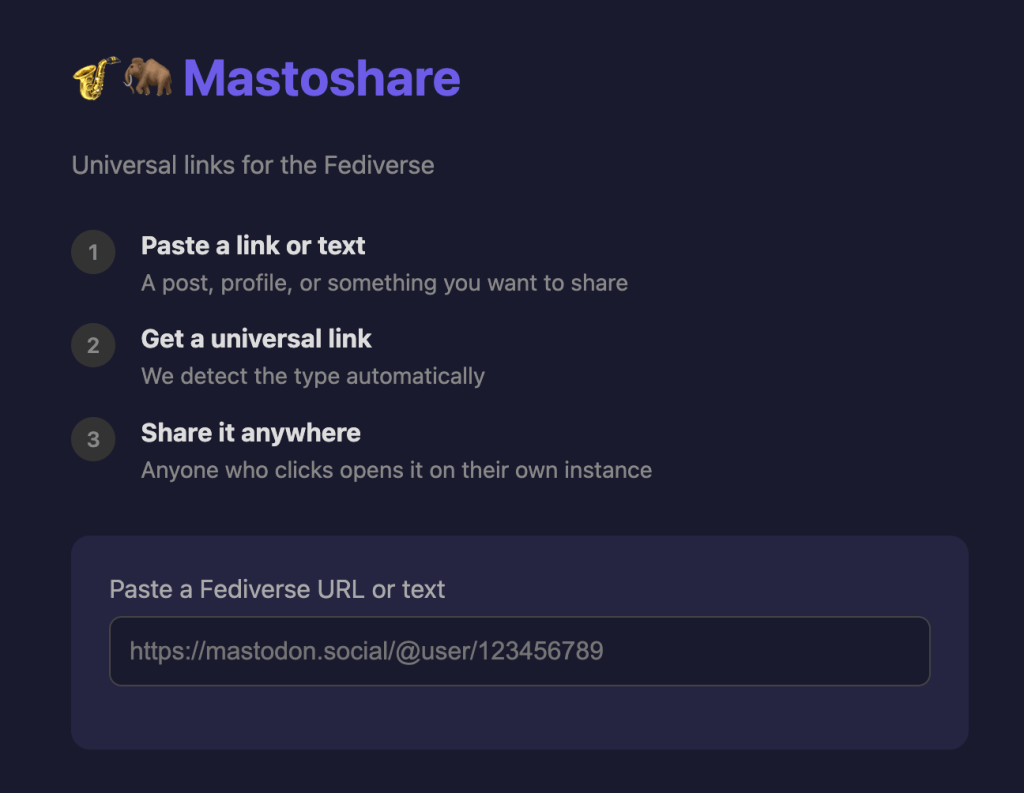
Mastoshare (CB) is a simple tool that smooths out one of the most (out of many) frustrating quirks of the Fediverse: the hassle of sharing links between different Mastodon instances. On a platform like X, a link to a post works for everyone because everybody is on the same site. On Mastodon, however, if you’re on mastodon.social and someone is horrible enough to send you a link to a post on fosstodon.org, clicking it drops you onto a “logged‑out” version of the other server. From there you can’t like, reply or boost the toot without taking extra steps. Most people end up copying the URL, firing up their own instance, pasting the link into the search bar and then finally finding the post again.
Mastoshare fixes this by creating universal links that automatically route you back to your home instance. You paste a Mastodon post or profile URL into the Mastoshare web page and it spits out a new link that looks like mastoshare.link/p/… When someone taps that link, the site asks once which instance they usually use, remembers the answer, and then sends them directly to the same post or profile on their own server, ready for interaction. The same idea works for “Compose” links, so you can put a “Share on Mastodon” button on a website and the service will figure out the visitor’s instance so the share happens immediately.
The service works for both individual toots and user profiles, and it does so without tracking or asking for passwords. It is open‑source, hosted in the EU, and the code lives on Codeberg. The project is maintained by Artem R., known as asci, and is built with SvelteKit (yay!), which keeps it lightweight and fast. Because the code is publicly available anyone can review it for security or even run their own copy.
doxx

The quickest explanation I can give for doxx is “Rusty Glow for Microsoft Word.”
Brandon Greenwell, a data‑science enthusiast who clearly spends most of his day in a shell, built it to solve a simple annoyance: opening a .docx file usually means launching a heavyweight GUI such as Word, LibreOffice, Pages, etc., which costs at least several seconds and shatters the flow if you’re working over SSH or prefer to stay in a console. This CLI tool is a Rust‑based utility that reads the Word file’s XML, renders it directly in your terminal, and does it in a blink, often under fifty milliseconds.
The experience feels native to the command line. Using the ratatui library, the program presents a tidy, scrollable view with a table of contents you can jump to, and a search box that highlights matches instantly. Tables retain their structure thanks to Unicode borders and intelligent column alignment, while LaTeX‑style equations appear correctly, both inline and on their own lines (though there are equation rednering quirks, still).
If your terminal emulator supports graphics (i.e., Kitty, WezTerm, etc.), you’ll even see the images embedded in the document without leaving the shell. Beyond viewing, doxx can convert a document on the fly: pipe it to Markdown for note‑taking, extract tables as CSV for data‑science pipelines, drop metadata into JSON, or output ANSI‑escaped text for tools like most.

Because it’s written in Rust, it is both lean and fast, relying on the docx‑rs crate to parse the underlying XML safely. It handles everything from monochrome to full 24‑bit true‑color output. A handful of command‑line flags let you start in outline mode for lengthy reports, jump straight to a search term, or export a specific format. So, just run doxx myfile.docx --export csv > data.csv and you have a ready‑to‑use spreadsheet. The name is a tongue‑in‑cheek nod to “doxxing,” repurposed here to mean “exposing the contents of .docx files” and freeing them from Microsoft’s lock‑in.
The README is outstanding, so I’ll leave you to it for more details.
I invariably have to open at least 2-3 Word docs a week, and would much prefer doing so in a terminal vs gDocs (I’ve eradicated all traces of Microsoft Office from all computing devices).
nettool.sh

Short and sweet section.
Nettool is a Bash script that bundles the most common networking chores into a single command‑line helper. It targets anyone who spends time in a terminal, whether they be students learning subnetting, sysadmins troubleshooting connections, or network engineers drafting designs.
What it does:
- Connectivity check – a one‑line ping test to confirm internet reachability.
- Interface dump – prints IP, netmask and MAC without parsing the raw
ifconfigorip aoutput. - Subnet calculator – give it a host count or a desired number of subnets and it returns the correct mask, network and broadcast addresses.
- Logging – every calculation is appended to a local CSV file, and the script can push that history into a MySQL table for inventory or audit purposes.
The idea was inspired by NetworkChuck’s YouTube subnetting series, turning the “paper‑and‑pencil” method into an automated routine. It runs on any Linux distro (or MacOS / Windows WSL) with Bash 4+, bc for arithmetic, net-tools for ifconfig, and mysql-client if you want the database export. Future versions aim to replace ifconfig with the modern ip command.
It’s also a really great example of a pro-grade Bash script.
FIN
Remember, you can follow and interact with the full text of The Daily Drop’s free posts on:
- 🐘 Mastodon via
@dailydrop.hrbrmstr.dev@dailydrop.hrbrmstr.dev - 🦋 Bluesky via
https://bsky.app/profile/dailydrop.hrbrmstr.dev.web.brid.gy
☮️


 hrbrmstr's Daily Drop
Leave a comment