mq; UBLOCKAI; Friendly SQL
The fam did an AM outing today, so I had some cycles to craft a Drop, after investigating and documenting a holiday hacking campaign by a very capable initial access broker.
TL;DR
(This is an LLM/GPT-generated summary of today’s Drop. It’s Ollama and MiniMax M2.1 since it just got released.)
- The author explores mq, a Rust-based command-line tool that processes Markdown using a jq-like syntax with Markdown-specific selectors and functions for document transformation and extraction (https://mqlang.org/)
- UBLOCKAI introduces a massive manually-curated blocklist of over 1,000 AI-generated content sites to filter out from search engines using uBlock Origin or uBlacklist, with a separate “nuclear” list for sites containing mixed authentic and AI imagery (https://github.com/laylavish/uBlockOrigin-HUGE-AI-Blocklist)
- Friendly SQL presents six useful SQL techniques including group by all, trailing commas, sample, count_if, and values for data wrangling in DuckDB, demonstrated in an interactive ObservableHQ notebook (https://observablehq.com/@a-lexwein/five-cool-little-bits-of-friendly-sql)
mq
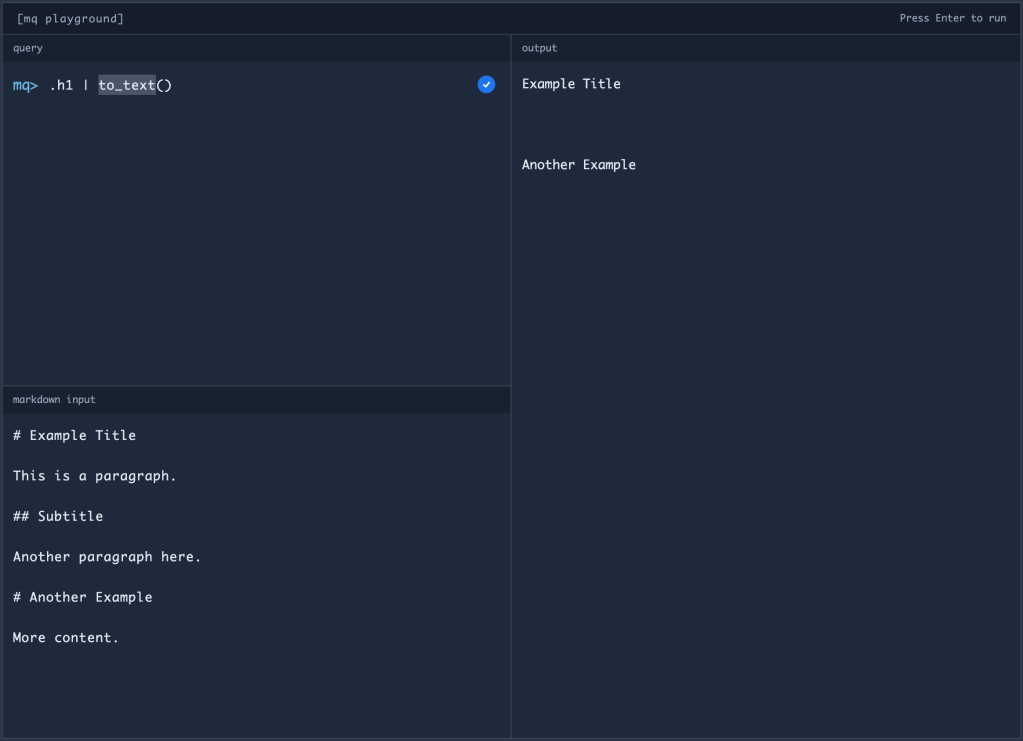
I’m a yuge fan of everything Markdown, so I was initially excited to see mq (GH). It is “a command-line tool that processes Markdown using a syntax similar to jq. It’s written in Rust, allowing you to easily slice, filter, map, and transform structured data.”
Why “initially”? Well, because the first two bullets to their self-asked question “why mq?” were:
- LLM Workflows: Efficiently manipulate and process Markdown used in LLM prompts and outputs
- LLM Input Generation: Generate structured Markdown content optimized for LLM consumption, since Markdown serves as the primary input format for most language models
Targeting LLMs first seems…bad? Especially when (as we will shortly see) there’s a sibling MCP server for the utility.
However, it’s still a Markdown tool, so it’s worth poking at and likely adding to the toolchest.
Let’s see the main titles for the sad number of Drops I’ve managed to eek out this month:
❯ mq .h1 ../*/*.md
# Bonus Drop #105 (2025-12-20): Exploits • Errors • Education
# Drop #743 (2025-12-22): Monday Afternoon Grab Bag
# Drop #739 (2025-12-01): Web-Slinging Monday
# Drop #740 (2025-12-02): Typography Tuesday
# Bonus Drop #104 (2025-12-06): Places, Pages, And Packets
# Drop #741 (2025-12-08): Monday Afternoon Grab Bag
# Drop #746 (2025-12-26):
# Drop #745 (2025-12-23): Typography Tuesday
# Drop #742 (2025-12-17): The Rumors Of The Drop's Demise Have Been Greatly Exaggerated
Sure, head -1 does that, too. But this took groks Markdown, so we can try to do some more with it and see if we can’t get all the section names that aren’t boilerplate or empty:
❯ mq '.h3 | select(and(ne(to_text(.), ""), ne(to_text(.), "FIN"), ne(to_text(.), "TL;DR")))' ../*/*.md
### daff
### mdxport
### GrAIphViz
### Euporie
### Alan
### Life On The Float
### Digging Coordinates
### Gitmal
### A Different Kind Of Packets For IPv6
### The Web Could Use Some GLP-1
### Bottom's Up!
### Bar Crawl
### mq
### dot-font
### Letraset
### Featured Free Font: Glina Script
### Unique IPs
### Protocols
### Packet Data
### RSC Explorer
### Cloudflare Error Page Generator
### SQL Quest: The Bank Job
### The Curious Case Of A Proposed AI URI Scheme And The Artificial Intelligence Internet Foundation (AIIF)
### Deno 2.6
### Human Writes
### The Advent Of Type 2025
### Hacking Adobe
So, even from that simple example, mq turns out to be quite capable as a general-purpose Markdown processor.
The selector system extends well beyond basic element targeting like .h1 or .h2, supporting complex queries such as select(.code.lang == "js") for finding JavaScript code blocks, or select(and(ne(to_text(.), ""), ne(to_text(.), "FIN"))) for filtering out empty sections and boilerplate content. The tool also provides native handling for CSV, JSON, YAML, TOML, and XML data embedded within Markdown documents. For more sophisticated transformations, you can define reusable functions using def expressions, leverage template-like string interpolation for generating dynamic content, and apply advanced pattern matching for filtering and transformation operations.
The developer experience includes an interactive REPL for experimentation and a VSCode extension providing syntax highlighting and LSP support. For visual query building, there’s a TUI (Terminal User Interface) mode, along with a built-in debugger for troubleshooting complex queries. A web-based playground is also available at mqlang.org/playground for quick prototyping without local installation.
Let’s look at some additional, practical examples beyond my simple heading extraction:
# Extract all JavaScript code blocks with their content
❯ mq 'select(.code.lang == "js") | .code.value' docs/*.md

# Generate a table of contents with proper links
❯ mq '.h | let link = to_link("#" + to_text(self), to_text(self), "") | let level = .h.depth | if (!is_none(level)): to_md_list(link, level - 1)' README.md

# Convert CSV data embedded in Markdown to a proper table
❯ mq 'include "csv" | csv_parse(true) | csv_to_markdown_table()' data.md

# Extract all external links for link checking
❯ mq '.link.url | select(test("^https?://"))' docs//*.md
The output of a slightly modified version of that last one:
> mq '.link.url | select(test("^https?://"))' */*/index.md | \
  sort | \
  uniq > 2025-drop-links.txt
on all the 2025 Drops to-date is at https://rud.is/dl/2025-drop-links.txt.
The syntax feels familiar if you know jq, but it’s extended with Markdown-specific selectors and functions. The .h1, .h2, .code, .link selectors make it natural to work with document structure, while functions like to_text(), select(), and map() provide the transformation capabilities.
Now, while I still think leading with LLM use cases was questionable marketing, the MCP server integration is actually quite clever. The four MCP tools (html_to_markdown, extract_markdown, available_functions, available_selectors) make it easy for anything that speaks “MCP” (including LLM assistants) to process and transform Markdown content on demand. This could be genuinely useful for documentation workflows where you need an LLM to extract specific sections or convert between formats.
As noted, mq is a solid addition to the Markdown toolkit. The query language is expressive, the tooling is well-thought-out, and it handles edge cases well (like MDX components and embedded data formats). If you regularly work with large sets of Markdown files or require programmatic document processing, it’s worth adding to your arsenal.
UBLOCKAI

This is a quick one since you all know how to use blocklists.
I get very queasy looking at “AI”-generated video, and very sad looking at “AI”-generated images. So, I was thrilled to discover “uBlockOrigin & uBlacklist Huge AI Blocklist”.
This is a “huge blocklist of manually curated sites (1,000+) that contain AI generated content, for the purposes of cleaning image search engines (Google Search, DuckDuckGo, and Bing) with uBlock Origin or uBlacklist.”
At present, there are two core lists: The “main” default list, and the “nuclear” (origin; blacklist) list. The nuclear list has sites that contain a mix of authentic and AI generated imagery (e.g., DeviantArt, Artstation, Stock Photography sites, etc.), which makes it tricky to outright block in the main filter list, so the author designated it to a separate list that you can toggle on and off if you so desire.
I may not be able to stop “AI”-mangled content from being produced, but I can def do my best to avoid it.
Friendly SQL

Alex Wein has a cool little (ObservableHQ) notebook with “Five Cool Little Bits of ‘Friendly’” SQL for wrangling data in DuckDB (or Snowflake)“.
We’ll ignore that last word since Snowflake is the Splunk of databases (i.e., bloated, expensive, and not necessary).
What you’ll learn:
group by all- (using) a final trailing comma
samplecount_ifvalues
Alex, sadly, uses his Spotify streaming history (please don’t support Nazi-supporting services), but you should be able to extend the examples to less skeezy data.
What I truly love about this post is that it’s an ObservableHQ notebook you can clone and hack on to your heart’s content. Plus, it’s super easy to do all said hacking locally by using the Observable Notebook ecosystem’s local tooling.
FIN
Remember, you can follow and interact with the full text of The Daily Drop’s free posts on:
- 🐘 Mastodon via
@dailydrop.hrbrmstr.dev@dailydrop.hrbrmstr.dev - 🦋 Bluesky via
https://bsky.app/profile/dailydrop.hrbrmstr.dev.web.brid.gy
☮️
 hrbrmstr's Daily Drop
Leave a comment