Wiregasm; Wireview / WebShark / Packet Dissector; WireMCP
A somewhat lighter Drop today given I’m supposed to be on holiday.
PCAPs — Packet CAPtures — are files that contain network packets. They can be generated by having certain programs (e.g., Wireshark/tshark; tcpdump) live-capture network traffic or by frameworks such as Scapy.
While somewhat of a niche format/technology, you can 100% capture packets from your Mac, Windows, or Linux system to see what’s going on behind the scenes as you work. We’ve talked about that a bit in previous Drops. Traditionally, one uses workstation-based tooling to open a PCAP and dissect packets with various parsers that understand differnt encapsulated layers. However, today we’re going to look at a WASM bundle that encapsulates the brains of Wireshark into something that can be run in-browser, without needing to send your PCAPs somewhere else for analysis. We’ll look at a few tools based on that, and then talk about using a recent-ish MCP server designed to work with PCAPs.
If you don’t have any PCAPs to try in the last two sections, head over to NETRESEC to grab some.
TL;DR
(This is an LLM/GPT-generated summary of today’s Drop. This week, I continue to play with Ollama’s “cloud” models for fun and for $WORK (free tier, so far), and gave gpt-oss:120b-cloud a go with the Zed task. Even with shunting context to the cloud and back, the response was almost instantaneous. They claim not to keep logs, context, or answers, but I need to dig into that a bit more.)
- Wiregasm brings a WebAssembly‑compiled version of Wireshark to browsers and Node.js, enabling packet analysis via a JavaScript wrapper and custom Lua dissectors (https://github.com/good-tools/wiregasm)
- Wireview, WebShark, and Packet Dissector all leverage Wiregasm to provide web‑based packet inspection interfaces, demonstrated with DNS query/response visualizations (3 links in section)
- WireMCP acts as an MCP server that connects tshark to external programs—including LLMs—to perform real‑time or file‑based network traffic analysis and threat checks (https://github.com/0xKoda/WireMCP)
Wiregasm

Wiregasm is Wireshark compiled to WebAssembly (WASM), giving us packet analysis capabilities that run directly in browsers or Node.js environments.
Cross-compiling Wireshark to emscripten/WASM requires porting multiple dependencies including libffi, glib, and Wireshark itself.
The folks behind Wiregasm maintain 7 patches to make this work:
- Disable Lemon/radiotap building
- Fix CPU name compilation errors
- Disable Snort dissector
- Export
wiresharkcommon headers - Force
/wiresharkas data directory for prefs/profiles/color filters - Make dissector registrations threadless
- Export
lrexlibfor proper linking
Wiregasm implements a subset of sharkd (Wireshark daemon) APIs via a DissectSession class:
| sharkd command | Wiregasm method |
|---|---|
| load | load() |
| frames | getFrames(filter, skip, limit) |
| frame | getFrame(frameNum) |
As noted, the project provides a lovely JS wrapper for the WASM bundle, and it’s pretty straightforward to use directly:
// Load the WASM module
const wg = await loadWiregasm({
  locateFile: (path, prefix) => {
    if (path.endsWith(".data")) return "path/to/wiregasm.data";
    if (path.endsWith(".wasm")) return "path/to/wiregasm.wasm";
    return prefix + path;
  }
});

// Initialize dissectors
wg.init();

// Write pcap to virtual FS
const data = await fs.readFile("file.pcap");
wg.FS.writeFile("/uploads/file.pcap", data);

// Analyze
const sess = new wg.DissectSession("/uploads/file.pcap");
sess.load();
const frames = sess.getFrames("", 0, 0); // filter, skip, limit
const frame = sess.getFrame(1); // Get full protocol tree

// Cleanup
sess.delete();
wg.destroy();
You can even add custom Lua dissectors to /plugins/ in the virtual filesystem before calling init():
const lua = await fs.readFile("custom.lua");
wg.FS.writeFile("/plugins/custom.lua", lua);
wg.init();
Most readers are not going to do any of that, which is why we’re nearly at the end of this section. The next one will point you to three different tools that essentially do the same thing.
Wireview / WebShark / Packet Dissector
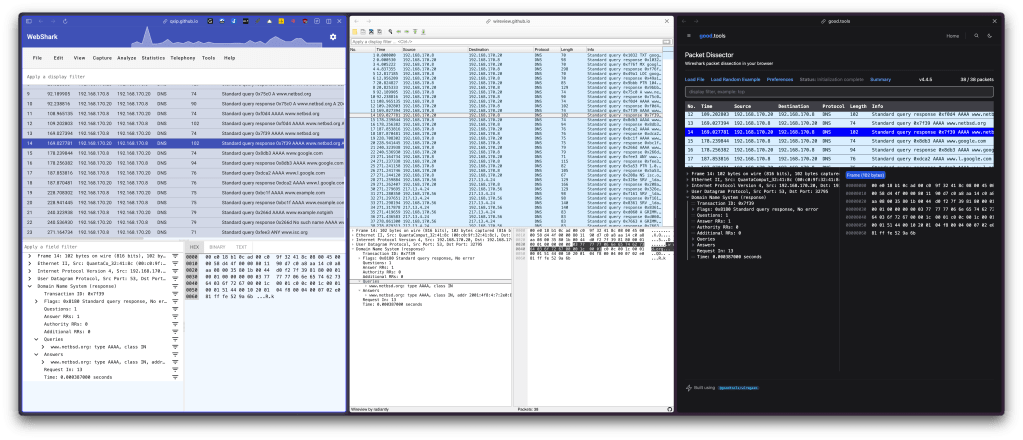
These three projects all use Wiregasm under the hood:
The section header has them all in the same view thanks to Arc’s split views.
In each of those views, I’ve selected a single packet and then drilled down into the dissected DNS query + response.
Scads of blathering has been done for Wireshark-proper, and this is a good place to start to get oriented in each of those web-based versions.
WireMCP
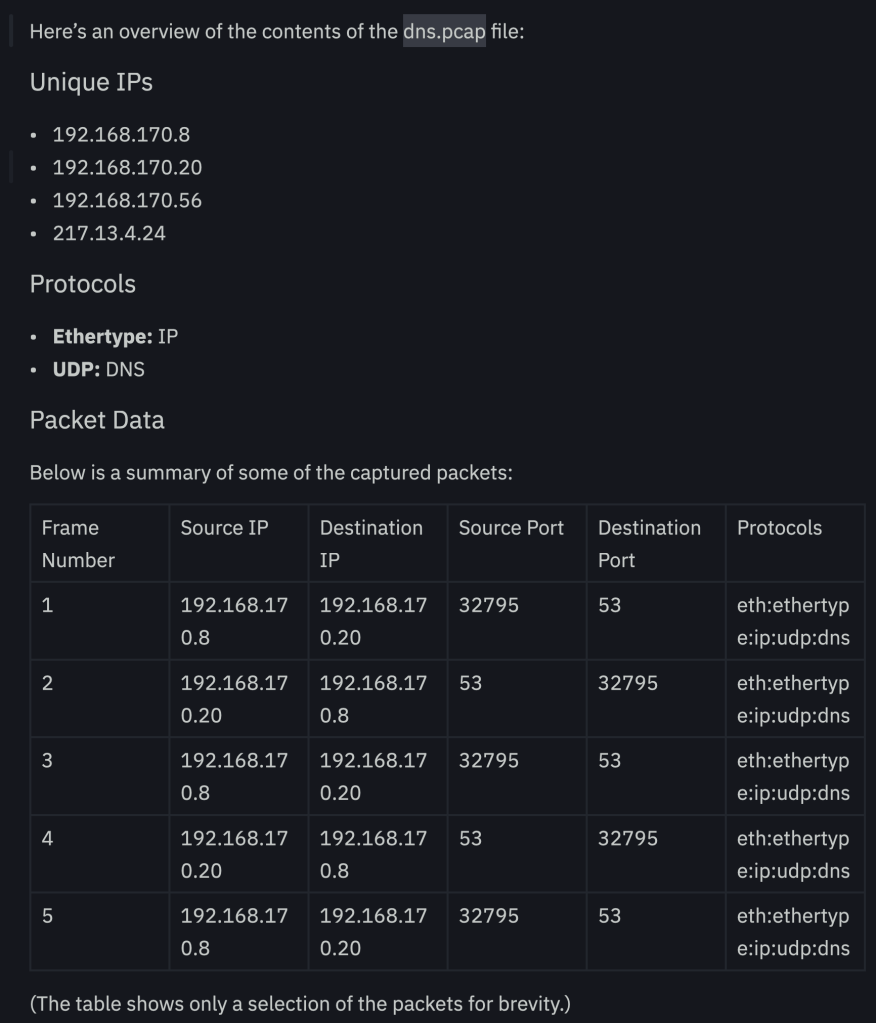
WireMCP is an MCP server that connects Wireshark’s tshark to any program that can interface with an MCP server (which is usually — BUT IS NOT LIMITED TO — an LLM), letting you analyze network traffic in real-time, or from capture files.
It has some live capture tools:
capture_packets– Grabs live traffic and converts it to JSON with packet details (IPs, ports, protocols, HTTP methods)get_summary_stats– Protocol breakdown (how much TCP vs UDP, etc.)get_conversations– Tracks communication flows between endpointscheck_threats– Captures IPs and checks them against URLhaus blacklist (this is a prett big limitation)
and what why we’re mentioning it today, PCAP analysis tools:
analyze_pcap– Deep dive into existing capture filesextract_credentials– Hunts for cleartext creds in HTTP Basic Auth, FTP, Telnet trafficcheck_ip_threats– Targeted threat intel lookups for specific IPs
You do need tshark installed for this one to work, and it is a WIP. But it’s also pretty hackable.
The section header is a small example of using it with a local Ollama setup, but you can have it work with Claude, etc. I’m not sure I’d want to have potentially sensitive data be shunted to any cloud-based “AI” setup, though.
FIN
Remember, you can follow and interact with the full text of The Daily Drop’s free posts on:
- 🐘 Mastodon via
@dailydrop.hrbrmstr.dev@dailydrop.hrbrmstr.dev - 🦋 Bluesky via
https://bsky.app/profile/dailydrop.hrbrmstr.dev.web.brid.gy
☮️
 hrbrmstr's Daily Drop
Leave a comment