Quick ASAM Update; Sniffly; Cognitive Webonance
Programming Note: I’m at yet-another $WORK offsite this coming week, so there is a chance a few Drops will be missed.
I needed to give a quick update on the ASAM thing from yesterday, and had recently used the second resource for $WORK (plus had always wondered where Zed kept some things), and didn’t have a good place to showcase the third resource, so you get each one, today, as they spilled out of the grey matter.
TL;DR
(This is an LLM/GPT-generated summary of today’s Drop using Qwen/Qwen3-8B-MLX-8bit with /no_think via MLX, a custom prompt, and a Zed custom task.)
- Quick ASAM Update: The U.S. Office of Naval Intelligence provides anti-shipping activity reports in PDF format, accessible via Worldwide Threat to Shipping Report Archive, with R and Node/Go scripts available for local archiving and processing (https://codeberg.org/hrbrmstr/asam)
- Sniffly: An open-source dashboard by Chip Huyen for analyzing Claude Code usage, offering insights into usage patterns, errors, and cost tracking, with setup instructions and a script to extract Zed AI history (https://github.com/chiphuyen/sniffly)
- Cognitive Webonance: PostHog redesigned their website to function like a desktop OS, allowing multiple windows, resizing, and a more interactive experience, with a focus on usability and engagement (https://posthog.com/)
Quick ASAM Update
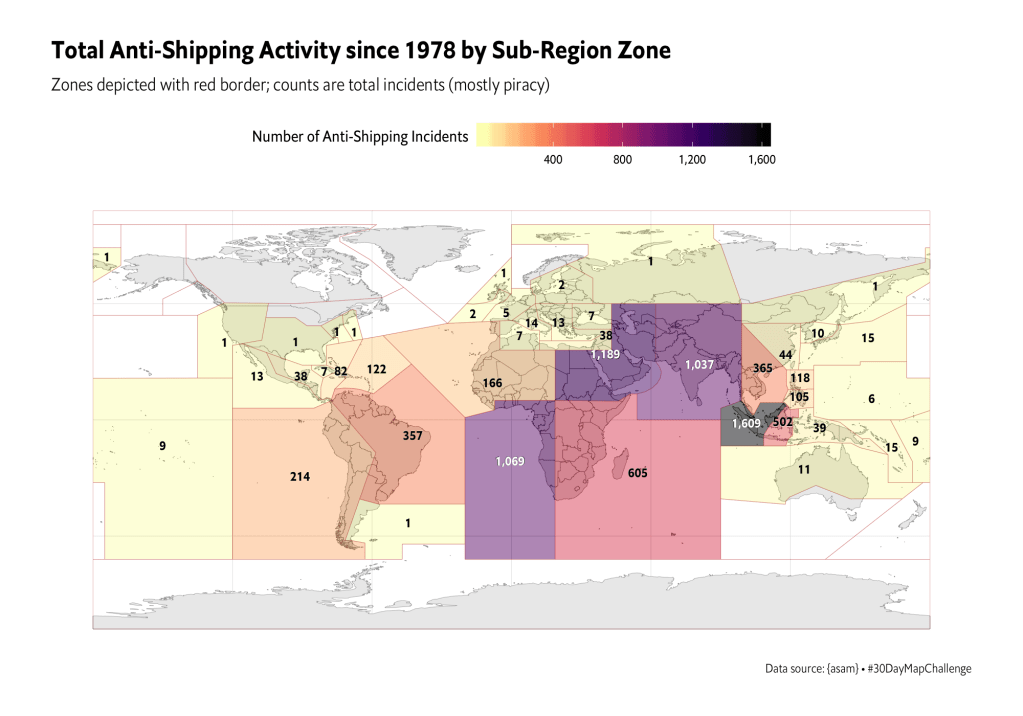
I really need to re-up this vis with the new data.
First, the U.S. Office of Naval Intelligence (ONI) does still produce anti-shipping activity reports…in PDF format. You can find them at the “Worldwide Threat to Shipping Report Archive”, and this R script will help you maintain a local archive:
library(rvest)

dir.create("~/Data/asam-pdf", showWarnings = FALSE)

base_url <- "https://www.oni.navy.mil/ONI-Reports/Shipping-Threat-Reports/Worldwide-Threat-to-Shipping-Report-Archive"

pg <- read_html(base_url)

Map(
  \(.l, .f) list(link = .l, file = .f),
  sprintf(file.path(base_url, "FileId/%s/"), html_attr(reports, "value")),
  sprintf("~/Data/asam-pdf/%s", html_text(reports))
) |>
  unname() -> corpus

for (report in corpus) {
  if (file.exists(report$file)) next
  download.file(report$link, report$file)
}
Those PDFs vary in organization and format, which explains why the data file version of the OG ASAM was so horrible. But, if you’re a budding R programmer, it’s good to get practice bending gnarly PDFs to your will. So, have at thee!
Finally, R’s great, and all, but I’d rather ship a small Golang binary CLI, pre-built index.js, or compiled Deno script executable to a target platform for system-level ops like performing a daily download. I’ve zero time for dealing with hundreds of needless package dependencies and function deprecations. So, I threw together Node and Go versions of the ASAM downloader hack and put them in Codeberg with the R version we saw yesterday. I’m also maintaining a daily download of the Maritime Optima ASAM GeoJSON and will carve out time to add a process to shove all the unique entries across all the files into a single GeoJSON and get it uploaded somewhere after each run.
Sniffly
(“AI” haters or Claude Code or Zed “AI” non-users can skip this one.)
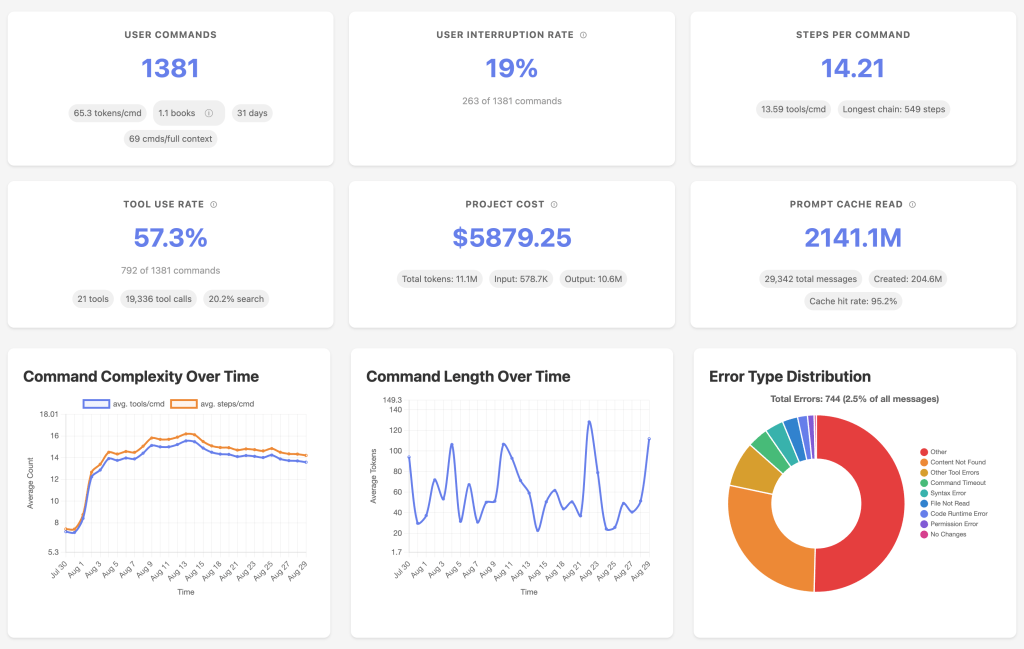
Sniffly is an open-source dashboard that Chip Huyen put together to help folks make sense of their Claude Code usage. Instead of leaving us to dig through cryptic logs or guess why something didn’t work, it pulls that information together into a local web app and lays out how you’re actually using Claude Code, where it tends to go wrong, and how you might get better results out of it.
Once it’s running, you get a clear picture of your usage patterns: which tools you call most often, how many steps Claude usually takes to finish a task, and what kinds of errors pop up again and again. Chip noticed that a big share of failures come from Claude trying to reach for files or functions that simply don’t exist, which is a useful nudge to make your codebase easier to navigate. It also shows that Claude leans heavily on search tools like grep and ls, so you start to see its habits in a way that makes sense.
Getting it set up doesn’t take much. If you just want to give it a try, there’s a one-liner you can run with uvx sniffly@latest init (which is no better than curl|bash but nothing really matters anymore). If you’d rather keep it around permanently, you can install it with the uv package manager or (ugh) pip. After that, sniffly init will get it going, and the dashboard will be live at http://localhost:8081. You can change the port, stop it from opening a browser automatically, or check your settings with a couple of simple commands.
Everything happens locally, so none of your logs or project details leave your machine unless you choose to share them. If you do want to share, you can generate a link and decide how much detail to include, which is handy for collaborating without oversharing.
The point of Sniffly is to take the guesswork out of using Claude Code. It helps you see where things are breaking down so you can restructure code, cut down on common mistakes, and even reduce the number of steps Claude needs to finish tasks. Chip managed to trim average runs from eight steps to seven just by making changes based on Sniffly’s feedback. On top of that, you can track costs, spot usage trends, and share what’s working with teammates.
When I use an LLM-based coding assistant, it’s usally the one baked into Zed. It keeps a history that is similar to Claude Code and can be found in a SQLite threads.db in the Zed appdir on your particular operating system. For macOS folks, that’s ${HOME}/Library/Application Support/Zed/threads/threads.db.
The column structure looks like this:
🦆>FROM (DESCRIBE threads) SELECT column_name, column_type;
┌─────────────┬─────────────┐
│ column_name │ column_type │
│   varchar   │   varchar   │
├─────────────┼─────────────┤
│ id          │ VARCHAR     │
│ summary     │ VARCHAR     │
│ updated_at  │ VARCHAR     │
│ data_type   │ VARCHAR     │
│ data        │ BLOB        │
└─────────────┴─────────────┘
That data BLOB is compressed according to the algorithm specified in data_type (for now, it’s all zstd). When uncompressed, it’s just JSON, so I threw together a script that will extract all the JSON files, carve them out into versioned directories (more on that in a sec), and run an example query that shows the thread, day of interaction, total input tokens, and total output tokens.
Zed’s been evolving their assistant, and there are (as of this post date) three different versions/flavors/schemas:
🦆>FROM (DESCRIBE FROM read_json('threads/0.1.0/*.json')) SELECT column_name, column_type;
┌──────────────────────┬─────────────────────────────────────────────────────────────────────────────────────────────────────────────────────────────┐
│     column_name      │                                                         column_type                                                         │
│       varchar        │                                                           varchar                                                           │
├──────────────────────┼─────────────────────────────────────────────────────────────────────────────────────────────────────────────────────────────┤
│ version              │ VARCHAR                                                                                                                     │
│ summary              │ VARCHAR                                                                                                                     │
│ updated_at           │ VARCHAR                                                                                                                     │
│ messages             │ STRUCT(id BIGINT, "role" VARCHAR, segments STRUCT("type" VARCHAR, "text" VARCHAR)[], tool_uses STRUCT(id VARCHAR, "name" …  │
│ initial_project_sn…  │ STRUCT(worktree_snapshots STRUCT(worktree_path VARCHAR, git_state STRUCT(remote_url VARCHAR, head_sha VARCHAR, current_br…  │
│ cumulative_token_u…  │ STRUCT(input_tokens BIGINT, output_tokens BIGINT, cache_creation_input_tokens BIGINT, cache_read_input_tokens BIGINT)       │
│ request_token_usage  │ STRUCT(input_tokens BIGINT, output_tokens BIGINT, cache_creation_input_tokens BIGINT, cache_read_input_tokens BIGINT)[]     │
│ detailed_summary_s…  │ VARCHAR                                                                                                                     │
│ exceeded_window_er…  │ JSON                                                                                                                        │
│ model                │ JSON                                                                                                                        │
│ completion_mode      │ JSON                                                                                                                        │
│ tool_use_limit_rea…  │ BOOLEAN                                                                                                                     │
├──────────────────────┴─────────────────────────────────────────────────────────────────────────────────────────────────────────────────────────────┤
│ 12 rows                                                                                                                                  2 columns │
└────────────────────────────────────────────────────────────────────────────────────────────────────────────────────────────────────────────────────┘
🦆>FROM (DESCRIBE FROM read_json('threads/0.2.0/*.json')) SELECT column_name, column_type;
┌──────────────────────┬─────────────────────────────────────────────────────────────────────────────────────────────────────────────────────────────┐
│     column_name      │                                                         column_type                                                         │
│       varchar        │                                                           varchar                                                           │
├──────────────────────┼─────────────────────────────────────────────────────────────────────────────────────────────────────────────────────────────┤
│ version              │ VARCHAR                                                                                                                     │
│ summary              │ VARCHAR                                                                                                                     │
│ updated_at           │ VARCHAR                                                                                                                     │
│ messages             │ STRUCT(id BIGINT, "role" VARCHAR, segments STRUCT("type" VARCHAR, "text" VARCHAR)[], tool_uses STRUCT(id VARCHAR, "name" …  │
│ initial_project_sn…  │ STRUCT(worktree_snapshots STRUCT(worktree_path VARCHAR, git_state STRUCT(remote_url JSON, head_sha VARCHAR, current_branc…  │
│ cumulative_token_u…  │ STRUCT(input_tokens BIGINT, output_tokens BIGINT, cache_creation_input_tokens BIGINT, cache_read_input_tokens BIGINT)       │
│ request_token_usage  │ STRUCT(input_tokens BIGINT, output_tokens BIGINT, cache_creation_input_tokens BIGINT, cache_read_input_tokens BIGINT)[]     │
│ detailed_summary_s…  │ VARCHAR                                                                                                                     │
│ exceeded_window_er…  │ JSON                                                                                                                        │
│ model                │ STRUCT(provider VARCHAR, model VARCHAR)                                                                                     │
│ completion_mode      │ VARCHAR                                                                                                                     │
│ tool_use_limit_rea…  │ BOOLEAN                                                                                                                     │
│ profile              │ VARCHAR                                                                                                                     │
├──────────────────────┴─────────────────────────────────────────────────────────────────────────────────────────────────────────────────────────────┤
│ 13 rows                                                                                                                                  2 columns │
└────────────────────────────────────────────────────────────────────────────────────────────────────────────────────────────────────────────────────┘
🦆>FROM (DESCRIBE FROM read_json('threads/0.3.0/*.json')) SELECT column_name, column_type;
┌──────────────────────┬─────────────────────────────────────────────────────────────────────────────────────────────────────────────────────────────┐
│     column_name      │                                                         column_type                                                         │
│       varchar        │                                                           varchar                                                           │
├──────────────────────┼─────────────────────────────────────────────────────────────────────────────────────────────────────────────────────────────┤
│ title                │ VARCHAR                                                                                                                     │
│ messages             │ JSON[]                                                                                                                      │
│ updated_at           │ VARCHAR                                                                                                                     │
│ detailed_summary     │ VARCHAR                                                                                                                     │
│ initial_project_sn…  │ STRUCT(worktree_snapshots STRUCT(worktree_path VARCHAR, git_state STRUCT(remote_url JSON, head_sha VARCHAR, current_branc…  │
│ cumulative_token_u…  │ MAP(VARCHAR, BIGINT)                                                                                                        │
│ request_token_usage  │ MAP(VARCHAR, STRUCT(input_tokens BIGINT, output_tokens BIGINT, cache_creation_input_tokens BIGINT, cache_read_input_token…  │
│ model                │ STRUCT(provider VARCHAR, model VARCHAR)                                                                                     │
│ completion_mode      │ VARCHAR                                                                                                                     │
│ profile              │ VARCHAR                                                                                                                     │
│ version              │ VARCHAR                                                                                                                     │
├──────────────────────┴─────────────────────────────────────────────────────────────────────────────────────────────────────────────────────────────┤
│ 11 rows                                                                                                                                  2 columns │
└────────────────────────────────────────────────────────────────────────────────────────────────────────────────────────────────────────────────────┘
For a larger project I’m working on, I just started to bump above the $20/month Zed AI when not using a local Qwen code model, so I am now interested in keeping track of “costs”. I will likely not make anything as extensive as Chip did, nor will I bother to provide support for less than the v0.3.0 schema, but if you want to hack on your own, you now know where all the specs and diagrams live.
Cognitive Webonance

PostHog ran into a problem that anyone who spends too much time with websites will recognize. When you open several tabs from the same site, they all look the same, and before long you’ve got a sea of identical titles and icons that are impossible to tell apart. As their site grew from a handful of product pages to more than a dozen, this frustration only got worse.
Instead of accepting the usual scrolling, single-page experience, they decided to rethink what a website could be. What they ended up building behaves more like a desktop operating system than a traditional site. You can open multiple windows at the same time, move and resize them however you like, snap them into place, and even use keyboard shortcuts to jump around. It feels less like browsing a website and more like multitasking on your computer.
The result is surprisingly playful. You might have an article open in one window, a video running in a corner, and even a game on the side. There’s a file explorer that doubles as their merch store. Product pages are laid out like slides in a presentation, some sections look like spreadsheets, and the whole thing even comes with a screensaver and desktop backgrounds.
They didn’t rebuild everything from scratch to make this happen. The design and coding happened hand in hand, right in the production environment. Content is managed with simple JSON files, and they built in systems to keep themes consistent across light and dark modes. It’s a mix of practicality and experimentation that lets them keep the experience polished while still breaking the mold.
At first it can feel a little strange, because people expect websites to behave in familiar ways (hence the section title). But after using it for a while, the team found themselves preferring this approach. It’s more engaging, it encourages exploration, and it beats scrolling endlessly down a long page.
I think it works especially well on widescreen monitors.
FIN
Remember, you can follow and interact with the full text of The Daily Drop’s free posts on:
- 🐘 Mastodon via
@dailydrop.hrbrmstr.dev@dailydrop.hrbrmstr.dev - 🦋 Bluesky via
https://bsky.app/profile/dailydrop.hrbrmstr.dev.web.brid.gy
☮️
 hrbrmstr's Daily Drop
Leave a comment