FFmpeg TUG; Linkhut; Peekaping
I spent way too much time adding WebR support to Observable Notebooks Data Loaders Example after composing yesterday’s Bonus Drop that there was no time left to gather themed resources. But, each of these are neat/useful/helpful. I recommend putting links to the first and third resources into your own Linkhut instance.
TL;DR
(This is an LLM/GPT-generated summary of today’s Drop using Qwen/Qwen3-8B-MLX-8bit with /no_think via MLX, a custom prompt, and a Zed custom task.)
- FFmpeg – The Ultimate Guide provides a comprehensive technical overview of FFmpeg, covering core media concepts, architecture, practical operations, advanced editing, performance optimization, and audio processing (https://img.ly/blog/ultimate-guide-to-ffmpeg/)
- Linkhut is a social bookmarking platform emphasizing openness, flexibility, and community, offering self-hosting, API integration, and a robust ecosystem for managing and sharing links (https://linkhut.org/)
- Peekaping is a self-hosted uptime monitoring solution with a microservices architecture, supporting diverse monitoring types, comprehensive notifications, status pages, and customizable SVG badges for tracking service health (https://peekaping.com/)
FFmpeg – The Ultimate Guide

One of my at-least-weekly uses of a local or commercial LLM is to craft an FFmpeg CLI call. I’ve used this utility for ages, but I don’t use it often enough to develop muscle memory for the ~3.5 trillion CLI parameters it supports. That LLM workflow is wired up to a Jolin MCP server and after each successfully generated incantation (so I don’t have to ask a daft LLM again for the same idiom).
Unfortunately, all the LLMs end up failing to provide a working FFmpeg CLI on the first shot 3/5 of the time (some university “AI” researchers should fine tune SmolLM3 just for FFmpeg CLI generation use). Nevertheless, it’s still faster than my self-directed trial-and-error.
Now, developing said CLI muscle memory is important, and one way to do so for FFmpeg is to both use it regularly, and learn from those who have spent the time to develop a solid mental model of how it works.
Back in 2022 (and, very likely before ChatGPT could have written the article) Csaba Kopias dropped some FFmpeg knowledge in an “ultimate guide”.
While I can’t speak to the “ultimate” part, I can assert that it 100% is a comprehensive technical guide to FFmpeg, and covers it from head to stern. It starts with core media concepts by explaining sampling rates, bitrates, channels for audio, and resolution, bit-depth, and codecs for video. It then walks through FFmpeg’s central architecture: how it decodes input files into memory, processes them through filter chains, and encodes them into output formats.
The “Getting Started” section covers installation, basic command structure, and understanding FFmpeg’s input/output syntax. The author does a nice job explaining the sometimes confusing command-line order and mapping between streams.
The “Practical Operations” section deals with transcoding audio and video files, with specific examples for popular formats like H.264 and H.265. The codec comparison section with actual bitrate and quality trade-offs is particularly spiffy.
The “Advanced Editing” section is where the guide gets interesting. It covers FFmpeg’s complex filter system (which can be thought of as a programmable pipeline for audio/video manipulation). Examples include adding text overlays, scaling, chromakey effects, and chaining multiple filters together.
The “Performance Optimization” section talks about editing without re-encoding, and shows how to perform certain operations (like trimming or stream replacement) by copying data directly rather than decoding/encoding, which can be scads faster.
Finally, the “Audio Processing” section takes on noise reduction, compression, equalization, and other audio enhancement techniques with practical examples and parameter explanations.
While there have been many additions to FFmpeg since 2022, the core concepts will still apply, and will help us all develop that muscle memory to free us from having to Google/Kagi/LLM/hack our way to a finished and polished media file.
Linkhut
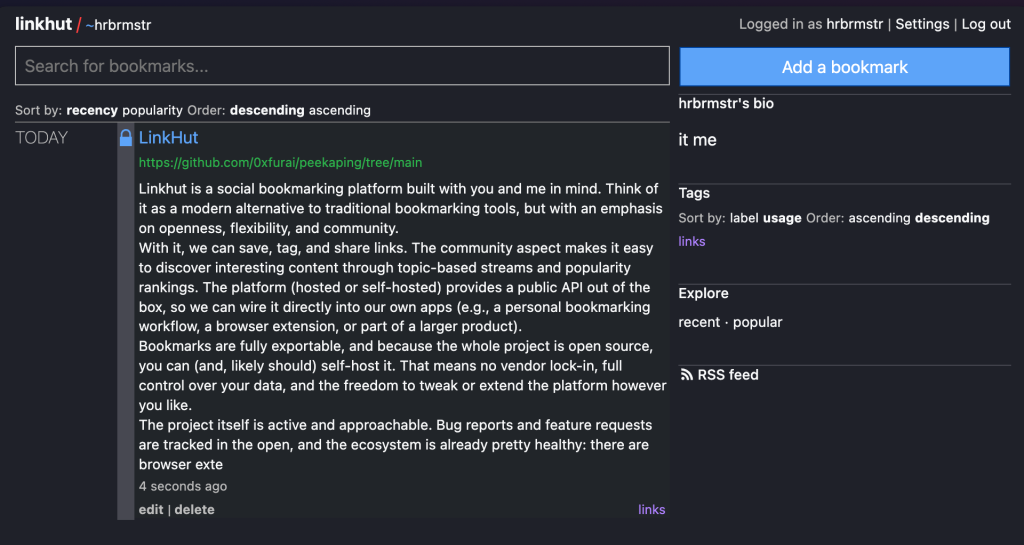
Linkhut is a social bookmarking platform built with you and me in mind. Think of it as a modern alternative to traditional bookmarking tools, but with an emphasis on openness, flexibility, and community.
With it, we can save, tag, and share links. The community aspect makes it easy to discover interesting content through topic-based streams and popularity rankings. The platform (hosted or self-hosted) provides a public API out of the box, so we can wire it directly into our own apps (e.g., a personal bookmarking workflow, a browser extension, or part of a larger product).
Bookmarks are fully exportable, and because the whole project is open source, you can (and, likely should) self-host it. That means no vendor lock-in, full control over your data, and the freedom to tweak or extend the platform however you like.
The project itself is active and approachable. Bug reports and feature requests are tracked in the open, and the ecosystem is already pretty healthy: there are browser extensions for Chrome and Firefox, iOS Shortcuts, and even IFTTT support. That makes it practical for everyday use while still appealing to technical folks who want to dig deeper.
I’m likely going to explore self-hosting this for the $WORK team so we can more easily share and curate links we find as we’re researching new vulnerabilities, exploits, PoCs, etc.
Peekaping

(I usually try to “bake” things for a week before posting about them, but this was just too easy to set up to not talk about it now.)
Peekaping (GH) is a self-described “modern”, self-hosted uptime monitoring solution that’s positioning itself as a serious alternative to Uptime Kuma. It’s built with Go for the backend and React for the frontend, and emphasizes strong typing throughout the stack, which is helpful if you decided to take a stab at adding support for other types of monitoring.
The whole system follows a microservices architecture that can be deployed either as a monolithic bundle for simplicity (I used the SQLite-flavored Docker approach) or as separate components for more control. And, the Go backend provides excellent performance with a super tiny resource footprint.
Peekaping supports an bonkers number of monitoring types that should meet your needs:
- HTTP/HTTPS, TCP, Ping (ICMP), DNS, and gRPC monitoring
- PostgreSQL, MongoDB, Redis, MySQL/MariaDB, and Microsoft SQL Server
- MQTT, RabbitMQ, and Kafka Producer monitoring
- Docker container health checks and SNMP monitoring
- Push webhooks for custom service health reporting
It is well-suited for monitoring complex, heterogeneous environments without needing multiple tools.
The notification system appears quite comprehensive (I did not configure it yet), and has support for over 15 different channels including Slack, Discord, Telegram, PagerDuty, Opsgenie, and various SMS/email providers. T
As if all that was not sufficient, Peekaping further includes built-in status page generation and SVG badge creation, which is handy if you maintain public-facing services. The badges are highly customizable with multiple styles (flat, flat-square, for-the-badge, etc.) and can display various metrics including uptime percentages, response times, and SSL certificate expiration dates. These can be embedded directly in READMEs, documentation sites, or dashboards.
As noted, the system supports SQLite for simple deployments, PostgreSQL for production environments, and (ugh) MongoDB for folks who are misguided enought to prefer document-based storage.
The Docker deployment went smoothly and supports both single-container and multi-container configurations. The SQLite option “just works”, and the provided docker-compose configurations includes proper health checks, restart policies, and volume management.
If anything breaks, I’ll let y’all know.
FIN
Remember, you can follow and interact with the full text of The Daily Drop’s free posts on:
- 🐘 Mastodon via
@dailydrop.hrbrmstr.dev@dailydrop.hrbrmstr.dev - 🦋 Bluesky via
https://bsky.app/profile/dailydrop.hrbrmstr.dev.web.brid.gy
☮️
 hrbrmstr's Daily Drop
Leave a comment