Zedless; Abusing Neovim For Fun And Fun!; MCP Text Editor Server
We all use a text editor of some sort, so today we take a look at text editing from three quite diverse views.
In other news, some of the section header images are from a new OpenGraph renderer I’ve been hacking on whilst in Austin this week. More on that in the Weekend Bonus Drop.
TL;DR
(This is an LLM/GPT-generated summary of today’s Drop using SmolLM3-3B-8bit via MLX and a custom prompt.)
- Zedless: Zed, an AI-enhanced GUI editor, has faced criticism for its “all-in” approach to AI features, but the Zedless project, a privacy-focused Zed fork, prioritizes local-first operations and open-source contributions, rejecting CLAs to maintain community ownership. (https://zed.dev/)
- Abusing Neovim For Fun And Fun: A Neovim plugin serves static content by reading from open buffers, leveraging LuaJIT for performance, and running in a Docker container with restricted access. (https://vim.gabornyeki.com/)
- MCP Text Editor Server: The server provides line-based file editing with hash validation, atomic multi-file operations, and secure path validation, enabling efficient partial file access for MCP clients. (https://github.com/tumf/mcp-text-editor)
Zedless

“AI” is, sadly, everywhere, and virtually no for-profit application has been left unscathed from “AI” “enhancements”. This is true of my present fav GUI editor Zed. Not everyone has been thrilled with Zed’s “all-in” approach to “AI”, but it — like The Browser Company (TBC) — both want[ed] to make great and ground-breaking apps, but devs gotta eat, too. Monetizing a “teams” version of either app was not going to bring in the Benjamins, and it was pretty easy to lean-in to the “AI” to try to make up that revenue gap (though TBC ultimately abandoned one of the best browsers to come along since Netscape Navigator).
Not everyone is/was thrilled about the deep integration of “AI” and other features, such as usage/performane telemetry. And, since Zed is released under a form of open source license, nearly 1,000 contributors are regularly working to maintain zedless, a (WIP) Zed fork focused on privacy and being local-first.
This project prioritizes complete self-hosting independence by removing any components that require proprietary cloud services and eliminating telemetry or crash reporting features. The modified architecture emphasizes peraonal control over infrastructure, requiring manual configuration of network service providers through standard formats like API base URLs, with no pre-configured defaults and all such features disabled initially. The project maintains contributor rights by rejecting copyright reassignment through Contributor License Agreements (CLAs), ensuring long-term community ownership and preventing potential licensing changes that could harm folks who contribute to the project.
I’m keeping an eye on it, since it may be the only Zed left after the “AI” bubble bursts (and, it will most certainly burst).
Abusing Neovim For Fun And Fun!
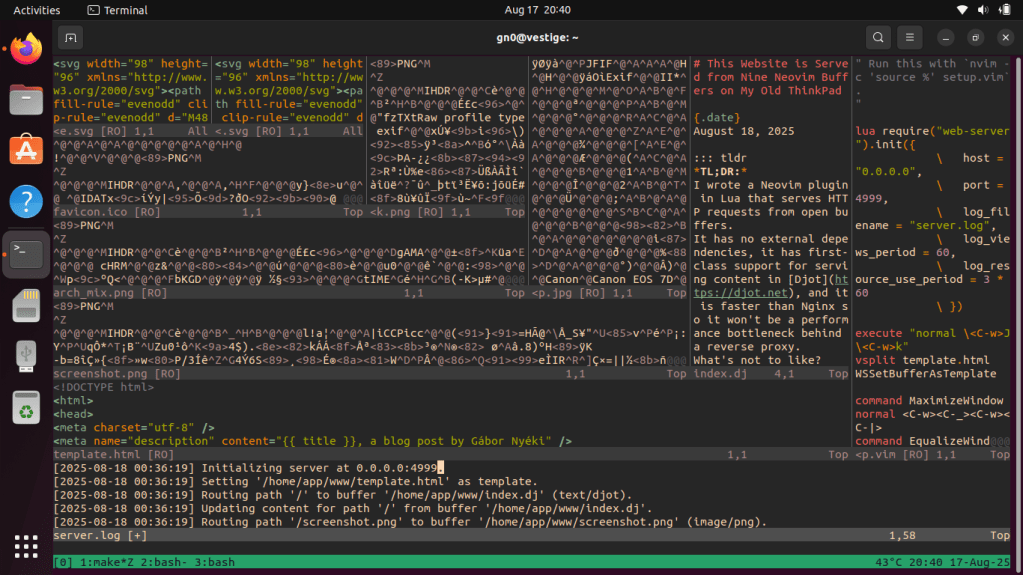
Gábor Nyéki built a web server inside Neovim(!!) and is using it to host his website from a 13-year-old ThinkPad. No wait! Don’t click away! The project is far more practical than it may sound.
The web server is implemented as a Neovim plugin written in Lua. Instead of reading files from disk when requests come in, it serves content directly from open editor buffers. You load your website files into Neovim, register them with the routing system using simple commands, and the editor starts responding to HTTP requests. When you want to update content, you just edit the buffer and save! The changes go live immediately.
The HTTP handling happens through Neovim’s Lua API, which provides access to libuv for network operations. The server parses incoming requests, matches them against its routing table, and returns the appropriate buffer content with proper headers. It supports different content types, so you can serve HTML, images, CSS, and other static assets all from the same Neovim instance.
Performance is shockingly good. Gábor benchmarks it against Nginx, and the Neovim server actually handles more concurrent requests per second. This comes down to LuaJIT being bonkers efficient, as it avoids many of the memory allocation overheads that slow down other interpreted languages. For a basic static site, the editor-server combination is fast enough that it won’t be the bottleneck when placed behind a reverse proxy.
The deployment runs on a Core i3 ThinkPad from 2012 with 8GB of RAM. The laptop shows its age with a dead battery and replacement fan, but Neovim only uses about 80MB of memory so the hardware handles it fine. The setup includes proper safety measures, too. Tthe Neovim process runs in a Docker container with restricted file system access and limited system calls, all sitting behind an Nginx proxy.
The workflow eliminates most web development friction. There’s no build process, no separate deployment step, no database to maintain. You edit files with all your familiar Vim keybindings and the changes appear on the web immediately. It’s essentially using your text editor as both development environment and production server.
This approach only makes sense for simple static sites, but it demonstrates how flexible modern editors have become. Neovim’s async capabilities and Lua integration create possibilities that go well beyond text editing. The project works because it embraces constraints rather than fighting them – it’s built specifically for serving static content and does that one thing super well.
MCP Text Editor Server

NOTE the lack of “AI” or “LLM” in this section. MCP servers are not bound to that paradigm.
MCP Text Editor Server is Model Context Protocol server providing line-based file editing through a standardized API. It’s designed for efficient partial file access to work with any MCP client.
The server acts as a controlled interface to text files on the filesystem. Instead of requiring clients to load entire files, it supports line range requests where you can fetch specific sections like lines 50-100 from one file and lines 200-300 from another in a single operation. This makes it practical for working with large files without transferring unnecessary content.
The editing mechanism uses a two-step process with hash validation. First, you request file content and receive both the text and cryptographic hashes for the content. Then you send patches specifying which lines to replace, including those hashes to prove the file hasn’t changed. If another process modified the file between your read and write operations, the edit gets rejected and you need to fetch fresh content.
Patches are applied intelligently from bottom to top to handle line number shifts correctly when multiple edits happen in the same file. The server supports atomic multi-file operations, so either all your changes succeed or none of them do. It handles various text encodings and includes security features like path validation to prevent directory traversal.
The line-oriented approach works super well for most text editing scenarios since files naturally break along line boundaries. The server can process multiple ranges from multiple files efficiently, reducing the number of round trips needed for complex operations.
MCP provides the standardized communication layer that lets any compatible client use these editing capabilities. You configure clients by pointing them at the server process, which can run locally through Python, in Docker containers, or via package managers like uvx. The protocol handles the request-response cycle and error reporting consistently across different client implementations.
This architecture creates a clean separation between file operations and client logic. Clients get safe, controlled access to filesystem operations without needing to handle the complexity of concurrent access, encoding issues, or atomic updates themselves. The server manages all the low-level details while exposing a simple line-based editing interface.
FIN
Remember, you can follow and interact with the full text of The Daily Drop’s free posts on:
- 🐘 Mastodon via
@dailydrop.hrbrmstr.dev@dailydrop.hrbrmstr.dev - 🦋 Bluesky via
https://bsky.app/profile/dailydrop.hrbrmstr.dev.web.brid.gy
☮️
 hrbrmstr's Daily Drop
Leave a comment