OverType; SystemD Service Hardening; GH Migration
I am, sadly, in travel mode this week, being forced to leave what is set to be an epic summer weather week in Maine to attend a $WORK event in (weak) Austin, TX. As a result, Drops may be spotty.
TL;DR
(This is an LLM/GPT-generated summary of today’s Drop using SmolLM3-3B-8bit via MLX and a custom prompt.)
- OverType (https://overtype.dev/) is a lightweight markdown editor using an invisible
textareaoverlay for input, paired with a styled preview layer. It preserves native browser features, is only 45KB minified, and supports all standard markdown formatting with optional features like a toolbar and mobile optimization. - SystemD Service Hardening (https://roguesecurity.dev/blog/systemd-hardening) explains how to analyze and harden SystemD’s permissive defaults using
systemd-analyzeandsystemctl edit, focusing onProtectSystem=strict,PrivateTmp=yes, and other kernel-level controls to improve security posture. - GH Migration (https://github.com/PatNei/GITHUB2FORGEJO) automates migrating GitHub repositories to Forgejo via the Forgejo API, offering mirror or clone strategies, public/private support, and optional cleanup for a self-hosted mirror of your GitHub portfolio.
OverType
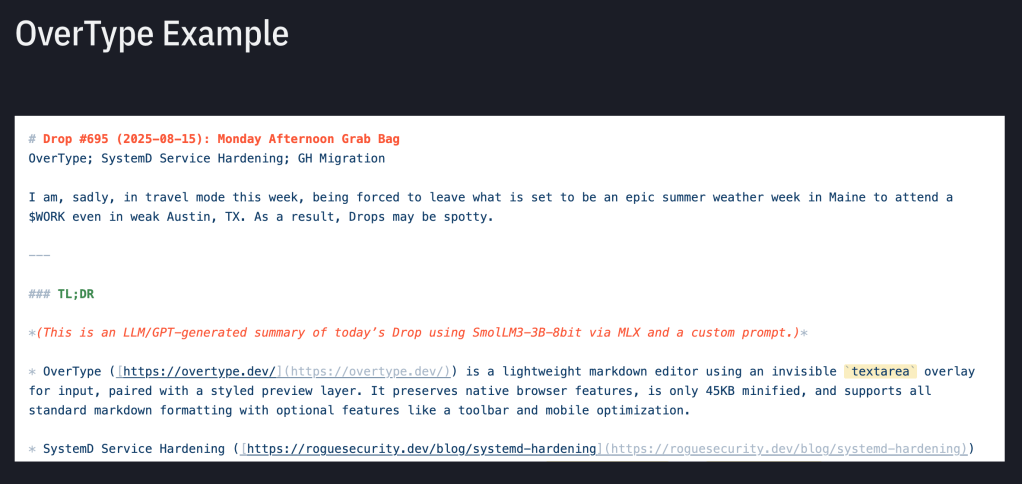
OverType (GH) is a lightweight markdown editor that takes a super simple approach to creating a WYSIWYG-style editing experience. Instead of using complex ContentEditable elements or virtual DOM libraries like most markdown editors, it employs an invisible textarea overlay technique that sits transparently on top of a styled markdown preview.
The core concept is pretty spiffy: you have two perfectly aligned layers where a transparent textarea handles all the input and cursor positioning while a styled preview div underneath shows the formatted markdown. This approach preserves all native browser behaviors like undo/redo, mobile keyboard support, spell checking, and text selection because you’re actually just typing in a regular textarea.
At only 45 KB minified, Overtype is super tiny compared to other alternatives, which typically range from 300-500 KB plus dependencies. It requires no build tools, complex configuration, or framework-specific integration. You can simply include a single script tag and initialize it with one line of code. The editor maintains visible markdown syntax rather than hiding it, which helps users understand what they’re creating while still providing a visually appealing interface.
The library includes optional features like a clean toolbar with keyboard shortcuts, customizable themes including light and dark modes, a stats bar showing character and word counts, and mobile-optimized responsive design. It supports all standard markdown formatting, including headers, bold, italic, links, lists, code blocks, and blockquotes. The editor is framework-agnostic and works equally well with Web Awesome, React, Vue, Vanilla JavaScript, or any other setup, as can be seen from this Drop example
SystemD Service Hardening

SystemD comes with very permissive security defaults that prioritize functionality over security to ensure services work out of the box. This article explains how to analyze and harden these defaults to reduce both the likelihood of compromise and the damage that could occur after exploitation. You can analyze your current security posture using the command “systemd-analyze security” to see all services or target a specific service for detailed analysis.
The tool shows various security controls with checkmarks or X marks indicating whether positive security measures are in place, along with a quantitative exposure metric to help prioritize which changes will have the most impact. All security configurations go into the Service section of systemd unit files or the Container section for podman quadlets, typically found in directories like /etc/systemd/system/.
The recommended approach is to use systemd’s override functionality rather than editing files directly, which you can do with “sudo systemctl edit ServiceName.service” to create clean configuration stubs. When services fail to start after changes, it usually means they need the permissions or capabilities you just removed, so there’s an element of trial and error involved.
Some of the most impactful hardening options include ProtectSystem=strict which makes the entire filesystem read-only except for API directories, PrivateTmp=yes for isolated temporary directories, ProtectHome=yes to block access to user directories, and various Protect options for kernel logs, modules, and system clocks. Other useful options include NoNewPrivileges to prevent privilege escalation, MemoryDenyWriteExecute to block certain injection attacks, SystemCallFilter to limit available system calls, and RestrictAddressFamilies to control network access.
I’d suggest focusing hardening efforts on external-facing services like web servers and SSH rather than trying to harden every single service (that can be pretty tedious). For custom scripts run through systemd timers, the process is especially useful since you know exactly what capabilities they need. The post includes a practical example of a hardened Traefik configuration showing how these principles apply in practice. The key philosophy is that you don’t need to harden everything perfectly, but applying these techniques where practical will meaningfully improve your security posture.
GH Migration

GitHub is being folded into Microsoft-proper, their CEO has bailed, and the service has had real stability issues over the past few weeks. Self-hosted Forgejo is a practical alternative to GitHub, but it does require some small work to migrate over to it.
This is a Bash script that automates the process of migrating all repositories from a GH user account to a Forgejo instance. It uses the Forgejo API to create repositories that match your GH repos, only requiring basic command line tools like bash, curl, and jq to run. You can configure it either interactively through prompts or by setting environment variables for your GH username, access tokens for both platforms, your Forgejo instance URL, and migration preferences.
The script offers two migration strategies: mirror mode, which keeps the Forgejo repositories continuously synchronized with their GH sources, or clone mode, which performs a one-time copy without ongoing updates. It can handle both public and private repositories and includes an optional cleanup feature that removes repositories on Forgejo if they no longer exist on GH.
The script processes all repositories for a given account in bulk rather than allowing selective migration, making it particularly useful for complete backups, migrations, or maintaining self-hosted mirrors of your entire GH portfolio.
FIN
Remember, you can follow and interact with the full text of The Daily Drop’s free posts on:
- 🐘 Mastodon via
@dailydrop.hrbrmstr.dev@dailydrop.hrbrmstr.dev - 🦋 Bluesky via
https://bsky.app/profile/dailydrop.hrbrmstr.dev.web.brid.gy
☮️
 hrbrmstr's Daily Drop
Leave a comment