Fortune Favors The Forgetful; prettyping; zx
Welcome to another Bonus Drop! Today we’re exploring three tools that can make your command-line experience more delightful and productive. From turning forgotten utilities into helpful reminders, to adding visual flair to network diagnostics, to bridging the gap between shell scripting and modern JavaScript — these picks showcase how thoughtful improvements can transform everyday terminal tasks.
TL;DR
(This is an LLM/GPT-generated summary of today’s Drop using MLX LLM in Ollama server compatibility mode, SmollM3-3B-8bit, and a custom prompt.)
- Fortune Favors The Forgetful: Mark Smith used
fortuneto create custom reminders by writing a file with tool usage tips, processing it withstrfile, and automating updates via aMakefile. He also piped output throughboxesorcowsayfor visual clarity. (https://www.judy.co.uk/blog/using-fortune-to-reinforce-habits) - prettyping: Wraps
pingin a colorful Bash/awk script, displaying network health in real-time with green/yellow/red color coding. Works on Linux/macOS/BSD without dependencies, offering a visual troubleshooting tool. (https://github.com/denilsonsa/prettyping) - zx: JavaScript/TypeScript library for shell scripting, using
$tagged templates to run shell commands with automatic escaping, error handling, and async support. Includeschalk,minimist, andfetchutilities, works cross-platform, and has TypeScript definitions. (https://google.github.io/zx)
Fortune Favors The Forgetful

Mark Smith was frustrated with forgetting about new command-line tools he’d installed, so he found a simple way to remind him using the old fortune program.
The fortune command normally shows random quotes when you run it, but Mark decided to make their own fortune file filled with reminders about tools they wanted to use more often.
First, he installed fortune, then made a text file with custom reminders, like “Remember you installed xh for HTTP requests” or “Use bat instead of cat for syntax highlighting.” Each reminder gets separated by a line with just a % symbol.
Mark then ran a command called strfile to process this file so fortune could use it properly. To make updates easier, he set up a simple Makefile that rebuilds everything when they add new reminders.
If you’ve never read the
strfileman page, you really need to. It’s one of the least professional old school (1993!) man pages I’ve encountered.
For this to be useful one has to add the fortune command to your shell startup file, and then instead of seeing random quotes we can now see their helpful reminders.
To make the reminders more noticeable, Mark piped the output through the venerable boxes or cowsay utilities.
The fortune tool has been used for ages as a reminder tool, and this is a clever adaptation.
To make it even easier to bootstrap an set of reminders for modern CLI alternatives, I build a fairly hefty Bash script that will help automagically find said replacements (if installed on your system) and make a (hopefully) non-boring fortune-compatible file for them. You can kick the tyres at https://codeberg.org/hrbrmstr/replacement-cliers. Tool additions and CLI improvements are always welcome.
prettyping
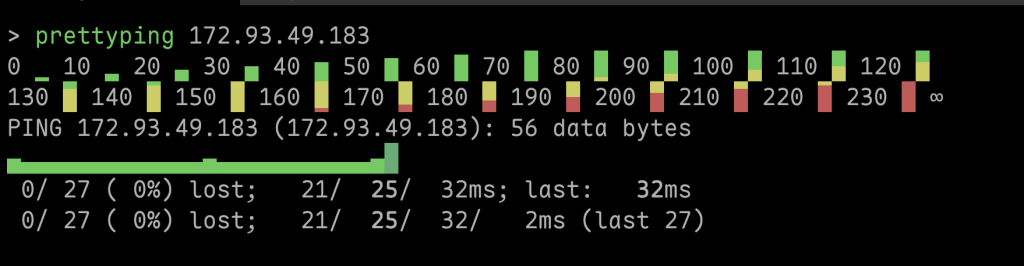
The ping command is essential for testing network connectivity, but watching endless lines of text scroll by isn’t exactly exciting. prettyping changes that by wrapping the standard ping tool in a colorful, visual interface that makes network monitoring actually enjoyable.
Created by Denilson Sá, prettyping transforms boring ping output into a real-time graphical display. Instead of reading timestamps and response times, you see colored characters that represent your connection quality. Fast responses appear in green, slower ones turn yellow to red, and timeouts are clearly marked. The result is an instant visual understanding of your network’s health.
What makes prettyping brilliant is its simplicity. Written in Bash and awk, it works on Linux, Mac, and BSD systems without any complex installation. Just download the script, make it executable (with chmod +x prettyping), and run it. No root access required, no dependencies to manage.
Beyond looking prettier, prettyping can make troubleshooting more effective. Network patterns that hide in traditional text output become immediately obvious. Intermittent connections, performance drops, and timeout patterns jump out visually, helping you spot problems faster.
prettyping proves that small improvements can make everyday tools significantly better. By adding color and visual organization to ping data, it transforms a purely functional utility into something both more useful and more pleasant to use. For anyone who works with networks regularly, it’s a simple addition that makes a real difference.
zx

The zx project (GH) is a JavaScript/TypeScript library that makes writing shell scripts easier and more maintainable. Instead of wrestling with Bash syntax, you can write scripts in JavaScript while still having access to all the shell commands you need.
It works by providing a clean wrapper around Node.js’s child_process module. The main feature is the $ tagged template literal that lets you run shell commands directly in your JavaScript code. You get automatic argument escaping, better error handling, and more reliable input/output management compared to traditional shell scripts. The library also includes several useful tools like chalk for colored output, minimist for parsing command line options, and fetch for HTTP requests.
Writing scripts this way has various practical benefits. JavaScript’s structure makes it much easier to write clear, modular code that handles errors gracefully. This is helpful for complex automation tasks or when building development toolchains. You can use any npm package in your scripts, which blurs the line between simple scripts and full applications. The scripts work across different operating systems including Linux, macOS, and Windows with WSL or Git Bash. zx also runs in alternative JavaScript environments like Deno, Bun, and even GraalVM.
One of the biggest advantages is native support for asynchronous operations. You can coordinate multiple processes or network requests using familiar JavaScript patterns like Promise.all and await, which is much more difficult to handle cleanly in traditional shell scripts. The library also includes TypeScript definitions out of the box.
Getting started is straightforward. Install zx through npm either locally in your project or globally on your system. Write your scripts as .mjs files to use ECMAScript modules with top-level await, or wrap your code in an async function for .js files. You can make scripts executable directly from the terminal using the shebang line, and the zx command line tool can even run scripts from remote URLs or extract and execute code blocks from Markdown files (both of those are kind of scary features, so be careful).
There’s a “lite” version available for situations where you need a smaller footprint, and the library is available through Docker containers.
I made a very quick attempt to implement the make-reminders.sh script from the first section in zx, which can be found in make-reminders.mjs in the same repo.
FIN
Remember, you can follow and interact with the full text of The Daily Drop’s free posts on:
- 🐘 Mastodon via
@dailydrop.hrbrmstr.dev@dailydrop.hrbrmstr.dev - 🦋 Bluesky via
https://bsky.app/profile/dailydrop.hrbrmstr.dev.web.brid.gy
☮️

 hrbrmstr's Daily Drop
Leave a comment