jora-cli; Discovery.js; JsonDiscovery
Today’s Drop is all about Jora (GH), a friendly, robust search tool that makes finding and organizing information in data files much easier than traditional methods.
It was designed around some core principles, which include:
- easy to write queries with minimal code
- won’t crash if you search for something that doesn’t exist
- automatically removes duplicates from results
- doesn’t change your original data
- fast and customizable
Jora has a full ecosystem of tooling that encompasses the CLI, browser, and data-driven workflows. We’re going to hit the core bits of each of these. If you do nothing else but side-load the browser extension (or use the “store” versions if you trust the sociopaths that run Google, Microsoft, and Firefox), I will consider today’s Drop a wild success.
NOTE: Since I’m fairly sure most readers use
jqor are at least familiar with JSON Path, I won’t be covering Jora’s query syntax extensively, but do encourage folks to peruse that URL to grok some interspersed examples in today’s tome.
TL;DR
(This is an LLM/GPT-generated summary of today’s Drop using Ollama + Qwen 3 and a custom prompt.)
- The
joraCLI tool enables powerful JSON processing, including filtering, grouping, and transforming data, with examples showing its use for extracting UUIDs and aggregating tags by category (https://github.com/discoveryjs/jora-cli) - Discovery.js is a framework for real-world JSON analysis, providing server-less reports and dashboards, and is used in projects like Statoscope and CPUpro (https://discoveryjs.github.io/discovery/)
- JsonDiscovery is a browser extension that turns your browser into a JSON exploration toolkit, useful for interacting with JSON data from REST APIs (https://freedium.cfd/p/51eda9103fa2)
jora-cli
Much like jq, most folks are going to get the greatest value from Jora via the jora CLI tool.
Say we want the UUIDs of the first 10 “Cisco” tags (data from $WORK):
$ curl --silent https://rud.is/data/tags.json | jora -p 2 tags.[name.match(/Cisco/)].id[0:10]
[
  "fd05f9b4-7599-452e-acbb-99767f125451",
  "8cdc09c8-15b3-40b2-8eb7-96acdf89c323",
  "5aa8d265-913d-4c87-a142-a437dd8363b6",
  "b75fb315-2928-4ae5-94d1-72a424518ca2",
  "d9f0f42d-591c-43a4-9797-cd83df434cee",
  "df3de941-c639-474e-adc2-855240b4f76d",
  "2d468165-daf9-46d4-ac2e-d4082a9cb2f5",
  "8b8632d6-e2c7-4946-b73f-a474ae15f36e",
  "6a4a300a-0e1b-440c-9598-efb5471b4cb8",
  "5fedddae-5c7b-4d66-a993-434796ccd1c1"
]
We can also do more complex tasks, such as aggregating tags by category, listing each tag’s label and CVE count, while filtering for tags my team has marked as harmful (i.e., recommend_block: true):
$ curl --silent https://rud.is/data/tags.json | jora -p 2 '
    tags
      .[recommend_block]  // Filter for high-risk tags
      .group(=>category)   // Group by category
      .({
        category: key,
        tags: value.({
          label: label,
          cveCount: cves.size(),  // Calculate CVE count
          firstReference: references[0]  // Extract first reference
        })
      })
'
This example shows some differences between jora features and jq, including:
- grouping: native
group()with inline key/value vs.group_by+mapreconstruction - nested value extraction: direct path access (
references) vs. explicit iteration (.[] | ...) - aggregation built-in methods (
size(),sum()) vs. manual reduction (map | length | add) - filtering integrated within paths (
[condition]) vs. separateselect/mapstages
One especially handy tool in the jora toolbox is the ability to turn verbose JSON into JSONXL, a Jora-ecosystem optimized binary storage format for JSON data:
$ curl --silent https://rud.is/data/tags.json --output /tmp/tags.json
$ jora -i /tmp/tags.json -o /tmp/tags.jsonxl -e jsonxl
$ eza -l /tmp/tags.js*
.rw-r--r--@ 1.6M user 18 Jun 22:53 /tmp/tags.json
.rw-r--r--@ 702k user 18 Jun 22:54 /tmp/tags.jsonxl
jora can also transform non-JSON values like NaN, Infinity, -Infinity, and undefined to null, ensuring that all output is valid JSON. jq typically errors out or behaves unpredictably if such values are encountered.
If you want to play more, load up some JSON into the sandbox and have at thee!
Discovery.js
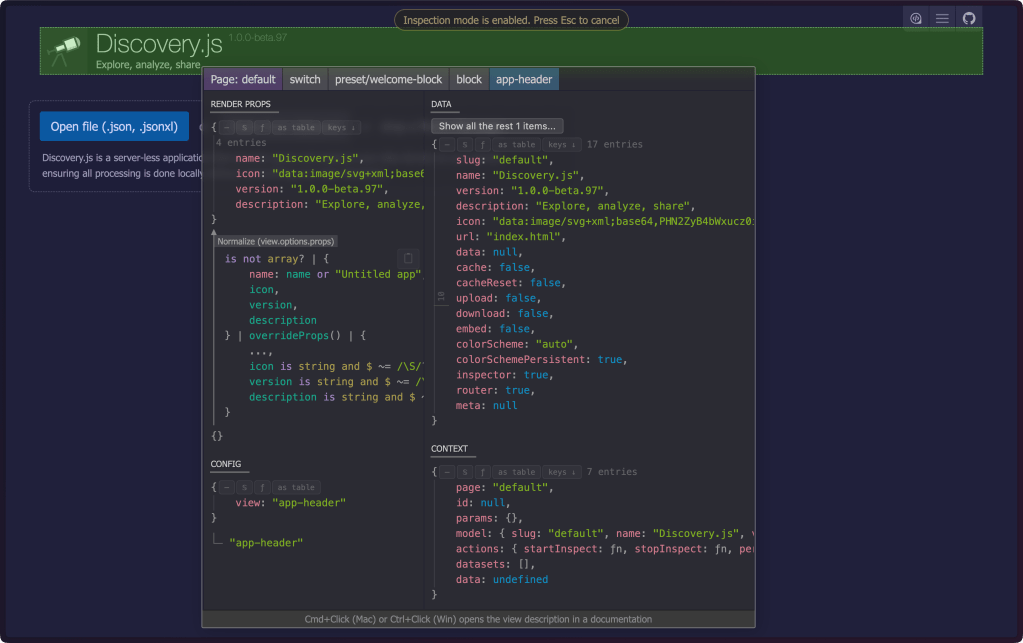
At $WORK We deal with many “foreign” APIs and collaborate with enough external research teams that we often encounter odd (I might even say “chaotic”) JSON blobs that are difficult to grok (I’m looking at you, HAR files). Discovery.js (GH) is another tree in the Jora ecosystem that is built around making such data discoverable.
This isn’t some fancier, boring “JSON treeview”. It’s a full-featured framework designed for real-world JSON analysis scenarios that actually respects your time and intelligence.
The core philosophy behind the tooling is that your data should be immediately explorable, shareable, and actionable. The framework generates server-less reports and dashboards that work in any browser. Upload JSON, get insights. No configuration Hades, no server maintenance, no vendor lock-in.
Once loaded, you have the universe of Jora expressions (ref. first section) at your disposal.
For proof of the project’s (and, my) assertions can be found in various implementations. Projects like Statoscope (webpack bundle analysis) and CPUpro (CPU profile analysis) leverage Discovery.js to solve specific, gnarly data problems. You’ll note that those aren’t toy examples, and can both handle complex analysis workflows.
Most data analysis tools force you into their mental model. Discovery.js inverts this relationship. It provides primitives for exploration while letting your data’s structure guide the interface. The result feels less like fighting a tool and more like having a conversation with your data.
There’s one more bit of handy tooling that leverages Discovery.js which we’ll cover in the last section.
JsonDiscovery
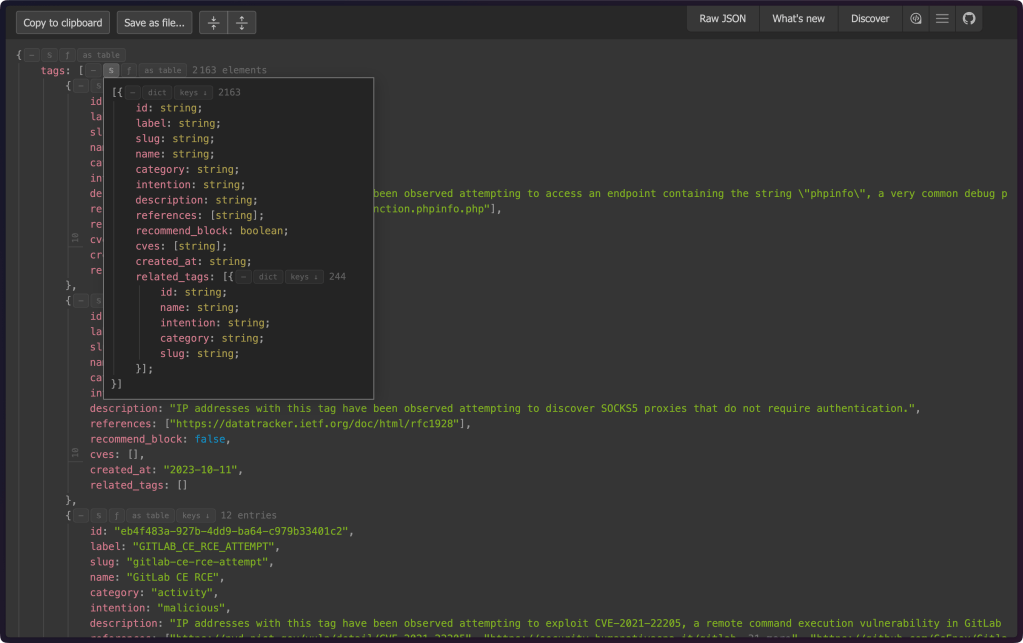
JsonDiscovery (GH) is a Chrome/Firefox browser extension that turns your browser into a JSON exploration toolkit. You can (and likely should) clone the code, review it, and use the unpacked extension (but, feel free to trust the sociopaths who run Google, Microsoft, and Mozilla if you want to load it from their store collections). Then, just load up any JSON URL, say https://rud.is/data/tags.json, and experience the interface from the middle section yourself (section header is a view from the extension in Arc).
It’s a super handy tool to have in the toolbox, especially if you are constantly dealing with new JSON return blobs from new REST APIs.
FIN
Remember, you can follow and interact with the full text of The Daily Drop’s free posts on:
- 🐘 Mastodon via
@dailydrop.hrbrmstr.dev@dailydrop.hrbrmstr.dev - 🦋 Bluesky via
https://bsky.app/profile/dailydrop.hrbrmstr.dev.web.brid.gy
☮️

 hrbrmstr's Daily Drop
Leave a comment