uchū; EvilDeno; ThumbHash
We are, once again, theme-less, but I managed to sneak in something from my profession into the Drop today, since it does bridge the gap between web/CLI development and hacking. We pair that with a sweet new color palette and smarter way to use image placeholders.
TL;DR
(This is an LLM/GPT-generated summary of today’s Drop using Ollama + Qwen 3 and a custom prompt.)
- uchū is a modern color palette using the OKLCH color space, offering both expanded and reduced versions for detailed or simplified web design needs (https://uchu.style/)
evildenodemonstrates how Deno can be used for offensive security operations, showcasing techniques like remote code execution, FFI with native libraries, and shellcode delivery (https://codeberg.org/mttaggart/evildeno)- ThumbHash generates tiny, high-quality image placeholders using a Discrete Cosine Transform and LPQ color system, providing fast-loading previews with accurate color and shape representation (https://github.com/evanw/thumbhash)
uchū Color Palette

uchū (GH) is a color palette created by NetOperator Wibby specifically for “internet lovers,” focusing on modern web development needs. Its key feature is the use of the OKLCH color space, a perceptually uniform color model that provides better consistency and flexibility in digital design. The creator refined this palette through a year of personal use, aiming to balance visual appeal with practical utility for web projects.
The palette comes in two versions: expanded and reduced. The expanded palette (color_expanded.css) contains ten color families: gray, red, pink, purple, blue, green, yellow, orange, plus yin (black) and yang (white). Most color families have nine stops or shades (yin has ten), allowing for detailed gradations. This level of detail supports complex UI work like layering, subtle backgrounds, and accessible contrast ratios. Developers can also access raw OKLCH values for each color stop, enabling custom opacity adjustments directly in CSS.
For simpler projects or to avoid decision fatigue, uchū offers a reduced palette (color.css). This version simplifies each color family to just three essential stops (light, base, dark), with further simplification for yin and yang. This helps designers prevent “analysis paralysis” while maintaining a coherent color system. As with the expanded version, raw OKLCH values remain accessible for custom opacity work.
uchū integrates easily into various development environments. For basic HTML/CSS projects, you can simply link the relevant CSS file from the uchu.style domain. For frameworks like Svelte or SvelteKit, the palette can be imported as a stylesheet with variables used directly in component styles. The palette is also available in Sass (SCSS), JSON, and TypeScript formats, making it compatible with many workflows, including CSS-in-JS approaches.
EvilDeno

So, by now, y’all know I 💙 Deno (a modern JavaScript/TypeScript runtime). Like all tools, it can be used for good; but, this particular tool is sharp enough to also be used for less-than-ideal purposes, at least in the wrong hands.
The evildeno repository is a collection of practical demonstrations showing how Deno can be used for offensive security operations. The repo is explicit about its educational intent and provides hands-on examples of how Deno’s legitimate features can be abused for red teaming, penetration testing, or, in the wrong hands, malicious activity. The project is structured into several sections, each illustrating a different technique or attack vector, and each comes with a summary and usage instructions.
The core theme of evildeno is to showcase Deno’s unique capabilities that set it apart from Node.js, particularly its ability to execute remote code, evaluate code directly from the command line, compile to standalone binaries, and interface with native libraries through its Foreign Function Interface (FFI). These features, while powerful for developers, also present significant risks if leveraged by attackers.
The url-fetch directory demonstrates how Deno can execute code directly from a URL. With a simple deno run command, you can fetch and run a remote TypeScript or JavaScript file. This is not a fileless technique, as the file is cached locally; but, it enables rapid, remote code execution with minimal friction. The example provided pops a calculator on Windows (or creates a file on Unix-like systems), but the technique is trivially adaptable to more complex payloads.
The dll-execution directory explores Deno’s FFI capabilities. Here, the demonstration involves creating a dynamic library (DLL or .so) using Rust, then loading and executing functions from that library within a TypeScript script. This allows JavaScript/TypeScript code to make direct Windows API calls, bypassing traditional detection mechanisms like rundll32.exe. The flexibility and ease of integrating with native code is both impressive and concerning from a security perspective.
The native-dll directory takes FFI a step further by showing how Deno can interact with native Windows DLLs, such as kernel32.dll, to invoke functions like CreateProcessA. This enables the execution of system commands (again, popping calc.exe as a benign demonstration), but the same technique could be used for more destructive purposes, such as manipulating system files or processes without relying on commonly monitored system utilities.
The shellcode-loader directory is a treat for offensive security professionals, providing a demonstration of loading and executing shellcode via Deno, leveraging a Rust-based library for obfuscation and delivery. This illustrates how Deno can be used as a staging point for more advanced attacks, combining JavaScript/TypeScript orchestration with native code execution.
While the demonstrations are intentionally not obfuscated, real-world attackers could easily disguise Deno as Node.js or use other forms of obfuscation to evade detection.
ThumbHash: Simple Image Placeholders Made Easy
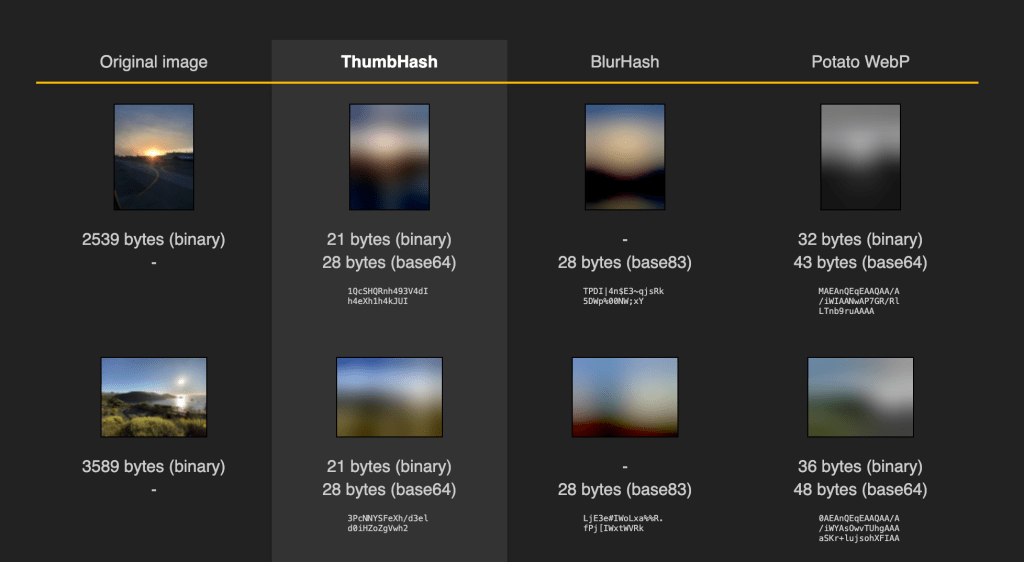
ThumbHash is a compact tool that creates tiny image previews that load instantly while the full image downloads, making websites feel faster and smoother. Think of it like a thumbnail sketch that captures the essence of an image in very little data. Unlike similar tools like BlurHash, ThumbHash shows more detail in the same amount of space, displays colors more accurately, preserves the original image’s shape (whether tall or wide), and can handle images with transparent areas.
The system works by simplifying images to their basic patterns using a mathematical technique called the Discrete Cosine Transform. It prioritizes capturing brightness details at higher quality than color details, which matches how our eyes work. For transparent images, it also stores information about which parts are see-through. ThumbHash only keeps the broad shapes and colors that our eyes notice most, ignoring fine details to keep the data small—similar to how JPEG compression works.
ThumbHash uses a special color system called LPQ—where L means brightness, P means yellow-blue differences, and Q means red-green differences. This approach is based on how human vision works, as we’re better at noticing changes in brightness than changes in color. By focusing more data on brightness, ThumbHash creates previews that look better to our eyes. The system can easily convert these values back to normal RGB colors when needed.
The data format is extremely efficient, packing multiple values into small spaces rather than using full bytes. The format includes basic color information, pattern details, and indicators for transparency and image shape. ThumbHash automatically figures out how much detail to include based on whether the image is wide, tall, or has transparent areas. This clever design even lets you determine the original image’s approximate dimensions from just the ThumbHash data.
You can use ThumbHash in many programming languages including JavaScript, Rust, Swift, and Java, with community-created versions for Go, Perl, PHP, and Ruby. The system is designed to be plug-and-play with no settings to adjust—making it simple to use, though less customizable.
The main site has great examples of how this maths-ematical system works.
FIN
Remember, you can follow and interact with the full text of The Daily Drop’s free posts on:
- 🐘 Mastodon via
@dailydrop.hrbrmstr.dev@dailydrop.hrbrmstr.dev - 🦋 Bluesky via
https://bsky.app/profile/dailydrop.hrbrmstr.dev.web.brid.gy
☮️
 hrbrmstr's Daily Drop
Leave a comment