CISA KEV MCP With llama3.2 & oterm; Context7; Zed AI
I try to keep the AI issues sparse and self-contained since I know many Drop readers are not fans of our AI overlords, so feel empowered to dump this edition into the bin (there will be no “AI” in the Weekend Bonus Drop).
TL;DR
(This is an LLM/GPT-generated summary of today’s Drop using Ollama + Qwen 3 and a custom prompt.)
I neglected to link to the updated Modelfile yesterday…apologies.
- KEV MCP server implementation with llama3.2 and oterm enables efficient interaction with structured data via MCP protocol (https://codeberg.org/hrbrmstr/kev-mcp)
- Context7 provides up-to-date, version-specific documentation and code examples to improve AI-assisted coding accuracy (https://context7.com/)
- Zed AI offers robust AI integration features, including inline assistance, project-wide context, and MCP support, within a powerful editor/IDE (https://zed.dev/)
CISA KEV MCP With llama3.2 & oterm
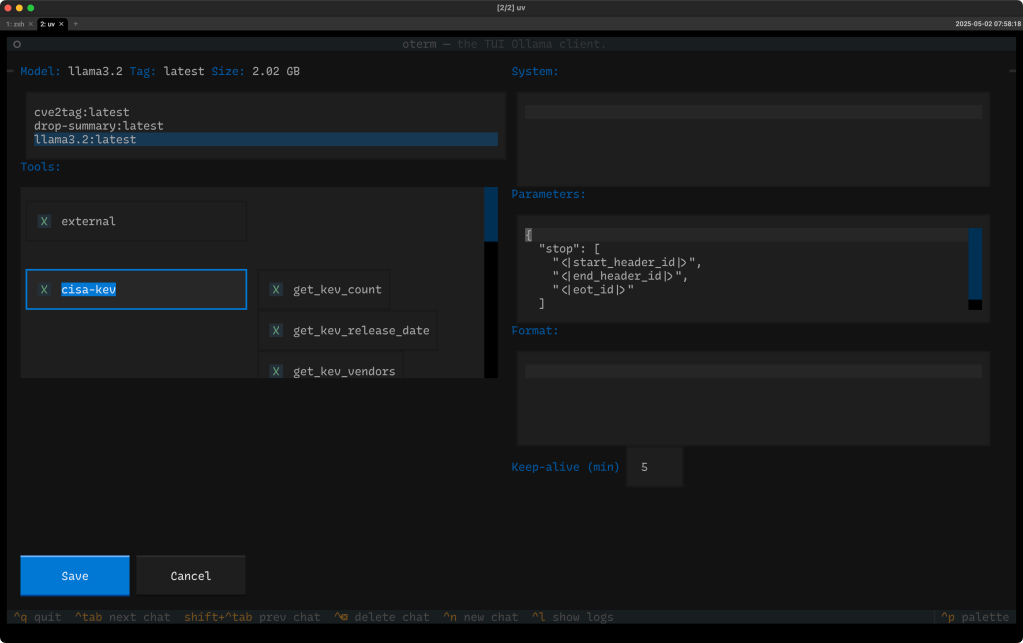
Ask anyone at $WORK and you’ll get the distinct impression that I have a case of MCP madness.
For those new to the Drop, MCP is a protocol designed for AI assistants and automation clients to interact with structured data in a standardized, type-safe way. Clients like Claude Desktop and (as we’ll go into, shortly) oterm can talk to MCP servers, and the most prevalent idiom for that is via the MCP stdin/stdout interface. This mode makes MCPs dead simple to integrate with LLMs, bots, or even CLI tools. It’s about contextual access, not just data dumps.
MCPs are a leveling up of the old school (if you call “June 2023” old), and klunky “function calling” interface that forced you to do a ton of heavy lifting to try to get LLMs to interact with external, networked resources.
As we’ve covered before, MCPs provided a well-thought-out idiom for defining, building, and running task-specific, contextually agnostic MCP servers.
Cursor’s directory is filled with very useful MCP servers that don’t require Cursor to work, and MCP has been around long enough for some awesomeness.
I built a fairly robust CISA KEV MCP Server that implmements over a dozen tools:
force_refresh_kev_dataget_cwe_statisticsget_kev_countget_kev_cvesget_kev_productsget_kev_release_dateget_kev_statisticsget_kev_vendorsget_recent_vulnerabilitiesget_related_cvesget_upcoming_due_datesget_vulnerability_detailssearch_by_cwesearch_kev
And, you can see them at work in this Claude Desktop session.
This post is not really about that MCP server, and I am fairly confident the README in the repo does a fine job explaining it, so we don’t need to waste your time here today blathering about it more. I will take a few seconds to note that one thing that MCP server does — that I wish more would do — is implement some thoughtful caching to prevent excessive (and slower) network requests.
Moving on…
Claude costs cash money to run, and I’ve made it known on several occasions that I am not a fan of what I have dubbed the “OpenAI Tax” (which is a generic term for needing to pay to use “AI”).
We’re finally starting to see some interactive Ollama compatible clients that support MCP servers, provided the underlying model supports function calling.
As noted up top, oterm — a fancy + spiffy TUI for Ollama — has added support for MCPs, and most clients use a config similar to what oterm wants:
{
  "theme": "textual-dark",
  "splash-screen": true,
  "mcpServers": {
    "cisa-kev": {
      "command": "node",
      "args": ["/Users/hrbrmstr/projects/kev-mcp/build/index.js"]
    }
  }
}
You can see the chat setup after adding the above config entry in the section header, and these are some questions I asked of KEV (bad typing and all):
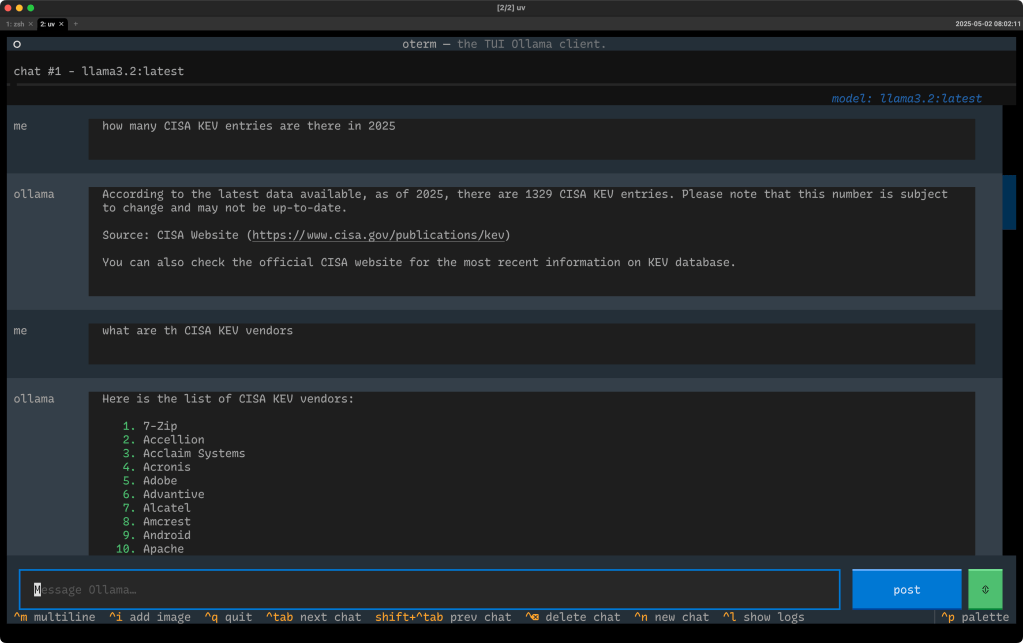
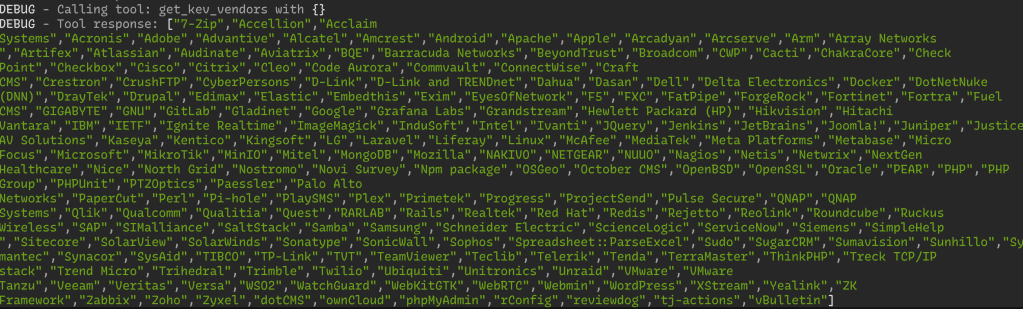
oterm debug logs the MCP interactions, so you can see it does what it says on the tin:
I need to try this out with Qwen 3 this weekend, but if you’ve been itching to play with MCP servers but don’t want to support “Big AI”, this is a great way to get started locally, and for free.
Context7

Content/training staleness is the bane of LLM/GPT environments, especially when it comes to using AI assistants in a coding context. It was truly amusing to see OpenAI’s (and others’) initial models use woefully out of date Golang (et al.) idioms when generating code (which quickly became “tells” that one was using an AI assistant — which is 100% fine, unless you didn’t admit to using an LLM assistant).
The steady march of model updates, retrieval augmented generation (RAG) setups, and the ability for models to be fed longer contexts (with documentation) or a URL with modern idiomatic code references/examples has greatly improved the assistive coding experience, but still usually puts the burden on you to provide all that.
Enter Context7 (GH). As they, themselves, put it:
Context7 pulls up-to-date, version-specific documentation and code examples directly from the source. Paste accurate, relevant documentation directly into tools like Cursor, Claude, or any LLM. Get better answers, no hallucinations, and an AI that actually understands your stack.
They have over 7,500 libraries available, and the Upstash team does their best to keep the service fresh.
While you could copy/paste specific context (and, that may make sense if you don’t want to burn through tokens in a paid service) from it, you can also use the Context7 MCP server (ref the GH link) to automagically use the resources it provides.
Cursor seems to be the 800lb gorilla of the moment, but Context7 works fine outside of a Cursor context.
If you do use coding assistants and are not using Context7, you are very likely wasting a non-insignificant amount of time.
Zed AI
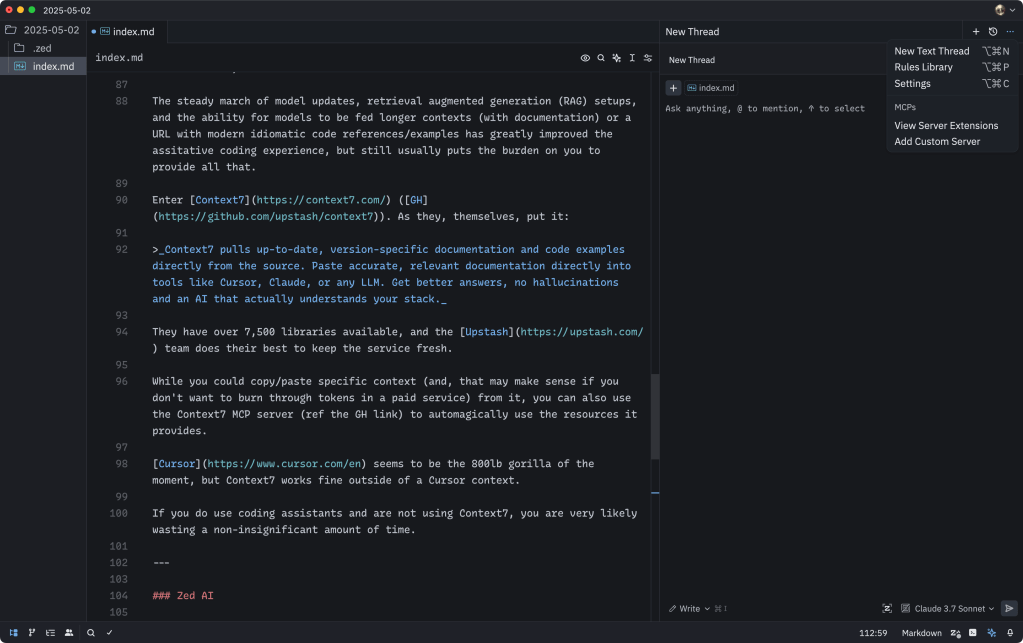
From my limited vantage point, it seems like Zed is a massively overlooked editor and IDE. I won’t go all “Rust Evangelism Strike Force” on y’all (in a Zed context), but the team has managed to both continually improve the core editor/IDE and integrate AI features without slowing things down, or continually shoving “AI” right into our faces.
If you haven’t looked at Zed, recently — especially their AI integration improvements — I assert you might want to take some time this weekend to do so (use the Preview channel when you do, too).
This is just a short-list of AI features (many of which work locally with Ollama):
- Inline, contextual assistance (including in the embedded Alacritty terminal)
- Project-wide context
- Amazing MCP support
- “Rules (ala”.cursorrules”) support
- A Claude Code-esque experience (with dir/file creation/editing) w/paid Zed AI
- Direct internet search or context content retrieval via URL
- Ability to switch between “ask” and “do it for me” modes
All that on top of a very robust and rich general editing experience.
FIN
Remember, you can follow and interact with the full text of The Daily Drop’s free posts on:
- 🐘 Mastodon via
@dailydrop.hrbrmstr.dev@dailydrop.hrbrmstr.dev - 🦋 Bluesky via
https://bsky.app/profile/dailydrop.hrbrmstr.dev.web.brid.gy
☮️
 hrbrmstr's Daily Drop
Leave a comment