cmarker; Typst HTML Output; Joint 📊 Inspiration
We’ve got a Typst two-fer and some Datawrapper and R cruncy goodness in store for today. So sit back and get distracted from all that’s going on, and perhaps even indulge some play time as you work through some of the examples in each section.
TL;DR
(This is an AI-generated summary of today’s Drop using Ollama + llama 3.2 and a custom prompt.)
- Typst’s cmarker package enables seamless Markdown-to-PDF conversion with customizable styling and formatting options (https://typst.app/universe/package/cmarker/)
- Typst 0.13.0 introduces preliminary HTML export capabilities with new features like html.elem and html.frame directives (https://typst.app/docs/changelog/0.13.0/#html-export)
- Datawrapper’s new small multiples feature inspired creative visualizations in R and ggplot2, showcased in Andrew Heiss’s choropleth binned histogram tutorial (https://www.andrewheiss.com/blog/2025/02/19/ggplot-histogram-legend/)
cmarker

Typst (GH) was originally desgined to ease the creation of academic papers, but the language, engine, and ecosystem can generate documents for any purpose. While Typst syntax is objectively much easier to learn than LaTeX, there is still some cognitive load associated with having to master yet-another markup language. Plus, once you have a content that’s in Typst format, re-using that content in other contexts can mean you’ll have multiple versions in multiple formats, which could lead to version drift.
Markdown is one of the more advantageous formats for such content creation and collaboration. While Typst has no out-of-the box support for Markdown, Quarto (via Pandoc) has a solve for that, but also introduces a dependency outside the Typst ecosystem. That may be a solid choice for many use cases, but we can stay within the Typst ecosystem-proper and reap the benefits of Markdown via the cmarker (GH) Typst package/plugin.
We’ll be using this Markdown example document and image in the examples, below. It has basic content with first- and second-level headings, paragraphs with some sample formatting, a blockquote, and an image. With just a few lines of Typst, we can generate a respectable PDF:
#import "@preview/cmarker:0.1.2"

#let file = "ipsum.md"

#cmarker.render(
  read(file),
  scope: (image: (path, alt: none) => image(path, alt: alt))
)
Typst will automagically download the cmarker package if it’s not already installed, and the #cmarker directive will read in the specified file. We have to use the scope paramater to help Typst find any associated images/etc.
With no further customizations, that will produce output like this:
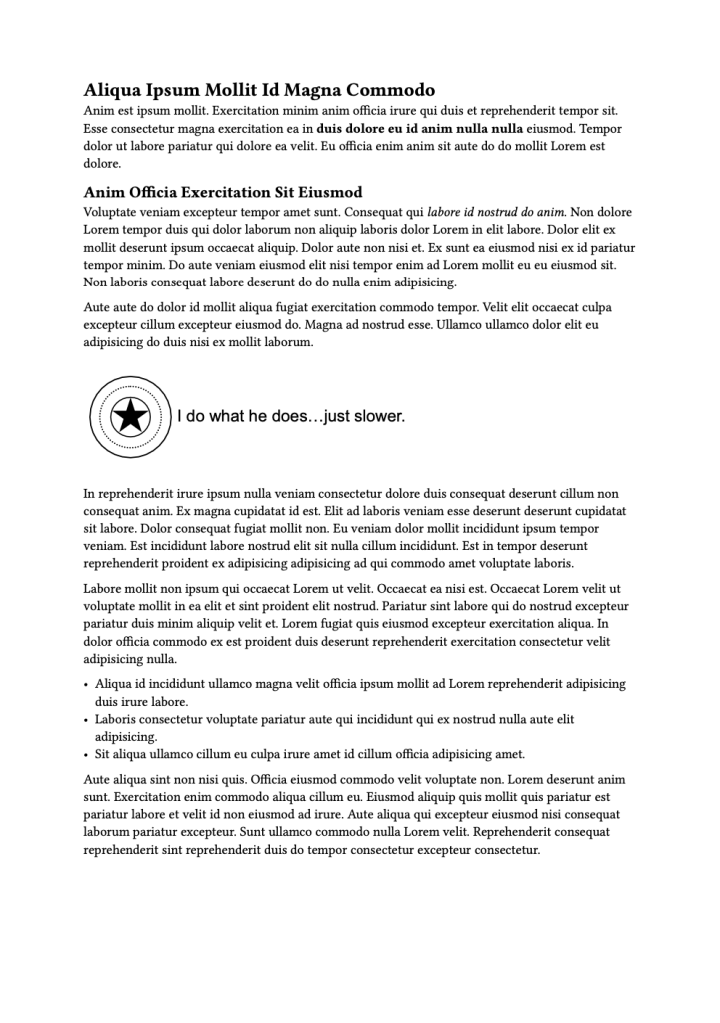
Not bad! But, you’ll notice the blockquote formatting is non-existent. That’s due to Typst having no built-in concept of a blockquote. However, the plugin has a blockquote parameter which will let us specify a Typst function to use for formatting. While we’re at it, we’ll add in some basic styling directives to make this look a bit spiffier:
// Imports the cmarker package for markdown processing
#import "@preview/cmarker:0.1.2"

// Specifies the markdown file to be processed
#let file = "ipsum.md"

// Sets the default text font to Inter and size to 10pt
#set text(
  font: "Inter",
  size: 10pt
)

// Sets paragraph leading (line spacing) to 0.5em
#set par(leading: 0.5em)

// Configures list styling with:
// - 1.2em spacing between items
// - 1.25em indentation
#set list(
  spacing: 1.2em,
  indent: 1.25em
)

// Sets default heading paragraph properties:
// - 1em leading
// - 1em spacing
#show heading: set par(
  leading: 1em,
  spacing: 1em
)

// Styles level 1 headings (h1):
// - 1.3em text size
// - medium weight
// - 0.33em leading
// - 0.5em spacing above, 1.5em below
#show heading.where(level: 1): content => block(spacing: 0.5em, below: 1.5em, {
  set text(size: 1.3em, weight: "medium")
  set par(leading: 0.33em)
  content
})

// Styles level 2 headings (h2):
// - 1.2em text size
// - medium weight
// - no text justification
// - 2em spacing above, 0.8em spacing
#show heading.where(level: 2): content => block(spacing: 0.8em, above: 2em, {
  set text(size: 1.2em, weight: "medium")
  set par(justify: false)
  content
})

// Centers all images in the document
#show image: it => align(center, it)

// Defines a basic blockquote style that makes text italic
#let basic-blockquote(content) = [
  #set text(
    style: "italic"
  )
]

// Renders the markdown file using cmarker with:
// - custom blockquote styling
// - custom image handling (preserves alt text)
#cmarker.render(
  read(file),
  blockquote: basic-blockquote,
  scope: (image: (path, alt: none) => image(path, alt: alt))
)

There are a few other parameters you can use with cmarkdown’s render function, one being raw-typst which lets you embed Typst code in HTML comments in the Markdown document. While that somewhat defeats the above re-use assertion, it does make it possible to have far more control over the formatted output than you can get with many Markdown-to-HTML tools.
I discovered cmarkdown when I wanted to make a PDF of 47’s Executive Orders. Tye Typst source for that uses a for loop to process all the EO Markdown documents into one giant PDF (with a fancier blockquote).
Typst HTML Output
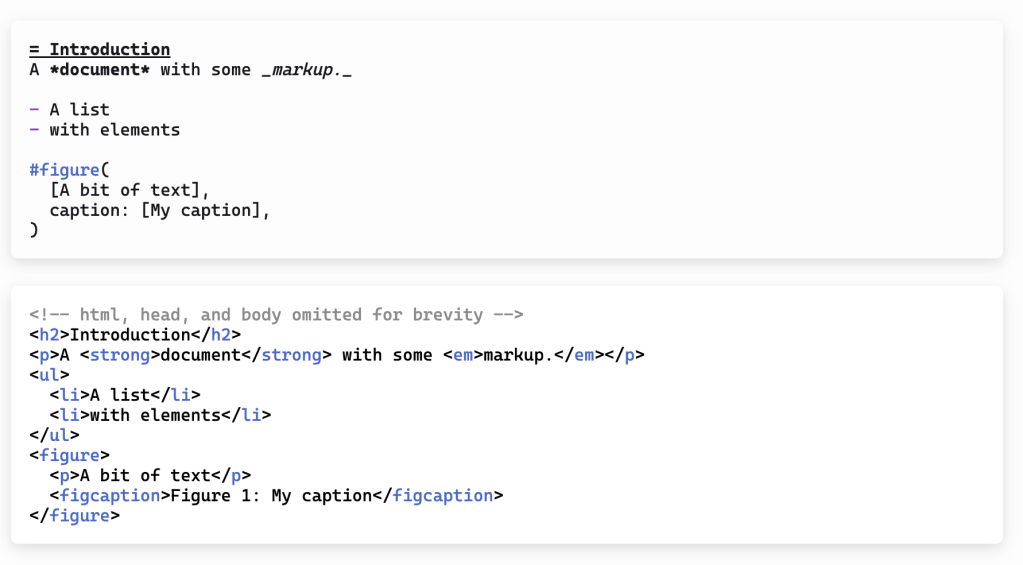
Typst 0.13.0 has preliminary support for HTML output!
Supporting HTML output is no small undertaking. While one can meticulously format an HTML document with some degree of precision, translating Typst directives to output HTML vs PDF with similar precision is a pretty hard task. (There is a reason PDF.js exists, after all.)
Further, some features in HTML aren’t avaialble in PDF. To make it easier to handle both types of output for a single document, the target variable will return html when the caller requests HTML output, so you can if/then your way out of trouble.
There’s also an html.elem directive that lets you output arbitrary tags with content, and html.frame that lays out its content as an inline SVG.
This functionality is behind a CLI feature flag, so you have to do something like this to use it:
$ typst compile --features html ipsum-01.typ ipsum-01.html
You can see that output here, though it will be missing the image.
Knowing they’re actively working on this is pretty exciting, as it will give us one more way to communicate with the world using Typst.
Joint 📊 Inspiration

Datawrapper is a great tool/service that makes basic and advanced data visualization more accessible to folks. They recently added support for small multiples (“facets” in {ggplot2} nomenclature) and a neat chart type called “comparison columns”.
I re-created one of their comparison columns examples in R with {ggplot2} and posted it to Bsky (the embed won’t work here so hit up this URL: https://bsky.app/profile/hrbrmstr.dev/post/3lik7thxdmc2m). That’s what’s in the section header.
The same day, {ggplot2} master Andrew Heiss saw this November 2024 Bsky post get re-upped — https://bsky.app/profile/obumbratta.com/post/3lbs67ic5bc2w — and whipped up a great explainer on how to add a choropleth binned histogram colored legend to {ggplot2} maps — https://www.andrewheiss.com/blog/2025/02/19/ggplot-histogram-legend/. It’s super well done.
See, not everything is horrible in 2025!
FIN
Remember, you can follow and interact with the full text of The Daily Drop’s free posts on:
- 🐘 Mastodon via
@dailydrop.hrbrmstr.dev@dailydrop.hrbrmstr.dev - 🦋 Bluesky via
https://bsky.app/profile/dailydrop.hrbrmstr.dev.web.brid.gy
Also, refer to:
to see how to access a regularly updated database of all the Drops with extracted links, and full-text search capability. ☮️
 hrbrmstr's Daily Drop

Leave a comment