MarkItDown; THERE ARE FOUR [COLORS]; Hyperfine
Three wildly different topics, today (as has been the majority of Monday Drops, of late).
TL;DR
(This is an AI-generated summary of today’s Drop using Ollama + llama 3.2 and a custom prompt + VSCodium extension.)
- MarkItDown, a Python utility by Microsoft, converts various file types to Markdown format, outperforming pandoc in analysis tasks (https://github.com/microsoft/markitdown)
- The “4 Colors Formula” and accompanying tool is a design approach using four distinct colors (primary, secondary, accent, and tertiary) to create visually appealing and functional designs (https://github.com/whosajid/4-Colors-Formula)
- Hyperfine, a Rust-based command-line benchmarking tool, accurately measures and compares the performance of arbitrary commands with methodological rigor (https://github.com/sharkdp/hyperfine)
MarkItDown

I’m somewhat loathe to mention this resource since it was made by Microsoft and their collaborators to steal [y]our content to be used in ChatGPT (et al.). However, in numerous tests of many different file types, it produces way better markdown than the venerable
pandoc. Shovels are used for evil every day, but that doesn’t mean we shouldn’t use a shovel to dig. Just don’t ⭐️ this thing (pls) or heap too much laud on those who have helped Microsoft steal all the world’s intellectual property.
MarkItDown is a Python utility developed by (ugh) Microsoft that facilitates the conversion of various file types into Markdown format. This tool is VERY useful for tasks such as indexing and text analysis. It supports a range of file formats, including PDFs, PowerPoint presentations, Word documents, Excel spreadsheets, images (by extracting EXIF metadata AND performing OCR), audio files (by extracting EXIF metadata AND transcribing speech), HTML files (with special handling for sources like Wikipedia), and other text-based formats such as CSV, JSON, and XML. As noted in my soapbox preamble, it does a far better job than pandoc for the purpose of analysis.
I used uv to install it into a Python virtual environemnt I have set aside for utilities like this (that way it keep Python in a jail like it deserves). Once installed, the tool offers a straightforward API for converting files. For example, to convert an Excel file named “test.xlsx” to Markdown, you would use the following code (pretty much stolen from the README):
from markitdown import MarkItDown

markitdown = MarkItDown()
result = markitdown.convert("test.xlsx")
print(result.text_content)
It’s fast and useful, two things one cannot usually say about anything from Microsoft.
THERE ARE FOUR [COLORS]
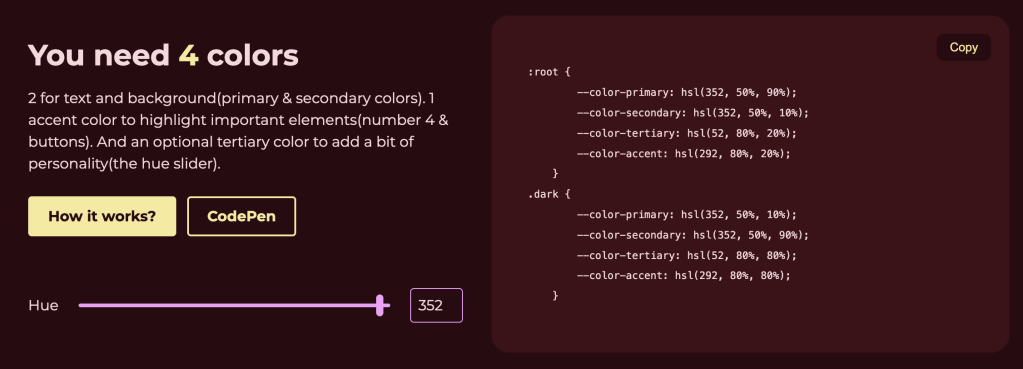
The “4 Colors Formula” is a practical approach to color selection in design. This method advocates for the use of four distinct colors, each serving a specific role to create a cohesive and visually appealing design.
The primary color forms the foundation of the design, typically applied to the background. This color sets the overall tone and mood, influencing the consumer’s initial impression. A well-chosen primary color provides a neutral or harmonious backdrop that allows other elements to stand out.
The secondary color is (usually) designated for text and essential information. It is quite important for this color to contrast well with the primary color to maintain readability and accessibility (i.e., pairing a light primary color with a dark secondary color can enhance text clarity and user engagement).
The accent color is there to highlight elements such as buttons, links, or calls to action. This color should be vibrant and attention-grabbing, guiding (OK…forcing) the user’s eye to critical components and facilitating intuitive navigation.
An optional tertiary color adds a bit of personality to the design. It can be used sparingly to introduce variety and prevent the design from appearing monotonous. The tertiary color often complements the other colors, contributing to a balanced and dynamic visual experience.
This formula is grounded in fundamental color theory principles, which explore how colors interact and the psychological effects they evoke. By limiting the palette to four purposeful colors, designers can maintain consistency, enhance user experience, and achieve aesthetic harmony.
Implementing the 4 Colors Formula involves selecting hues that work well together, considering factors such as color harmony, contrast, and cultural associations. It just so happens that the author of the GH repo has a super-focused tool for this very thing! One example from it is in the section header, and I don’t think the tool itself requires further blathering.
Hyperfine

I used output from Hyperfine in a few posts on Bluesky, and it turns out I’ve just only lightly mentioned it in a couple previous Drops.
Hyperfine is a Rust-based command-line benchmarking tool (RStats folks should think {bench} or {microbenchmark}) for measuring and comparing the performance of arbitrary commands. It was creted by the one-and-only David Peter (think “fd, and bat“), it takes inspiration from the shortcomings of ad hoc benchmarking methods, particularly the tendency of developers to rely on crude tools like time or simple loop-based tests. Those methods can provide some insight, they often fail to account for real-world variability, such as system load or caching effects, and can lead to misleading results.
Hyperfine’s leans on a ton of methodological rigor. When you execute a benchmark with Hyperfine, it doesn’t just run your command once or twice. Instead, it performs multiple executions (you can control this), taking care to account for system environmental factors that could skew results. It automatically warms up the system cache (which is tunable) and then collects a statistically significant set of timings (letting you know if any are outside of the measured norm). These are processed to produce useful metrics such as the mean execution time, standard deviation, and confidence intervals.
It has super minimal syntax, it let us compare similar commands directly, and streamlines a process that might otherwise involve juggling shell scripts and manual data collection.
Here’s what I showed folks on Bluesky:
$ hyperfine --warmup=5 \
  "duckdb -c \"FROM read_csv('epss_scores-2021-11-05.csv')\"" \
  "Rscript --vanilla -e 'readr::read_csv(\"epss_scores-2021-11-05.csv\")'" \
  "Rscript --vanilla -e 'data.table::fread(\"epss_scores-2021-11-05.csv\")'" \
  "Rscript --vanilla -e 'arrow::read_csv_arrow(\"epss_scores-2021-11-05.csv\")'" \
  "Rscript --vanilla -e 'vroom::vroom(\"epss_scores-2021-11-05.csv\")'" \
  "Rscript --vanilla -e 'polars::pl\$read_csv(\"epss_scores-2021-11-05.csv\")'" \
  "Rscript --vanilla -e 'polars::pl\$scan_csv(\"epss_scores-2021-11-05.csv\")'"

Benchmark 1: duckdb -c "FROM read_csv('epss_scores-2021-11-05.csv')"
  Time (mean ± σ):      59.3 ms ±   1.5 ms    [User: 52.9 ms, System: 4.5 ms]
  Range (min … max):    57.4 ms …  65.7 ms    47 runs

Benchmark 2: Rscript --vanilla -e 'readr::read_csv("epss_scores-2021-11-05.csv")'
  Time (mean ± σ):     423.8 ms ±   3.5 ms    [User: 454.6 ms, System: 42.4 ms]
  Range (min … max):   418.1 ms … 429.6 ms    10 runs

Benchmark 3: Rscript --vanilla -e 'data.table::fread("epss_scores-2021-11-05.csv")'
  Time (mean ± σ):     157.9 ms ±   1.7 ms    [User: 117.6 ms, System: 23.7 ms]
  Range (min … max):   155.5 ms … 162.9 ms    18 runs

Benchmark 4: Rscript --vanilla -e 'arrow::read_csv_arrow("epss_scores-2021-11-05.csv")'
  Time (mean ± σ):     543.8 ms ±   8.4 ms    [User: 461.0 ms, System: 72.5 ms]
  Range (min … max):   534.4 ms … 560.3 ms    10 runs

Benchmark 5: Rscript --vanilla -e 'vroom::vroom("epss_scores-2021-11-05.csv")'
  Time (mean ± σ):     397.2 ms ±   2.2 ms    [User: 425.7 ms, System: 39.5 ms]
  Range (min … max):   393.0 ms … 400.1 ms    10 runs

Benchmark 6: Rscript --vanilla -e 'polars::pl$read_csv("epss_scores-2021-11-05.csv")'
  Time (mean ± σ):     139.6 ms ±   2.2 ms    [User: 104.7 ms, System: 29.5 ms]
  Range (min … max):   135.3 ms … 144.6 ms    20 runs

Benchmark 7: Rscript --vanilla -e 'polars::pl$scan_csv("epss_scores-2021-11-05.csv")'
  Time (mean ± σ):     138.5 ms ±   9.7 ms    [User: 96.0 ms, System: 25.7 ms]
  Range (min … max):   131.1 ms … 180.4 ms    22 runs

  Warning: Statistical outliers were detected. Consider re-running this benchmark on a quiet system without any interferences from other programs. It might help to use the '--warmup' or '--prepare' options.

Summary
  duckdb -c "FROM read_csv('epss_scores-2021-11-05.csv')" ran
    2.34 ± 0.17 times faster than Rscript --vanilla -e 'polars::pl$scan_csv("epss_scores-2021-11-05.csv")'
    2.35 ± 0.07 times faster than Rscript --vanilla -e 'polars::pl$read_csv("epss_scores-2021-11-05.csv")'
    2.66 ± 0.07 times faster than Rscript --vanilla -e 'data.table::fread("epss_scores-2021-11-05.csv")'
    6.70 ± 0.17 times faster than Rscript --vanilla -e 'vroom::vroom("epss_scores-2021-11-05.csv")'
    7.14 ± 0.19 times faster than Rscript --vanilla -e 'readr::read_csv("epss_scores-2021-11-05.csv")'
    9.17 ± 0.27 times faster than Rscript --vanilla -e 'arrow::read_csv_arrow("epss_scores-2021-11-05.csv")'
This immediately gives us a clear, side-by-side performance comparison. You can also shunt structured output to JSON or CSV, but David went out of his way to make the human readable output super accessible.
It’s something y’all should 100% add to your toolkits.
FIN
We all will need to get much, much better at sensitive comms, and Signal is one of the only ways to do that in modern times. You should absolutely use that if you are doing any kind of community organizing (etc.). Ping me on Mastodon or Bluesky with a “🦇?” request (public or faux-private) and I’ll provide a one-time use link to connect us on Signal.
Remember, you can follow and interact with the full text of The Daily Drop’s free posts on:
- 🐘 Mastodon via
@dailydrop.hrbrmstr.dev@dailydrop.hrbrmstr.dev - 🦋 Bluesky via
https://bsky.app/profile/dailydrop.hrbrmstr.dev.web.brid.gy
Also, refer to:
to see how to access a regularly updated database of all the Drops with extracted links, and full-text search capability. ☮️

 hrbrmstr's Daily Drop
Leave a reply to Drop #705 (2025-09-05): If It Walks Like A 🦆… – hrbrmstr's Daily Drop Cancel reply