DuckDB HTTP Server Extension; DuckDB In Action; masto.sh
The resource in the first section was so stupid cool that I just had to make today a DuckDB Drop.
It’s probably also a good time to mention a recent vulnerability in Grafana caused by the way they deployed DuckDB. And, that DuckDB has a whole chapter on security in their manual .
I swear I’ll get to the whole “WordPress rant” at some point, especially since I’m definitely migrating the Drop again due to the recent incident(s).
In other news, did not do a great job with the “why”, regarding the weekend Drop’s “PDF-to-text” service, so there’s a brief fourth section on that, plus some links to a robust version of the service.
TL;DR
(This is an AI-generated summary of today’s Drop using Ollama + llama 3.2 and a custom prompt.)
- DuckDB HTTP Server Extension: A community-built project that turns any DuckDB instance into an HTTP OLAP API server, providing features like customizable authentication and a web-based GUI for querying data. (https://github.com/quackscience/duckdb-extension-httpserver/tree/main)
- DuckDB In Action: A comprehensive guide to using DuckDB, covering basic setup to advanced data pipeline construction, with hands-on projects and real solutions to common data workflow problems. (https://motherduck.com/duckdb-book-brief/)
- masto.sh: A simple bash script that uses the Mastodon API to fetch posts and store them in a local DuckDB database, allowing users to run SQL queries to analyze their social media activity. (https://github.com/olithissen/masto.sh)
DuckDB HTTP Server Extension

The DuckDB HTTP Server Extension is a community-built project that turns any DuckDB instance into an HTTP OLAP API server. This experimental extension adds new features to DuckDB, enabling us to interact with our data[bases] through a web interface and RESTful API calls.
It provides two main functions: httpserve_start() and httpserve_stop(). These let you start and stop an HTTP server directly from DuckDB. You can customize the server with your choice of host, port, and authentication settings, supporting both basic and token-based authentication for secure access.
A handy feature is the embedded Play User Interface (ref section header), a web-based tool for querying and visualizing data. This means you can work with your data queries in an ad-hoc GUI without needing extra software. The extension also integrates smoothly with the chsql extension, so if you’re familiar with ClickHouse-style SQL, you can use that syntax.
The design is super flexible: it works with both local and remote datasets, including integration with MotherDuck, expanding the range of data sources you can access. The API supports various output formats like JSONEachRow and JSONCompact, making it easier to integrate with other tools and systems.
For hackers and data folk, this extension opens up new possibilities for building data-driven applications. It enables DuckDB instances to query each other—or even themselves—supporting complex distributed data processing scenarios. The project includes examples and a “flock” macro to demonstrate how multiple DuckDB instances can collaborate over a network. The README is very well done.
NOTE: It requires the latest version of DuckDB.
A handy way to start it on the CLI is via something like:
DUCKDB_HTTPSERVER_FOREGROUND=1 duckdb -c "LOAD httpserver; SELECT httpserve_start('localhost', 9999, '');"
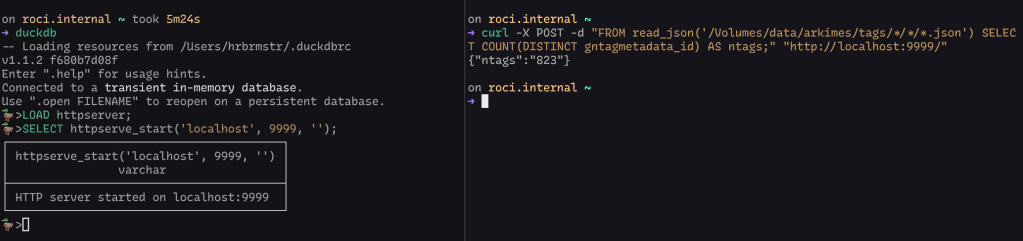
Try not to expose this to the internets or your work LAN, since DuckDB has some powerful extensions that do things like let your queries shell out to the operating system and make HTTP-based requests to your internal network resources. Also make sure to setup creds or a shared secret to help ensure only those who need access have access.
DuckDB In Action
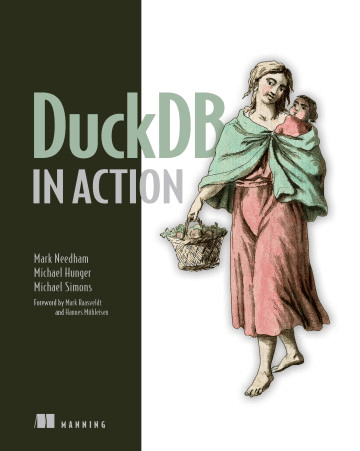
“DuckDB in Action” by Mark Needham, Michael Hunger, and Michael Simons is a comprehensive guide to using DuckDB, a powerful in-memory analytical database. The book offers a hands-on approach to learning DuckDB, covering everything from basic setup to advanced data pipeline construction. It’s available for free from MotherDuck.
I’ve been coursing through the book since the early releases of it and it’s a solid resource and reference for anyone using DuckDB (though, there is quite a bit of icky Python in the tome).
Each chapter includes hands-on projects, so you can, um…see “DuckDB in action”. The book also covers a wide range of topics, including data ingestion, SQL querying, advanced aggregation, and integration with said icky Python.
The authors address common data workflow problems and provide real solutions. They also explore DuckDB’s cloud capabilities through MotherDuck, discussing “serverless” SQL analytics.
For speed freaks, there’s even a chapter on performance considerations for large datasets.
I kind of consider myself a fairly knowledgeable DuckDB weilder, and there were some new tricks inside even for me.
masto.sh

Given the chaotic nature of modern social networks, it’s pretty important to backup your posts in the event you want to escape from the clutches of an evil billionaire or two.
Mastodon folks can use masto.sh to do so in the familiar confines of DuckDB. It’s a simple bash script that uses the Mastodon API to fetch your posts and store them in a local 🦆 database, letting you run SQL queries to gain insights into your social media activity see your 💩 posting history 🙃.
To get started, clone the repository or copy the script. Make sure you have curl, jq, and DuckDB installed on your system. You’ll also need to obtain Mastodon API access through your account’s developer settings.
The script has two main functions: it can initialize a new database and update it with your posts. The update process is incremental, picking up from the last processed post ID, which makes it efficient for regular backups. If you prefer to start from scratch, there’s a force refresh option available.
Once your posts are stored in DuckDB, you can run SQL queries to analyze your Mastodon activity—like counting your total favorites or exploring other data points. It’s a great way to get personal analytics and better understand your social media presence.
Keep in mind a couple of minor issues: reposts are currently stored as empty rows in the database, and there might be some timezone discrepancies with the created_at field. Despite these quirks, masto.sh is a solid tool for Mastodon folks who want more control over their data.
PDF-to-Text “Why?”

First, there’s now a repo for the Deno service that has a more robust, nigh production-ready version of it, complete with JSON logging, rate-limiting, light PDF sanity checking, and a compiled Docker setup.
I grok that I said this is for a work thing, but the choice to use Deno and a PDF JS library were pretty deliberate.
Deno runs in a sandboxed environment by default, which restricts access to system resources unless explicitly granted. This limits potential security vulnerabilities. In the app, we process PDFs entirely within the JavaScript runtime, without spawning external processes or shell commands. This eliminates risks associated with command injection or unexpected behavior from external tools. Using a JavaScript library for PDF processing reduces the risk of memory-related vulnerabilities often associated with lower-level languages. We also process the PDFs in memory, which avoids risks associated with creating temporary files on the filesystem (Deno’s runtime has excellent garbage collection, and I’ve not had this service go past 250 MB even under load).
So, running this as a compiled Deno binary in a Docker container means there’s a fairly low risk of someone successfully conducting an exploit via a specially-crafted PDF that might take advantage of an unknown weakness in PDF.js.
FIN
Remember, you can follow and interact with the full text of The Daily Drop’s free posts on Mastodon via @dailydrop.hrbrmstr.dev@dailydrop.hrbrmstr.dev ☮️
 hrbrmstr's Daily Drop
Leave a comment