ThumbHash, BlurHash, & “Potato WebP”; cssnano; Squoosh
I occasionally blather about the need to address the reality of the internet, especially when it comes to bandwidth and connection reliability. I regularly find myself in parts of rural or semi-remote coastal Maine where “G”, prefixed by any number — stands for “gosh-awful internet”.
So, if apps and sites spent a tad more time groking the need for incremental loading and reducing the size of any piece of content, it would make life much better for folks who deal with garbage internet connections.
Doing so will also, generally, improve the experience of any visitor.
Thus, we have three resources that deal with size/loading optimizations in a few different ways.
ThumbHash, BlurHash, & “Potato WebP”
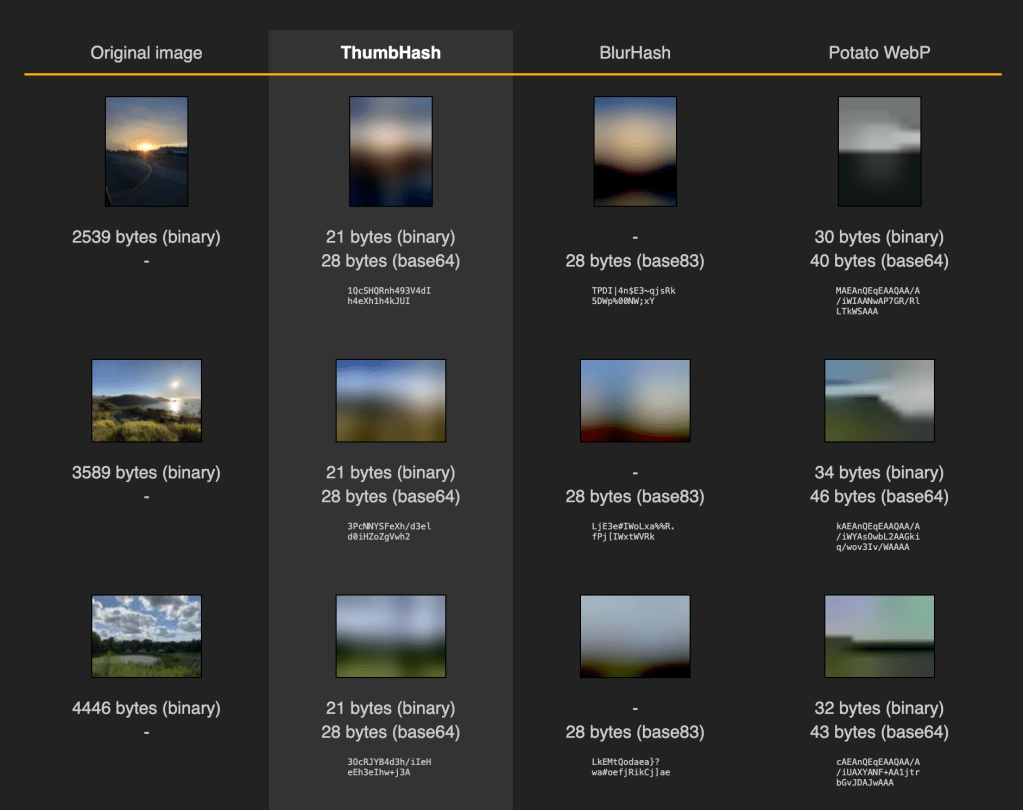
ThumbHash, BlurHash, and “Potato WebP” are techniques used to handle images efficiently, especially in scenarios where bandwidth is limited or quick loading times are crucial. Let’s take a look at each method to grok their purposes, how they work, and when to use them.
ThumbHash is designed to create a compact representation of an image that can be used to generate a blurred placeholder or to compare images quickly. It samples low-frequency luminance (brightness) and chrominance (color) components of an image using mathematical transforms. The result is a short byte array (typically around ~28 bytes for color images). This byte array can be decoded to reconstruct a blurred version of the original image.
It has an extremely small size, which makes it efficient for storage and transmission. Encoding and decoding are wicked fast, the results are consistent across the vast majority of platforms and devices.
We might use ThumbHash to, say, display a low-resolution image preview while the full image loads. Since the value is crafted from image data, we can also use it to quickly compare images based on visual content or use it as a similarity value.
Similar to ThumbHash, BlurHash creates a short string representation of an image that can be decoded into a blurred placeholder. The algorithm divides the image into a grid and computes average colors and gradients for each section. It then encodes this information into a short Base83 string (typically ~20-30 characters). That resultant string can be decoded to reconstruct a blurred version of the image.
The output is super compact, and it produces smooth and aesthetically pleasing placeholders.
“Potato WebP” is a colloquial term referring to WebP images that have been compressed to a very low quality, resulting in a pixelated or “potato-like” appearance. WebP itself is an image format that provides both lossless and lossy compression. By setting low-quality parameters, WebP can produce extremely small file sizes. Unfortunately, while images retain their original dimensions, they lose significant detail and clarity.
| Aspect | ThumbHash | BlurHash | Potato WebP |
|---|---|---|---|
| Data Size | ~28 bytes | ~20-30 characters | Varies (larger than ThumbHash/BlurHash) |
| Output | Blurred placeholder image | Blurred placeholder image | Low-quality version of the original image |
| Purpose | Placeholders, comparison | Placeholders, previews | Fast loading of actual images |
| Use Cases | Placeholders during load | Enhancing UX in feeds | Serving images where quality is secondary |
Which tool should you use?
Well, you can use ThumbHash or BlurHash when you need a quick, lightweight placeholder or bandwidth is highly limited. Just so long as if you think it’s necessary to improve perceived performance without serving the actual image.
You can use Potato WebP when you need to display the actual image content, you’re willing to sacrifice image quality for faster load times, and the display context tolerates low-fidelity images (e.g., thumbnails, backgrounds).
cssnano
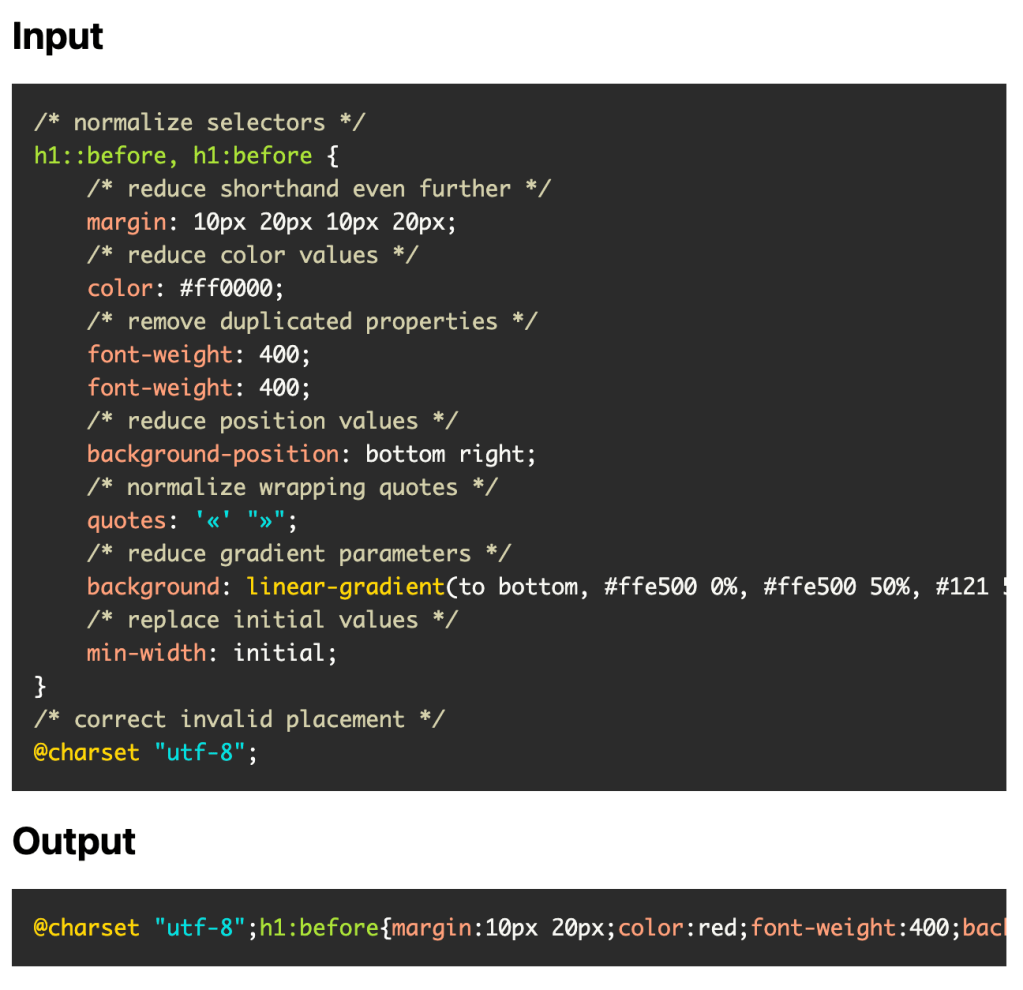
cssnano (GH) is a CSS optimization tool designed to minify and compress CSS files for production environments. It takes well-formatted CSS and applies various optimizations to produce a compact version suitable for production use. It performs a series of focused transformations to minimize file size while maintaining the original CSS semantics. There are over 30 plugins dedicated to different aspects of CSS optimization, which you have complete control over.
By default, cssnano applies safe optimizations, but it also provides an advanced preset for more aggressive transformations when appropriate.
“What are these optimizations?”, you say? Most center around:
- normalizing CSS selectors
- reducing shorthand properties
- compressing color values
- removing duplicate properties
- optimizing position values
- normalizing quote styles
- simplifying gradient parameters
- replacing initial values with their actual defaults
- correcting invalid placements of at-rules
An example is in order:
Before:
h1::before, h1:before {
  margin: 10px 20px 10px 20px;
  color: #ff0000;
  font-weight: 400;
  font-weight: 400;
  background-position: bottom right;
  quotes: '«' "»";
  background: linear-gradient(to bottom, #ffe500 0%, #ffe500 50%, #121 50%, #121 100%);
  min-width: initial;
}
@charset "utf-8";
After:
@charset "utf-8";h1:before{margin:10px 20px;color:red;font-weight:400;background-position:100% 100%;quotes:"«" "»";background:linear-gradient(180deg,#ffe500,#ffe500 50%,#121 0,#121);min-width:0}
That’s a ~54% reduction in file size (when gzipped).
The tooling is powered by PostCSS, and it can be combined with other PostCSS plugins for tasks such as linting or transpiling future CSS syntax.
Before dedicating some storage space to it, give the playground a go.
Squoosh
Squoosh (GH) is a GUI and CLI (thanks to the Frostoven (GH) rescue) image optimization tool developed by Google Chrome Labs. It runs entirely a web browser, requiring no installation, and all image processing occurs on-device, ensuring privacy and security (apart from you hitting the app’s domain and any telemetry it sends by default). Squoosh supports various image formats including PNG, JPEG, WebP, and AVIF, and allows real-time, side-by-side comparison of original and optimized images.
It offers multiple compression algorithms to reduce file size while maintaining quality. You can adjust image dimensions, although it is recommended to resize images before uploading to the app for best results. For certain images, reducing the number of colors can further decrease file size.
Using Squoosh is straightforward: upload an image to squoosh.app, experiment with different compression settings, compare the original and optimized versions, and then download the optimized image.
“Rescued” Squoosh also offers advanced features such as a command-line interface (CLI) for batch processing and integration into build workflows.
FIN
Remember, you can follow and interact with the full text of The Daily Drop’s free posts on Mastodon via @dailydrop.hrbrmstr.dev@dailydrop.hrbrmstr.dev ☮️
 hrbrmstr's Daily Drop
Leave a comment