yt-transcribe; xan; Go To Shell!
I’m (thankfully) back at the Maine compound, and also back at a leisurely keyboard. To make up for the brief hiatus, we’ve got two tools you can use immediately to get stuff done, along with an assertion that you may be better off Go’ing than Bash’ing.
TL;DR
(This is an AI-generated summary of today’s Drop using Ollama + llama 3.1b and a custom prompt.)
- yt-transcribe: A macOS script that combines
ffmpeg,jq,python,yt-dlp, andmlx-whisperto easily extract transcripts and thumbnails from YouTube videos, creating an HTML page with optional thumbnails (https://github.com/llimllib/yt-transcribe). - xan: A command-line tool written in Rust for efficient CSV file processing, leveraging multithreading and a minimalistic expression language to perform tasks such as previewing, filtering, slicing, aggregating, sorting, and joining CSV files (https://github.com/medialab/xan).
- Using Go Instead of Bash for Scripts: A guide by Krzysztof Kowalczyk on leveraging Go as a scripting language, highlighting its benefits such as portability, reliability, strong typing, and speed, making it suitable for scripts that need to run consistently across different systems (https://pkg.go.dev/github.com/bitfield/script).
yt-transcribe

Prior to StreamYard (streamyard.com) providing transcripts for shows, I had a whole idiom going where I would have to extract a wav file from the YouTube link for our Storm⚡️Watch podcast recordings and then run them through whisper.cpp. I had a script for this, but it was very specific to our needs, and only grabbed the raw audio (mp3, wav) and transcript files (txt, json, vtt).
Friend-of-the-Drop @llimllib@hachyderm.io made a super-cool yt-transcrib script that combines the powers of ffmpeg, jq, python (ugh…we’ll forgive Bill), and yt-dlp + mlx-whisper to help make grabbing transcripts super easy. Along the way it also makes a spiffy HTML page with optional, interstitial thumbnails.
It’s a macOS thing for now, though I don’t think it’ll take too much effort to have it work everywhere, and you should make sure you have the necessary CLI tools:
$ brew install ffmpeg jq python yt-dlp
and mlx-whisper installed:
$ # It's Python, and worse — Python on macOS — so it's already broken, so break it some more$ python3 -m pip install --break-system-packages mlx_whisper
I tried it on our most recent episode:
./yt-transcribe \
   -outdir "${HOME}/Documents/sw/ytdlp" \
   -outfile "2024-09-03.html" \
   -thumbs "https://www.youtube.com/watch?v=cTeO-grsgfo"
and it was, indeed, faster than my whisper.cpp version, and did a great job on the transcript + thumbs.
xan
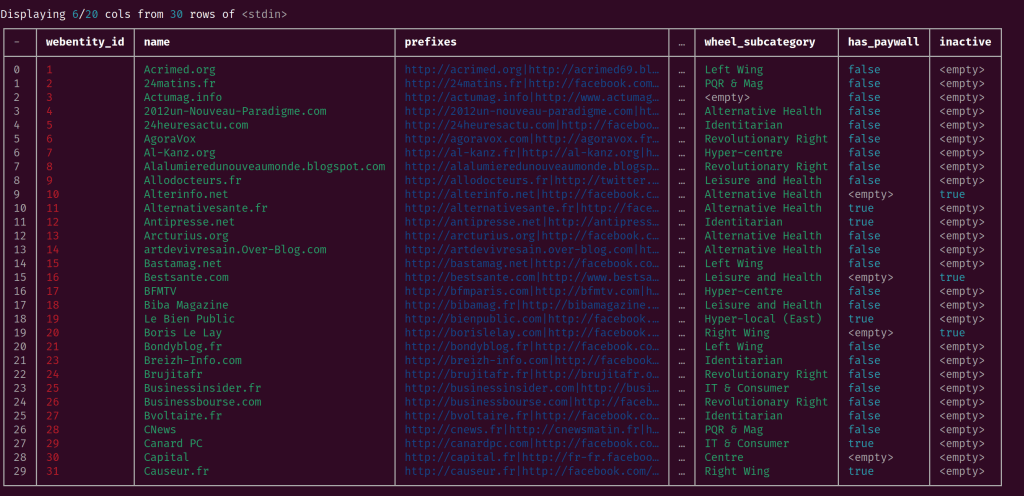
Xan is a command-line tool designed to process CSV files efficiently. It is written in Rust to leverage performance and parallelism, making it capable of handling YUGE CSV files so fast The Flash might be envious. It utilizes multithreading to perform tasks as speedily as your system allows, and it even has its own minimalistic expression language tailored specifically for CSV data. This focused DSL is faster than typical dynamically-typed languages like Python/JavaScript/R, providing a significant performance advantage. NOTE: I have not done a raw comparison of xan to DuckDB, but I suspect they may be on-par, to at least some degree, for this use-case.
The tool leverages a cadre of composable subcommands that can be chained together to perform various tasks. These tasks include previewing, filtering, slicing, aggregating, sorting, and joining CSV files, making Xan a versatile tool for data manipulation and analysis.
Here are some (unexpanded) example use-cases for xan. The README has a bonkers number of expanded examples, so you should def head there after this quick review:
- Previewing CSV Files:
- View: Display CSV files in the terminal for easy exploration
xan view medias.csv - Flatten: Show a flattened view of CSV records
xan slice -l 1 medias.csv | xan flatten -c
- View: Display CSV files in the terminal for easy exploration
- Filtering and Searching:
- Search: Search for rows based on specific conditions
xan search -s outreach internationale medias.csv | xan view - Filter: Use expressions to filter rows
xan filter 'batch > 1' medias.csv | xan count
- Search: Search for rows based on specific conditions
- Data Manipulation:
- Select: Choose specific columns to display
xan select foundation_year,name medias.csv | xan view - Sort: Sort the CSV file based on a column
xan sort -s foundation_year medias.csv | xan select name,foundation_year | xan view -l 10 - Deduplicate: Remove duplicate rows based on a column
xan dedup -s mediacloud_ids medias.csv | xan count
- Select: Choose specific columns to display
- Data Analysis:
- Frequency: Compute frequency tables for a column
xan frequency -s edito medias.csv | xan view - Histogram: Print a histogram for a column
xan frequency -s edito medias.csv | xan hist - Statistics: Compute descriptive statistics for columns
xan stats -s indegree,edito medias.csv | xan transpose | xan view -I
- Frequency: Compute frequency tables for a column
- Data Transformation:
- Map: Create a new column by evaluating an expression
xan map 'fmt("{} ({})", name, foundation_year)' key medias.csv | xan select key | xan slice -l 10 - Transform: Transform a column by evaluating an expression.
xan transform name'split(name, ".") | first | upper' medias.csv | xan select name | xan slice -l 10
- Map: Create a new column by evaluating an expression
- Aggregation:
- Aggregate: Perform custom aggregation on columns
xan agg'sum(indegree) as total_indegree, mean(indegree) as mean_indegree' medias.csv | xan view -I - Groupby: Group rows and perform per-group aggregation
xan groupby edito'sum(indegree) as indegree' medias.csv | xan view -I
- Aggregate: Perform custom aggregation on columns
It’s 100% a tool I’m keeping in the toolbox.
Go To Shell!

In “Using Go instead of bash for scripts“, Krzysztof Kowalczyk provides a comprehensive guide on leveraging Go as a scripting language, highlighting its benefits and practical applications. We’ve been turning to Go (vs. Bash or other plaintext scripting languages) for small utilities at work as all the batteries needed are included (so no need to include how to brew/apt/yum dependencies in a README or check for system tooling availability in a script), and things work as expected on our diverse array of client and server systems. Krzysztof’s expository on the same rationale aligns very closely with ours.
As noted, Go offers several advantages over traditional Bash scripting. Its portability and reliability make it a good choice for scripts that need to run consistently across different systems. Go’s strong typing helps catch bugs at compile time, reducing runtime errors. And, Go scripts can be faster than those written in interpreted languages like Python or Bash, especially if you can take advantage of goroutines.
Creating a multi-purpose Go program is one practical example for using this idiom. Instead of having multiple Bash scripts (e.g., run.sh, test.sh, deploy.sh), a single Go program can handle various tasks using command-line flags or subcommands. For instance, a Go program in a do directory can be executed with different flags (e.g., do -run, do -test, do -deploy) to perform specific actions.
If you do need to hit up other system commands, the os/exec package allows Go programs to execute external commands, similar to how Bash scripts do. And, Go provides functions for reading and writing files, creating zip archives, and more, which can be used in scripts. Also, error handling in Go can be concise and effective using an idiom like Kowalczyk’s must function, which panics on errors.
Go also excels at providing logging affordances, and custom logging functions can be created to manage informational or debugging output.
It’s a quick read, IMO a great idea, and pairs well with Bitfield’s “script” library (GH).
FIN
Remember, you can follow and interact with the full text of The Daily Drop’s free posts on Mastodon via @dailydrop.hrbrmstr.dev@dailydrop.hrbrmstr.dev ☮️


 hrbrmstr's Daily Drop
Leave a reply to hrbrmstr Cancel reply