SigmaOS; get; corsproxy.io
As expected, there was at least one additional no-Drop day last week (turns out the weeks before new feature launches at a startup are, um, busy). But, there’s plenty of time for a Bonus Drop.
We’re HTTP-focused, today. Some of that is a new-ish browser I’m defaulting to for a while (testing it as an Arc replacement), and the rest is filled with some super interesting new toys to play with.
SigmaOS

(The bits after ❡1 are macOS-specific, so you can skip that if you’re on a different OS.)
Despite Google’s U-turn on abandoning blocking third-party cookies (which would have very likely shunted even more customers to Google’s advertising platform), they’re still going full steam ahead with Privacy Sandbox and Manifest V3. Vivaldi, and — to a lesser extent — Arc are both playing cat and mouse with Google’s invasive code and defaults in Chromium. However, both of them are regularly failing more sandbox safety checks. to make matters worse, it appears Arc disabled my Kagi Search extension (which is needed to make it a selectable option as the default search engine) earlier this week, and enabled Perplexity (which you’d think I’d be happy about, except that all the LLM/GPT agents that can fetch web content are still orders of magnitude slower than a basic search engine). So, I re-did my semi-regular search for an alternative browser.
I had forgotten about SigmaOS (I’m just going to call it “sigma” from now on), as when I tried it last year, the UX just failed to jive with my brain. Like Arc, sigma aimes to “reimagine” the browser experience. These are the features it’s hawking (in their marketing speak, but it’s pretty accurate):
- Workspaces: Organize tabs into separate lists, like rooms in a house
- Vertical tabs: Easier overview of open pages, similar to a to-do list
- Tabs as tasks: Mark tabs as done or lock them to keep them around
- Split Screen: Easy multitasking with two websites side by side
- Lazy Search: Quickly search through tabs, internet, commands, and bookmarks
- Ask Anything: AI companion (Airis) to chat with websites and get contextual answers
- Look it up: AI-powered internet search for learning and asking follow-up questions
- Simplify: Summarize any website into a short, interactive summary
- Magic Theme: Automatically match browser colors to the current website
- Ad-free browsing: Built-in ad blocker
- Focus Mode: Hide everything but the current webpage
- Easy Migration: Import logins, cookies, and history from previous browsers
- Multiple Logins: Separate profiles for different accounts within workspaces
- Single-key Shortcuts: Powerful and easy-to-learn keyboard navigation
- Command-Hover: Quick link preview without opening the page
- Autosync: Sync your setup across multiple Macs
- Magic Rename: Automatic renaming of frequently used tabs
- WebKit engine: Like Safari, for performance, security, and macOS integration
- SwiftUI: Built natively for optimized macOS performance
- Apple Keychain: Secure password management with biometric protection
- Chrome Extension Support: Compatible with popular Chromium extensions
- Power-efficient: Optimized for M1/M2 chips to maximize battery life
- Page Suspension: Automatically unload inactive pages to preserve RAM
- A1 Kit: AI browser engine for context-aware assistance
- Available for macOS (Windows and iOS versions planned)
- Free personal version with paid Pro and Max tiers for advanced features
Yeah, it’s got “AI” (just like Arc, sigh), but you can disable the more annoying components and just not use the context-aware tooling.
WARNING: there are virtually no application menus. It wants you to use the command palette (it calls it a command line) and keyboard shortcuts (which I’m still fumbling through, but at least the user interface context clues — which can be disabled — that pop up are helping).
The Workspace tabs are also deliberately not click-able (they want you to lean in on the keyboard interactions).
Sigma prioritizes some things Apple does as well, so tabs auto-snooze to save battery and RAM. Unfortunately, I got used to Arc’s incredibly fast tab switching, and am working on getting used to the delay (usually single-digit seconds). Arc’s command palette also pops up and is ready for input faster than Sigma’s is.
I have a few locked/pinned tabs in the screenshot in the header (for sites I frequently use), and — if you look to the lower left in the tab side-panel, you’ll see that Sigma auto-organizes pages you open from primary pages. This is also taking some getting used to.
Thankfully, they also have a built-in cheat sheet (to the right in the image in the section header), so learning these new idioms is way less painful than I expected it to be. That cheat sheet appears in what is also the side-panel for having a second web page up.
Their concept of “bookmarks” are you adding hashtags to a site (so, it’s sort of like one of those knowledge-graph tools like Notion), but nothing is going to replace Raindrop for proper bookmarks for me.
The scant Chrome extensions I rely on all seem to work (it’s just been a couple days, so I’ll report back after more use), and, I’m appreciating some of the subtle rendering differences between WebKit and Blink.
I will say that Sigma (for me) works best on the ultra widescreen monitor, but it is more than manageable on the laptop, especially in focus mode.
If you’re on macOS and are looking for a new browser, this is worth the time sink to test.
get

I do not know what has inspired the recent spate in HTTP/scraping-specific domain-specific languages, but I’m here for it.
Today’s installment is get (GH), a “query language designed for the web with a clear and extensible syntax, tailored for common data extraction tasks. Think of it as a fresh take on SQL, blending simplicity with powerful functionality. You’ll be drilling down to the data that matters most in just a few lines of code.”.
You can read their rationale for a scraping DSL, but, I’m not sure I buy into their arguments. However, I do likes me some new toys, so I fired up a terminal to install it and – you can’t (yet). There is a repo (ref ❡2), and I can get Bun (they use Bun) to do some build tasks, but there’s nothing obvious artifact-wise to “just use”.
They do have a playground with some syntax and scraping examples. While this may be a DSL, it’s sitting on top of a JavaScript engine (either the one in the browser — since get is doing all HTML ops in-browser in the playground — or likely with some JS engine built into whatever CLI tool will eventually be baked-in to the project). I mention that, since get relies heavily on JS-ops for more intricate scraping ops.
The URL in the above ❡ takes you to a playground with a test get script I threw together after a bit of trial-and-error. That’s what’s in the section header vs. me put a ton of JSON into this post (NB: folks who did read section one, that’s also Sigma in “focus mode”). I highly suggest tapping “Show simplified” to see how get pre-processes the original script.
Obviously get is not ready for prime-time, but it’ll be a fun project to track.
corsproxy.io
This section is quick.
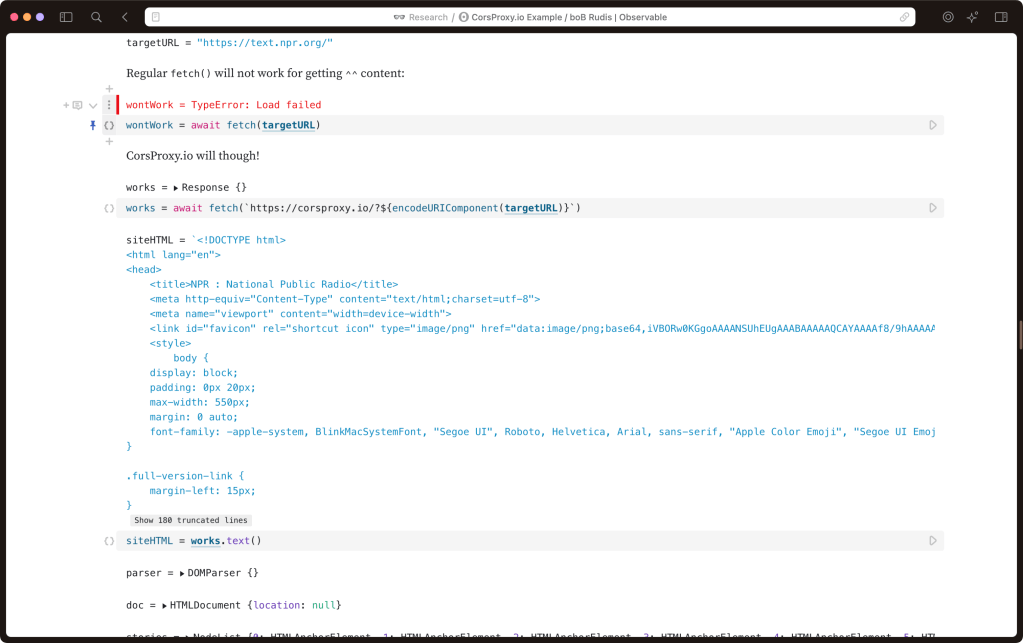
I was looking for an XHR request in the get example in the previous section, when I learned that the devs just embedded the get engine in-browser. However, that meant they had to fetch content from a different origin domain from that page, which requires a generous CORS policy on a given site. Most sites do not have a generous CORS proxy, and I did notice a call out to CorsProxy.io, which dubs itself as the “fastest [free] CORS Proxy you’ll find”.
They claim “no logs”, but please do not use it to grab sensitive data, since you have no idea whether that’s true or not.
I used it to replicate the get example in section two in this Observable notebook (also in the section header).
FIN
Remember, you can follow and interact with the full text of The Daily Drop’s free posts on Mastodon via @dailydrop.hrbrmstr.dev@dailydrop.hrbrmstr.dev ☮️


 hrbrmstr's Daily Drop
Leave a comment