Pandoc 3.9; mermaid-rs-renderer; Pretty Mermaid Skills
A handy update to pandoc + a pair of mermaids await Drop readers today.
TL;DR
(This is an LLM/GPT-generated summary of today’s Drop. Ollama and MiniMax M2.1.)
- Pandoc 3.9 introduces a WASM build for client-side document processing, adds PDF standard support for archival and accessibility compliance, and now accepts JSON in defaults files alongside YAML for more flexible configuration management (https://github.com/jgm/pandoc/releases/tag/3.9)
- mermaid-rs-renderer is a Rust-based CLI tool and library that renders Mermaid diagrams to SVG, PNG, and other formats, with a Typst Universe package that runs as a WASM plugin, providing a lightweight alternative to the Node.js-dependent mermaid-cli (https://github.com/1jehuang/mermaid-rs-renderer)
- Pretty Mermaid Skills is an LLM “skill” that wraps the beautiful-mermaid library to enable AI agents to render Mermaid syntax into SVG or ASCII output with theming support, solving the common problem of LLMs generating diagram code but not being able to display the results (https://github.com/imxv/Pretty-mermaid-skills)
Pandoc 3.9
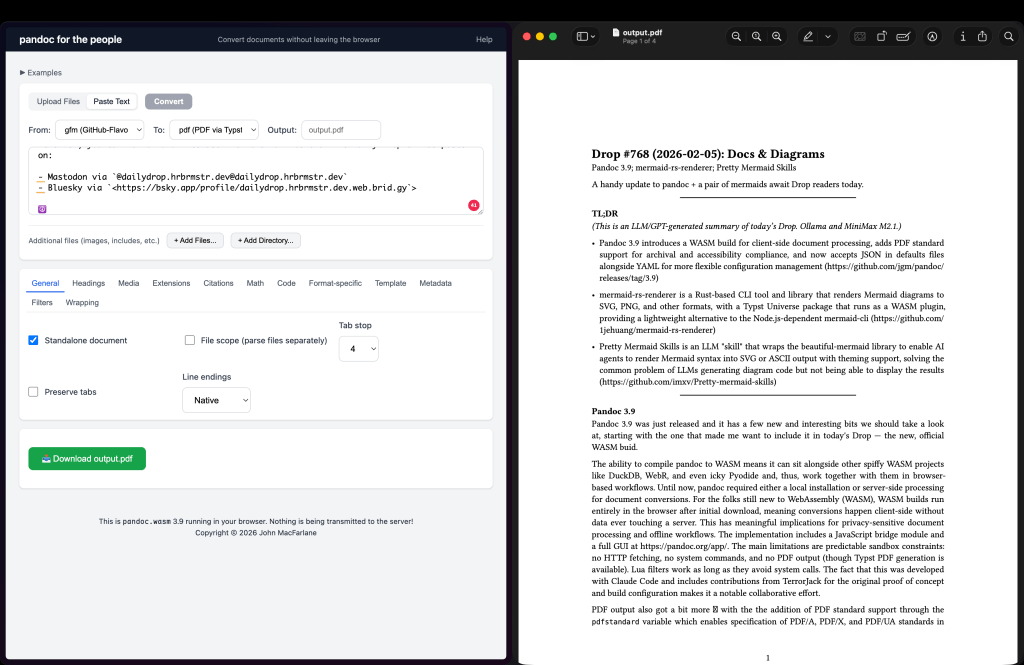
Pandoc 3.9 was just released, and it has a few new and interesting bits we should take a look at, starting with the one that made me want to include it in today’s Drop — the new, official WASM build.
The ability to compile pandoc to WASM means it can sit alongside other spiffy WASM projects like DuckDB, WebR, and even icky Pyodide and, thus, work together with them in browser-based workflows. Until now, pandoc required either a local installation or server-side processing for document conversions. For the folks still new to WebAssembly (WASM), WASM builds run entirely in the browser after initial download, meaning conversions happen client-side without data ever touching a server. This has meaningful implications for privacy-sensitive document processing and offline workflows. The implementation includes a JavaScript bridge module and a full GUI at https://pandoc.org/app/. The main limitations are predictable sandbox constraints: no HTTP fetching, no system commands, and no PDF output (though Typst PDF generation is available). Lua filters work as long as they avoid system calls. The fact that this was developed with Claude Code and includes contributions from TerrorJack for the original proof of concept and build configuration makes it a notable collaborative effort.
PDF output also got a bit more 💙 with the the addition of PDF standard support through the pdfstandard variable which enables specification of PDF/A, PDF/X, and PDF/UA standards in LaTeX output. This matters because these standards govern archival preservation (PDF/A), print production (PDF/X), and accessibility compliance (PDF/UA). The implementation uses LaTeX’s \DocumentMetadata command, which requires LuaLaTeX. PDF version requirements are inferred automatically but can be overridden. The Typst template also received accessibility improvements for definition lists to work properly with PDF/UA-1 output. These changes reflect increasing regulatory and organizational requirements around document accessibility and long-term preservation.
FINALLY, defaults files now accept lovely JSON in addition to icky YAML, and variable interpolation works for the defaults field within defaults files. This second point is the more consequential change. Previously, building layered defaults configurations required workarounds or duplication. Now defaults files can cleanly extend other defaults files with interpolated values, enabling more maintainable configuration hierarchies for organizations or individuals managing multiple output profiles. The JSON support adds flexibility for environments where YAML parsing is problematic or where configuration is generated programmatically, or where you just have common sense and despise YAML as much as I do. I am a tad wary whenever I see “interpolation” mentioned in config-file contexts, so we’ll see how soon if/when another pandoc CVE emerges.
mermaid-rs-renderer
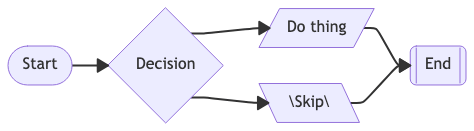
For a recent project for a lecture I teach at CMU I converted my slides from Keynote to Typst, and also wrote two mini-books in Typst for it. In all three, I wanted some basic diagrams and ended up using Mermaid syntax, since there was a handy Typst plugin for it. It turns out that it wasn’t just fot Typst, as it’s a full Rust-based library and CLI tool that just happens to compile to WASM (for the Typst bit).
The CLI tool in it is dubbed mmdr and it handles the common documentation workflow cases. You can pipe diagram text directly to stdout (cat diagram.mmd | mmdr -e svg), convert single files (mmdr -i diagram.mmd -o output.png -e png), or batch-process all Mermaid code blocks from a Markdown file into a directory of numbered outputs. The config accepts a JSON file with Mermaid-compatible themeVariables for colors and typography, plus flowchart section for spacing overrides. CLI flags like --nodeSpacing and --rankSpacing let you tweak layout without a config file. The --fastText flag trades font-accurate text measurement for calibrated ASCII width estimates, which pushes tiny diagram rendering into sub-millisecond territory at the cost of slightly imprecise label sizing.
The aforementioned Typst integration ships as a Universe package (@preview/mmdr) that wraps the Rust renderer as a WASM plugin. The usage is what one might expect in Typst: #mermaid("graph TD; A-->B;") renders inline, with optional base-theme, theme, and layout parameters for customization. The mermaid-svg variant returns raw SVG string if you need to manipulate it before display. Since Typst compiles documents without network access or external processes, having a native Mermaid renderer eliminates the friction of pre-generating diagrams or relying on external toolchains. The plugin documentation is upfront that feature coverage trails the official Mermaid.js implementation, so complex diagrams may need testing.
For documentation pipelines, the practical upside is removing Node.js and Chromium from your build dependencies. A Rust binary or WASM module slots into CI environments and static site generators without the 300MB+ memory footprint and multi-second cold starts that mermaid-cli brings. The tradeoff is accepting that edge-case Mermaid syntax or newer diagram types may not render correctly until the Rust implementation catches up.
Pretty Mermaid Skills
(Folks who try to avoid LLMs can skip this section.)
Pretty Mermaid Skills is an LLM “skill” — a packaged capability that extends what skill-savvy agents can do in agentic coding environments. ($DEITY I can’t believe I typed the “a” word twice). It wraps the beautiful-mermaid npm library to give agents (now 3 times) the ability to render Mermaid diagram syntax into SVG or ASCII output with theming support.
I use the generic term since skills work just fine in Ollama and other LLM contexts. They’re not Claude-specific.
The skill auto-installs its single dependency (beautiful-mermaid) on first run, so there’s no npm install step required.
The SKILL.md file serves as documentation that LLMs read to understand when and how to use the skill. It includes trigger conditions (like detecting Mermaid code blocks or requests to “create a flowchart”), workflow decision trees, and command examples. When you ask Claude to render a diagram, it reads the skill docs, writes your Mermaid syntax to a .mmd file, then shells out to the render script.
Most large “foundation” LLMs can generate Mermaid syntax all day, but most can’t natively render it. The SVG/ASCII output is what makes it useful — you get an actual image file or terminal-friendly text diagram rather than just the DSL code.
Supported diagram types include:
- Flowcharts (process flows, decision trees)
- Sequence diagrams (API interactions, message passing)
- State diagrams (FSMs, application lifecycle)
- Class diagrams (object models)
- ER diagrams (database schemas)
The beautiful-mermaid library does the heavy lifting — this skill is essentially a CLI wrapper plus AI-readable documentation. The ASCII output option is useful for embedding diagrams in READMEs or terminal workflows where images aren’t practical.
FIN
Remember, you can follow and interact with the full text of The Daily Drop’s free posts on:
- Mastodon via
@dailydrop.hrbrmstr.dev@dailydrop.hrbrmstr.dev - Bluesky via
<https://bsky.app/profile/dailydrop.hrbrmstr.dev.web.brid.gy>
☮️
 hrbrmstr's Daily Drop
Leave a comment