Gregory Grotesk; Human Types; Back In The Line Height Again
We’re going to talk about “AI” today, but not in the way you think, and I’m pretty certain you’ll appreciate the takes by some well-spoken and well-meaning designers. I’m also including a paid font recommendation (and explain why in that section). And, to ensure there’s something for everyone, we look at some guidance from the capable folks on the WebKit team for ensuring your web typography looks stellar.
TL;DR
(This is an LLM/GPT-generated summary of today’s Drop. This week, I continue to play with Ollama’s “cloud” models for fun and for $WORK (free tier, so far), and gave gpt-oss:120b-cloud a go with the Zed task. Even with shunting context to the cloud and back, the response was almost instantaneous. They claim not to keep logs, context, or answers, but I need to dig into that a bit more.)
- Gregory Grotesk is a versatile, well‑crafted grotesque typeface with a functional specimen site and extensive alternates, though it comes at a high price (https://www.typemates.com/fonts/gregory-grotesk)
- Human Types is Monotype’s experimental series exploring how designers can collaborate with AI in type design, showcasing projects by Sina Otto, Matthieu Salvaggio, and Matteo Bologna (https://www.monotype.com/type-trends/human-types)
- The WebKit blog explains the new
lhCSS unit for line‑height, a simple solution that aligns paragraph spacing with line spacing for cleaner web typography (https://webkit.org/blog/16831/line-height-units/)
Gregory Grotesk
I try to space out when I include a font recommendation that costs cash money, as leaders and oligarchs around the world have made that a pretty scarce resource for the rest of us. But, both the site design for and the font itself made Gregory Grotesk something I had to share.
First off, the “specimen page” (the technical term for when one is showcasing a font’s capabilities) if both functional and fun. Almost every container with text is marked contenteditable, and the color scheme has perfect contrast and feels like it was deliberately crafted. The specimen cards scattered across the page aren’t nearly as random as many others I come adcross, and the mix of a structured grid elements with some rotated text treatments works super-well.
Anyway, you came for font drops, not site critiques!
“Design with charisma, perform with utility” is a great way to frame this typeface. The designers seemed to grok that most typography exists in that middle ground between pure expression and invisible functionality, and this font is super-comfortable living there.
The specimens show a typeface that has both personality and clarity. The “alternates” and the range of weights make it incredibly versatile in that you could set body copy that feels approachable and warm, then switch to the bolder weights for headlines that have real presence (and stay within the same font).
The letterforms have a “contemporary” feel, but also aren’t trying to be trendy. And, this is a rare modern font that seem like it may survive the “fast font fashin” trend. In their examples, the text rhythm looks even, the spacing feels natural, and there’s enough character in individual letterforms to keep things interesting without becoming distracting.
The range of styles and the language support suggest this was designed as a serious workhorse, something that could handle real-world projects across different contexts and continents. But unlike some utilitarian grotesques that can feel a bit cold or mechanical, Gregory Grotesk seems to retain a human quality. It’s functional without being boring, distinctive without being difficult. That’s actually a harder balance to strike than it might seem.
It’s also (kind of) ridiculously expensive if you arne’t someone who is using fonts professionally (i.e., you can pass the costs onto your clients). But, that’s also one reason I chose to include it this time. “Real” fonts take time, effort, and skill (unlike all the slop “AI” produces these days), and the folks who craft them do need to eat. The trial versions are free, but lack some of the advanced features.
I won’t be dropping coin on it, but I do appreciate how well crafted it (and the site is). The section header was set in the font.
Human Types

Speaking about “AI”, Monotype has a pretty interesting series that tries to put the humanity back at the center of the conversation about “AI” and typography. Instead of wringing hands about whether machines will replace designers, Human Types takes a more curious, grounded approach: it asks what happens when actual type designers and creative directors start experimenting with these tools.
The project brings together three distinct voices. Sina Otto from Monotype’s own studio explored “AI” as an echo or ripple, a reflection that amplifies human input but can never be the source itself. She created work that machines can alienate but never truly generate, emphasizing that “AI” depends entirely on human intention and emotion. Matthieu Salvaggio from Blaze Type treated “AI” like a type design student, feeding it control characters from existing fonts to see what it would create. The results felt genuinely like watching someone learn the craft, complete with the promising ideas and technical stumbles you’d expect. And Matteo Bologna from muccaTypo took a more playful route, imagining an “AI” assistant so personal it dredges up your embarrassing past love for Papyrus and starts transforming everything you read accordingly.
A yuge refreshing component of this series is that nobody’s even remotely pretending to have answers. These are experiments, provocations, early days explorations of what it means to work alongside something that never sleeps, never stops learning, and has access to more typography than any human could hold in their head. Each exploration acknowledges the real concerns about craft and livelihood while refusing to be precious about it. Typography has survived wholesale disruptions before, from metal to digital, and each time the human choices about meaning, emotion, and expression remained central.
The takeaways are thoughtful without being prescriptive. “AI” can help people find needles in the overwhelming haystack of available fonts. The models are getting decent at lettering and lockups. It might enable more personalized reading experiences where typography adapts to individual needs rather than presenting everyone with identical static text. But the conceptual work, the curation, the human judgment about what matters and what doesn’t, that’s not going anywhere.
If you care about where type is headed, this is worth your time. It’s not dystopian and it’s not cheerleading. It’s designers actually making things with these tools and thinking carefully about what they’re learning in the process.
Back In The Line Height Again
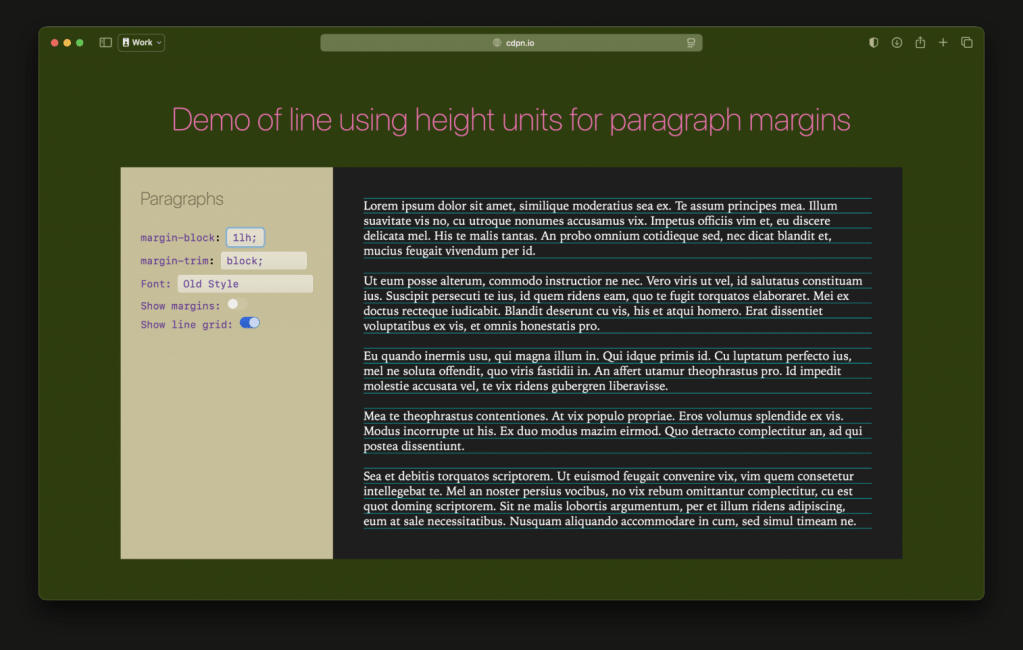
Say what one might about Apple, the humans on the team behind WebKit are clever, capable, and creative. Earlier this year they did a post on how to get more “pro” when it comes to line height.
The lh unit showed up in browsers in 2023 and nobody really made a fuss about it, which is funny because it actually fixes something that’s been busted about web typography for, oh, about thirty years.
“We’ve” (for some definition of “we”) always set paragraph margins using em units, which are based on font size. But that means the space between paragraphs has nothing to do with how tall your lines actually are. So you get this weird mismatch where everything looks slightly off, and you might not even know why. It just feels a bit janky.
The lh unit measures one line height. That’s it. Use 1lh for your paragraph margins and suddenly the space between paragraphs matches the space between lines. Put a grid over your text and everything actually lines up instead of looking like a mess.
It’s such a simple fix that it feels almost stupid that we didn’t have it before. You write margin-block: 1lh and you’re done. No complicated math, no fragile hacks. Works in over ninety percent of browsers, and for the rest you just put a fallback value on the line above it.
Web typography has gotten a bunch of these little improvements lately that make it way easier to make text look good without spending hours fiddling with it. The lh unit is probably the most practical of the bunch because it solves something you deal with constantly and the solution is dead simple.
That’s really all there is to it. Your text will look more polished and you barely had to do anything. Sometimes the best features are the boring ones that just work.
FIN
Remember, you can follow and interact with the full text of The Daily Drop’s free posts on:
- 🐘 Mastodon via
@dailydrop.hrbrmstr.dev@dailydrop.hrbrmstr.dev - 🦋 Bluesky via
https://bsky.app/profile/dailydrop.hrbrmstr.dev.web.brid.gy
☮️


 hrbrmstr's Daily Drop
Leave a comment