Blinko; Piles; Memos
It’s been two weeks since the last Drop! The $WORK offsite turned into a week+ of being down-and-out with some plague that was neither COVID nor the strain of seasonal influenza that the jab was supposed to cover. Finally started feeling human enough to take on some cognitive load.
So, tis time to get down to Drop bidnez again.
Today, we’re covering some “new” note takers, a software development space that seems to undergo some fresh competition every 3-5 years or so.
TL;DR
(This is an LLM/GPT-generated summary of today’s Drop using Qwen/Qwen3-8B-MLX-8bit with /no_think via MLX, a custom prompt, and a Zed custom task.)
- Blinko offers a self-hosted note-taking system with AI integration, supporting Markdown, tags, task management, and local LLM compatibility (https://blinko.space/en)
- Piles is a minimal web clipper with text collection and export capabilities, though it lacks advanced organization features (https://piles.dev/)
- Memos is a lightweight, self-hosted knowledge base with Markdown support, local storage, and a clean interface, ideal for quick notes and data sovereignty (https://www.usememos.com/)
Blinko
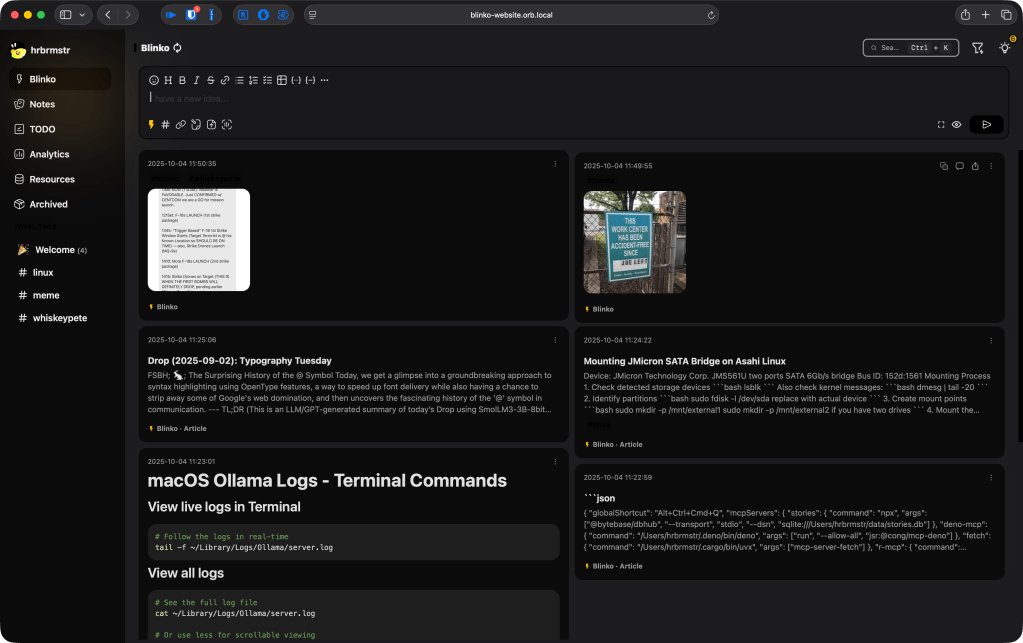
Blinko (GH) is “advertised” as an AI-powered “card notes” note-taking system. It does successfully combine note-taking, microblogging, pastebin functionality, task management, and, sigh, “AI” functionality. We’re only going to talk about the self-hosted version, since the economy is about to be decimated, and I doubt anyone wants to add another subscription to their monthly spending portfolio.
Before getting into it, all I did to get it going is do the suggested:
curl -s https://raw.githubusercontent.com/blinko-space/blinko/main/install.sh | bash
at a terminal, and let Orbstack give me a nice, local HTTPS URL to access it from (the web view you see in the section header). If I had planned on using it more, I would have put it on the home server and made it available via WireGuard/Tailscale, as it seems well-suited for such a hosting environment.
You can use it via the browser or a dedicated “app” (which is pretty much an embedded web browser). The core of Blinko is a Rust/Tauri-based app framework that uses React & Typescript for frontend machinations, and Postgres on the backend. As a result, it does have the, now tired, look-and-feel of yet-another React application.
Notes are stored in Postgres, which makes it trivial for the app to utilize vector embeddings for retrieval-augmented generation (RAG) context lookups. Said lookups can work with an LLM provider (local or commercial) for AI-assisted operations.
Blinko takes a “capture first, organize later” approach, which I do appreciate, since that’s how I tend to operate as I collect nuggets throughout any given day. As such, these disorganized creations are called “blinkos”, whereas more formal notes are unimaginatively called “notes”. Both objects have what you might expect:
- Full Markdown and plain text support
- Unlimited multi-level nested comments with proper deletion support
- Tagging system for organization
- Statistics dashboard showing number of notes, total words, max daily words, active days, and a heat map to visualize writing sessions
- Task management with reminders
- Export/import functionality (it does not truly support Joplin notes imports, yet)
- Automated scheduled backups
- Music player integration so you don’t have to switch applications while working
Since it does not support Joplin markdown natively for import, I haven’t put enough notes in it to fully test out the search functionality (AI-assisted or otherwise), but can confirm that it wires up to local Ollama just fine.
If you’re satisfied using Obsidian or Joplin, I don’t see much reason to migrate (Joplin’s local AI features seem on-par with Blinko; I cannot speak to Obsidian’s) unless you’re looking to change things up a bit.
The community appears vibrant, and it is clear the developers know what they’re doing, so I’d keep this on a watchlist for when you may want to jump into an alternative note-taking envrionment.
I will be working on an converter to make Joplin imports work better, and likely re-up a Blinko section in a future Drop, to talk more about the organizational and AI features.
Piles

Piles is yet-another web clipper that relies on a browser extension (Chrome or Firefox required) to let you store items you encounter on the web. It’s another “just take/clip this thing” without the need for tagging/organizing/etc.
The interface is very minimal, only supports text collection, and seems to have a 100 “pile” limit (for now).
Data is stored on the Piles server(s), and you can delete or export saved clips by tapping on a button or via the CLI (just substitute the cookie you see in Developer tools for COOKIE_VALUE below):
$ curl --silent 'https://piles.dev/portal/pile/download' -b 'piles-api=COOKIE_VALUE' | jq '.[]|.Title'

"Federal appeals court upholds decision that Trump's view on birthright citizenship is likely unconstitutional - CBS News"
"Hopes fade for quick end to government shutdown | AP News"
"Japan’s ruling party elects Sanae Takaichi as new leader | AP News"
Don’t store anything sensitive, since we have no idea what the architecture looks like.
This seems like a fun little app that one could vibe-code in a weekend and keep all local.
It will not be replacing Raindrop.io for me.
Memos
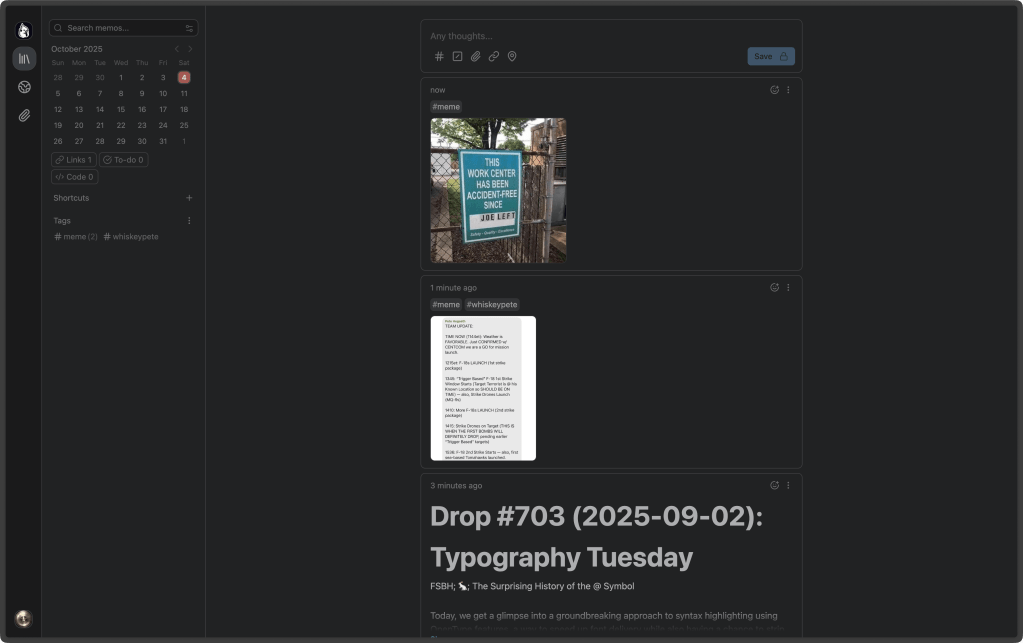
Memos (GH) bills itself as an open-source, self-hosted “knowledge base” and note-taking system. That’s accurate enough, though it’s more like yet-another (that’s come up alot, today, hasn’t it?) minimalist, self-contained stream-of-consciousness vault for folks who want to jot things down and own the bits that represent their thoughts.
Unlike all the other “AI-powered” options (mercifully, it doesn’t try to pretend it’s your therapist or writing coach), Memos focuses on simplicity, speed, and data sovereignty. No accounts, no cloud, no subscriptions. Just a tidy little Go backend, a[nother, (sigh)] React frontend, and a small SQLite database (or Postgres/MySQL, if you insist).
I, again, took the path of least resistance:
docker run -d \
  --name memos \
  --restart unless-stopped \
  -p 5230:5230 \
  -v ~/.memos:/var/opt/memos \
  neosmemo/memos:stable
After about 10 seconds, Memos was happily running at an Orbstack HTTPS URL (pictured in the section header), ready for a first login and setup.
Were I to make it a permanent resident, I’d (again) toss it on a home server and tuck it behind Tailscale or WireGuard. It’s small and fast enough to be your own personal note garden, accessible from anywhere, without having to trust a SaaS provider’s uptime or privacy promises.
Under the hood, Memos is Go + React all the way down, and it shows — in a good way. The interface is super clean, responsive, and unobtrusive. The app feels more like a streamlined microblog than a more heavyweight note system like Joplin or Obsidian.
Everything is stored locally (in ~/.memos by default if you used the container workflow). That includes uploads, configs, and your actual notes. If you’re the sort who sleeps better knowing your words live in a folder you can back up or grep through — this one’s for you.
The “notes” themselves (dubbed — unimaginatively — “memos”) support Markdown and images, and they’re timestamped in a timeline view that feels like a private, searchable feed of your thoughts. There’s tagging, embedding, and even an API if you want to wire it into your own tooling.
Key features you’d expect include:
- Markdown-native: write in Markdown, preview in place
- Data control: store locally or in your own database
- Tagging & search: lightweight, but functional
- REST API: easy to integrate with other tools
- Multi-user support: you can share an instance with others if you’re brave
- Tiny footprint: it’s small enough to run on a Raspberry Pi without complaint
No AI, no plugins marketplace, no social layer — and that’s kind of the charm. It’s the antidote to bloated “productivity” apps that want to gamify your brain dumps.
If you’re happily living in Obsidian, Joplin, or even Logseq, Memos isn’t going to uproot your setup — but it might quietly complement it. Think of it as a digital scratchpad that respects your time and privacy.
It’s perfect for quick notes, daily logs, or the odd midnight idea you don’t want ending up on a corporate cloud.
The community around it is active, the development pace steady, and the install footprint tiny. It’s one of those projects that feels like it was built for builders — the kind of software that doesn’t need to explain itself in 20 slides.
I’ll likely keep an instance running to capture my daily technical detritus. It may not replace Joplin, but it sure feels nice to write in something that just works.
FIN
Remember, you can follow and interact with the full text of The Daily Drop’s free posts on:
- 🐘 Mastodon via
@dailydrop.hrbrmstr.dev@dailydrop.hrbrmstr.dev - 🦋 Bluesky via
https://bsky.app/profile/dailydrop.hrbrmstr.dev.web.brid.gy
☮️
 hrbrmstr's Daily Drop
Leave a comment