Dia; Comet; Kite
NOTE: I find the resource in the last section — Kagi’s nascent “news” “app” — to be the froodiest of all of today’s resources if you just want to get to something free and very useful.
The first two sections cover two new “AI”-first Chromium-based browsers: Dia and Comet. I begin each section with as impartial of a description of each service as I could muster, then briefly share some opines. Let me take a moment to share what they have in common.
Coming from Arc (or even Vivaldi), using either of these two new browsers was painful. Assistant-panes notwithstanding, each uses the same, boring, inefficient browser UI idioms that have been around forever. I miss vertical tabs. I miss link copying level-ups. I miss my Cmd-Shift-P command palettes. But, I digress.
Both browsers share the same, basic concept: shove a hideable “AI” assistant panel on the right side of whatever you are browsing. Every bit of content in a browser pane/tab is accessible, and will be fed to the local[!] or upstream models that each uses.
Neither truly work “offline” (Comet is supposed to, more on that in the Comet section). So, when I jump on the fully isolated homelab VLAN (that has no internet connectivity at all — it’s where I might see if something is malicious or not), these SUPER POWERFUL AI tools are completely useless.
Both received high anti-tracking marks from the EFF’s tool, but they both failed my sociopath test. Dia’s built in ad blocker also worked well (Comet imported all my extensions, so my usual set up behaved as expected).
Surprisingly, despite both assistant panels always showing a little “pill” with the title of the current tab in it, they both required me to tell them to use the page context when answering questions. That’s going to trip many folks up, since Dia has also lied to me at least once every single time I’ve used it.
Bottom line:
- I won’t use Dia at all. You can read why in that section.
- I appreciate the deep browser integration of Comet, but I’m not paying $200/month to use a browser with a built-in piece of opaque spyware. Especially since I can get the same functionality with a browser MCP extension and local or commercial LLMs. And, I’m almost fully reliant on vertical tabs and split-panes, now.
If you have any specific questions about either browser that I have not answered in this Drop, hit me up in the usual places.
TL;DR
(This is an LLM/GPT-generated summary of today’s Drop using Ollama + Qwen 3 and a custom prompt.)
- Dia summary (https://diabrowser.com/invite/S8B075) Dia is an “AI”-first web browser that aims to integrate artificial intelligence into the core browsing experience, offering a minimal interface with “AI” features layered on top.
- Comet summary (https://comet.perplexity.ai/) Comet is an “AI”-native web browser that preserves Chrome’s extension compatibility and familiar UI while fundamentally rethinking the browser as an “AI”-powered workspace, offering automation modes and dynamic suggestions based on content and browsing state.
- Kite summary (https://kite.kagi.com/) Kite reimagines news consumption by delivering a comprehensive daily briefing at noon UTC that synthesizes thousands of global news sources into a focused 5-minute read, prioritizing diverse perspectives, factual reporting, and complete privacy protection.
Dia

Dia is an “AI”-first web browser developed by The Browser Company (the makers of Arc), designed to integrate “artificial intelligence” directly into the core browsing experience. Unlike Arc, which targeted power users and reimagined browser workflows, Dia aims for a broader audience by offering a minimal, familiar interface with “AI” features layered on top.
Key features of Dia include:
- The marquee one is a built-in “AI” chatbot accessible from a sidebar or the omnibox, which can analyze, summarize, and interact with the content of your open tabs, browsing history, and even logged-in sessions.
- The URL bar doubles as an interface for the “AI” assistant, letting you search the web, summarize files, answer questions about your browsing context, and even draft content based on your open tabs.
- Folkls can customize the assistant’s tone, writing style, and coding preferences via chat, and opt-in to allow the “AI” to use up to seven days of browsing history for more contextual responses.
- Similar to Siri Shortcuts or mini-apps, folks can build or use “skills”—snippets of code that automate tasks or enhance browsing, like creating custom reading layouts or summarizing information across tabs.
- All data is encrypted and stored locally by default, with any data sent to cloud services being transient and (in theory) deleted immediately after processing.
Dia is currently invite-only and available for macOS, with a waitlist for broader access. The design philosophy emphasizes familiarity (so folks can switch from Chrome or Safari without friction) but adds subtle enhancements for convenience and craft. For now, Dia is free, targeting folks who want “AI” assistance without the complexity or learning curve of more advanced browsers like Arc.
In essence, Dia is Chrome-like in appearance and usability, but with a deeply integrated “AI” layer that can interact with your web activity, automate tasks, and provide context-aware assistance across your browsing sessions.
The ever-present assistant uses Google’s Gemini. That alone makes it a non-starter for me (I don’t use any Google “AI” at all).
As noted in the intro, it failed the sociopath test quite miserably:
- ❌😎 attribution-reporting
- ❌😎 browsing-topics
- ✓😞 interest-cohort
- ❌😎 join-ad-interest-group
- ❌😎 private-aggregation
- ❌😎 private-state-token-issuance
- ❌😎 private-state-token-redemption
- ❌😎 run-ad-auction
- ✓😞 shared-storage
- ✓😞 shared-storage-select-url
- ✓😞 storage-access
It also does not have the typical “location” bar, so my loading of the Kagi extension did not let me seach in the same way I do every other browser. I will never trust the search results from “AI” tools that aren’t at least using my Kagi or Searxng MCP tools.
While it does have Arc’s (and Vivaldi’s) split-view pane capability, that’s where the improved human browser interaction ends.
Oh, and as of this writing, it’s still at version 138.0.7204.93, so it’s still vulnerable to CVE-2025-6554, an actively exploited type confusion in the V8 JavaScript engine.
It did the job I would expect when summarizing this Bellingcat post — https://rud.is/drop/679/ice-summary-md-dia.md.
You can see the chat I had about that page, too, and make your own call on the efficacy of that interaction: https://rud.is/drop/679/ice-dia-chat.md.
Dia has a /code action, so I had it make an app using the JSON mentiond in today’s third section, and it did not do a bad job: https://rud.is/ex/dia-app/, though it took 4 tries. The prompt was “Gimme a single page vanilla HTML JS CSS web app to read https://kite.kagi.com/world.json and and display article titles and the summary field.” The multiple tries was due to it lying about retrieving the JSON to determine the structure, so I had to provide a sample.
Not gonna lie: I feel pretty betrayed by The Browser Company (TBC). Arc is (was?) magical (without the “AI”). It increased my daily efficiency by at least 10-15%. Dia really feels like it wants to be an iPad/tablet/mobile device browser (which will be difficult given Apple’s ban on non-WebKit browsers outside of the EU). TBC did test it with “younger” folks, and I can absolutely see where that influence came into play. I’ll refrain from saying any more to not offend any younger folks who read this.
At some point the VC free ride will also be over and Dia wielders will have to cough up some coin on the regular to use this browser (probabilistically generated Gemini tokens will not work for happy thoughts alone).
The coolest part of the Dia experience was the initial app launch and onboarding experience. TBC knows how to do that sort of thing super well. Other than that, Dia feels hollow; it seems to treat content as something to compact and then dispose; the “prompt engineering” needs some significant leveling up; they should add some local processing if at all possible; and, it would be great if they could bring back at least some of the magic that was in Arc.
It’s already been deleted from my Mac.
Comet
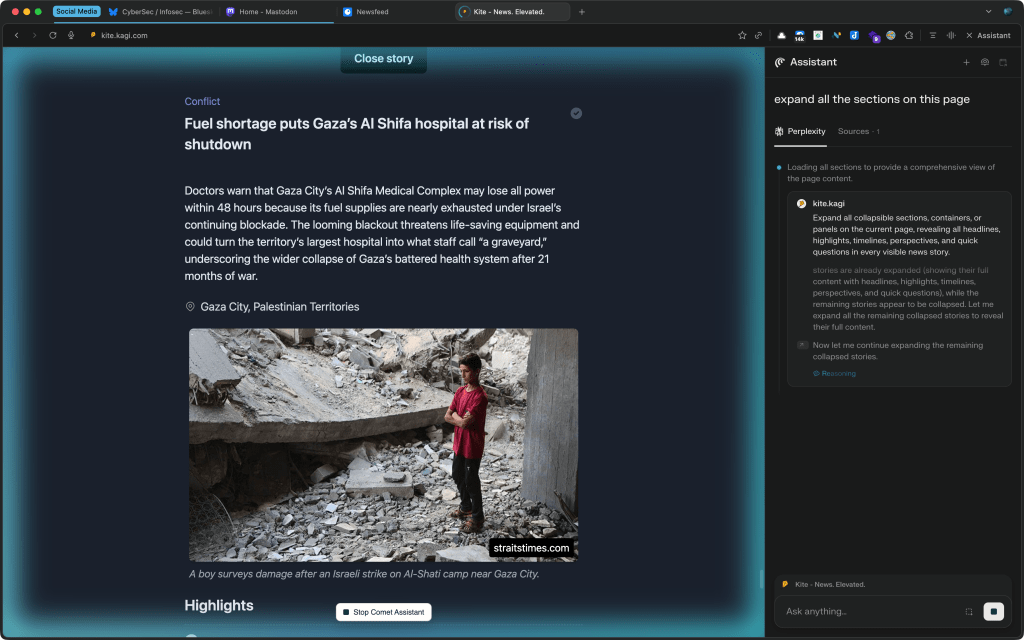
Comet is an “AI”-native web browser from Perplexity, designed to make agentic, context-aware automation a core part of daily browsing. Built on Chromium, it preserves Chrome’s extension compatibility, instant migration of settings, and familiar UI, but fundamentally rethinks the browser as an “AI”-powered workspace.
Key features of Comet include:
- A sidebar assistant can summarize, answer, and act on content from any open tab—text, video, or app—without copy-paste or context switching. The “AI” can automate complex workflows: managing tabs, summarizing emails/calendars, booking meetings, shopping, and executing multi-step research or transactional tasks via conversational prompts.
- Automation modes:
- Headed mode lets you watch as Comet visually clicks, fills forms, and executes actions step-by-step, with human override at any point.
- Headless mode spawns sub-agents to perform tasks in parallel, operating in the background for high-level automation (e.g., managing social accounts, applying for jobs en masse).
- The assistant understands the content and state of your browsing session, offering dynamic suggestions and page-specific actions (e.g., summarizing a social profile, composing posts, comparing products across sites).
- Local models (WebAssembly/WebGPU-accelerated) handle basic summarization and intent recognition for privacy and speed. Complex or data-intensive tasks route through Perplexity’s cloud APIs, with human control over privacy modes (local-only, pseudonymous cloud, or full cloud with consent). NOTE: I saw no evidence of “local mode” in action.
- Local storage of sensitive data, strict local-only processing for marked operations, and granular privacy controls for cloud-based AI tasks. Native ad blocker (open-source) and privacy sandboxing for sensitive inputs.
- Full support for Chrome extensions, PWAs, and planned APIs for building AI-enhanced web apps directly atop Comet’s agentic infrastructure.
Comet is invite-only and available to Perplexity Max subscribers ($200/mo), with a waitlist for broader access, and I have no idea why I got access to it (I do not pay $200/mo for Perplexity). It runs on Windows and macOS, with mobile versions in development. The design is familiar for Chrome users but adds powerful automation and AI-driven enhancements for those who want their browser to act as a “cognitive operating system” for daily workflows.
It unsurprisingly uses Perplexity’s “Sonar” model, built on Llama 3.3 70B and further trained for answer quality and web search efficiency.
The browser also maintains the typical “location bar” which obeys the search engine override from the Kagi extension.
Google makes it virtually impossible for folks who base other browsers on Chromium to disable the two privacy holes Comet lets slip through in my sociopath test, so it gets pretty high marks from me:
- ✓😞 attribution-reporting
- ❌😎 browsing-topics
- ❌😎 interest-cohort
- ✓😞 join-ad-interest-group
- ✓😞 private-aggregation
- ✓😞 private-state-token-issuance
- ✓😞 private-state-token-redemption
- ✓😞 run-ad-auction
- ✓😞 shared-storage
- ✓😞 shared-storage-select-url
- ✓😞 storage-access
As noted, Comet did a much better job fully integrating into Chromium. I actually enjoyed having it orchestrate various things. This — https://rud.is/drop/679/kite-md-extrraction-comet.md — is markdown it generated from iterating through some of the story nodes on a page from the resource in today’s last section. It auto-made tab groups, and can fire up Developer tools. Whomever thought up that part of the integration did a phenom job.
The Comet team also didn’t try to dumb down the browser. You are still in control. I am using all my extensions and settings. Kagi is still my search engine.
I did a similar chat with the Bellingcat article mentioned in the first section, and you can judge the results for yourself: https://rud.is/drop/679/ice-comet-chat.md.
Even if Perplexity were to revamp the interface to be more like Arc or Vivaldi, the functionality I need/want from an LLM connected to a browser can be had with a browser MCP server.
Comet is 100% better than Dia, but it is not worth $200/month.
Kite
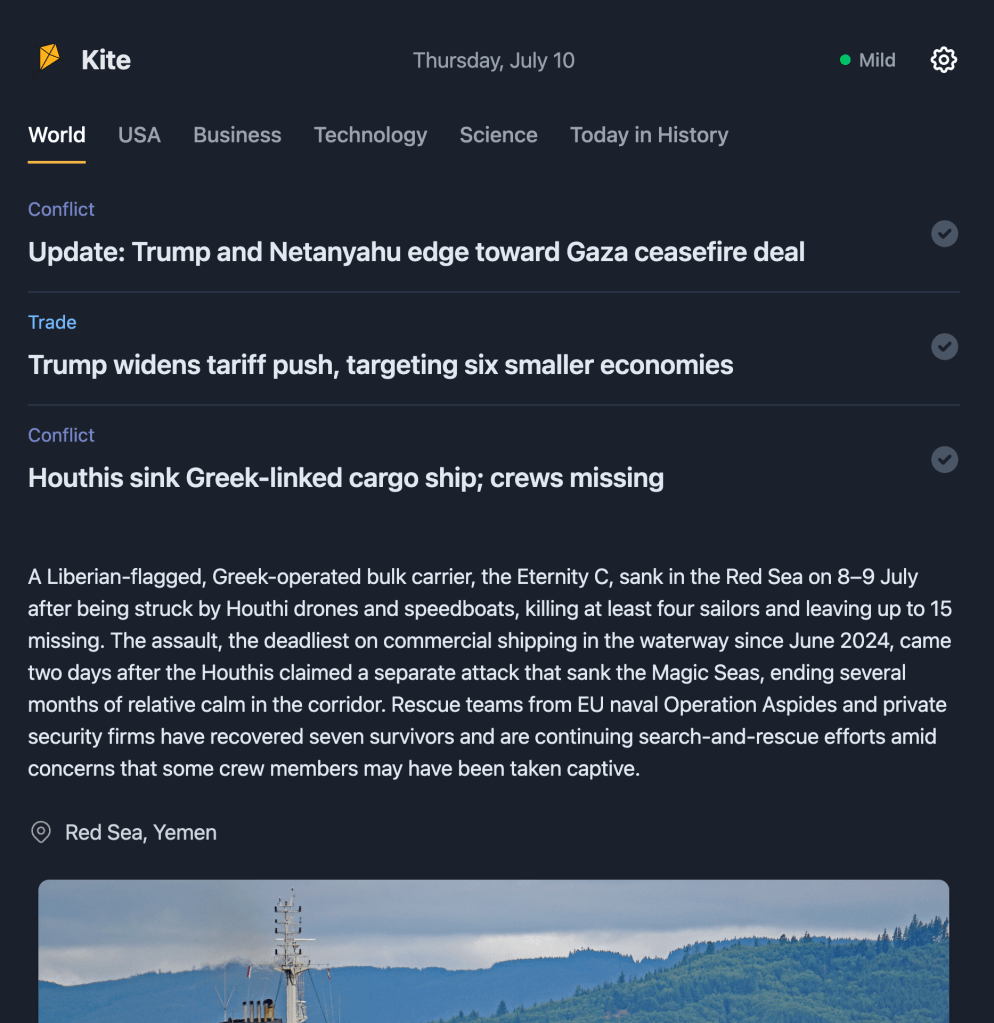
Kite (GH) by Kagi reimagines news consumption by breaking free from the ad-driven clickbait cycle that has turned news into “mental junk food.” Instead of endless scrolling and attention hijacking, Kite delivers one comprehensive daily briefing at noon UTC that synthesizes thousands of global news sources into a focused 5-minute read. By prioritizing diverse perspectives, factual reporting, and complete privacy protection, Kite offers a deliberate alternative to the attention economy—giving readers essential information that respects both their intelligence and their time, with a natural endpoint that encourages living in the moment rather than trapped in infinite feeds.
Kite front end is a statically served app and is fully open source. Said front-end uses Kite application data that can be found at https://kite.kagi.com/kite.json (which links to other files like https://kite.kagi.com/world.json). They’re licensed under CC BY-NC, which means that this data can be used free of charge (with attribution and for non-commercial use). Perfect opportunity for a weekend [vibe] code project!
You get a summary up-front, a few highlights, key quotes, links to diverse but authoritative articles on the news item, timeline, background and more.
Kagi’s search service user base is around 50K humans, and I have to wonder if it’s just us (I’m a paid subscriber to Kagi) who are going to find this useful/refreshing, or if there will be broader appeal.
There’s also an unfortunate situation in the U.S. where the current regime deliberately floods the news zone on a daily basis, making it difficult to solely rely on a once-per-day update.
Still, the site icon has already earned a place in my pinned Arc tabs, and I will most certainly be referencing it daily.
FIN
Remember, you can follow and interact with the full text of The Daily Drop’s free posts on:
- 🐘 Mastodon via
@dailydrop.hrbrmstr.dev@dailydrop.hrbrmstr.dev - 🦋 Bluesky via
https://bsky.app/profile/dailydrop.hrbrmstr.dev.web.brid.gy
☮️


 hrbrmstr's Daily Drop
Leave a comment