MCPJam Inspector; mcp-cli; Liquid Glass in the Browser
I’ve got MCP on the mind this weekend, but there’s no “AI” in this Bonus Drop edition. Paragraph one of the first section has some justification for having two sections on MCP. And, since I know the AI-haters out there likely just lump “MCP” into the same trash heap with LLMs, we’ve got a link to a super cool post in the third section that showcases human ingenuity and knowledge (about as “not-AI” as one can get).
TL;DR
(This is an LLM/GPT-generated summary of today’s Drop using Ollama + Qwen 3 and a custom prompt.)
- MCPJam Inspector is a developer tool for testing and debugging Model Context Protocol (MCP) servers, offering features like multi-protocol connectivity and LLM tool interaction (https://www.mcpjam.com/)
mcp-cliis a node-based CLI tool for interacting with MCP servers, allowing users to list and call tools, read resources, and supports OAuth (https://github.com/wong2/mcp-cli)- “Liquid Glass in the Browser” explores replicating Apple’s Liquid Glass effect using SVG filters and Three.js, showcasing creative workarounds for browser rendering limitations (https://specy.app/blog/posts/liquid-glass-in-the-web)
MCPJam Inspector
Before we get into this Jam session, let me toss a link to “MCP: An (Accidentally) Universal Plugin System”. That post nails something that is more often true than I think we overtly realize: the best tech protocols end up being used for stuff nobody planned. The author realizes that the Model Context Protocol (MCP), which was built to help AI assistants access data, is actually just a really good way to connect any app to any service. It’s like how USB ports ended up charging everything instead of just connecting keyboards, or how people started using car cigarette lighters to power anything but cigarettes. The critical insight is that every MCP server someone builds for their AI becomes a free plugin that any other app can use—accidentally creating a universal plugin system. It’s a perfect example of how the most useful technologies emerge not from grand design, but from people figuring out creative ways to misuse well-designed systems.
Since any app can use any MCP server, being able to “see” what said server can do is fairly important. Good MCP servers are self-documenting, since the tools, resources, and other capabilities need to be “explained” to the LLMs/agents calling/using them; and, what was intended for machines also just happens to work super well for us humans.
MCPJam Inspector (NPM) (GH) is a developer tool is designed to test and debug Model Context Protocol (MCP) servers, offering a workflow and feature set reminiscent of Postman but tailored for the unique requirements of MCP-based systems. The project emerged as a community-driven fork of the original @modelcontextprotocol/inspector, aiming to accelerate development and introduce enhancements that the original tool lacked, particularly in user experience, debugging, and AI integration.
Here are the core features/capabilities:
- Multi-Protocol Connectivity: MCPJam Inspector can connect to MCP servers over three major protocols—STDIO, Server-Sent Events (SSE), and Streamable HTTP. This makes it flexible for various server implementations and environments.
- Tool Execution and Live Parameter Input: You can enumerate and manually trigger any tool your MCP server exposes, passing live parameters and immediately seeing responses and errors. This is invaluable for iterative development and debugging of tools, prompts, and resources.
- LLM Tool Interaction: If you have Anthropic or OpenAI keys handy, you can also test your MCP server as if it were connected to these LLMs. This means you can simulate AI-driven requests and validate your server’s behavior in realistic scenarios, which is especially useful for teams building AI-integrated applications.
- Enhanced Debugging Experience: MCPJam Inspector provides detailed error logs, improved logging UX, and a more informative interface for tracing issues—far superior to debugging via an AI client or raw logs.
- Quality of Life Improvements: You can save requests, manage multiple server connections, and store server configurations. This streamlines repetitive testing and supports workflows involving several environments or team members.
The easiest way to launch the inspector is via npx:
npx -y @mcpjam/inspector@latest
This command starts the inspector and opens it in your browser at http://localhost:6274.
Alternatively, you can run it in Docker:
docker pull mcpjam/mcp-inspector:main
docker run --rm -p 6274:62
74 -p 6277:6277 mcpjam/mcp-inspector:main
This also serves the UI at http://127.0.0.1:6274.
You can connect to a local or remote MCP server, pass custom arguments, and load server configurations from a JSON file. For example:
npx @mcpjam/inspector node build/index.js --port 3000 --debug
npx @mcpjam/inspector --config ./my-config.json
A configuration file can specify multiple servers, their startup commands, arguments, and environment variables.
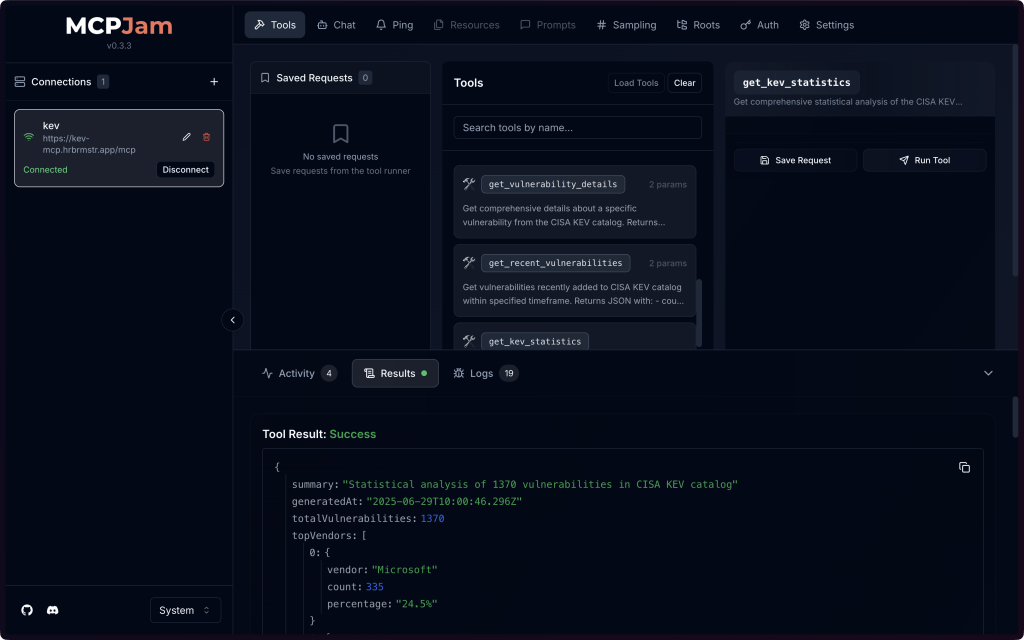
You can give it a go with my public CISA KEV MCP server — https://kev-mcp.hrbrmstr.app/mcp (a screencap of a session targeting that is in the section header).
It’s a brand new project that is already at v0.3.3, so keep an eye out for regular and fast updates.
mcp-cli

(Short section due to the enclosed images and the video mentioned at the end of the section.)
If you don’t want to mode switch to a browser to see what tools you can call, mcp-cli might be your cup of tea. It’s a node-based CLI inspector for the Model Context Protocol that can:
- run MCP servers from various sources
- list Tools, Resources, Prompts
- call Tools, Read Resources, Read Prompts
plus has OAuth support for SSE and Streamable HTTP servers.
The GitHub README has a decent video walkthrough, and the section header plus the following shows how the program lists tools (it is pretty clear the author does not interact with well self-documented MCP servers much), and how it shows the results of a selected tool call, respectively.

If you want some servers to test that against, hit up https://github.com/jaw9c/awesome-remote-mcp-servers.
Liquid Glass in the Browser

I am in the “not a fan” club when it comes to Apple’s latest design choice (“Liquid Glass”), I am alsop not in Apple’s target demographic anymore, so we’re likely stuck with it for at least 1-2 years. Unlike me, this latest design effect has caught the attention of many web developers since — unlike simple glassmorphism (think backdrop-filter: blur() with some transparency) — Apple’s invention creates genuine light refraction that makes content appear to sit beneath actual curved glass.
Now, I am 100% a fan of posts where the author digs in deep to recreate something from one idiom/medium to another, which is what “Liquid Glass in the Browser” does quite well. It documents an attempt to replicate this iOS/iPadOS/watchOS/tvOS/macOS feature for any content in any browser.
There was an immediate road block to this pursuit, however, as web browsers don’t give us access to their paint layer. We can blur backgrounds and add transparency, but true light refraction around glass edges? That’s asking for shader-level control we simply don’t have.
SVG filters offer a glimmer of hope. Using feDisplacementMap, you can actually shift pixels based on a gradient map, creating convincing edge refraction effects. It’s clever, but limited, since you’re still working within the browser’s constrained rendering sandbox.
Here’s where things get interesting. The author suggests capturing page screenshots with html2canvas, then using Three.js to simulate glass materials in 3D space. Position the glass at the bottom, overlay the screenshot beneath it, and sync everything as users scroll.
It’s resource-heavy. It’s complex. It’s absolutely not how you’d architect this in a perfect world.
And yet, it works.
In reality, this isn’t just about replicating Apple’s effect. It’s a great example of how immense curosity can be teamed up with ingenuity (and deep knowledge) to ovecome limitations. This exploration is one of many that showcases how the constraints of the web force us into solutions that are simultaneously hacky and brilliant.
The full implementation and React library are available for experimentation:
- Specy/liquid-glass: A pretty weird attempt at making liquid glass for the web
- @specy/liquid-glass-react – npm
FIN
Remember, you can follow and interact with the full text of The Daily Drop’s free posts on:
- 🐘 Mastodon via
@dailydrop.hrbrmstr.dev@dailydrop.hrbrmstr.dev - 🦋 Bluesky via
https://bsky.app/profile/dailydrop.hrbrmstr.dev.web.brid.gy
☮️
 hrbrmstr's Daily Drop
Leave a comment