rv; Jetrelay; How↠Why
The 7.5 hour trip from ME to DE took over 10, hence no Bonus Drop over the weekend, and it’s yet-another-work-offsite-week (FML), so the Drops will be thin this week.
I’m covering rv as there was some Mastodon buzz about it, and I took some decent copious notes after playing with it for a bit. Since I’m typing during #2.1 & #2.2’s naptimes, (visiting them before heading to D.C.) I’m leaning a bit heavily into the previously noted “Smart Brevity” format, since it turns out I’ve been taking notes with those concepts in mind for a few decades. The mid-section is the only one that explicitly uses that framework, since I find it kind of tedious to only write or read things in that style.
TL;DR
(This is an LLM/GPT-generated summary of today’s Drop using Ollama + Qwen 3 and a custom prompt.)
rvaddresses R’s dependency management challenges with faster installation, reproducible lockfiles, and environment isolation (https://github.com/A2-ai/rv)- Jetrelay is a high-performance relay for Bluesky’s jetstream feed, using Linux kernel tricks to broadcast data efficiently (https://www.asayers.com/jetrelay/)
- Solution-focused questioning shifts the mindset from problem analysis to actionable solutions, improving team productivity and creativity (https://hachyderm.io/@mweagle/114515586531421699)
rv: Solving? R’s Dependency Management Challenges
rv tackles a set of interconnected challenges that R users have struggled with for years:
The R package ecosystem has lacked a comprehensive, modern dependency management solution that combines speed, reproducibility, and robust version pinning. While Python has tools like pip, Poetry, and Conda, and now uv, R’s built-in install.packages() function and even newer tools have significant limitations.
Specifically, rv addresses:
- Performance issues – R package installation is traditionally slow, especially when compiling from source.
rvaccelerates this process through parallelized installation and prioritizing pre-compiled binaries. NOTE that very recent versions of R install groups of packages at lightning speed, so you don’t really needrvif you rely on “the latest” of everything and stick mostly to CRAN. - Reproducibility challenges: R projects often suffer from “works on my machine” syndrome due to inconsistent package versions.
rvgenerates lockfiles that precisely pin all dependencies and subdependencies. - Environment isolation:
rvintegrates with the{box}package to create isolated environments, preventing package conflicts between projects. - Cross-platform compatibility: Managing consistent environments across Windows, Mac, and Linux has been difficult in R.
rvprovides tooling that works consistently across platforms.
How does rv compares to rxisting R solutions?
The renv package has been the most popular solution for R dependency management. While both tools create lockfiles, rv differentiates itself in several ways:
rvis significantly faster, using Rust for core operations whilerenvis written entirely in Rrvhas more intelligent binary package selection and fallback strategies- The lockfile format in
rvis more comprehensive, tracking more metadata about each dependency
pak improved upon base R’s installation capabilities with parallelization and better dependency resolution. However:
paklacks robust lockfile support for exact environment recreationrvoffers better integration with project-specific workflowsrvprovides clearer separation between development and production environments
packrat was an earlier attempt at package isolation but has been largely superseded by renv. rv improves upon both with:
- Better performance characteristics
- More comprehensive dependency tracking
- Cleaner integration with modern R workflows
So, I will not pretend to fib, and note that my initial thought about rv was (before digging) that it was just going to be a lame attempt to copycat Python’s uv. While rv and Python’s uv do share some similarities (one being both are written in Rust for performance and focus on modern package management) rv is not simply a copycat. It addresses R-specific challenges:
- The R package ecosystem works fundamentally differently from Python’s (CRAN vs PyPI)
- R’s compilation requirements and binary compatibility issues are unique
- The integration with R-specific virtual environments via
{box}shows consideration for the R ecosystem - An increasing reliance on social Git repos, R Universe, and non-standard package hosting idioms.
Looking at the example projects, rv implements workflows tailored to R’s package structure and common use cases like RMarkdown documents and Shiny applications.
Now, one solution often overlooked is nix. It, too, offers an alternative solution to dependency management across languages:
- Language-agnostic approach: Nix can manage R packages alongside other languages in a unified system
- System-level reproducibility: Nix goes beyond package versions to reproduce the entire computing environment
- Steep learning curve: Nix requires learning a specialized language and approach to configuration
While Nix is powerful, its complexity makes it less accessible for teams primarily working in R. rv provides a more focused, user-friendly solution specifically designed for R workflows.
The aforementioned examples in rv demonstrate real-world benefits:
- Simplified CI/CD integration for R projects
- Faster package installation in development and deployment
- Clearer dependency documentation within projects
- Easier onboarding for new team members working on R projects
Having only tried it for a few days, my initial impressions are that rv represents a meaningful advance in R dependency management rather than an unnecessary duplication. By combining performance improvements, comprehensive lockfiles, and integration with R-specific workflows, it addresses long-standing pain points in the R ecosystem.
Its Rust foundation may be inspired by tools like uv, but its implementation and features are thoughtfully designed for R’s unique package ecosystem and user needs. For R teams struggling with dependency hell, package conflicts, or cross-platform consistency, rv offers a compelling solution that goes beyond what existing tools provide.
Jetrelay
I still have some reservations about investing anything substantial into Bluesky/ATproto (until there is more “core identity” dispersion outside of reliance on Bsky infrastructure). However, I do still admire ATproto and the way information on it zips throughout the ether. So, we’ll continue to occasionally cover cool tech like Jetrelay.
Big picture:
Jetrelay is a tiny, high-performance relay for Bluesky’s “jetstream” feed. It uses clever Linux kernel tricks to broadcast real-time data to thousands of clients with minimal CPU and memory overhead.
How it works:
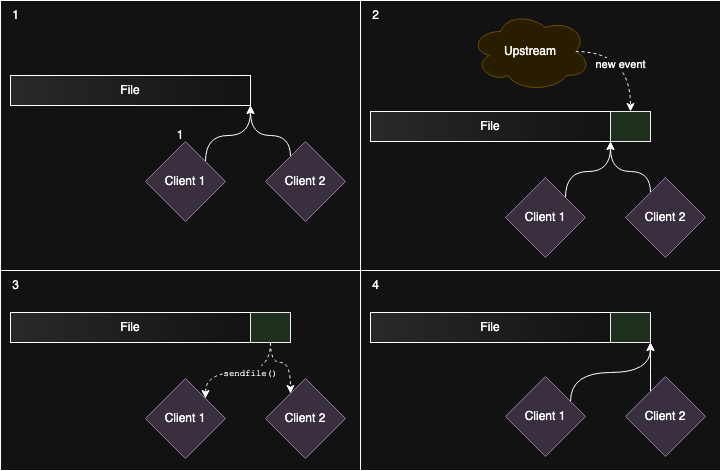
Jetrelay writes incoming events to a file. Each client has a “cursor” marking its position in that file. When a client needs data, Jetrelay copies bytes from the file straight to the client’s socket.
Why it’s fast:
- Uses
sendfile()so data moves directly from the file (in kernel cache) to the network-no userspace copying. - Uses
io_uringto batch I/O for thousands of clients in a few syscalls. - Cleans up old data from the file with
fallocate()so disk space stays flat.
Results:
- 20,000 clients, 24 Gbps on local loopback.
- 8,500 clients at 10 Gbps in real-world VM tests.
- Outperforms the official jetstream server by a wide margin.
Trade-offs:
- No per-client filtering (yet).
- Lacks production features (metrics, security, etc.).
- Meant as a demo, not a drop-in replacement.
Why it matters:
Jetrelay shows how smart use of OS features can make real-time, push-based systems scale-without complex code or massive hardware. It’s a blueprint for efficient broadcasting in a push-first internet.
How↠Why: Solution-Focused Questions

(This section was spawned from a Mastoton thread.)
Have you ever caught yourself or your team stuck in an endless loop of problem analysis? We’ve all been there. And, frustration builds as we repeatedly ask, “Why is this project so slow?” or “Why are we always missing deadlines?”
These questions might seem logical, but they often lead us further into problem-focused thinking without creating a path forward.
There’s a simple yet powerful shift you can make in your questioning approach:
Instead of asking “Why is it X?” where X = {slow, late, taking so long, unclear}, consider rephrasing as “What would it take to be Y?” where Y = {faster, early, done sooner, more clear}.
This subtle reframing does something remarkable to our brains. Rather than dwelling on obstacles or assigning blame, it immediately redirects our focus toward potential solutions and actionable steps.
When we ask, “Why is this project behind schedule?” we tend to generate reasons, excuses, and analysis. But when we ask, “What would it take to get this project back on track?” we naturally begin thinking about resources, approaches, and possibilities.
This solution-focused questioning technique doesn’t just feel better—it works better. It activates our creative problem-solving abilities and keeps us moving forward rather than spinning our wheels.
Here’s a few more examples to get you started if your team doesn’t already practice solutions-focused principles:
- Instead of: “Why do we keep hitting the same bugs?”
Try: “What would it take to consistently catch these bugs before release?” - Instead of: “Why is team communication so poor?”
Try: “What would it take to improve transparency and collaboration on this team?” - Instead of: “Why are our incident response times so slow?”
Try: “What would it take to reduce our incident response times by 50%?” - Instead of: “Why do our meetings never stay on track?”
Try: “What would it take to make our meetings focused and efficient?” - Instead of: “Why do we always struggle with onboarding new hires?”
Try: “What would it take to make onboarding seamless and effective for new team members?”
FIN
Remember, you can follow and interact with the full text of The Daily Drop’s free posts on:
- 🐘 Mastodon via
@dailydrop.hrbrmstr.dev@dailydrop.hrbrmstr.dev - 🦋 Bluesky via
https://bsky.app/profile/dailydrop.hrbrmstr.dev.web.brid.gy
☮️
 hrbrmstr's Daily Drop
Leave a comment