Wave; Geolocus; Lichen
The unplanned Drop hiatus last week was due, one again, to the seemingly never-ending long covid saga, but the noggin is mostly clear, today, so let’s get to today’s resource compendium before that changes.
TL;DR
(This is an LLM/GPT-generated summary of today’s Drop using Ollama + llama 3.2 and a custom prompt.)
- Wave Terminal combines traditional command-line workflows with modern graphical interfaces, offering features like integrated file preview, editing, and SSH connection management, as well as AI-powered chat integration (https://www.waveterm.dev/)
- Geolocus is a freely available, openly maintained IP geolocation database that provides both physical and logical location information for each IP address, supporting dual-model approach and high-quality data accessibility (https://www.geolocus.io/)
- Lichen is a Rust-based tool for managing license files and license headers in software projects, offering functionalities like generating full license texts, applying standardized license header comments, and scanning source files for automatic updates (https://github.com/philocalyst/lichen)
Wave
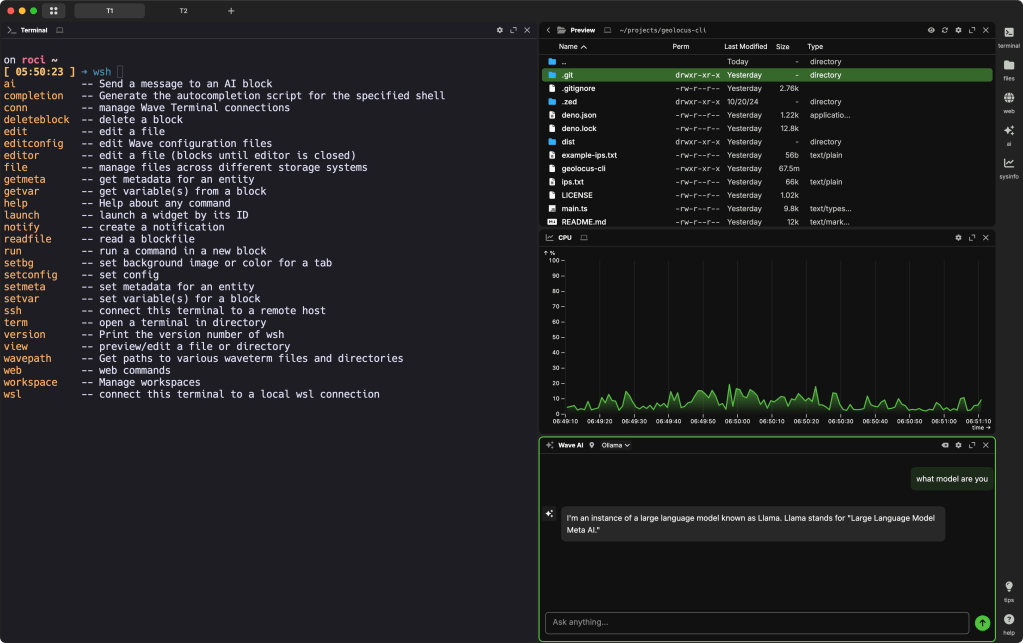
Unless you’re a just a casual command line jockey, the choice of one’s terminal tends to be a pretty personal predilection. Back in the day, I was enamored with Warp (warp.dev — not linking to it on purpose) as it was a pretty cool reimagining of how a terminal worked. But, there’s no way I’m using something that is pretty much just data exfiltration as a service in disguise.
I’ve noted that my preferred terminal is WezTerm, and I also spend a fair amount of time in the Alacritty pane inside of the Zed editor. Both are GPU-powered and are delightful experiences.
A friend recently reminded me of Wave (GH), and it had been a minute since I played with it, so I poked at it once again, mostly to talk about it in a Drop.
This open-source, cross-platform terminal combines traditional command-line workflows with modern graphical interfaces. It was designed with the goal of eliminating the need to switch between terminals, editors, browsers, and documentation by bringing these tools into one environment.
Wave extends standard terminal functionality with integrated features. From right inside the app (because it’s an app, not really just a terminal) we can preview and edit files, navigate directories, view markdown and images, and manage files — including those on remote machines — all without having to launch external apps. It also includes a VSCode-like editor that can serve as your shell’s default editor. If you work with remote servers, there’s an additional benefit from the SSH connection manager which simplifies switching between environments.
An inline web browser allows access to resources like GitHub, Stack Overflow, dashboards, and web applications directly in the “terminal” window. This feature enables checking documentation, monitoring systems, and searching for solutions without opening a separate browser. Wave supports screen splitting and customizable layouts, allowing arrangement of terminals, editors, and web views into personalized workspaces and dashboards. We can also build and import widgets and pre-built dashboards for quick information visualization.
Wave Terminal also incorporates AI as a core feature, deeply integrating it into the terminal environment to streamline workflows and boost productivity. The terminal offers native ChatGPT integration that enables users to interact with large language models directly from the terminal interface.
This integration provides two interaction modes: an interactive chat session activated via a dedicated button or ctrl + space shortcut for maintaining context in ongoing conversations, and a quick command mode using /chat <question> for immediate, one-off queries without disrupting workflow.
Wave’s AI implementation is model-agnostic and highly customizable. While it defaults to OpenAI’s GPT-3.5-turbo, we can configure our own API keys and endpoints to connect with various providers including Anthropic’s Claude, Google’s Gemini, Azure OpenAI, Perplexity, or local models like Ollama and OpenLLAMA. This “bring your own LLM” approach is managed through JSON presets that allow users to define and switch between multiple AI configurations based on their privacy, cost, or capability requirements.
The AI widget supports extensive configuration options for model selection, API tokens, base URLs, response characteristics, and timeout controls. These settings are accessible through both the UI and command-line commands. Importantly, when using personal API keys, requests bypass Wave’s infrastructure and go directly to the chosen provider, enhancing privacy. Wave’s development team continues to expand AI capabilities, planning support for additional cloud and local models, enhanced agent-based workflows, and improved context integration.
You’re likely detecting a cold, analysis tone in my presentation of Wave, and that’s due to my inability to figure out what problem it is solving. Unlike Warp — where one of the core cool/attractive initial features was how they reimagined output blocks and snippets integration — Wave like someone just superglued WezTerm, Finder, Safari, and ChatGPT windows together in the same window.
Part of my issue is likely due to my increasing use of Zed in the way I think the Wave devs intended their app to be used. I can remote into other systems painlessly in Zed, and ave access to a great terminal there, but also edit remote files in Zed. If needed, I have an AI panel right at my disposal, too. And, all of that comes without the Electron baggage Wave brings to the table.
But, do not let my grumpy old dude syndrome prevent you from giving Wave a go. It is packed with a ton of features, and it may fit into your workflows better than it does mine.
Geolocus

ONYPHE is one of the few outstanding cybersecurity companies. They perform internet-wide scans to help organizations managed their internet-facing “attack surface”. Their research team is also pretty spiffy, and have recently released Geolocus — a freely available, openly maintained IP geolocation database that’s rebuilt daily, available as a free REST API, and distributed as an MMDB file. Unlike commercial alternatives with restrictive licenses, Geolocus makes high-quality geolocation data accessible to everyone.
Geolocus has a dual-model approach, providing both “physical” location (where the device is actually hosted) and “logical” location (inferred from WHOIS registration data) for each IP address. This distinction is especially helpful in today’s internet landscape where physical hosting locations often differ from administrative assignments.
Part of my hiatus was due to work on a Geolocus CLI tool (CB) (🪢). I needed an efficient way of performing large-scale enrichment of IP addresses for a project at work, and also wanted to take advantage of both the “physical” and “logical” network subnet information ONYPHE provides. The tool is written in Deno and there are binary releases for all platforms at the Codeberg link. It supports output to JSON, ndjson, and CSV, and has some other bells and whistles you can read about at either repo.
A typical lookup returns comprehensive information including country, continent, ASN, organization, subnet, coordinates, timezone, and abuse contacts—all with both logical and physical attributes side by side. This dual perspective reveals when services use global cloud infrastructure or when mismatches exist between intended and actual hosting locations.
This is a super nice alternative to other IP geo databases/services, made doubly great since I know I can trust the folks from ONYPHE (not all IP geo data providers as capable as they may indicate on the tin).
Lichen

I am forever a gadfly when it comes to CLI tools for managing .gitignore, LICENSE, and other boilerplate files for projects. The most recent diversion has been Lichen (GH), a Rust-based tool for managing license files and license headers in software projects. It streamlines generating full license texts and applying standardized license header comments to source code files. The tool supports over 600 licenses through SPDX identifiers, helping projects maintain compliance with open-source licensing standards.
The tool offers key functionalities including the gen command for creating complete license files by retrieving standard templates and automatically inserting author, year, and contributor information. This process can be controlled through command-line arguments or a configuration file, and lets us specify license type, author details, and copyright date either directly or via a .lichen.toml file.
A super cool feature of Lichen is that it can also scan source files and apply or update license headers with the apply command. It automagically determines appropriate comment syntax for each programming language, handles existing headers, and respects ignore patterns. Users can configure exclusion rules globally or per-license using regular expressions, and target specific files or directories.
Configuration is managed through the aforementioned .lichen.toml file, which defines global behaviors, default license choices, author information, target file patterns, and exclusion rules. Per-license configuration blocks enable applying different licenses to different parts of a codebase, supporting scenarios like dual-licensing.
Built for correctness and performance, Lichen uses standard SPDX license templates, applies language-appropriate comment styles, and leverages Rust for reliability. Installation options include building from source using Cargo or downloading pre-built binaries from GitHub.
FIN
Remember, you can follow and interact with the full text of The Daily Drop’s free posts on:
- 🐘 Mastodon via
@dailydrop.hrbrmstr.dev@dailydrop.hrbrmstr.dev - 🦋 Bluesky via
https://bsky.app/profile/dailydrop.hrbrmstr.dev.web.brid.gy
☮️

 hrbrmstr's Daily Drop
Leave a comment