Blogscroll; Scrollbars; Scrollama
This is my first day back at $WORK in a while, and it’s been good but hectic. So I spun the topic theme wheel and it landed on “scroll”, so I plucked some easy-to-cover resources out of Raindrop.io backlog that have been on the TODO list to cover.
They’re wildly different from each other, but they all involve scrolling in some way.
Please don’t hate me for the middle resource 🙃.
TL;DR
(This is an AI-generated summary of today’s Drop using Ollama + llama 3.2 and a custom prompt.)
- BlogScroll is an open directory of personal websites and blogs curated on GitHub, aiming to spotlight individual digital spaces outside major platforms (https://blogscroll.com/)
- Custom scrollbars often break platform behaviors and accessibility features, making them a fundamentally flawed approach to web design (https://modem.io/blog/scrollbars/)
- Scrollama is a JavaScript library that enables easy implementation of scrollytelling features using the IntersectionObserver API (https://russellsamora.github.io/scrollama/basic)
Blogscroll
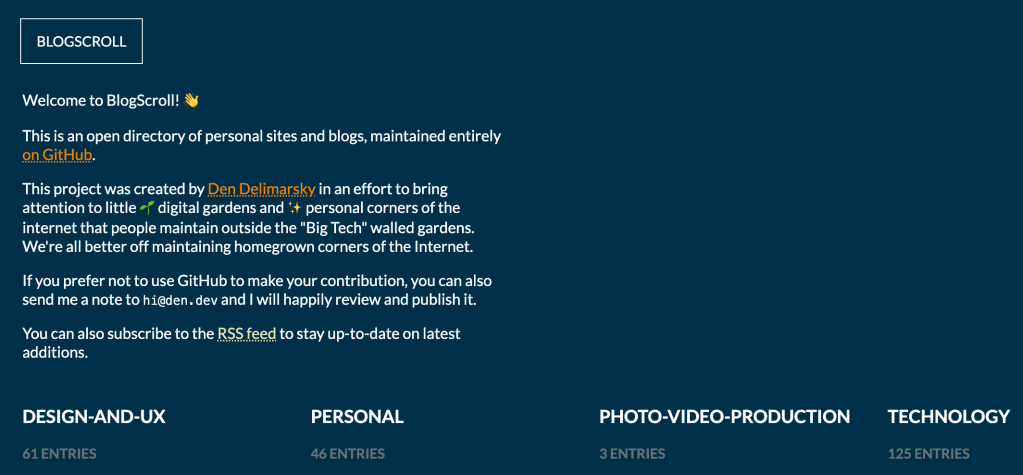
BlogScroll (GH) is an open directory of personal websites and blogs, curated entirely on (sigh) GitHub and created by Den Delimarsky. This project has the laudable goal of spotlighting individual digital spaces that exist outside major platforms.
Den was inspired by his enjoyment of reading personal stories and exploring unique online spaces, leading him to compile his browser bookmarks into this accessible directory. It’s organized into categories such as design and UX, personal, photo and video production, and technology, each containing numerous entries.
This feels like the very early days of the Yahoo! index, where the entry counts are quite manageable and you can count on the curation to provide solid links. For example, the technology category includes over 100 entries, featuring personal sites of individuals like developers and tech enthusiasts; each one has been PR’d by Den.
To add a site, contributors can fork the repository and submit a pull request with a new entry in the appropriate category file, providing the URL, the site owner’s name, and a link to the site’s favicon. The project emphasizes the inclusion of independently managed sites with custom domains, explicitly excluding platforms like Medium or LinkedIn (unless they have custom domains).
Openness is great, but that can also lead into bad places. So, the project maintains standards against inappropriate content and reserves the right to curate entries to ensure quality and relevance. This initiative reflects a broader movement (and a 2025 Drop subtext) towards decentralization and personal ownership on the internet, encouraging individuals to cultivate their own digital spaces away from large, centralized platforms.
100% add your site to the list!
Scrollbars

Here’s what not to do to the visitors of your site or consumers of your app. NOTE: keep scrolling for a while even if it doesn’t seem like anything is happening.
If I may pontificate a bit…
Modifying scrollbar behavior and appearance is a fundamentally flawed approach to web design for scads of reasons.
Custom scrollbars frequently break expected platform behaviors, including keyboard navigation, screen reader compatibility, and system-level accessibility settings. They also tend to perform poorly compared to native scrolling implementations, often introducing lag and inconsistent movement patterns.
They also typically ignore specialized display modes and system preferences that humans rely on for comfortable browsing. The common practice of making scrollbars extremely thin or semi-transparent creates significant usability barriers, particularly for folks with motor control challenges who need larger click targets.
Horizontal scrolling implementations are particularly problematic, forcing us to navigate in two dimensions which significantly increases cognitive load. When coders override default scrolling behavior, they break established patterns that we humans have developed over decades of web browsing, including standard keyboard shortcuts and touch gestures.
While developers often justify custom scrollbars for the sake of cross-platform visual consistency, this approach fundamentally misunderstands human visitor expectations. Most of us prefer our operating system’s native scrollbar behavior and appearance, as it provides a consistent experience across all applications.
Creating custom scrollbar implementations also introduces unnecessary complexity and potential points of failure. Even large companies with significant resources struggle to create custom scrolling behaviors that work as reliably as native implementations. The development time spent on custom scrollbars could be better allocated to improving core functionality and accessibility.
The next time you’re tempted to create custom scrollbars, go visit the link at the top of the section.
Scrollama

Scrollama (GH) is a JavaScript library designed to help you start “scrollytelling” — a technique that enhances storytelling by integrating interactive elements that respond to scroll actions — with minimal effort and overhead. It leans heavily on the IntersectionObserver API to efficiently detect the visibility of elements within the viewport, eliminating the need for less efficient scroll event listeners. This approach ensures smoother performance, especially in complex web applications.
There are three key features of Scrollama that make it a useful and easy to use framework:
- Step Triggers: Scrollama can detect when specific elements, referred to as “steps,” enter or exit the viewport. This capability allows developers to initiate animations or other interactive behaviors precisely when these elements become visible or hidden.
- Step Progress: Beyond simple entry and exit detection, Scrollama can monitor the progress of an element as it moves through the viewport. This feature enables the creation of animations that evolve in real-time as the user scrolls, providing a more dynamic user experience.
- Sticky Graphic Support: Scrollama simplifies the implementation of sticky graphics—a common scrollytelling pattern where a graphic remains fixed in place while related content scrolls alongside it. This technique is often used to keep visual elements in view as accompanying text or other content changes.
To integrate Scrollama into a project, you can include it via a script tag or install it using npm. Once included, initializing Scrollama involves selecting the elements to observe and defining the desired behaviors for when these elements enter or exit the viewport. There are plenty of example to clone and customize to help get you started.
The library is versatile and can be used with other JavaScript frameworks (like Lit elements) or even just vanilla JavaScript. While many of Russell’s examples use D3 for brevity, Scrollama itself does not depend on D3 or any other library (if you still haven’t picked up D3, 2025 is a good time to start).
My personal goal is to have two scrollytelling pieces out (hopefully work-related) this year.
FIN
Remember, you can follow and interact with the full text of The Daily Drop’s free posts on:
- 🐘 Mastodon via
@dailydrop.hrbrmstr.dev@dailydrop.hrbrmstr.dev - 🦋 Bluesky via
https://bsky.app/profile/dailydrop.hrbrmstr.dev.web.brid.gy
Also, refer to:
to see how to access a regularly updated database of all the Drops with extracted links, and full-text search capability. ☮️
 hrbrmstr's Daily Drop
Leave a comment