md-browse ; electrobun; Turndown
A THEMED DROP! W00t!
But, honestly, just hit the md-browse link in the TL;DR, and spend all your time actually being able to read the internet again.
Keep reading if you want more details on the core bits that made it possible.
TL;DR
(This is an LLM/GPT-generated summary of today’s Drop. Ollama and MiniMax M2.1.)
- md-browse is a markdown-first web browser that converts web pages to clean markdown by sending Accept headers and using Turndown for HTML-to-markdown conversion, prioritizing readability over visual artifacts (https://github.com/needle-tools/md-browse)
- electrobun is a lightweight alternative to Electron that uses Bun and native WebViews on each platform to build cross-platform desktop apps with dramatically smaller bundle sizes and type-checked IPC (https://github.com/blackboardsh/electrobun)
- Turndown is a JavaScript library that converts HTML to Markdown across browsers, Node, and Deno by walking DOM trees and applying customizable rules to produce clean, readable markdown output (https://github.com/mixmark-io/turndown)
md-browse
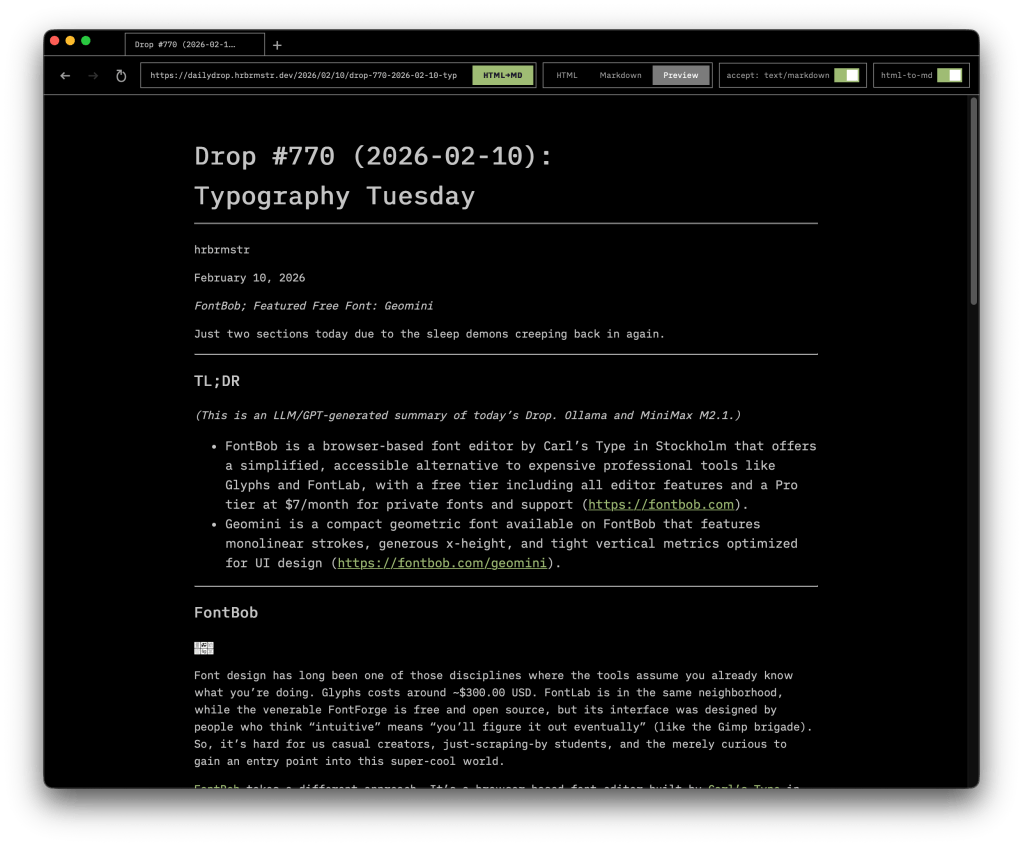
I was just having a convo with a teammate last week about wishing there was a browser that just converted everything to markdown (rendered or raw) to avoid all the garbage that is the internet in 2026. I need to speak things into existence more often!
As you all know, most web browsers treat every page as a visual artifact, downloading and rendering the full weight of “modern” HTML, CSS, and JavaScript regardless of whether you actually need any of it. If you spend most of your time reading rather than interacting, that is a lot of overhead for what amounts to text on a screen. md-browse takes a different approach.
Built on Electrobun (which “TIL” and is in the next section), md-browse is a markdown-first browser that treats readable text as the default rather than the exception. When you navigate to a URL, it sends an Accept: text/markdown (also “doh! why have I not done this to various sites I run?”) header before anything else. Servers that respect that header return markdown directly, and md-browse displays it as-is. For everything else, the app fetches the HTML and runs it through a tuned Turndown (also in the last section!) conversion pipeline that strips away scripts, styles, navigation chrome, and footer clutter, pulling the actual content from semantic elements like <main> and <article> and converting it to clean markdown. The result is close to what AI tools see when they ingest a web page: just the substance, structured and readable.
The interface supports tabbed browsing with full navigation history, and each tab offers a dual-view toggle so you can switch between raw markdown and a rendered preview. The architecture is straightforward: a Bun process handles fetching, conversion, and state management over RPC, while a Svelte-based toolbar view manages tabs, navigation controls, the URL bar, and content display. The design is dark, minimal, and built around readability rather than decoration.
IT IS SO STUPID DREAMY!
electrobun

I despise Electron apps, as Electron is a bad solution to the cross-platform GUI app distribution problem. Seeing how nimble and lightweight md-browse was made me super happy to discover electrobun. Rather than ship a 150MB bundle for what’s essentially a wrapper around your web app, electrobun lets your system’s native WebView handle rendering. For macOS that means WebKit-proper; on (ugh) Windows it’s Edge WebView2; and, for Linux it’s WebKitGTK; This drops the most minimal app from 50MB to about 13MB distributed, which I can 100% live with.
The framework runs on Bun rather than Node, which means your main process gets Bun’s TypeScript execution and bundling instead of V8. The repo breakdown is a mix of 40% TypeScript, 34% C++, 14% Objective-C++, 5% Zig. All OS-native functionality like window management, system trays, and menus live in that C++/Obj-C layer, while Zig handles a SIMD-optimized BSDIFF implementation for binary diff updates.
I poked around the forums and folks were regularly praising the update system. Apps gets tarred, zlib-compressed, then wrapped in a self-extracting ZSTD bundle for distribution. Updates produce patches often measured in kilobytes rather than megabytes (like the good ol’ days!), and the whole thing works against a static file host. Folks on older versions download successive patches; if patching fails, it falls back to full download. The IPC model uses typed end-to-end RPC, so your cross-process calls between the Bun main process and webview get type-checked at compile time (which is a real improvement over Electron’s untyped IPC, even though TypeScript is not in any way, shape, or form foolproof).
Yoav at Blackboard built electrobun to power co(lab), their hybrid browser/code editor, and it recently hit v1 with macOS, Windows, and Ubuntu support. The API covers windows, menus, context menus, tray icons, clipboard, dialogs, webview partitions, session storage, find-in-page, and the update infrastructure. The CLI handles DMG generation, code signing, and notarization on macOS, with build targets for macos-arm64, macos-x64, win-x64, linux-x64, or all at once.
Compared to Rust’s Tauri, you’re writing Bun+TypeScript for your main process instead of Rust, which lowers the barrier considerably if you don’t want to context-switch languages. Compared to Electron, you lose guaranteed Chromium consistency across platforms (unless you opt into bundling CEF), but gain those dramatically smaller bundles and update sizes.
The ecosystem around it, which I suggest means things like plugins, community packages, and Stack Overflow (yes, SO is still “a thing”) answers, is essentially nonexistent compared to Electron or even Tauri. If you need battle-tested production stability with a large support community, this isn’t there yet. If you’re building something new and can tolerate rough edges in exchange for small bundles and sane updates, give it a serious look.
Turndown
We referenced Turndown (GH) back in 2024 but have never covered it. This seemed like a good opportunity to do so.
By now you’ve grok’ed that Turndown converts HTML to Markdown. It works across browsers, Node, and Deno without dram (JS/TS DOM-dependent libraries are notoriously fierce beasts to tame).
It walks a DOM tree, matches each element against a set of rules, and calls the matching rule’s replacement function to produce Markdown. Built-in rules cover standard HTML elements sensibly, but you can override any of them or add custom rules for elements like strikethrough or task lists. And, these rules evaluate in reverse order of addition, so your custom rules always win.
Browser builds use the native DOM parser and come in at roughly 4KB minified+gzipped with zero runtime dependencies (yay!). Node builds pull in jsdom (sigh) for DOM parsing (the “sigh” was due to jsdom being a ridiculously heavyweight dependency). For Deno, import via npm:turndown and pair it with deno-dom or linkedom to skip the jsdom weight.
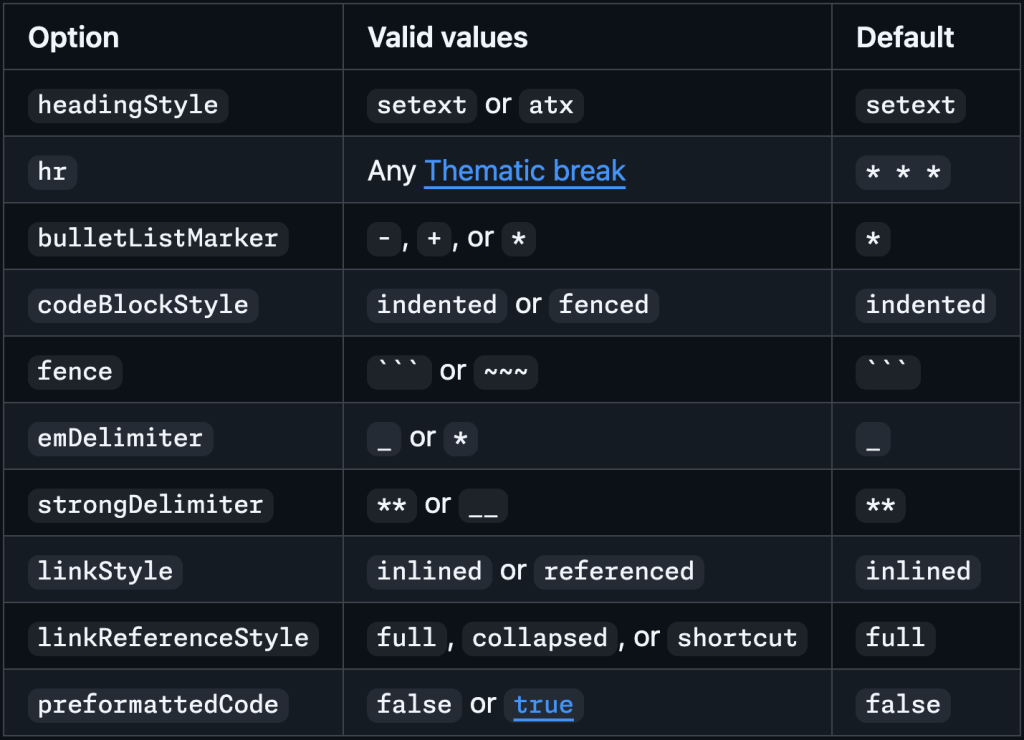
Configuration handles Markdown style preferences such as heading style (setext underlines vs. atx hashes), bullet markers, code block style (fenced vs. indented), and emphasis delimiters. The turndown-plugin-gfm plugin adds what I’d call must-have GitHub-flavored extras like tables and task lists.
I use this and readability libraries in a personal service that turns content at URLs into markdown + text and it’s never failed me once.
FIN
Remember, you can follow and interact with the full text of The Daily Drop’s free posts on:
- Mastodon via
@dailydrop.hrbrmstr.dev@dailydrop.hrbrmstr.dev - Bluesky via
<https://bsky.app/profile/dailydrop.hrbrmstr.dev.web.brid.gy>
☮️
 hrbrmstr's Daily Drop
Leave a comment