Chromium XL; How Terminals Work; How Hackers Are Fighting Back Against ICE
We’re all over the place today, but it’s all (mostly?) good news!
TL;DR
(This is an LLM/GPT-generated summary of today’s Drop. Ollama and MiniMax M2.1.)
- Google reversed its 2022 decision to remove JPEG XL support from Chromium, adding a full decoder built on the secure Rust library
jxl-rsafter years of complaints, driven by Apple’s adoption of JXL across Safari and iOS and its inclusion in the PDF specification (https://github.com/chromium/chromium/commit/3badff27281339878293e935a5e0fbb41da553bf) - An interactive terminal guide at how-terminals-work.vercel.app teaches thirteen terminal concepts through hands-on demos, covering escape sequences, raw versus cooked mode, alternate screen buffers, and clarifying confusing terminology like TTY, PTY, and shell (https://how-terminals-work.vercel.app/)
- EFF’s Cooper Quintin compiled a practical rundown of counter-surveillance tools being used against ICE, including OUI-SPY for detecting Flock cameras, the Wigle app for BLE/WiFi alerts, crowdsourced ALPR mapping at deflock.me and alpr.watch, and EFF’s Rayhunter for cell-site simulator detection (https://www.eff.org/deeplinks/2026/01/how-hackers-are-fighting-back-against-ice)
Chromium XL

Google spent three years pretending JPEG XL didn’t matter. This week they finally gave up.
A commit merged into Chromium adds a full JXL decoder, reversing the controversial 2022 decision that removed experimental support for the format. At the time, Google claimed the ecosystem hadn’t shown enough interest, but the actual story was a bit more complicated. The truth, however, is that Google had its image formats to promote, and JPEG XL was technically superior to both of them.
That superiority isn’t subtle. JPEG XL can take your existing JPEG files and compress them another 20 percent with zero quality loss. The conversion is completely reversible. It decodes faster than AVIF, which means less battery drain on phones. And it supports true progressive loading, where images start blurry and sharpen as bytes arrive, making pages feel responsive even on slow connections.
The removal sparked years of complaints from developers, but Google didn’t budge. What finally moved them was market reality. Apple shipped JXL support across Safari, iOS, and macOS in 2023. Then the PDF specification added JPEG XL as a supported format. So, since Chrome ships with a PDF viewer, suddenly Google was faced with a choice between supporting JXL or breaking PDF compliance.
The implementation is worth noting for security-minded folks. The new decoder runs on jxl-rs (a Rust library). Image decoders have always been prime targets for exploits because they parse complex, untrusted data, and they’re typically written in C++. Rust’s memory safety “guarantees” (probably) eliminate entire vulnerability classes. Both Google and Mozilla had said a secure decoder was a prerequisite for reconsidering support, and jxl-rs delivered.
What does this mean going forward? JPEG XL is now viable for production use. Chrome and Safari cover the vast majority of browser traffic, and Firefox has its implementation in progress (right after they shove some more “AI” down upon their brainwashed masses). If you’ve been waiting for the right moment to start switching to JXL images, this is it.
How Terminals Work
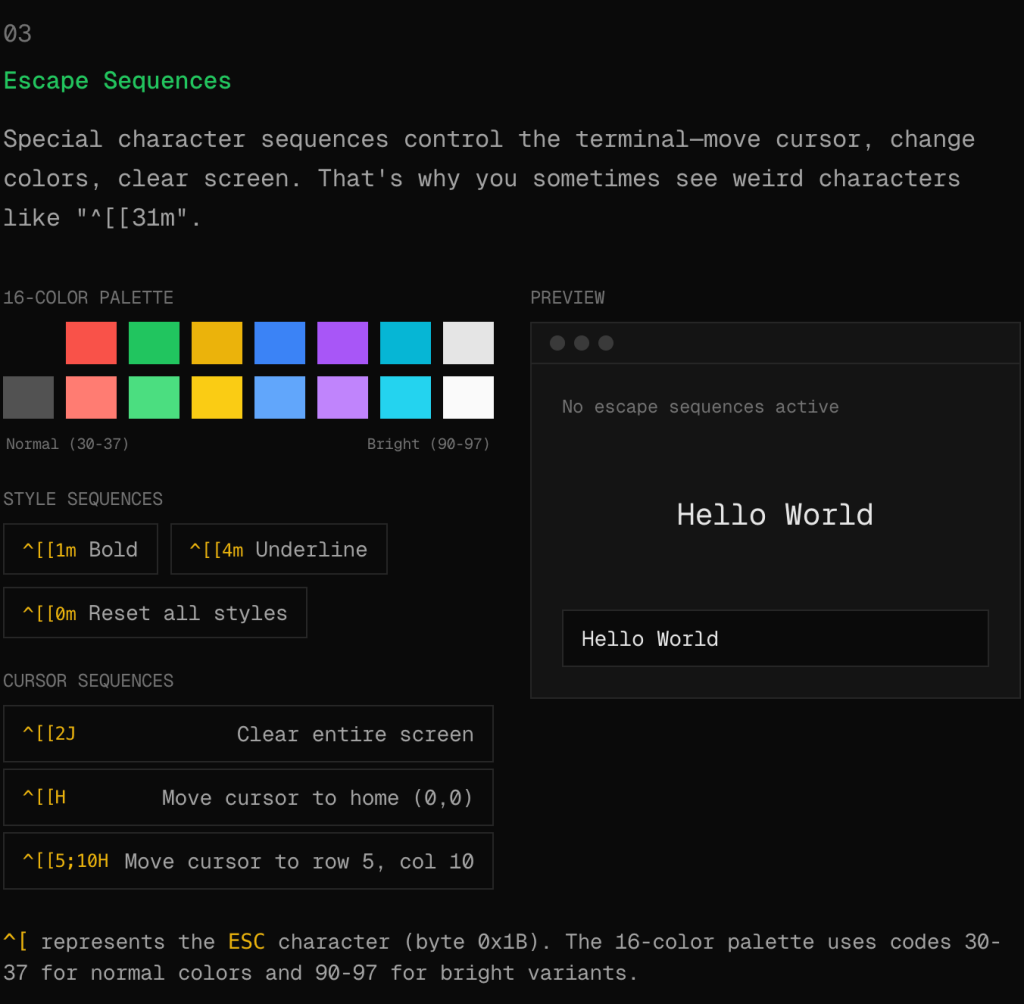
I want (no, “need”) to recommend an interactive guide at how-terminals-work.vercel.app. It explains terminal internals in a way that might actually stick for most folks (esp. those who weren’t born and raised in a terminal), which is harder than it sounds. If you’ve ever seen ^[[A appear when pressing the up arrow in the wrong context, or wondered how vim preserves your scrollback when you quit, def give this site the fifteen minutes it deserves.
The guide covers thirteen topics, from the basic grid model through escape sequences to TUI architecture, with every concept being a working demo. The ANSI escape code section lets you click color buttons and watch the byte sequences light up (i.e., you can toggle bold, toggle underline, and the raw codes update to match). Reading about escape sequences has never done much for me, but watching them assemble in response to clicks is different.
The raw versus cooked mode demo handles the canonical distinction well. You type in cooked mode and your characters buffer until you press Enter. Switch to raw and every keystroke fires immediately. This is why vim responds instantly to navigation keys while Bash waits for a complete command. The visual approach conveys this faster than documentation typically does.
There’s a visualization of the alternate screen buffer that shows the dual-buffer system directly. Open a simulated vim, watch your shell output vanish into the normal buffer, close it, and see everything return. That ^[[?1049h sequence finally makes sense. The signals section takes a similar hands-on approach: a simulated process you can interrupt with Ctrl+C, suspend with Ctrl+Z, or EOF with Ctrl+D.
I think I feel like this guide works because it shows instead of tells, skipping the historical context and the vague “terminals are complicated” hedging that usually pads such explanations.
The vocabulary section at the end is worth bookmarking on its own. “Terminal,” “console,” “shell,” “TTY,” “PTY” are terms that get mixed up constantly. The guide provides clear definitions and a stacking diagram that shows how terminal emulator, PTY, shell, and CLI programs relate. Useful the next time someone says their terminal can’t find a command when they mean their shell.
There are some (very) minor issues IMO: no table of contents for navigating thirteen sections, a Nerd Fonts tangent that doesn’t quite fit, and no author attribution. However, none of them diminish the core material.
How Hackers Are Fighting Back Against ICE

This is a quick one since I can let the resource do all the work!
EFF’s Cooper Quintin put together a practical rundown of counter-surveillance tools and techniques people are using against ICE operations. The piece covers hardware projects like OUI-SPY for detecting Flock cameras and drones, the Wigle app for BLE/WiFi alerting, crowdsourced ALPR mapping at deflock.me and alpr.watch, various ICE reporting apps (some of which Apple pulled after DOJ pressure), and EFF’s own Rayhunter for cell-site simulator detection. Also touches on the Benn Jordan research that found hundreds of misconfigured Flock cameras with exposed admin interfaces.
We US-ians are going to need all the help we can get for the foreseeable future.
FIN
Remember, you can follow and interact with the full text of The Daily Drop’s free posts on:
- Mastodon via
@dailydrop.hrbrmstr.dev@dailydrop.hrbrmstr.dev - Bluesky via
<https://bsky.app/profile/dailydrop.hrbrmstr.dev.web.brid.gy>
 hrbrmstr's Daily Drop
Leave a comment