Euporie; Alan; Life On The Float
I’m still pretty DoS’d with React2Shell (play along at home here) but got some down-time today to jot down three things I wanted to post at some point this week (and, today is as good a day as any other).
TL;DR
(This is an LLM/GPT-generated summary of today’s Drop. This week, I have been — for lack of a better word — forced into using Gemini, so today’s summary was provided by that model. Sigh.)
- Euporie is a terminal-first suite of tools for working with Jupyter notebooks and kernels, featuring applications like
euporie-notebookandeuporie-console, and it manages to render rich output like tables, images, and math within the terminal (https://euporie.readthedocs.io/en/latest/#) - Alan is a macOS-only utility created to outline the active window, addressing a decline in proper contrast on the operating system for better visual identification (https://tyler.io/2025/11/26/alan/)
- Life On The Float details the remarkable and unexpected voyage of Argo float 7900904, which spent years collecting unprecedented temperature and salinity data while drifting and bumping under the massive ice shelves of East Antarctica near Denman Glacier (https://reportearth.substack.com/p/one-of-my-best-stories-was-about)
Euporie
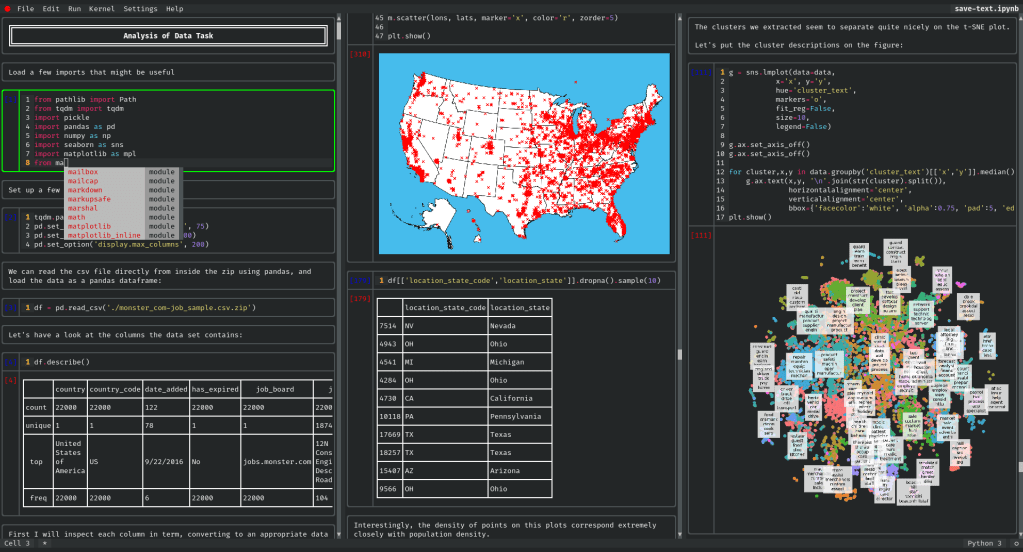
Folks that have known me for a while know my deep loathing for Jupyter notbooks, since no real work should be done in the same tool you consume cat pictures. This is science, not a videogame.
Don’t get me wrong. The concept of spawning a REPL-like kernel that can stay up forever (or be re-run), with reactive cells that can be filled with code for diverse compute engines is super nice. While I despise VS Code more than I do all things Jupyter (browser-wise), it had a nice browser-non-browser (it’s icky Electron) interface to Jupyter kernels that Zed has yet to really even come close to.
But, then along came Euporie (GH), and Juypter notebooks are back on the menu for this hrbrmstr, especially since I can use them anywhere I can ssh into without leaving WezTerm. It’s a terminal-first way to work with Jupyter notebooks and kernels, letting us stay in our precious shells to do data science or just have a better REPL experience.
Euporie is actually a small family of tools, each aimed at a slightly different workflow:
euporie-notebookis the full notebook experience in the terminal: edit cells, execute them, and view output without leaving the sessioneuporie-consoleis a REPL connected to a Jupyter kernel, closer to an interactive console workflow but with Euporie’s nicer renderingeuporie-previewis a read-only notebook viewer, handy when you just need to inspect what’s inside a notebook quicklyeuporie-hubis the multi-user angle: an SSH-accessible service where multiple people can connect and use Euporie apps remotely
Where Euporie starts to feel less like “a neat TUI trick” and more like a serious tool is in how it handles output. Jupyter is full of “rich” results that are easy in a browser and historically awkward in terminals: markdown, tables, images, math, and interactive widgets. Euporie does the hard work of rendering these in a terminal-friendly way. It can display things like markdown and tables cleanly, and for graphics it can use terminal graphics protocols (depending on what your terminal supports) so plots and images aren’t reduced to sad ASCII approximations. It also has support for rendering formats you don’t normally associate with terminals, including things like SVG and PDFs, which is the kind of feature you don’t notice until you’re debugging a report generation pipeline at 0-dark-30.
On the “day-to-day usability” side, it feel more like a modern editor rather than a retro console app. You get conveniences like completion, inline suggestions, and contextual help, and you can choose keybinding styles that match how you already operate, including Vim and Emacs modes. That matters more than it sounds, because the fastest tool is often the one that doesn’t fight your muscle memory.
Installing it is very straightforward despite having to touch icky Python. If you like the newer Python tooling ecosystem, uv tool install euporie is a clean option, and pipx or pip work too. Euporie itself requires Python 3.8 or newer, and it runs on Linux, macOS, and Windows. One important detail: Euporie doesn’t magically provide kernels for you. It talks to Jupyter kernels, so you’ll still need to have whatever kernels you want installed and available for the languages you plan to run.
In practice, Euporie is perfect for some common scenarios. Remote work is the daftly obvious one: data science and ML tasks on GPU servers, lab machines, cloud instances, or anything you touch primarily via SSH. It’s also useful in automation-heavy environments where you want to quickly inspect notebooks as artifacts, like CI/CD jobs that produce notebooks as reports. And if you’re the kind of person who’s already doing serious development in the terminal and treats the browser like a reluctant side quest, Euporie fits that workflow nicely.
The hub piece is the one to keep an eye on if you’re thinking beyond a single-user setup. There are plenty of ways to offer shared notebook access, but doing it through SSH instead of running a full JupyterHub stack can be attractive in teams that already have strong SSH-based access patterns and want something simpler to operate.
If your work regularly crosses into terminal-only territory, it’s one of those tools that can quietly upgrade your workflow without requiring you to rebuild it from scratch.
Alan
macOS-only resource, here, so feel free to skip if you’re not part of the cult.
Proper contrast across all operating systems has been in steep decline, along with most other aspects of the endpoint UX. Tyler Hall does a fair job blathering about it and that link goes to a particular store spot of his: determinig what is the active window on macOS.
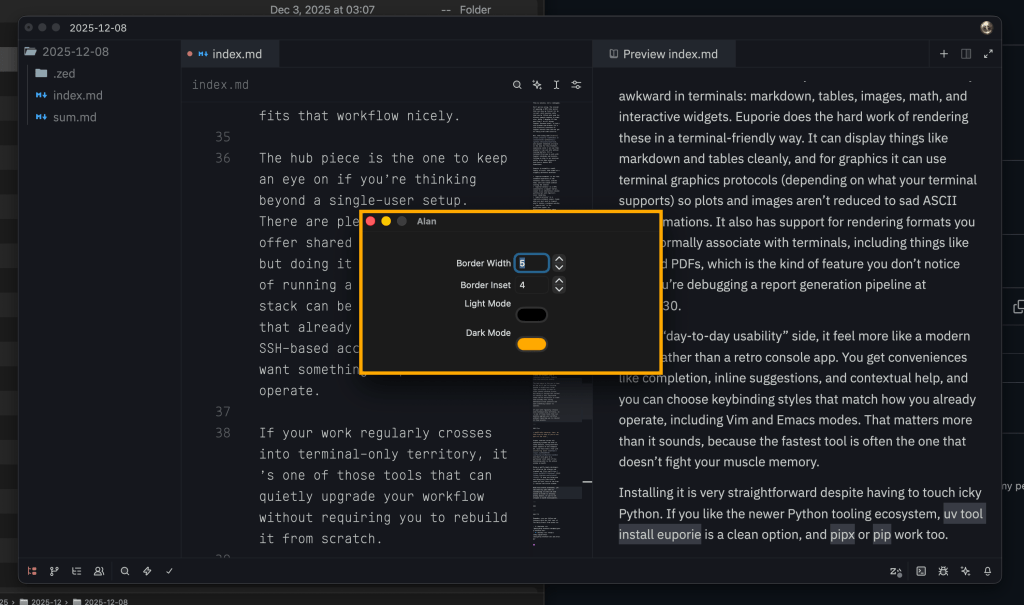
Being a spiffy Apple developer, he rolled up the sleeves and cranked out Alan.app (GH). It does one thing and one thing only (the kind of tools we like, here at the Drop): outline the active window.
With full source available, you can even try your hand at customizing it (the LLM code assist in Xcode is actually pretty decent, if you’re not steeped in macOS development).
The section header is Alan in action.
Life On The Float
We’ll do something a bit different for today’s final section since the post was a great read, and the story was very compelling (and it has MAPS AND SCIENCE!).
Chris Mooney wrote about one Argo float’s unexpected Antarctic voyage, and the unprecedented findings discoverd from its journley.
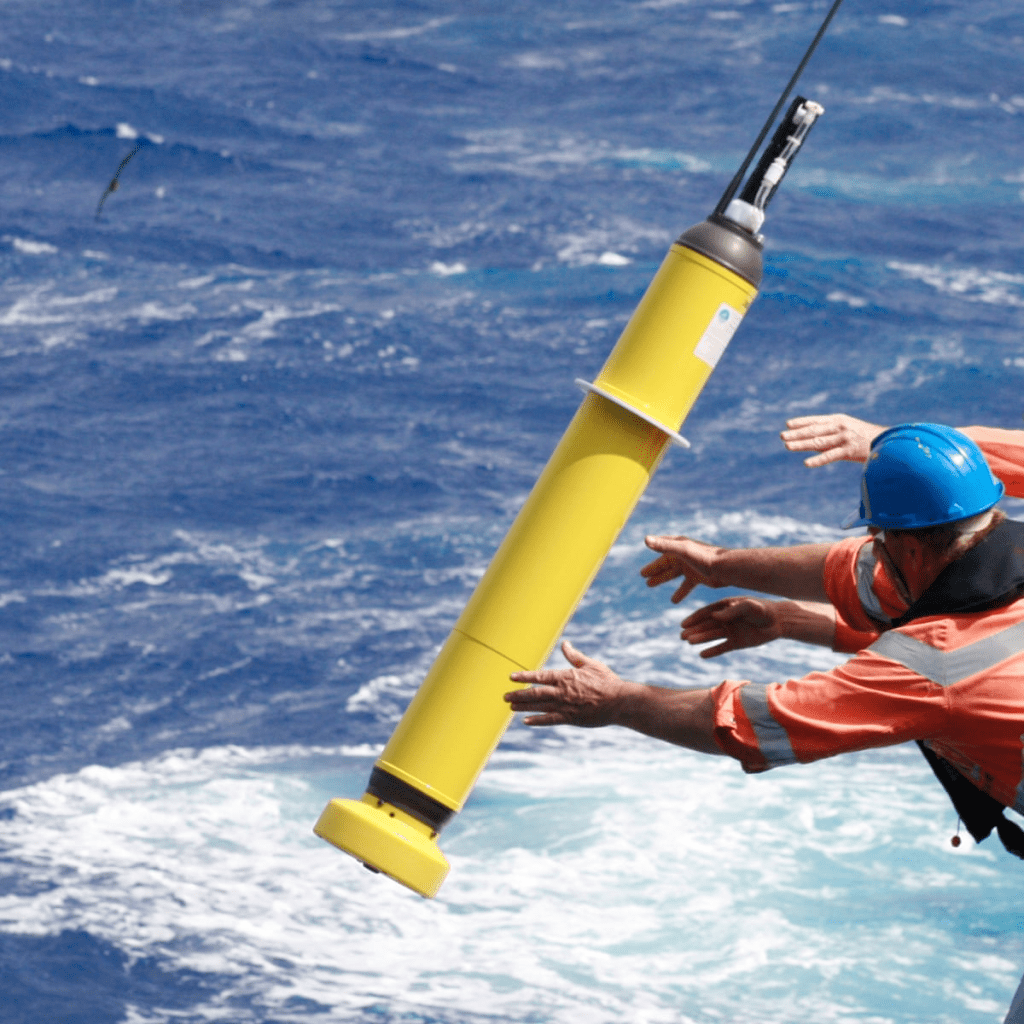
These tiny floats are supposed to be very disciplined little ocean robots. They sink, drift, rise, phone home by satellite, lather, rinse, repeat. Do that for long enough across enough oceans and you get one of the quiet triumphs of modern Earth science: a steady, global stream of temperature and salinity measurements that would be impossible to collect by ship alone. But every now and then, one of these instruments stops behaving like a metronome and turns into a character.
In 2019, float 7900904 was deployed near Totten Glacier in East Antarctica to measure ocean conditions in a place where the stakes are high and the access is awful. Polar versions of these floats exist, and scientists have learned how to operate them in icy seas, but there are still plenty of ways for reality to win. Almost immediately, this one went off-script. It drifted away from the deployment area and then vanished under the ice for eight months, the kind of disappearance that usually means you write it off, update your inventory, and try not to think about the budget line item too much.
Then, in 2020, it resurfaced hundreds of miles away near Denman Glacier, which is not just a different neighborhood but a much more interesting one. Denman is one of those places glaciologists and oceanographers want to watch closely, because it’s hard to reach and harder to instrument. Getting meaningful, sustained measurements there is a logistical headache. This float didn’t solve that problem on purpose. It solved it by getting lost in exactly the right direction.
And it didn’t just make a cameo appearance. For more than two additional years, into 2023, the float kept doing its five-day rhythm of dives and ascents, except the “drift” part of the cycle involved moving under massive ice shelves. It bounced off the undersides of Denman and Shackleton, and it bumped into the seafloor, again and again, and it kept coming back with data. These instruments are sturdy, but they are not designed to be pinballs beneath Antarctic ice. The fact that it lasted roughly two and a half years in that kind of environment is part engineering, part luck, and part stubbornness.
What it found is why people still tell the story, and I will not steal the thunder from either the linked post or the linked paper.
FIN
Remember, you can follow and interact with the full text of The Daily Drop’s free posts on:
- 🐘 Mastodon via
@dailydrop.hrbrmstr.dev@dailydrop.hrbrmstr.dev - 🦋 Bluesky via
https://bsky.app/profile/dailydrop.hrbrmstr.dev.web.brid.gy
☮️
 hrbrmstr's Daily Drop
Leave a comment