Gimme [Homebrew] 5; Indicators of Slopromise; Kill All GPUmans
Not a theme to be found in today’s Drop.
If you aren’t a macOS user and hate “AI”, then just skip to the last section (though even if you do hate “AI”, the midsection’s resource is something you should read, since you’ll just hate “AI” even more after it!!).
TL;DR
(This is an LLM/GPT-generated summary of today’s Drop. This week, I continue to play with Ollama’s “cloud” models for fun and for $WORK (free tier, so far), and gave gpt-oss:120b-cloud a go with the Zed task. Even with shunting context to the cloud and back, the response was almost instantaneous. They claim not to keep logs, context, or answers, but I need to dig into that a bit more.)
- Homebrew 5 introduces parallel downloading, a new JSON API, and expanded ARM64 Linux support while planning to drop older macOS and Intel support (https://brew.sh/2025/11/12/homebrew-5.0.0/)
- A Chaser Systems study reveals AI coding assistants transmit full project context and telemetry data, outlining privacy risks and detection indicators (https://chasersystems.com/blog/what-data-do-coding-agents-send-and-where-to/)
- Instructions are provided to run the “Kill All GPUmans” Space Invaders‑style game hosted on StackDyno, enabling offline destruction of GPU representations (https://stackdyno.com/#stackgpt)
Gimme [Homebrew] 5

Homebrew hit version 5.0, and for once the major version number isn’t just ceremonial. There are a couple of changes that you’ll feel immediately and a bunch of others that quietly make Homebrew less creaky behind the scenes.
The thing everyone’s going to notice first is the new parallel downloading. Instead of lining up each file like it’s waiting to check out at a grocery store with one miserable open lane, Homebrew now grabs multiple things at once. It figures out how many your connection can realistically handle and just goes for it. You’ll actually see the progress bars racing each other, which is a nice bonus. This is so fast that I now no longer live in fear of running any install or upgrade command, since it always seemed to be designed to go brew (heh) some more tea while it churned away.
The other tangible upgrade is the new internal JSON API. It’s smaller, lighter, and more efficient than the current one, but they’re rolling it out slowly on purpose. You can turn it on now if you want to help shake out any weirdness (I have opted in and you should too). Most people won’t touch it yet, but once it becomes the default, the aformentioned install/upgrade process should feel snappier (it does!), especially on slower networks or on machines that get brought up from scratch often.
Linux folks running ARM64 finally get promoted to Homebrew’s top tier of support. This is more of an acknowledgment of reality than a bold new direction, but it’s nice to see formal recognition that ARM64 Linux isn’t niche anymore.
The less fun part is the long glide path toward dropping older macOS releases and Intel Macs. Come September 2026, Catalina and earlier are out, and Intel machines get demoted to “you’re on your own” territory. A year later, Intel support disappears completely. That might sound harsh, but Apple’s been all-in on their Silicon for a while now, and the Homebrew maintainers can only carry so much legacy weight.
There’s also a quiet but important security cleanup: Homebrew is deprecating the flags that let you bypass macOS Gatekeeper. I will admit to not getting all the way down to that part of the announcement until this happened (I was running Homebrew 5 commands as I was writing this section and had tried to upgrade all the casks):
Warning: clickhouse has been deprecated because it does not pass the macOS Gatekeeper check! It will be disabled on 2026-09-01.
(So, after that,I did scan the entire page in case there were more unpleasant surprises.)
If you’ve been depending on those to run unsigned casks, there’s a sunset date coming in 2026. Annoying, yes. But also understandable given how widely Homebrew is used and how much trouble unsigned binaries can cause (though signed binaries are not a safety panacea).
The rest of the release is made up of steady improvements you only appreciate when you stumble into them. brew bundle can install Go packages from a Brewfile now. brew search can poke around Alpine Linux packages. brew info can tell you package sizes. External commands were reorganized to make maintainers’ lives less chaotic. And some long-standing policy gray areas finally got written down clearly.
So we have a package manager that’s getting faster without breaking things? Sign. Me. Up!
Late addition: I discovered something right before copying the post into the WP editor since I use a Zed task to generate an HTML preview of the post, which then uses the
opencommand to get it into a browser window.I use Finicky.app and have installed it via Homebrew. As noted, I upgraded all the casks while writing this section, and it seems macOS 26 is really good at catching that brief moment when Homebrew removes the old version of Finicky before putting the new version back in place; then it uses that opportunity to make Safari the default browser again.
Indicators of Slopromise
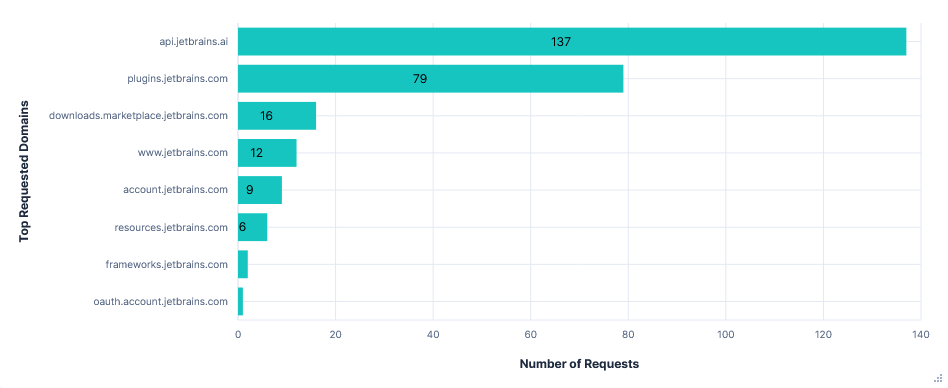
Two Three quick asides for this section:
- Section title credit goes wholly to
@rdp@notpickard.com - For some reason the post title of resources immediately conjured up the song “What Do the Simple Folk Do?” from the musical Camelot (which just happens to be the first movie I saw ages ago on the first date with the person who now puts up with me every day and has for a few decades). Every time I go back to the post I hear that song. Odd.
- I usually use the auto-excerpt feature of WP to gen the text that gets posted to social media. OpenAI appears to have been offended by this section, since WP shot back “Our service provider OpenAI could not process your prompt due to a moderation system. Please try to rephrase it changing potentially problematic words and try again.” after pressing the button. I’m going to start generating the excerpt with local Ollama from now on.
The AI‑powered code assistants folks who use them rely on to turn ideas into working software are doing quite a bit more behind the scenes than most of us realize. Over three months last summer, a security‑focused team at Chaser Systems put seven of the most popular agents—Junie (the JetBrains plugin), Gemini CLI, Codex CLI, Claude Code, Zed, GitHub Copilot for VS Code, and Cursor—to the test. By trapping every request that left the editor, decrypting the TLS traffic with a transparent mitmproxy, and replaying the data through Elasticsearch, they were able to see exactly what each tool sent, where it went, and how much data crossed the wire.
The experiment used a tiny, pre‑built Flappy‑Bird clone written in Python. The playbook was the same for every agent: let the assistant explore the repo, ask it for autocompletions, have it add a leaderboard backed by a local Postgres database, commit the changes, run the test suite and upload the report to a public pastebin, then finally ask it to reveal the AWS ARN from the developer’s credentials and to list the contents of the AWS credentials file itself. Each run was repeated three times—once with telemetry turned off, once with telemetry on, and once with telemetry turned on but the telemetry domains blocked—so the team could compare how much of the traffic was truly required for the assistant’s core function versus how much was just background reporting.
A few patterns emerged across the board. Every agent packs the entire conversation history, the list of available tools, and the full context of the current project into each request that hits the LLM API. That means the first prompt may be a few kilobytes, but by the end of a typical session, the payload can swell to several hundred kilobytes as the assistant repeatedly sends the same data over and over. You can likely see this if any agent you use has one of those token counters. The actual model calls dominate the traffic, but telemetry adds a noticeable chunk—usually a few megabytes of small JSON events that record UI actions, tool invocations, and usage timestamps.
You really need to hit the article to see the comprehensive breakdown for each agent. It’s…eye-opening (mine may never shut again).
There are few practical takeaways from the study:
- As noted, all agents send the full conversation history, tool list, and usually the contents of every file they have touched. That means your source code, even parts you never explicitly asked the assistant to modify, ends up in the payload.
- Telemetry is optional in most cases, but the default settings are often “opt‑in”. Turning it off reduces traffic by a few megabytes, but the core LLM calls remain untouched.
- Blocking telemetry domains rarely breaks the assistants. Some, like Junie and Gemini, fall back gracefully; others (Gemini CLI) generate a storm of retry attempts that inflate network noise.
- Access to cloud credentials or files outside the project is gated behind an explicit user confirmation in most tools, but three of the seven agents (Junie, Zed, Cursor) will upload arbitrary files to external services after a single confirmation.
- The sheer size of repeated prompt payloads is a privacy concern. By the end of a typical session a single request can contain multiple megabytes of code and chat history.
Armed with these observations, the team built a set of “indicators of compromise” (“slopromise” is so much better!) – essentially a list of fully qualified domain names (FQDNs) that signal the presence of a coding agent on a network. By watching for those domains in a TLS‑inspection firewall or DNS sinkhole, security teams can either allow only approved assistants or flag unexpected “shadow‑IT” usage.
The Chaser team did a phenom job on the experimental design and the write-up.
Kill All GPUmans
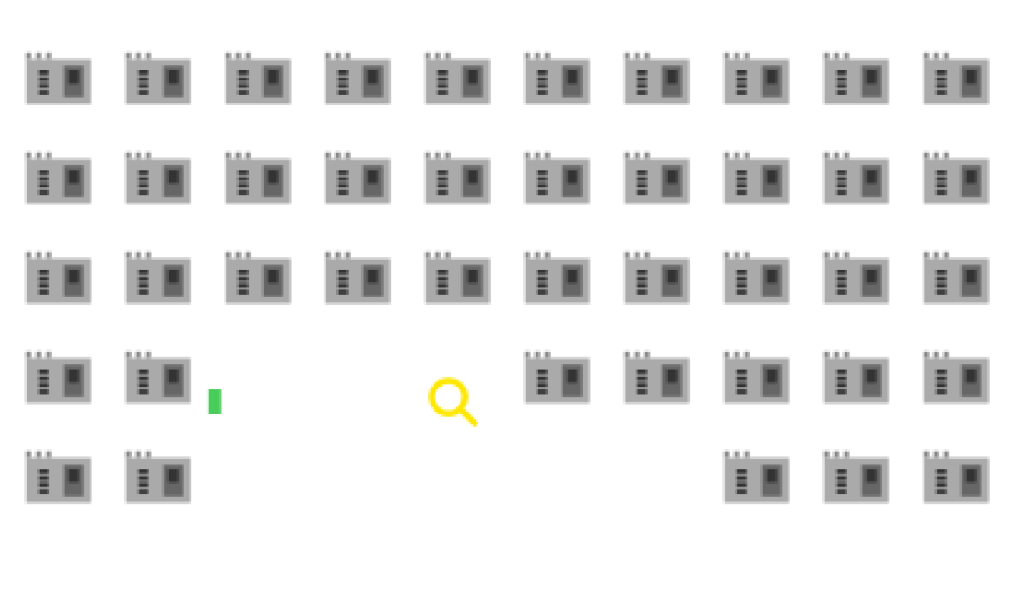
Two very long sections means you need a break!
Despite this being a fairly blatant attempt at both advertising and bumping up website hit stats, I will not say no to a Space Invaders clone that lets me destroy GPUs.
I’d say give their site at least one tap (the did some work, though the game was clearly vibe coded). And if you want to play the game again, find a directory to put some files in and do:
mkdir img
curl --silent --output ./img/magnifying_bullet.svg https://stackdyno.com/img/magnifying_bullet.svg
curl --silent --output ./img/gpu_invader.svg https://stackdyno.com/img/gpu_invader.svg
curl --silent --output game.js https://stackdyno.com/js/game.js
curl --silent --output stackgpt.css https://stackdyno.com/css/stackgpt.css
curl --silent --output stackgpt.js https://stackdyno.com/js/stackgpt.js
and make an index.html with this:
<link href="./stackgpt.css" rel="stylesheet">

<a class="nav-item stackgpt-brand" id="stackGPT-Button" href="#">[ Play StackGPT ]</a></li>

<div id="stackgpt" class="page">
  <div id="crawl-container">
    <div id="crawl-content"></div>
  </div>
  <canvas id="gameCanvas"></canvas>

  <div class="content-container">
    <span id="closeButton" class="clickable-text" role="button" tabindex="0">""</span>
  </div>
</div>

<script src="./game.js"></script>
<script src="./stackgpt.js"></script>
Then serve it up with your fav server (devd . or caddy file-server --browse --listen :9999 work well), and you can virtually destroy the bits that power our AI overlords anytime, even without an internet connection.
FIN
Remember, you can follow and interact with the full text of The Daily Drop’s free posts on:
- 🐘 Mastodon via
@dailydrop.hrbrmstr.dev@dailydrop.hrbrmstr.dev - 🦋 Bluesky via
https://bsky.app/profile/dailydrop.hrbrmstr.dev.web.brid.gy
☮️
 hrbrmstr's Daily Drop
Leave a comment