Cutting Centralization Out Of The Loop; Beyond WCAG; This Video Could Have Been A Web Page
Today’s Drop isn’t channeling why Paul [McCartney] wrote the iconic song in today’s tagline (in the chorus he is complaining about fans literally standing outside his door), so much as it is the “fixing/mending/taking” bits in the verses. We’ve got three very diverse resources that explore facets of those themes.
TL;DR
(This is an LLM/GPT-generated summary of today’s Drop using MLX LLM in Ollama server compatibility mode, SmollM3-3B-8bit, and a custom prompt.)
I was pretty shocked SmollM3 tackled this given the link complexity in the first section and the aside in the last section. Still super fast, too!
- Cutting GitHub Out of the Loop – Security and privacy concerns with US/Microsoft hosting, Microsoft’s track record with nation-state actors, GitHub’s use of code for AI training, and the need to migrate to alternatives like SourceHut, Codeberg, and GitLab. (https://www.circusscientist.com/2025/07/23/cutting-github-out-of-the-loop/)
- Beyond WCAG: Color Comfort Scores – Jon Mittelman highlights that high-contrast color pairs can still cause eye strain, glare, and fatigue, leading to the development of more nuanced “color comfort scores” that consider hue, saturation, and physiological responses. (https://freedium.cfd/@jan.mittelman/beyond-wcag-a-color-comfort-score-to-catch-eye-straining-combos-dcf75159c9ff)
- YouTube to Webpage Conversion – Jesse Vincent’s Perl script converts long YouTube videos into digestible web pages, leveraging yt-dlp and ffmpeg for efficient processing. (https://github.com/obra/Youtube2Webpage)
Cutting Centralization Out Of The Loop

Speaking of silly people running around, there are far too many individuals, teams, and organizations dependent on cetralized services, a major one being GitHub. If you don’t know my stance on GitHub by now, you’ll eventually get the earful if you catch a social media rant. For now, you can take the word of these folks (I cut the link DoS from my Raindrop.io links down to just 10):
- How and Why to Ditch GitHub (Taggart Tech) — Security and privacy concerns with US/Microsoft hosting, Microsoft’s track record with nation-state actors, US government surveillance risks, and GitHub’s use of everyone’s code to train language models.
- Give Up GitHub: The Time Has Come! (Software Freedom Conservancy) — GitHub’s Copilot uses public code for for-profit AI, disregard for open-source licenses, ignoring community complaints, and fostering proprietary/vendor lock-in with a walled garden for FOSS.
- Ditching GitHub – A Token of My Extreme (tomscii.sig7.se) — Personal account outlining why the author is moving all code off GitHub, advocating for alternatives.
- Divesting from Github and going self-hosted (nilsnh.no) — Copilot and its disregard for copyright/licensing, Microsoft’s profit-driven ownership, and the challenge but necessity of moving to self-hosting.
- Should developers ditch GitHub? (Mattermost) — SFC calls for ditching GitHub: opaqueness about code used for model training, monetization of open-source contributions, lack of transparency/accountability.
- We need to talk about your Github addiction (Ploum.net) — Criticism of GitHub’s shift toward a dopamine-driven “attention” platform, its use of all posted code for AI training, intrusive notification system, and overall departure from professional open-source hosting.
- Git Myself Because GitHub Cannot Be Trusted (Darren Nathanael) — Copilot, for-profit exploitation of FOSS projects’ code, and the difficulty of leaving due to vendor lock-in.
- Open source devs urged to ditch GitHub after Copilot launch (TechCrunch) — Community backlash and SFC’s anti-GitHub campaign after Copilot’s controversial release.
- Give Up Github (Reddit r/emacs) — Community discussion on the legal, ethical, and practical reasons for leaving, including Copilot and interest in alternatives (e.g. SourceHut, Gitea).
- Why I Quit GitHub (Digital Initiatives at the Grad Center – CUNY) — Ethics concerns, company behavior, protests over ICE contracts, and reasons for individual contributors to stop supporting the platform.
OK, I lied. There’s an 11th link that spawned the inclusion of this section: Tom Hastings’, “Cutting GitHub out of the loop”.
I stopped mirroring source to Bitbucket ages ago, so was not aware of their massive pullback from supporting FOSS projects. GitLab is on the “please buy me” circuit, so expect more of the same from them when some daft billionaire/hedge fund/megacorp does acquire them. Tom provides keen guidance on using the built-in self-hosted git via ssh + the built-in web server and some simple Linux glue.
Stay on GitHub at your and your org’s/team’s peril. Don’t say I (and many others) didn’t warn you.
And, don’t say you do not have robust choices:
- sourcehut (git+CI/CD)
- Codeberg (git+CI/CD)
- tangled (git)
- Heptapod (CI/CD if you must have a SaaS one)
At the very least, stop leading others astray by being a walking promotional endorsement for organizatons that are doing nothing more than attempting to be the one and only stop shop in a tech feudal society.
Beyond WCAG
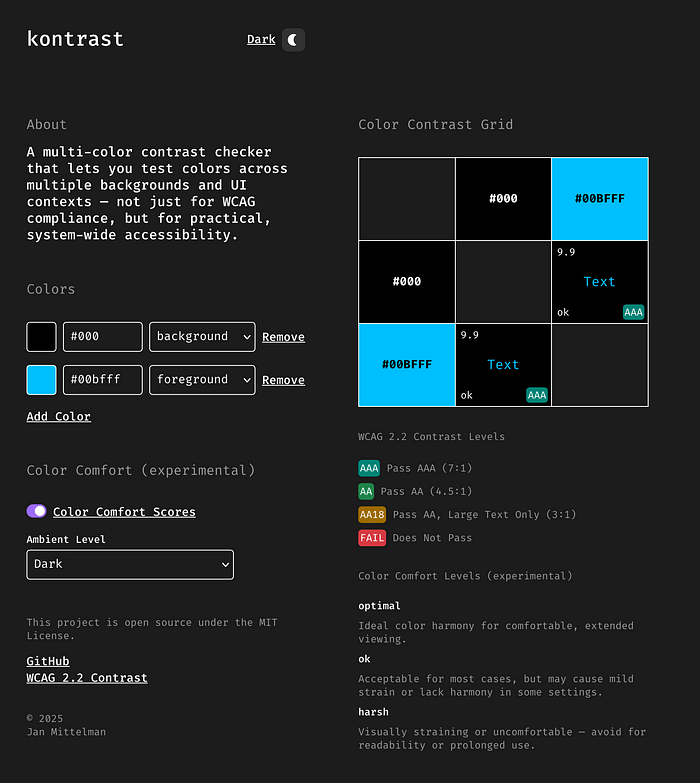
Jon Mittelman’s epic piece — “My Color Combo Passes WCAG — So Why Does It Still Hurt to Look At? — sheds light on something that’s easy to miss, especially if you use common WCAG compliance tools.
WCAG’s color contrast guidelines have long been the standard for judging if text is readable against its background. However, if you’re an interface designer or someone who stares at screens for hours, you’ve probably noticed that not all “passing” color combos feel comfortable to look at. In fact, some color combos that clear WCAG’s mathematical hurdle still feel harsh, cause eye strain, or are downright unpleasant after long use. (I’m looking at you, all white text on an all black background.)
Their current model is based purely on luminance contrast — a mathematical assessment of lightness and darkness between two colors. But as many users and accessibility advocates have noticed, high-contrast isn’t always synonymous with comfort. Folks sometimes find supposedly accessible color pairs glaring, fatiguing, or jarring over time. The real world isn’t as simple as WCAG’s formulas, and user comfort is a much more complex aggregation of factors than “is the ratio above x?”
There’s a growing realization that WCAG-legal color choices can still induce:
- Glare and visual fatigue — especially with strong, saturated pairs.
- Flickering or halo effects on some displays or in low ambient lighting.
- Difficulty reading for extended periods, especially for those with visual or neurological sensitivity.
Research in ergonomics and vision science now points to certain color pairings inducing more strain, even if they technically “pass” contrast standards.
To bridge this gap, various individuals and creator communities are developing more nuanced measures, sometimes called “color comfort scores.” These attempt to quantify not just whether a color pair is readable, but also how comfortable it is on the eyes over time—a kind of “visual ergonomics” for color combos.
Such a score generally considers:
- Relative luminance difference (what WCAG already uses)
- Hue angle difference (how far apart colors are on the color wheel)
- Saturation levels
- Physiological response data (from eye-tracking or subjective questionnaires)
- User feedback on perceived strain
By going beyond pure contrast ratio, this approach aims to catch those uncomfortable pairs before they reach users’ screens.
I’ll let Jon take it from here, noting that I’ve also added his link to my “accessibility” folder in Joplin to remind me to not repeat my own “glaring” content mistakes.
This Video Could Have Been A Web Page

I fear we’re going to be stuck with all the detritus influencer culture has brought upon us for quite a while. One of said bits of flotsam is the dreaded “in this video, I explain how to…” posts that litter every video posting platform.
Yes, I ACK that some folks learn better from videos, but that’s not why most folks make videos. I’ll take a transcript + key frames any day, and — while we’ve featured similar tools in previous Drops — I had to link to Jesse Vincent’s one — https://github.com/obra/Youtube2Webpage — since it is pure, glorious, 100% human crafted Perl.
Jesse’s script quickly turns a long-winded YT video into a quickly digestible image-adorned transcript using yt-dlp & ffmpeg.
_Speaking of ffmpeg, I’m a billion years old and have used that tool for many of said years and I still have not committed even a tiny fraction of the CLI options to memory. Scott VanRavenswaay has a pretty clever natural language-to-ffmpeg-CLI incantation tool — wtffmpeg — that relies on local inference to help you get your cat videos (et al.) into the right shape and size to post anywhere you like.
FIN
Remember, you can follow and interact with the full text of The Daily Drop’s free posts on:
- 🐘 Mastodon via
@dailydrop.hrbrmstr.dev@dailydrop.hrbrmstr.dev - 🦋 Bluesky via
https://bsky.app/profile/dailydrop.hrbrmstr.dev.web.brid.gy
☮️
 hrbrmstr's Daily Drop
Leave a comment