MarkText; WASMPrints; Cerberus
The Typography Tuesday Drop was sidelined due to both getting back to $WORK after a 4-day weekend and me being daft and updating every Apple *OS to their version 26 counterparts. AMA about macOS 26 (et al.), especially if you want to know about compatibility with any tooling.
TL;DR
(This is an LLM/GPT-generated summary of today’s Drop using Ollama + Qwen 3 and a custom prompt.)
- MarkText is a cross-platform, distraction-free FOSS Markdown editor featuring real-time WYSIWYG preview, advanced formatting (math, diagrams), and robust export options, with minor quirks in preview/export consistency but strong core functionality (https://www.marktext.cc/).
- Recent research shows WebAssembly-based fingerprinting enables highly precise, hard-to-spoof browser/device identification by measuring low-level execution timings, raising both privacy concerns and new defensive strategies (https://arxiv.org/abs/2506.00719).
- Cerberus is a Caddy plugin that uses SHA-256 proof-of-work challenges to aggressively block automated AI bot abuse, prioritizing service protection over user convenience and offering frequent, configurable computational barriers (https://github.com/sjtug/cerberus).
MarkText
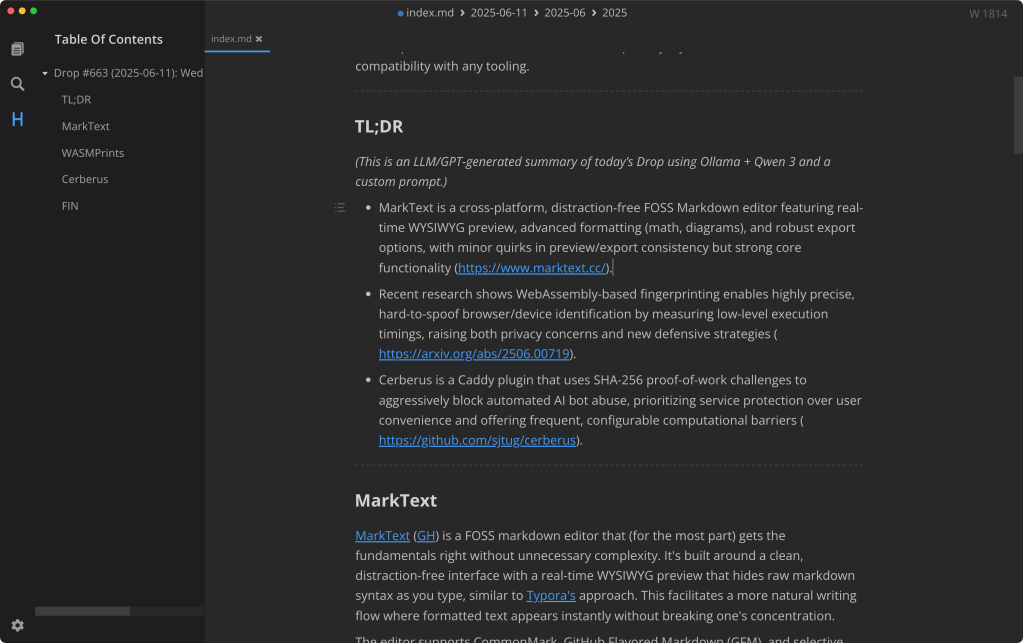
MarkText (GH) is a FOSS markdown editor that (for the most part) gets the fundamentals right without unnecessary complexity. It’s built around a clean, distraction-free interface with a real-time WYSIWYG preview that hides raw markdown syntax as you type, similar to Typora’s approach. This facilitates a more natural writing flow where formatted text appears instantly without breaking one’s concentration.
The editor supports CommonMark, GitHub Flavored Markdown (GFM), and selective Pandoc features, handling everything from basic formatting to advanced elements like math expressions (KaTeX), diagrams (PlantUML, Mermaid, flowcharts), and footnotes. You can paste images directly from your clipboard, which streamlines document creation significantly. Code blocks get proper syntax highlighting via PrismJS, making it a decent choice for composing technical documentation.
Three editing modes cater to different preferences: Source Code Mode for direct Markdown control, Typewriter Mode that centers your current line, and Focus Mode that strips away UI distractions. The customization options are extensive, with multiple built-in themes and the ability to create custom CSS themes. RTL language support is included.
Export options cover HTML and PDF, plus you can copy content in various formats. The outline view helps navigate longer documents by headings. File management is integrated directly into the app, and it runs smoothly across Linux, macOS, and Windows with straightforward installation via binaries or package managers.
Whenever there’s a Drop resource with a GH link, I usually peek at the issues and there are some nits that have been picked for MarkTest. Some folks report minor discrepancies between the editor display and exported output, particularly with line breaks. The live preview can also occasionally make editing already-rendered text less intuitive since the raw syntax is hidden. On the plus said, said issue spelunking did reveal that recent updates have added the aforementioned PlantUML support, improved image handling with PicGo integration, and better keyboard shortcuts for international users.
MarkText is not trying to be everything to everyone, but what it does, it does pretty well. The real-time preview feels genuinely useful rather than gimmicky, and the cross-platform consistency is solid (though the macOS app feels a tad “sluggish”). For anyone who spends serious time in Markdown documents, it’s worth evaluating against your current workflow.
I’ll keep it in the arsenal, but will continue to edit most of my markdown in Zed, though I did use MarkText for this entire Drop (well, “will be” as of typing this closing graph).
WASMPrints

As we’ve covered in a few previous Drops, browser fingerprinting has always been a cat-and-mouse game between privacy advocates and those seeking to uniquely identify web clients. Just when you think you’ve got your digital privacy locked down with spoofed user agents and privacy extensions, along comes a new technique that makes those defenses look quaint. Enter WebAssembly-based fingerprinting: a method that’s quietly leveling up how browsers, devices, and even virtual environments can be uniquely identified.
The traditional fingerprinting playbook relied heavily on JavaScript to collect obvious markers like user-agent strings, screen dimensions, color depth, and installed plugins. These methods worked well enough for a while, but they had a fundamental weakness: they were easily spoofed. Privacy-conscious users could simply lie about their browser type, fake their screen resolution, or disable plugins entirely.
Recent research, particularly the work by Guri and Fibert in their paper “Browser Fingerprinting Using WebAssembly,” demonstrates how WebAssembly changes this landscape in a pretty big way. This new magick is elegant in its simplicity: instead of asking the browser what it is, WebAssembly (WASM from now on) lets us observe how it behaves under the hood.
WASM runs at near-native speed, which means its execution characteristics are deeply influenced by the underlying hardware, the browser’s JavaScript engine, the operating system, and even whether you’re running in a virtual machine. These behavioral signatures are incredibly difficult to mask because they emerge from the fundamental architecture of your computing environment, not from easily manipulated configuration settings.
The fingerprinting process works by running a carefully designed battery of timing tests that measure the performance of various interactions between JavaScript and WASM. These tests include calling JavaScript functions from WASM and vice versa, reading from and writing to WASM’s linear memory, invoking standard JavaScript built-ins like Math.cos from WASM, and setting properties using WASM functions as getters and setters through Object.defineProperty.
Here’s a simplified version of how the core fingerprinting loop works:
for (let i = 0; i < numIterations; i++) {
    let start = performance.now();
    wasmFunction();
    let end = performance.now();
    timings.push(end - start);
}
Each test runs multiple times to account for natural performance variations, and the resulting execution times are recorded with high precision. The collection of these timings creates a high-dimensional feature vector that serves as a unique fingerprint for that specific browser and device combination. This fingerprint can then be compared against a database of known signatures using traditional distance metrics to identify not just the browser and operating system, but even detect virtualized environments.
The precision is remarkable and scary. The research shows that this technique can distinguish between different versions of the same browser, identify specific hardware configurations, and even detect when someone is running their browser inside a virtual machine. It’s the kind of granular identification that makes traditional spoofing techniques look like putting a fake mustache on your driver’s license photo.
Of course, where there’s a new attack vector, defensive measures inevitably follow. The researchers also provide mitigation strategies (🙏🏽), and some of them are quite clever. One approach involves injecting random delays into timing-sensitive operations:
let originalDefineProperty = Object.defineProperty;
function myDefineProperty(obj, prop, descr) {
    if (descr && descr['set']) {
        let originalSetter = descr['set'];
        descr['set'] = function(...args) {
            setTimeout(() => originalSetter.apply(this, args), Math.random() * 1000);
        };
    }
    originalDefineProperty(obj, prop, descr);
}
Object.defineProperty = myDefineProperty;
This kind of timing noise can make Firefox appear more like a Chromium-based browser or simply introduce enough randomness to confuse the classification algorithms.
From a security perspective, this development is fascinating but also concerning. On one hand, it demonstrates the incredible ingenuity of researchers pushing the boundaries of what’s possible with web technologies. On the other hand, it highlights how even privacy-focused users with sophisticated defensive tools can still be uniquely tracked.
The detection side is equally important. If you’re concerned about whether a website is attempting this kind of fingerprinting, you can monitor for suspicious patterns in high-resolution timer usage through performance.now() calls or instrument WASM exports to log unusual execution patterns.
WebAssembly’s power in this context also raises broader security questions. The same low-level access that enables precise fingerprinting could potentially be exploited through bugs or vulnerabilities in WASM modules. The research community is already developing tools like Fuzzm and CROW to harden WebAssembly binaries against such attacks.
For those interested in exploring this technology firsthand, there’s an open-source WebAssembly fingerprinting library available at github.com/drbh/wasm-fingerprint. The paper provides comprehensive details including algorithms, code snippets, and evaluation results.
The implications of these techniques extend beyond simple user tracking. They could be especially valuable for fraud detection, bot identification, or security applications where you need to verify that a client is actually what it claims to be. It’s a double-edged sword that will likely reshape how we think about both privacy and security on the web.
Cerberus

AI bots are wreaking havoc on many web properties. Virtually all the existing big-name model providers hammer sites, often via residential or commercial proxies, making them hard to detect via IP or ASN sources.
Cereberus is Caddy plugin implements SHA-256 proof-of-work challenges as a computational barrier against these unwanted requests. This makes attacks expensive by forcing clients to solve cryptographic puzzles before accessing services. When Cerberus receives a request, it may issue a challenge that the client must complete to proceed. The solution grants temporary access for a limited number of subsequent requests, but new challenges are generated frequently, potentially on every request.
This aggressive stance is intentional. The developers have chosen to prioritize service availability over user convenience, acknowledging that legitimate users will experience some friction. It’s a pragmatic decision for scenarios where service outages from abuse are more costly than slightly degraded user experience.
Cerberus evolved from Anubis but has taken its own path. Where Anubis operates as a standalone server, Cerberus integrates directly as a Caddy handler. It strips away custom UI elements and anti-AI rules in favor of Caddy’s built-in matchers for filtering. The result is a more focused, aggressive implementation that rotates challenges more frequently.
Getting started requires either installing pre-built binaries or building from source. The installation process is clean:
caddy add-package github.com/sjtug/cerberus
For custom builds, xcaddy handles the compilation:
xcaddy build --with github.com/sjtug/cerberus@v1.0.0
The team behind Cerberus wants to push challenge frequency even higher, eventually rotating per request. They’re exploring configurable difficulty levels per route and considering a “block_only” mode for pure blocklisting without proof-of-work overhead. Performance concerns with their current approach have them investigating alternative algorithms like blake3 with WebAssembly.
This plugin won’t suit every use case. If you’re running a consumer-facing service where friction kills conversion, this isn’t your tool. But for self-hosted infrastructure, mirror services, or any scenario where automated abuse threatens service availability, it offers a compelling defense mechanism.
It dropped in fine and did what it said on the tin, but I’m tracking AI bots across all my internet-facing servers, so won’t be using this “in prod” any time soon.
FIN
Remember, you can follow and interact with the full text of The Daily Drop’s free posts on:
- 🐘 Mastodon via
@dailydrop.hrbrmstr.dev@dailydrop.hrbrmstr.dev - 🦋 Bluesky via
https://bsky.app/profile/dailydrop.hrbrmstr.dev.web.brid.gy
☮️
 hrbrmstr's Daily Drop
Leave a comment