Cockpit; HTML Whitespace is Broken; DuckDB 1.2.0
I couldn’t let the week go by without mentioning the DuckDB 1.2.0 release, so I pulled in one resource thats been sitting in the TODO queue, and snuck in a recently published post on a topic I suspect most folks haven’t thought much about.
TL;DR
(This is an AI-generated summary of today’s Drop using Ollama + llama 3.2 and a custom prompt.)
- Cockpit is a web-based server administration tool that bridges command-line and GUI interfaces, offering comprehensive system management features while running efficiently on-demand (https://cockpit-project.org)
- HTML whitespace handling varies between inline and block elements, affecting link underlines and accessibility, with specific best practices needed for proper content display and screen reader compatibility (https://blog.dwac.dev/posts/html-whitespace/)
- DuckDB 1.2.0 introduces improved storage compatibility, primary key support, enhanced CSV/Parquet handling, and CLI improvements with a 13% performance boost on TPC-H SF100 queries (https://duckdb.org/2025/02/05/announcing-duckdb-120.html)
Cockpit
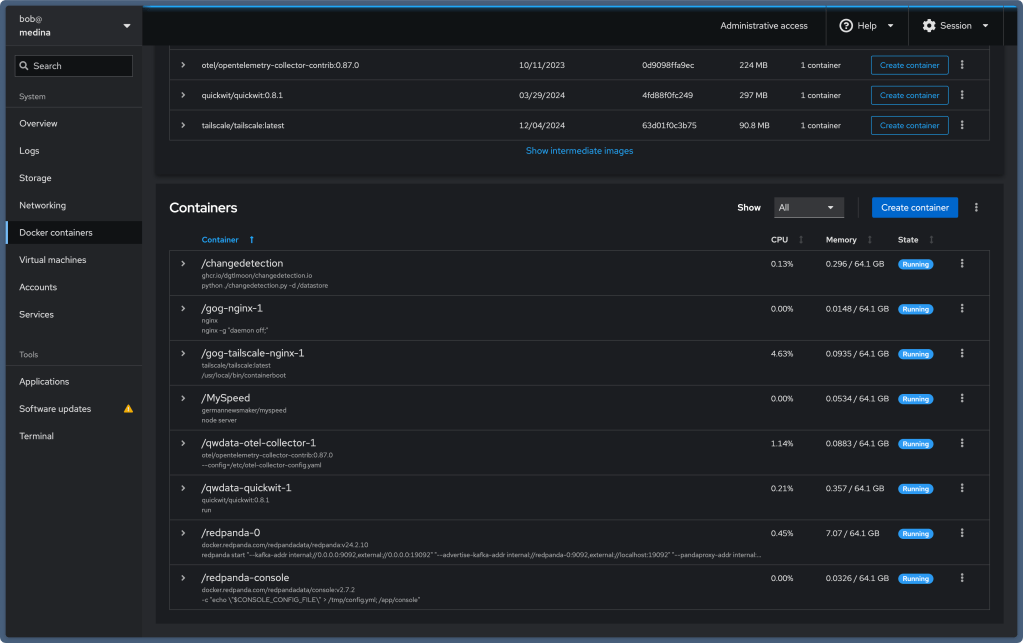
Cockpit (GH|GHOrg) is a server administration tool that sports a friendly bridge between the command-line and point-and-click GUI worlds. It plays nicely with all your existing system tools, so you can switch between the web interface and command-line whenever you want. It’s super efficient and only runs when you need it, so it doesn’t bog down system resources.
Getting started is pretty straightforward since it has comprehensive setup instructions for all supported operating systems. Once installed it:
- Uses your regular system login (no extra passwords to remember!)
- Runs on port 9090 with secure HTTPS
- Works right out of the box with self-signed certificates
It can do pretty much everything you need:
- Set up networks and manage firewalls
- Handle storage (including fancy stuff like RAID and encrypted partitions)
- Spin up and manage virtual machines
- Work with containers (Podman or Docker)
- Keep an eye on system logs and performance
- Manage user accounts
The Cockpit team is super active, pushing out new updates every two weeks. They’re careful about testing everything thoroughly, so you don’t have to worry about updates breaking your system. Since it’s open source (under GNU LGPL), you can even see how it works and also contribute to the project.
Want to do more? Cockpit has tons of optional add-ons, like cockpit-podman for container management and cockpit-files for advanced file operations.
Whether you’re coming from Windows, just learning Linux, or you’re a command-line pro, Cockpit is definitely worth checking out, especially if you manage multiple systems.
HTML Whitespace is Broken

When it comes to working with HTML, how spaces, tabs, and line breaks are handled can be pretty tricky to understand. It’s one of those things that seems simple at first but has some interesting quirks that can catch even experienced developers off guard. In “HTML Whitespace is Broken”, Douglas Parker takes us on a detailed journey of virtually every HTML whitespace mainstays and edge cases, providing guidance and workarounds to deal with it most effectively.
HTML treats whitespace differently depending on whether you’re working with inline elements (like text and links) or block elements (like paragraphs and divs). With inline elements, spaces between things are actually shown on the page, but multiple spaces get squeezed down into just one space. Block elements are a bit different, ast hey tend to ignore spaces more aggressively; and — if you have a block that’s nothing but spaces — it just disappears entirely.
One of the most common headaches developers face is with link underlines. You know those times when you have a link and the underline extends further than you expected (which has totally never happened to me in at least 37 of these Drops)? That’s because spaces inside the link tags become part of what gets underlined. And if you happen to have a line break before the closing tag, surprise — you might get some extra underlining you didn’t want.
CSS can make things even more interesting (or complicated, depending on how you look at it). When you change how elements are displayed using CSS, it can actually affect how whitespace is handled. This isn’t just about “looks”; it can impact how screen readers interpret your content, which is pretty important for accessibility.
To handle all this, there are some helpful best practices to keep in mind. Try to avoid extra spaces at the beginning and end of links, be consistent with how you use display properties, and consider using CSS margins and padding instead of trying to create space with HTML. When you’re working with a content management system, remember that all these whitespace rules will apply to whatever content gets entered.
And while the good old non-breaking space ( ) can be tempting to use as a quick fix, it’s best to use it sparingly. It’s a special tool that’s great for specific jobs but shouldn’t be your go-to solution for every spacing issue.
The whole thing is complex because browsers can’t read our minds — they can’t tell if we added spaces to make our code prettier or if we actually want those spaces to show up on the page. But once you read through Parker’s post, and understand these behaviors, you’ll be much better equipped to handle whitespace in your HTML documents!
DuckDB 1.2.0

Whilst I was traipsing around San Diego with my work-mates, the DuckDB team released version 1.2.0. That release blog has expository and examples for the major release components, so we’ll just hit the highlights here:
Breaking Changes
- The
randomfunction now uses a larger state for improved randomness - Map indexing behavior has changed to return single values instead of lists
list_reduceindexing has been fixed to start from 1
Storage and Compatibility
- New compression methods introduced but disabled by default for backwards compatibility
- Explicit storage versions can be specified using
ATTACHstatements - Files can be converted between storage versions for compatibility
Database Features
- Primary keys can now be added to existing tables
- Over-eager constraint checking issues have been resolved
- Performance optimizations yielding 13% improvement on TPC-H SF100 queries
CSV Handling
- Support for Latin-1 and UTF-16 encodings
- Multi-byte delimiters up to 4 bytes
- Strict CSV parsing mode following RFC 4180
- 15% faster CSV parsing with new line-finding algorithm
- Removed 8MB row length limitation
Parquet Enhancements
- Dictionary encoding and Bloom filter support
- New compression options including
DELTA_BINARY_PACKED
CLI Improvements
- New safe mode for restricted file system access
- Enhanced autocomplete using PEG
- Better number formatting for large values
SQL Enhancements
- Prefix aliases for improved readability
- New
RENAMEclause inSELECTstatements - Star
LIKEsyntax for column selection
Extension Support
- New C-style API for extensions
- Official musl support for
linux_amd64_muslplatform
FIN
Remember, you can follow and interact with the full text of The Daily Drop’s free posts on:
- 🐘 Mastodon via
@dailydrop.hrbrmstr.dev@dailydrop.hrbrmstr.dev - 🦋 Bluesky via
https://bsky.app/profile/dailydrop.hrbrmstr.dev.web.brid.gy
Also, refer to:
to see how to access a regularly updated database of all the Drops with extracted links, and full-text search capability. ☮️
 hrbrmstr's Daily Drop
Leave a comment