Vector; ATFile (a.k.a. Be Careful Of The Blob(s)); Betwixt
In today’s Drop, we explore three spiffy tools for data engineering, debugging, and defender evasion : Vector’s robust observability pipeline, ATFile’s clever use of Bluesky’s blob storage, and Betwixt’s surprisingly effective web traffic analysis capabilities.
TL;DR
(This is an AI-generated summary of today’s Drop using Ollama + llama 3.2 and a custom prompt.)
- Vector is a high-performance observability data pipeline written in Rust that handles data collection, transformation, and routing through a component-based architecture of Sources, Transforms, and Sinks (https://vector.dev)
- ATFile is a shell script tool that enables using any PDS as blob storage for the AT Protocol, allowing users to upload and retrieve files through Bluesky’s infrastructure (https://github.com/electricduck/atfile/tree/main)
- Betwixt is a web debugging proxy tool that provides Chrome DevTools-style traffic analysis by creating a local proxy service on port 8008 (https://github.com/kdzwinel/betwixt)
Vector

Vector (GH) is a high-performance observability data pipeline, written in Rust, that enables collecting, transforming, and routing all observability data types (logs, metrics, traces). It serves as a vendor-agnostic layer between your observability data sources and destinations.
This framework/platform employs a component-based architecture with three primary types. “Sources” handle data ingestion from various inputs like files, syslog, journald, and Kubernetes. They implement standardized protocols like HTTP, gRPC, and TCP/UDP. “Transforms” process observability data through operations like parsing, filtering, and aggregation. The transform layer supports complex event processing, field manipulation, and type conversion. “Sinks” route processed data to destinations. Vector maintains official integrations with major observability platforms while supporting generic protocols for custom implementations.
Thanks to Rust, Vector provides memory safety without garbage collection overhead. The architecture leverages async I/O and implements back-pressure handling throughout the pipeline. It can handle multi-gigabyte throughput with sub-millisecond latency on modest hardware.
Vector can be deployed as:
- A daemon on individual hosts
- A sidecar in Kubernetes pods
- An aggregator service for data centralization
- A stateless service in stream processing architectures
Vector uses YAML (ugh) for configuration with support for environment variable interpolation and dynamic configuration reloading. The configuration model is declarative and supports complex topologies through component chaining.
sources:
  logs:
    type: file
    include: ["/var/log/**/*.log"]

transforms:
  parse_logs:
    type: remap
    inputs: [logs]
    source: |
      . = parse_json!(.message)

sinks:
  metrics_out:
    type: prometheus
    inputs: [parse_logs]
    address: 0.0.0.0:9598
We have a diverse array of “pipelines” and “logs” at $WORK and I’m thinking Vector could serve as both a central log aggregator for any events and also as a preprocessing pipeline for some our data science/analytics workflows, especially since we do have some high-volume observability data.
I’ve only just started tinkering with it, so I’ll report back if we do end up adopting it in some way.
ATFile (a.k.a. Be Careful Of The Blob(s))

In the AT Protocol, Blobs are unstructured data (typically media like images and video) that can be stored in repositories. They are not stored directly in repositories but are referenced by content hash (CID), and they use a specific format with required fields:
$type: Must be set to “blob”ref: A CID reference to the blob using therawmulticodec type
The content hash (CID) must use CIDv1, base32 for string encoding, and employ raw (0x55) multicodec for blob references.
These Blobs can then be retrieved using the com.atproto.sync.getBlob endpoint which requires the account’s DID and the blob’s CID.
Large binary objects are deliberately kept separate from the main repository structure while maintaining referential integrity through content-addressed linking. This design choice helps maintain repository efficiency while still allowing for arbitrary binary data storage.
SO…why am I boring you with that?
Well, because some clever human made ATFile, a shell script that lets you use any PDS as a place to store and retrieve these Blobs, which is done via uploading files. For example:
$ atfile upload /tmp/hello.txt

 ##########################################
 # You are uploading files to Bluesky PDS #
 #    Do not upload copyrighted files!    #
 ##########################################

Uploading '/private/tmp/hello.txt'...
---
Uploaded: 📄 hello.txt
↳ Blob: https://porcini.us-east.host.bsky.network/xrpc/com.atproto.sync.getBlob?did=did:plc:hgyzg2hn6zxpqokmp5c2xrdo&cid=bafkreid3gtooifq6v7cee6qcao5uylz2hk2m7am46eq6hmy4f63j6itvki
↳ Key: 3lbflwwkmoe2x
Now, we can see what that is:
$ curl --silent"https://porcini.us-east.host.bsky.network/xrpc/com.atproto.sync.getBlob?did=did:plc:hgyzg2hn6zxpqokmp5c2xrdo&cid=bafkreid3gtooifq6v7cee6qcao5uylz2hk2m7am46eq6hmy4f63j6itvki"
ATfile Hello
If you hit up my Bluesky profile, you won’t see that there, since it’s not connected to an actual post.
Running atfile -h provides you with all the functionality baked into the tool.
NOTE: I highly recommend installing the mediainfo CLI, as noted in the script.
I have no idea how long Bluesky plans on keeping arbitrary Blobs around, but you can 100% run your own PDS if that’s of concern.
These Blobs are almost certainly going to get abused by attackers as command and control (C2) endpoints and for malware distribution or adversary tooling download points.
And, it truly does support all media types. If you’re brave and have the full ffmpeg suite installed, give:
$ ffplay "https://porcini.us-east.host.bsky.network/xrpc/com.atproto.sync.getBlob?did=did:plc:hgyzg2hn6zxpqokmp5c2xrdo&cid=bafkreibqdw3e536oxwvg26pbgddeuh6bjufnz5btonbrd5avmzcyofn6km"
a go.
Betwixt
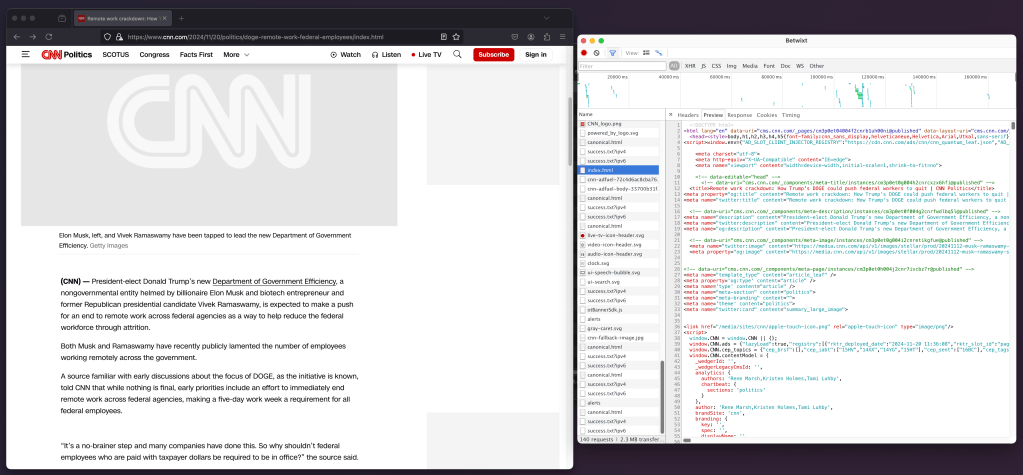
In the “I can’t believe this still works in 2024” bucket is Betwixt, a web debugging proxy that enables web traffic analysis outside the browser through a familiar Chrome DevTools interface. It operates by creating a background proxy service that listens on http://localhost:8008.
The proxy can be configured either system-wide or for individual terminal sessions. For system-wide configuration on macOS, the HTTP proxy settings can be adjusted through System Preferences under Network Advanced settings. Windows users configure this through Network & Internet Proxy settings, while Ubuntu users access it via Network Proxy in All Settings.
For terminal-specific traffic capture, setting the HTTP proxy environment variable (export http_proxy=http://localhost:8008) will direct all terminal traffic through Betwixt (for at least a majority of curl-based tools).
Since most sites are HTTPS, now, you’ll need to follow these instructions for installing the required certificates, but an increasing number of sites have extra TLS protections in place, so you may not be able to debug every site you’d like.
macOS folks will either need to rebuild the tool, or run:
$ sudo /usr/bin/xattr -d com.apple.quarantine $HOME/Downloads/Betwixt-darwin-x64/Betwixt.app
so modern macOS installations will execute it. Furthermore, Apple Silicon users will have a bit of a first-run delay as Rosetta 2 does its magic.
FIN
We all will need to get much, much better at sensitive comms, and Signal is one of the only ways to do that in modern times. You should absolutely use that if you are doing any kind of community organizing (etc.). Ping me on Mastodon or Bluesky with a “🦇?” request (public or faux-private) and I’ll provide a one-time use link to connect us on Signal.
Remember, you can follow and interact with the full text of The Daily Drop’s free posts on Mastodon via @dailydrop.hrbrmstr.dev@dailydrop.hrbrmstr.dev ☮️
 hrbrmstr's Daily Drop
Leave a comment