Secure ShellFish; Get Out Of My <head>; Tini
The resources in today’s Drop have each made it onto and then off-of my “I should talk about this today” list (said list has ~20-ish items on it at any given time). None of them really fit into a neat meta-category, but they’re all pretty useful in each of their own contexts.
TL;DR
(This is an AI-generated summary of today’s Drop using Ollama + llama 3.2 and a custom model.)
- Secure ShellFish provides a native SSH and SFTP client for macOS and iOS with performance, accessibility, and contextual terminal capabilities (https://secureshellfish.app)
- Get Out Of My
<head>offers practical guidance on browser-centric meta tags and features, including link previews, favicon implementations, and mobile-specific considerations (https://getoutofmyhead.dev) - Tini is a minimalistic init system designed for containerized environments, ensuring proper zombie process reaping and signal handling within containers (https://github.com/krallin/tini)
Secure ShellFish

(NOTE: This is for iOS and/or macOS folk, so feel empowered to jump to the next section if you’re not on those platforms.)
I generally lean towards avoiding single-platform resources, and also try to avoid resources that have a cost associated with them. I’m making a rare exception for this section in today’s Drop as this app has been super handy and is very well crafted.
Secure ShellFish is a native SSH and SFTP client available for both macOS and iOS that emphasizes performance and accessibility by using system components rather than web technologies. The application provides seamless integration with both operating systems, offering Finder access on macOS and Files app integration on iOS.
The app provides some super-clever, contextual terminal capabilities with intelligent filename detection. Part of that means we are able to drag, and share detected files directly from terminal output. It supports modern authentication methods, including SSH key authentication, YubiKey NFC support, and time-based authentication.
Remote SSH server directories become first-class citizens in the host operating system, appearing directly in Finder or the iOS Files app. The application relies on Apple’s iCloud Keychain for secure cross-device configuration synchronization, which makes for seamless transitions between devices.
The terminal interface supports sophisticated interactions that most of us are used to from moderm terminal apps. It maps cursor drags to arrow keys and handles mouse clicks for compatible servers/sessions. If you rock Droplets on Digital Ocean, it has some special features just for you (which I’ll leave you DO folks to explore). It also provides exquisite tmux support, which helps ensure session persistence across network disruptions.
Secure ShellFish also provides robust widget and watchOS integration through server-side commands that enable real-time monitoring and control capabilities.
The app includes a dedicated widget command that gets installed as part of the Shell Integration package. This command allows direct control of widget content from any server, even when running from cron jobs or external processes. The syntax is straightforward and supports multiple display elements:
$ widget terminal.fill Load 30/100
The widget system supports:
- Icons and text in different colors
- Progress indicators
- Custom tap actions that can open URLs or trigger shortcuts
Watch complications mirror the widget functionality, allowing server statistics and status information to be displayed directly on the watch face. The integration works through the same server-controlled mechanism as iOS widgets.
Complementing the widget functionality is a notify command that enables server-side notification generation. Like the widget system, notifications can be:
- Triggered from any server after Shell Integration installation
- Configured to run shortcuts when tapped
- Used in automated tasks and cron jobs
The widget and watch integration is particularly useful for:
- Displaying server statistics on home/lock screens
- Monitoring system resources through cron jobs
- Creating interactive dashboards for server status
- Following long-running tasks and tailing log files from the home screen
While the base application is free, the pro version removes terminal advertisements and unlocks additional capabilities like offline directory access, unlimited server connections, and enhanced file management features. Pro pricing is structured as either a 15𝑈𝑆𝐷𝑎𝑛𝑛𝑢𝑎𝑙𝑠𝑢𝑏𝑠𝑐𝑟𝑖𝑝𝑡𝑖𝑜𝑛𝑜𝑟𝑎15USDannualsubscriptionora3 USD monthly fee. I had no qualms about dropping some coin on a lifetime license which is just over $20 USD.
Get Out Of My <head>
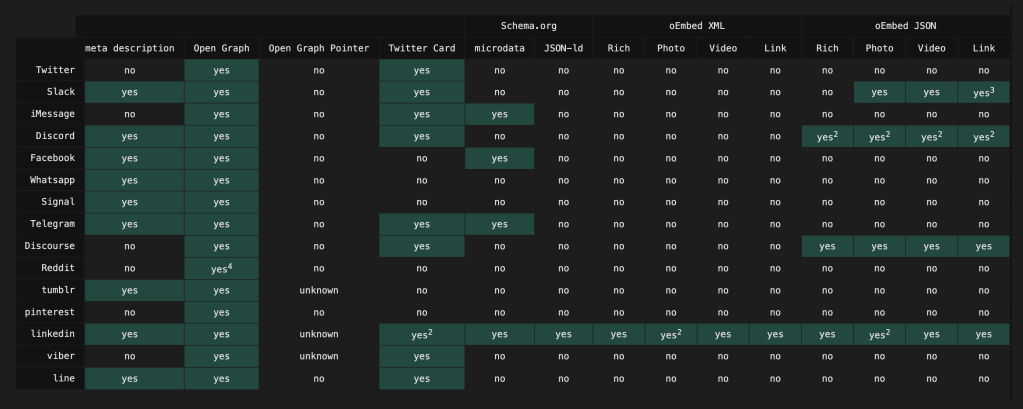
getoutofmyhead.dev is an accessible and practical resource focused on helping folks understand and implement various browser-centric meta tags and features correctly. The site specializes in explaining the nuances of link previews, browser compatibility settings, and device-specific icons.
The author provides detailed guidance on implementing link preview meta tags, which are handy for controlling how URLs appear when shared across various platforms. It also covers the sometimes confusing x-ua-compatible meta tag implementation, and provides comprehensive information about favicon implementations across different browsers.
There’s a dedicated section for mobile-specific considerations, including proper Apple touch icon setup. Plus, Nathaniel covers some esoteric topics, such as an exploration of the HandheldFriendly meta tag usage.
Beyond documentation, the site includes practical tools like a link preview tester, which helps developers validate their meta tag implementations without having to repeatedly test across multiple platforms.
The author did a great job ensuring each section has a casual tone, and it’s an overall quick read.
Tini

Tini is a minimalistic init system designed for containerized environments. In Unix-like operating systems, the init process is the first process started by the kernel and is responsible for reaping zombie processes—terminated child processes that haven’t been properly cleaned up. In containers, the absence of a proper init system can lead to the accumulation of zombie processes, which consume system resources and can eventually exhaust the process table, leading to system instability.
By serving as the init process within a container, Tini ensures that all child processes are properly reaped, preventing the buildup of the aforementioned zombies. Additionally, Tini forwards signals to the child processes, ensuring that they receive and handle signals like SIGTERM appropriately. This is necessary for the graceful termination of processes within containers.
Starting with Docker version 1.13, Tini is included and can be enabled by using the --init flag when running a container. This integration simplifies the process of managing child processes and signal handling within containers, enhancing the stability and reliability of containerized applications.
FIN
Remember, you can follow and interact with the full text of The Daily Drop’s free posts on Mastodon via @dailydrop.hrbrmstr.dev@dailydrop.hrbrmstr.dev ☮️
 hrbrmstr's Daily Drop
Leave a comment