Vitale: Live, Reactive TypeScript/JavaScript Notebooks In VS Code
Lynn of TITAA fame (the most recent issue is up, and if you do no subscribe you’re missing out!) re-posted (on 🦋) a HackerNews bot post about a new TS/JS notebook system named Vitale (GH). That piqued my interest, so I checked it out, and thought I’d drop my first impressions in the weekend Drop.

Vitale What/Why?
So we already have the Deno Jupyter kernel (plus some other JS/TS local or hosted notebook-esque systems). So, why do we need a new one?
The authors have embraced the concept of moldable development, which is ” a way of programming through custom tools built for each problem.”. You should take a break from this post and hit up this, then this to learn more about this “moldable” thing.
Back? Yay!
Vitale enables rapid feedback for exploratory development, which means we can quickly iterate, and experiment with code. It’s built using TypeScript and React, which means we get live results inline while writing TypeScript in notebooks. One of the major goals of the project was to enable folks to interactively develop React components within a notebook for fast iteration and experimentation with component properties and states (this is where the “moldable” thing starts to play).
It uses Vite behind the scenes, hence the name.
Just like Observable, when top-level objects have been defined in Vitale, changes to those objects cause any cell that references them to be executed again. This makes for some pretty powerful reactivity.
My mental model for it is that it’s kind of just like a local copy of Observable, just geared more towards building small web apps.
You can use it in VS Code or a GitHub Codespace, but why voluntarily give Microsoft telemetry on you and what you’re working on? It works fine in VS Codium. To add it to either VS Code or Codium grab the VSIX they provide and use the command palette to install it.
Your First vnb
I’m keeping track of the Entrust certificate situation, so we’ll build a small Vitale notebook to explore that as our first example.
Make a folder, then run the following inside it:
pnpm init
pnpm add -D @githubnext/vitale d3-dsv d3-fetch jsdom @observablehq/plot
touch entrust.vnb
That pnpm is the “performant node package manager”. It’s faster and more disk-efficient, and the Vitale examples all use it, so we will too. We’re bringing D3 helpers and both jsdom and Observable Plot to the party, and all we’re going to do is visualize a remote CSV (that counts as one of those moldable things, though, since it’s task-specific).
Put each of the blocks, below, in new cells:
// make charts
import * as Plot from '@observablehq/plot'

// read data
import { csvParse, autoType } from 'd3-dsv'
import { csv } from 'd3-fetch'

// need this for plot rendering
import { JSDOM } from "jsdom"

const jsdom = new JSDOM("");

const window = jsdom.window;
const document = window.document;
const entrust = await csv("https://data.hrbrmstr.dev/et.csv", autoType)
Plot.plot({
  width: 900,
  grid: true,
  style: {
    background: "transparent",
  },
  document,
  marks: [
    Plot.lineY(entrust, { x: "date", y: "ct", stroke: "steelblue"})
  ]
})
When executed, it’ll look something like this:
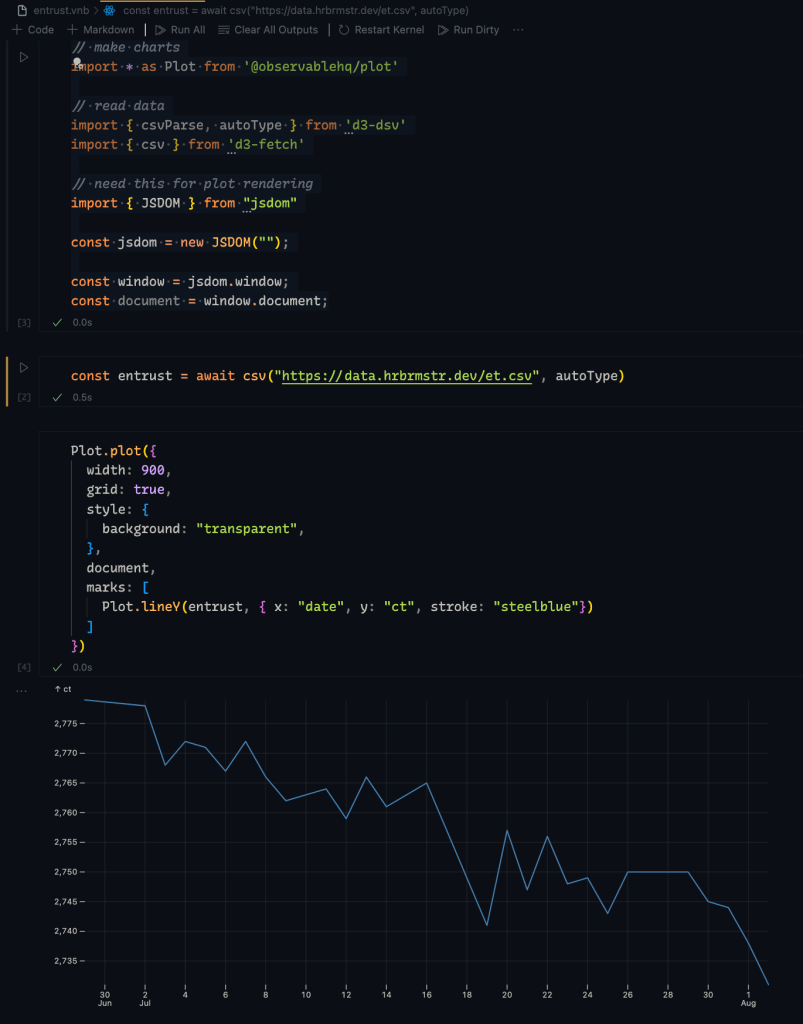
The files, themselves, just contain a JavaScript structure, so they’re git-friendly and pretty readable:
node -e "console.log(JSON.stringify($(cat entrust.vnb)))" | jq
{
  "cells": [
    {
      "kind": 2,
      "language": "typescriptreact",
      "value": "import * as Plot from '@observablehq/plot'\n\nimport { csvParse, autoType } from 'd3-dsv'\nimport { csv } from 'd3-fetch'\n\n// need this for plot rendering\nimport { JSDOM } from \"jsdom\"\n\nconst jsdom = new JSDOM(\"\");\n\nconst window = jsdom.window;\nconst document = window.document;",
      "metadata": {
        "id": "tGzJzEwTfoO5kqT76cW2B"
      }
    },
    {
      "kind": 2,
      "language": "typescriptreact",
      "value": "const entrust = await csv(\"https://data.hrbrmstr.dev/et.csv\", autoType)",
      "metadata": {
        "id": "d9mOJ3gLiQZzu8yJCXxC-"
      }
    },
    {
      "kind": 2,
      "language": "typescriptreact",
      "value": "Plot.plot({\n  width: 900,\n  grid: true,\n  style: {\n    background: \"transparent\",\n  },\n  document,\n  marks: [\n    Plot.lineY(entrust, { x: \"date\", y: \"ct\", stroke: \"steelblue\"})\n  ]\n})",
      "metadata": {
        "id": "HHhoLqwSGZ46Han5K3cL7"
      }
    },
    {
      "kind": 2,
      "language": "typescriptreact",
      "value": "",
      "metadata": {
        "id": "o-x8X9Js2ekRlBCPxZCwO"
      }
    }
  ]
}
We can get a bit fancier and just yank out the code, too:
node -e "console.log(JSON.stringify($(cat entrust.vnb)))" | \
  jq -r '.cells[] | select(.language == "typescriptreact") | .value'
// make charts
import * as Plot from '@observablehq/plot'

// read data
import { csvParse, autoType } from 'd3-dsv'
import { csv } from 'd3-fetch'

// need this for plot rendering
import { JSDOM } from "jsdom"

const jsdom = new JSDOM("");

const window = jsdom.window;
const document = window.document;
const entrust = await csv("https://data.hrbrmstr.dev/et.csv", autoType)
Plot.plot({
  width: 900,
  grid: true,
  style: {
    background: "transparent",
  },
  document,
  marks: [
    Plot.lineY(entrust, { x: "date", y: "ct", stroke: "steelblue"})
  ]
})
Data Wrangling With Arquero And Vitale
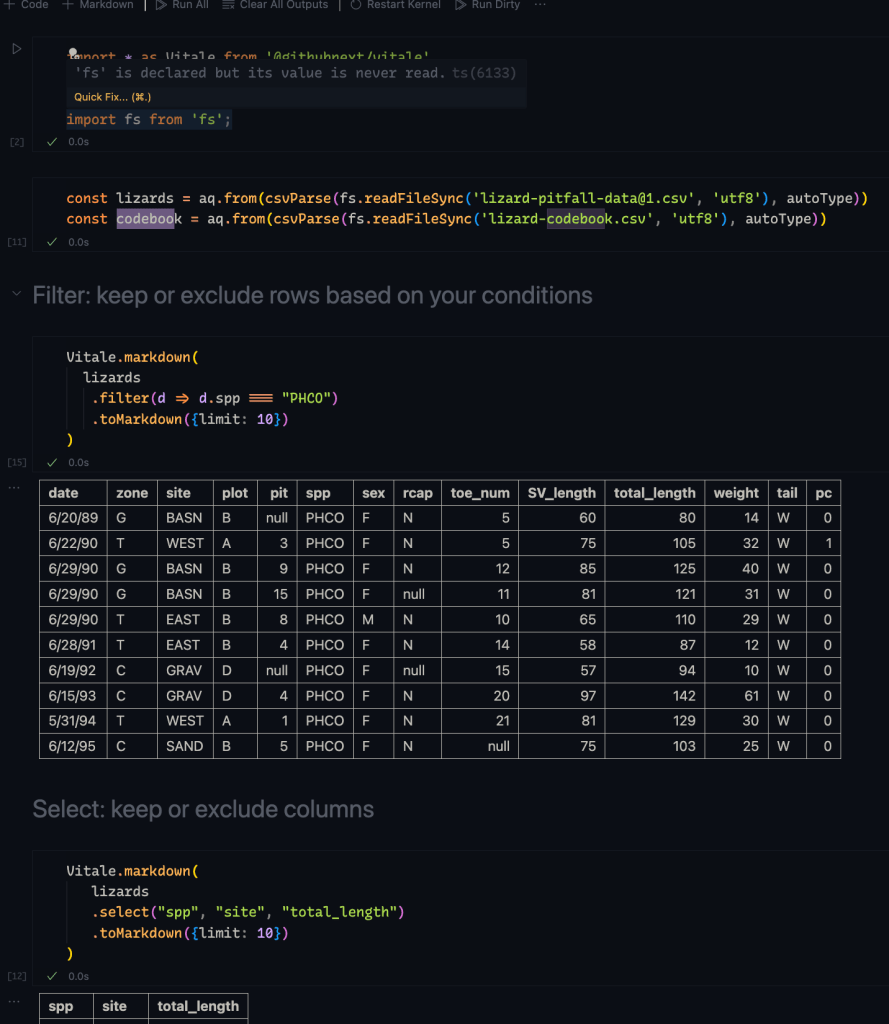
I’m working on a DuckDB example for Vitale, but there are some hiccups that are going to take some time to figure out. In the meantime, I made a thinner version of Allison’s epic “Arquero data wrangling examples” in Vitale.
You can find that over on Codeberg.
Just clone the repo, pnpm i in the directory, then open the notebook.
FIN
It’s still early days for Vitale, and I might just have to get over my loathing of React to play with the app-side of this new toy.
Remember, you can follow and interact with the full text of The Daily Drop’s free posts on Mastodon via @dailydrop.hrbrmstr.dev@dailydrop.hrbrmstr.dev ☮️

 hrbrmstr's Daily Drop
Leave a reply to Lynn Cherny Cancel reply