& U Thot Ur SMS Abbrevs Were Cool; Color Me UI-seful; In Praise of Low Tech DevEx
Another potpourri of topics to ease y’all back in from the long, sweltering weekend (at least in the U.S.)
& U Thot Ur SMS Abbrevs Were Cool
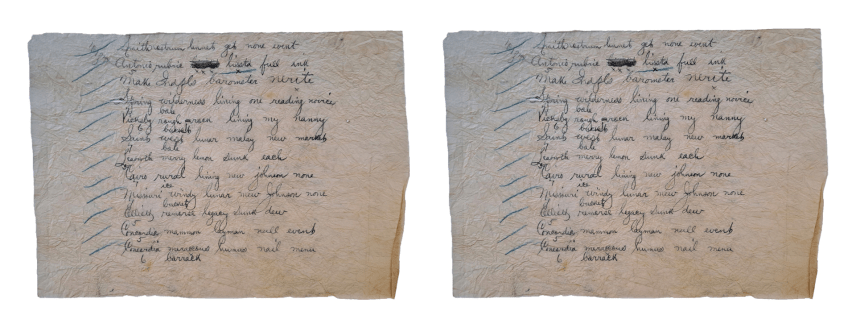
In the late 1990s and early 2000s, a new form of communication emerged that permanently alter how we interact with each other and start the downfall of modern society: text (SMS) messaging. With this new medium came a unique language all its own, filled to the brim with abbreviations and acronyms designed to convey maximum meaning with minimal characters.
This textspeak was, in fact, a necessity. Back in my day, text messages were limited to a scant 160 characters, and greedy telcos often charged customers per message sent. This created a strong incentive for we humans to squeeze as much meaning as possible into each text, leading to the creation of creative abbreviations and shorthand.
Would you believe we cool tech cats of that era weren’t the first humans to bask in the cleverness of our condensed creation? Textspeak shares similarities with earlier forms of abridged communication. This goes all the way back (at least in the pseudo-modern era) to the telegraph (where charges were by the word). There were all forms of condensed languages and even codes used to save a pence or two (and, sometimes, to obfuscate the message from the telegraph operator).
The telegraph also — with no exaggeration — revolutionized weather forecasting by enabling rapid transmission of weather data across long distances. The U.S. Army Signal Corps (USASC) established a national weather service in 1870, using telegraph lines to collect and disseminate weather information. Now, the USASC weather folks transmitted many weather-related messages a day, to many diverse telegraph stations. Even at the outset, these messages — if not optimized in some way — would start to add up $-wise. So, these clever folks developed their own coded system that used numbers and letters to represent different weather conditions, allowing for quick and concise communication of complex meteorological information. For example, cloud types were assigned specific numbers, and wind directions were represented by letters.
Over time, the coding system evolved and became more sophisticated. The World Meteorological Organization (WMO) eventually standardized these codes globally, ensuring consistency in weather reporting across different countries and regions.
If you want to see a full example of this, along with a ~5 minute video that tells a tale of a cryptic telegraph message found in a dress from the 1800’s that led someone to dig into what they might be, head on over to the Grand Forks Herald.
The NYTimes also covered this back in January, and NOAA did a pretty deep-dive back in December of last year.
If this piqued your interest, perhaps take a stab at writing a program that groks The Signal Service Weather Code and lets folks encode/decode conditions with it.
Color Me UI-seful
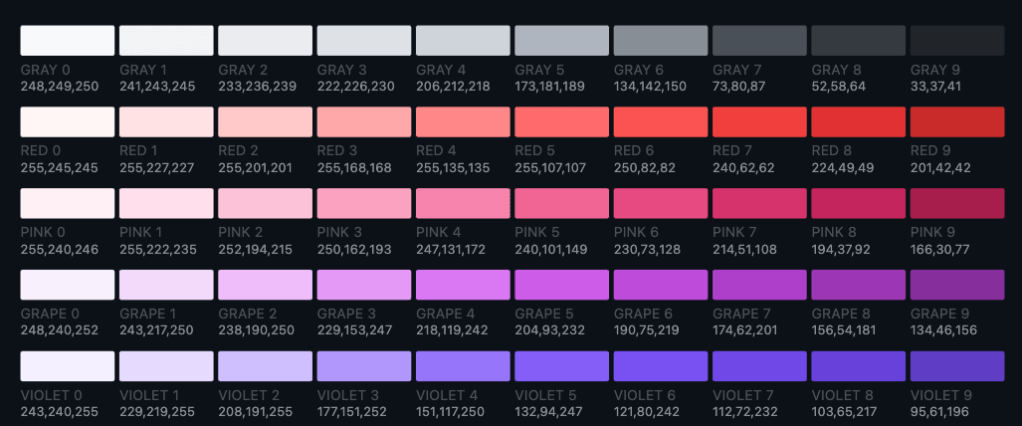
Making pretty and accessible UIs for anything — TUI, web, or full-on native apps — is not a trivial task. Drilling down a bit, even picking the right colors can be daunting (as we’ve covered in many previous Drops). Thankfully, accessibility and design researchers keep coming up with new ways to help us use smart colors in those pretty and accessible components.
Open Color presents a comprehensive color palette optimized for UI elements such as fonts, backgrounds, and borders. The project’s core objectives include ensuring all colors have practical applications, providing a general-purpose color scheme for UI design, and maintaining perceptual brightness consistency across hues of similar luminance.
This Open Color system offers a range of colors and supports multiple formats and development environments, including CSS, Sass, Less, Stylus, JSON, SVG, and various design tools. Its variable naming convention follows a structured pattern (e.g., $oc-color-number in Sass) which makes it “easy” to integrate with existing projects.
Now, even with this system, one may still find it difficult to achieve both “pretty” and “accessible”. Enter Colar (with apologies for linking to Medium) (GH). The article is an extensive guide for those of us who struggle with color selection in design. The author — Ferdy Christant — who self-describes themselves as “color-challenged,” shares a very comprehensive color palette based on the aforementioned Open Color system, with some extensions. The palette consists of 234 colors (18 hues x 13 luminosity steps) and is designed for wide applicability in web and app design, illustration, and even print.
Christant also discusses various characteristics of a good color palette, including attractiveness, completeness, “themability” (my spell checker says that’s not right but 🤷🏼), equal distance colors, accessibility, and extensibility. It emphasizes the importance of balancing these characteristics, as they can sometimes conflict with each other. The author praises Open Color for its artistic approach to color selection, which results in visually appealing and consistent color scales.
The guide also includes a suite of testing tools and helpers to assist in color selection and combination. These tools allow users to quickly evaluate color combinations, test gradients, and generate variations of atomic UI elements. The author describes these tools as “game-changers” for those who struggle with color selection, as they speed up the process and reveal unexpected and attractive color combinations.
This resource is definitely a keeper!
In Praise of Low Tech DevEx
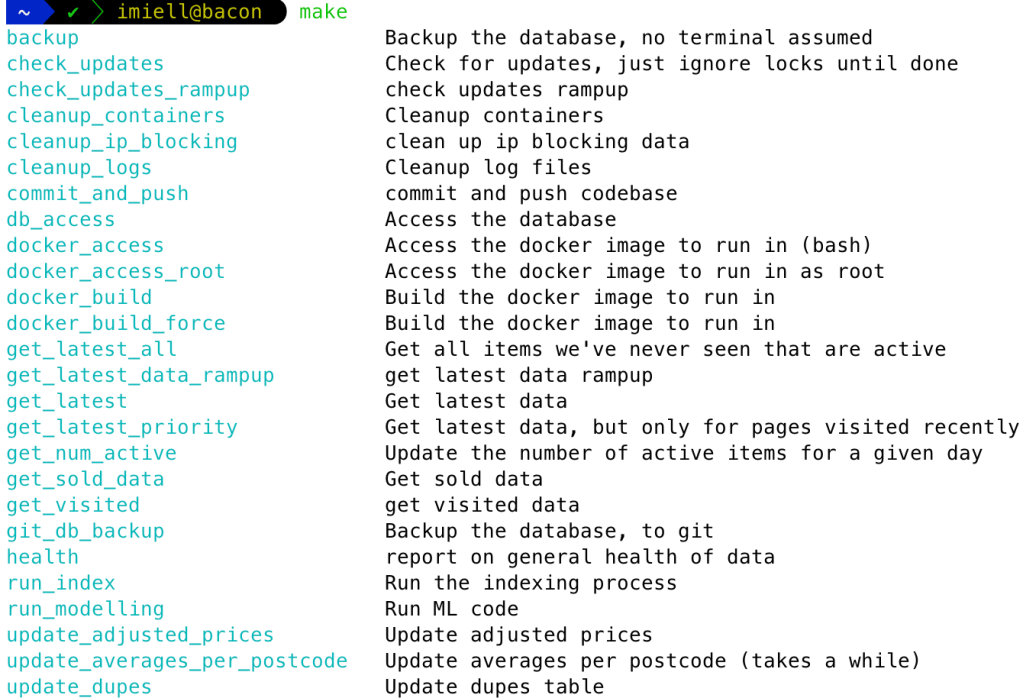
Ian Miell (author of a few spiffy “Learn X The Hard Way” tomes) has a neat post on relying on developer tools that are:
- long-standing and battle-hardened
- stable with few dependencies
- text-based and command-line oriented
- aligned with Unix principles
These tools are generally quite portable, fast, composable, and embeddable. They are also usually accompanied by a steep learning curve, with mega-ROI in the long run.
Ian’s post is very readable, with plenty of examples and tool suggestions. Def check it out!
FIN
Remember, you can follow and interact with the full text of The Daily Drop’s free posts on Mastodon via @dailydrop.hrbrmstr.dev@dailydrop.hrbrmstr.dev ☮️
 hrbrmstr's Daily Drop
Leave a comment