Take Time To Liberate
We’re keeping this one easy — no coding required!
However, it might not apply to everyone, since many of you likely abandoned Amazon/Audible a long time ago for books of any kind, including audiobooks. I stopped purchasing Amazon Kindle books a long time ago; but, only recently decided to cancel Amazon Prime completely — and stop using Amazon altogether — after Amazon’s attempt at charging an “advertisement tax” for Prime Video (~$4.00 USD/month if you want pseudo-ad-free shows).
If you had or have the “Audible” habit, then today you get to break said habit by de-DRM-ing your Audible library (painlessly).
We’ve covered this topic before, but Libation is a far more polished (and, free) solution.
Libation
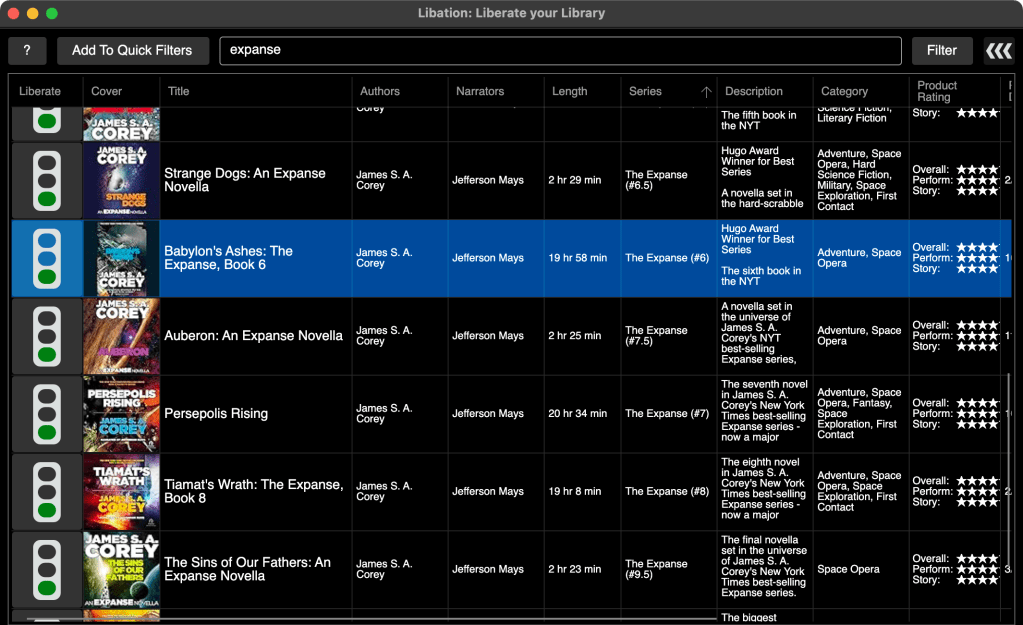
I won’t blather too much about Libation since there is a ton of information in the GitHub repo, including a step-by-step walkthrough.
Part of this setup is you providing your credentials to Audible, which are your credentials to Amazon. That’s a pretty scary thing. So, I isolated the install on a dedicated system on my “see if this thing is skeezy” VLAN. Then ran a live packet capture whilst doing the authentication dance, and checked it afterwards and — for at least my experience — nothing skeezy happened. No attempts to shunt your creds to some awful third party during the auth period nor for a week while I had it running. That’s no guarantee it won’t ever be skeezy, but I’m not going to be using Audible any more, so I changed my Amazon password after it finished converting all the books. I highly recommend you do the same, and also ensure you have MFA setup.
Besides removing DRM, other reasons to use Libation include the bonkers cool Lucene search capabilities (not full-text, but all other fields), auto-tagging of books, and a robust CLI.
If you have an extensive library, this process will take a while, and you may want to exclude any podcasts or Audible-only casts (like the NYT/WaPo/etc.) from the archive (unless you do want those backed up as well). I’ve also had to restart the app more than a few times (it’s a single human project with a few intermittent extra committers, so I fully expected some rough edges).
One super cool aspect of removing the DRM is that I can run all these through Whisper when the entire process is finished for use in QuickWit (a FOSS full-text search tool we’ve covered before).
Alternative Storefronts
Along with your local library, The Internet Archive, and Project Gutenberg, there are some fine alternatives to Audible.
Libro.fm (copy the URL and nuke the referral code if that bugs you) has a similar credit system as Audible, and parts of the purchase price goes to a local bookstore of your choice. It’s also DRM-free.
Chirp is a neat service with no credit system, but has discounts (provided you don’t mind being pinged regularly about said discounts).
There are others, but I’m confident y’all either already have alternatives or can inspect more comprehensive lists for ones that match your style.
Listening On The Go
Apple has made it super hard to listen to generic audiobooks on their devices in the default “Books” app, but I’ve had great success with BookPlayer. It’s also open source, but for Apple’s *OS ecosystem.
There are plenty of others, and both Libro.fm and Chirp have Apple and Android apps that work pretty well, too.
FIN
We’ll 100% get back to coding in February!
Remember, you can follow and interact with the full text of The Daily Drop’s free posts on Mastodon via @dailydrop.hrbrmstr.dev@dailydrop.hrbrmstr.dev ☮️

 hrbrmstr's Daily Drop
Leave a comment