Initial Thoughts On ‘Fleet’; Peek (macOS/$); Checking In On D2
Apologies for the tardiness of today’s Drop. A bunch of U.S. states seceding from the Union distracted me for a bit this morning.
TL;DR
This is an AI-generated summary of today’s content.
- The blog post begins with the author’s initial thoughts on JetBrains Fleet, a new integrated development environment (IDE) built on the Java Virtual Machine (JVM). The author appreciates Fleet’s distributed architecture, remote editing capabilities, and performance, but notes its lack of a live preview functionality and plugin ecosystem. The author also mentions using JetBrains’ Writerside for final editing stages, and promises to provide periodic commentary on Fleet as they use it more extensively. The primary resource for this section is JetBrains Fleet.
- The second section introduces Peek, a macOS app that enhances QuickLook, the macOS feature for previewing documents. The author praises Peek for its speed, neat features such as font selection for source rendering, syntax highlighting, and extensive configuration options for Markdown rendering. The primary resource for this section is Peek.
- The final section provides an update on the progress of D2, a new diagramming paradigm. The author highlights several new developments, including free icons, improved font rendering, support for light/dark mode, CSS-like support for styles, and the ability to include other diagram files. The author also mentions the new Quarto D2 extension that makes including D2 diagrams in Quarto documents easy and enjoyable. The primary resources for this section are D2 and the Quarto D2 extension.
Initial Thoughts On ‘Fleet’
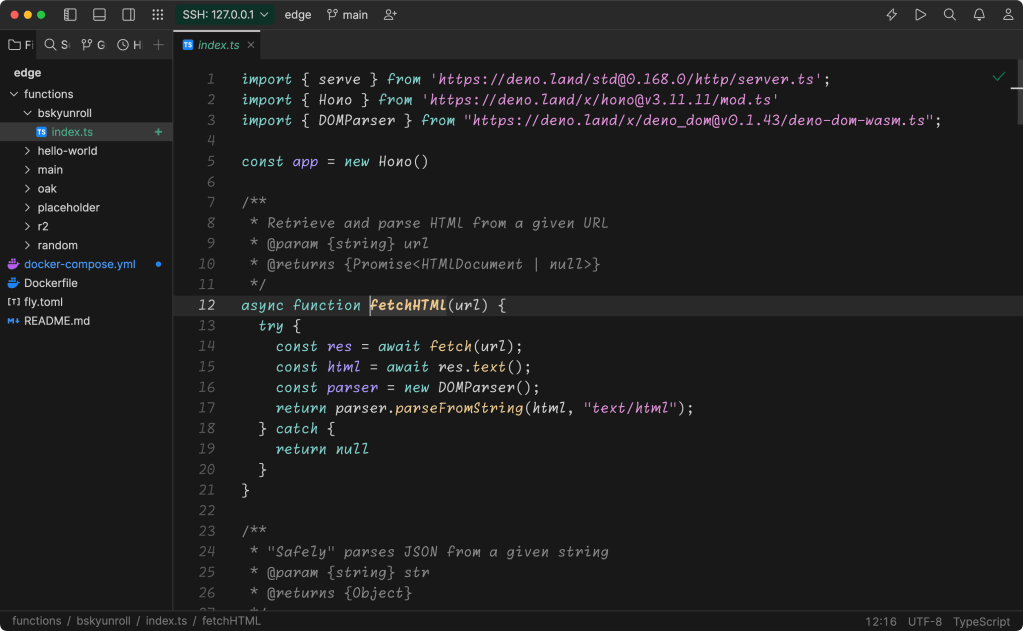
Well, my “daily drivers” are all up-ended thanks to some aforeblogged cool Rust projects and my abject disdain for all things Microsoft. So, I’ve decided to give JetBrains Fleet a go. In fact, I used it to edit today’s Drop!
So, “Fleet” is yet-another integrated development environment (IDE). This one is built on the Java Virtual Machine (JVM), so it runs everywhere and is not an also-ran Electron app. It offers a distributed architecture, allowing for collaborative coding sessions where we can share not just the editor, but also terminals and debugging sessions. Fleet also provides remote editing, similar to the way one can remote in with VS Code (or, y’know, old-school ssh then use vim). The section header is a screencap of me using it to access the server. I usually put some extended Drop examples on for y’all.
So far, Fleet has been very performant, and the local terminal emulation feels better than what ships with VS Code. I’ve only tried it with Markdown, and it lacks a live preview functionality and there is no plugin ecosystem (yet), so I’m using JetBrains’ Writerside in the final stages of cranking out this edition.
Font support is great, the command palette functions as expected, and — if you’re into such things — it even has a JetBrains AI helper (which I have not, and likely will not, use).
It will eventually be non-free, but that’s A Good Thing™, since we’re all paying the price for Microsoft’s surveillance of us in VS Code land
According to their blog, they’ve been working on this thing since late 2021. I know JetBrains has alot going on, but I would have expected this to have some more corners rounded out. In present form, it is no “VS Code killer”.
Unlike VS Code (and, even, vim), which tries to be all things to all peoples, Fleet feels like an app oriented for web developers. That is not a bad thing, but it’s also not my primary use of an editor.
I will likely continue to poke at using it, but I may just have to fight through some of the long covid brain fog to finally get neovim up and running.
Peek (macOS/$)

Given Fleet’s lack of a preview mode for Markdown documents, I poked around a bit for standalone ones (more on that in a future Drop). That search became derailed when I found Peek (macOS App Store 🔗) a macOS app that levels up QuickLook — the macOS feature which lets you tap the spacebar on a file/directory and see a preview of the document.
I tend to avoid QuickLook, as it is often slow and buggy. I’ll likely use it much more, now, since Peek is speedy and has some very neat features. This includes the ability to choose the font for source rendering, colourful syntax highlighting, elegant copy from the QuickLook preview window, and a crazy amount of configuration options for Markdown rendering as you’ll see below:
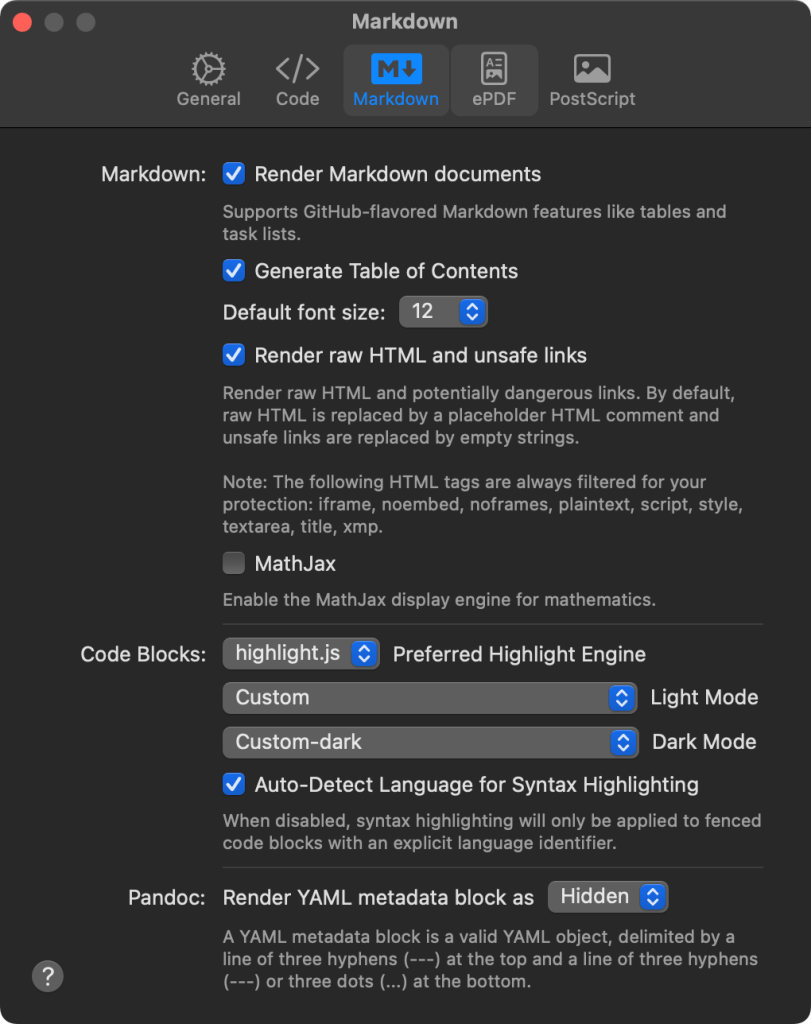
Oh, and on top of slick rendering and the ability to copy from previews, you can also find text, jump to line/page numbers, and have the preview window remember your scroll position (if the document hasn’t changed).
It’s not free, but the authors clearly know what they’re doing in macOS-land, and this will definitely save me time and enhance productivity. So, if you do use macOS, I’d suggest saving a trip to Starbucks and using that coin for Peek.
Checking In On D2
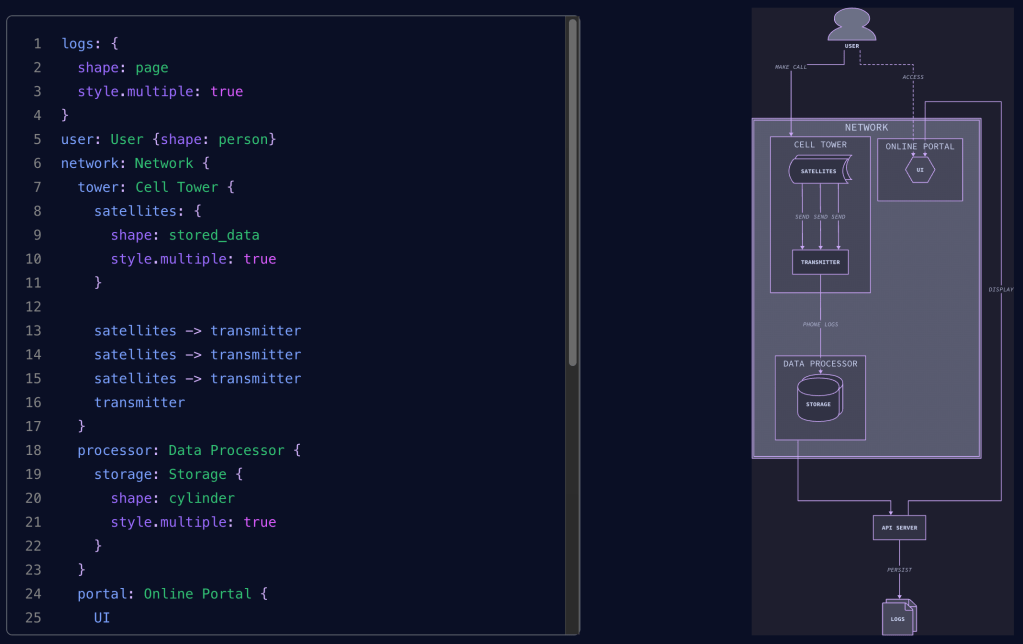
It’s been a minute since we’ve checked in on the progress of the crunchy new diagramming paradigm that is D2 (GH), and there’s been a bonkers number of developments you should check out.
For starters, Terrastruct has scads of free icons you can reference from D2 specs, so you don’t have to build up your own library of them.
SVGs are super tiny now thanks to smart font embedding, and font rendering has been levelled-up a bit as well, including multi-byte language support.
Documents can support light/dark mode, and you can get super-precise when setting container dimensions.
There is CSS-like support for styles, and the ability to include other diagram files, so no more copy/paste and find/replace verbosity. In fact, there is full-on support for creating themes for documents, making it super easy to customize the output for any given project.
PDF exports are also now a thing, and ELK (the language used to build the D2 documents) has seriously improved layout functionality. This includes an impressively customizable grid-layout capability. ELK also groks SQL, and when making diagramming database tables, key references aim can be directed at the field level vs. the generic table level.
Finally, for Quarto aficionados, there’s a bonkers amazing Quarto D2 extension that works super well and makes including D2 diagrams in Quarto docs painless and, dare I say, fun!
FIN
Y’all may see some layout tweaks next week as I’m working my way through the hosted UX and absolutely need to make some quality of life (for you and me) improvements to the Drop.
Remember, you can follow and interact with the full text of The Daily Drop’s free posts on Mastodon via @dailydrop.hrbrmstr.dev@dailydrop.hrbrmstr.dev ☮️

 hrbrmstr's Daily Drop
Leave a comment