Kaku; Pake; Fair Weather
No theme, save for focusing on one developer for the first two sections. The Drop’s title comes from the last section.
Note the change-up to MiniMax M2.5 in the TL;DR. I highly recommend checking that model out, provided you’re not “AI”-averse (which, just to be clear, is legit cool, and I’m slightly jealous of y’all who are). For those who are not in that category, I’ll just note that it took 3x as long as 2.1, so this will be the last time I use it for the TL;DR.
TL;DR
(This is an LLM/GPT-generated summary of today’s Drop. Ollama and MiniMax M2.5.)
- Kaku is a macOS-only fork of WezTerm that adds ergonomic Cmd-key shortcuts and includes a shell “starter pack” with tools like Starship, zoxide, Delta, and zsh plugins, plus optimizations that reduce the executable from 67 MB to 40 MB and cut launch latency (https://github.com/tw93/Kaku)
- Pake is a Tauri-based CLI tool that converts any URL into a lightweight cross-platform desktop app, though users may encounter xattr errors and local storage restrictions that can be resolved through codesigning with an Apple Developer certificate (https://github.com/tw93/pake?tab=readme-ov-file)
- Fair Weather is a vanilla JS weather scoring app that uses Open-Meteo APIs to calculate activity-specific scores for running, cycling, and stargazing, featuring color-coded timeline cards with clothing recommendations and an “Add to Calendar” function for hourly slots (https://fair-weather.query-farm.services/)
Kaku
NOTE: macOS only, so Win/Lin folks can skip to the next section
Well, I did not expect WezTerm to be the first “daily driver” to go by the wayside in 2026, but here we are.
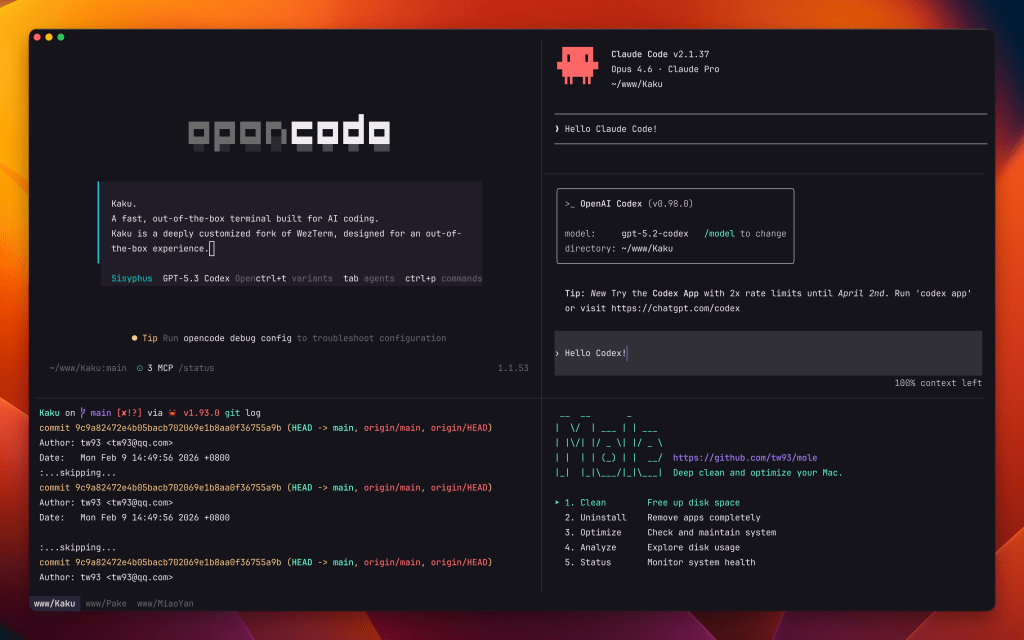
Kaku is a fork of WezTerm that adds some super nice ergonomics and a shell “starter pack” for folks who have not already leveled up their Zsh configs.
First up, please ignore the sad use of the forbidden letterform pair (“AI”) in the repo’s description. I’m not surprised devs will use that to get SEO and AEO + attract “AI” Bruhs; and the author did cite their desire for a solid terminal experience for “AI”-assisted coding as one of the reasons for building this fork, but it’s incidental to the utility of the terminal.
In the ergonomics space, Kaku defines a numbner of Cmd- keys for working with tabs, panes, etc. You could 100% do this on your own, to some degree. But out-of-the-box defaults are handy, especially for folks new to the terminal.
We’ve mentioned every component in Kaku’s “starter pack” in previous Drops, but rather than drop 4 links, we’ll snip from them to explain each component here.
Starship is a cross-shell prompt written in Rust that dynamically displays contextual information as you navigate your filesystem. It detects the current Git branch and status, active language/runtime versions (Node, Python, Go, Rust, etc.), cloud provider context (AWS profile, Kubernetes cluster), and the wall-clock duration of the last command. Configuration lives in a single TOML file, and it works across zsh, bash, fish, and PowerShell without modification.
z (typically via zoxide these days) tracks the directories you visit and ranks them by frequency and recency. Instead of typing out full paths, you give it a partial string, and it jumps to the best match. So z proj might resolve to ~/work/projects/greynoise-mcp if that’s where you spend your time. It hooks into cd transparently, so it learns passively as you work.
Delta replaces the default pager for git diff, git log, git show, and similar output with side-by-side or unified views that include syntax highlighting, line numbers, and configurable themes. It also handles grep output and plain diff. You configure Git to use it as core.pager and interactive.diffFilter, and it picks up language-aware highlighting automatically from the file extension.
zsh-completions is a community-maintained collection of completion definitions for commands that don’t ship their own. It fills gaps for tools like docker, cargo, kubectl, systemctl, and hundreds of others, providing tab completion not just for the top-level command but for subcommands, flags, and sometimes even argument values (like container names or branch names).
zsh-syntax-highlighting colorizes your command line as you type. Valid commands appear green, unknown commands red, strings get quoted highlighting, and paths that resolve on disk are underlined. It catches typos before you hit enter, which is especially useful for long pipelines or commands with complex flag combinations.
zsh-autosuggestions shows a ghost-text completion pulled from your shell history as you type, similar to how Fish shell works natively. Press the right arrow key to accept the full suggestion, or keep typing to narrow it. It surfaces commands you’ve run before in the current context, which is particularly useful for long or complex commands you run frequently but don’t want to alias.
Letting it add this to your config only puts one line in your ~/.zshrc, which you can 100% remove. Despite already using everything but Z, I let it do it to see how Tw93 rolls and then ditched the line.
ASIDE: I neglected to mention that X-CMD is still part of my daily drivers, and I am surprised it’s part of Tw93’s config.
WezTerm was already fast and lean, but Tw93 managed to shrink it a bit more and dial the speed knob up a bit. The optimized build reduces the executable from roughly 67 MB to 40 MB through aggressive symbol stripping and feature pruning, while the bundled resources drop from around 100 MB to 80 MB via asset optimization and lazy-loaded assets. Launch latency improves from standard to near-instant through just-in-time initialization, and shell bootstrap time is cut from approximately 200 ms to 100 ms with optimized environment provisioning. These gains come from stripping unused features, lazy loading color schemes, and tuning the shell integration layer.
If you go the Homebrew route to install, use kakuku as the formula name, since there was a conflict with an existing tool.
Pake
We’ll stay in the Tw93-verse for the Drop’s midsection and cover Pake.
This will be a short section since this is a “Give it a URL and an optional app name, and you get back a double-clickable cross-platform app that turns the website into a URL” tool.
It relies on Rust’s Tauri under the hood, so it’s more lightweight than most other options.
I tried wrapping my “Bloomberg Terminal For The Internet” at work in with it and got:
$ deno run -A npm:pake-cli "https://viz.greynoise.io/observe/explore/sessions" GreySharkBundling GreyShark.app (/Users/hrbrmstr/Library/Caches/deno/npm/registry.npmjs.org/pake-cli/3.8.4/src-tauri/target/aarch64-apple-darwin/release/bundle/macos/GreyShark.app)failed to bundle project failed to remove extra attributes from app bundle: `failed to run xattr` Error failed to bundle project failed to remove extra attributes from app bundle: `failed to run xattr` ELIFECYCLE Command failed with exit code 1.
That’s not a showstopper, and the resultant app worked fine for a bit until our web app tried to use local storage (macOS is pretty strict these days). After codesigning it with my Apple Developer cert it worked fine.
Keep an eye on it, and kick the tyres. It’s always handy to have another one of these web-to-app builders in the arsenal.
Fair Weather
As longtime Drop readers will know, I’m a weather nerd who will always try out any new weather app, API, or gadget that comes my way.
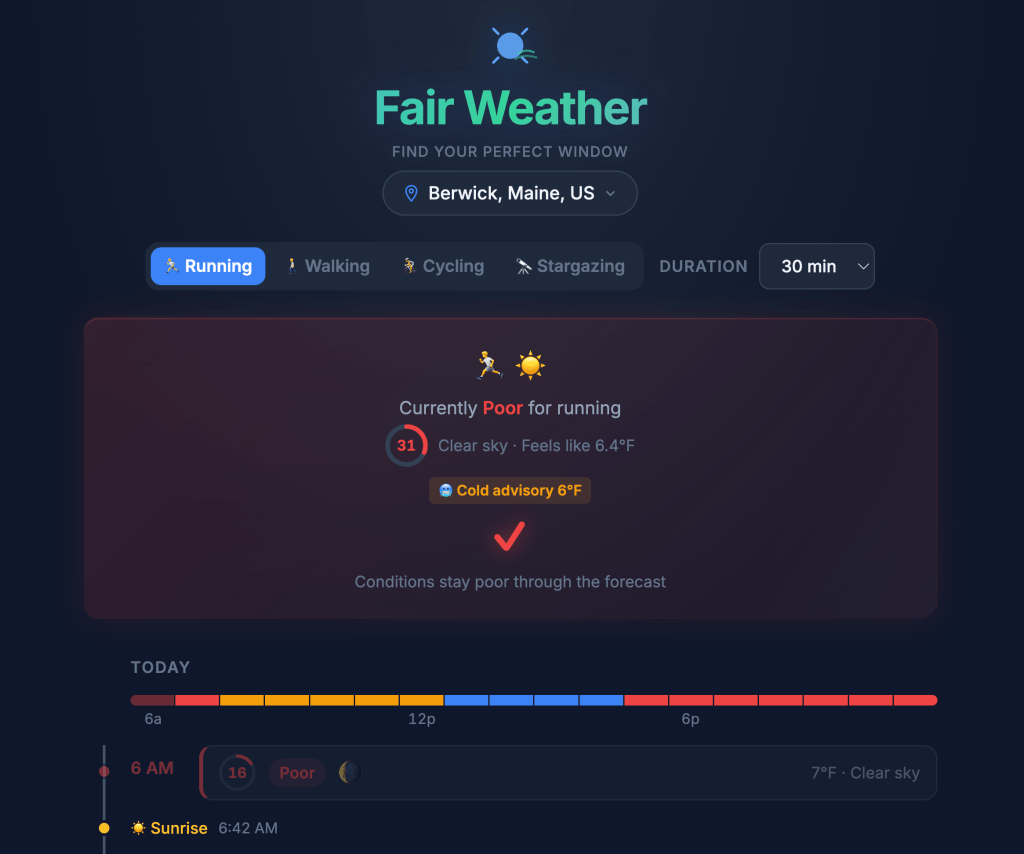
Fair Weather is a single-page (SPA) weather scoring app from Query.Farm, the supercalifragilisticexpialidocious DuckDB extension studio. It’s designed to answer one question: “When should I go outside [to do X]?”
It relies on two Open-Meteo API calls:
- Weather forecast (
api.open-meteo.com/v1/forecast) – pulls hourly temperature, feels-like temp, humidity, weather code, wind speed, UV index, precipitation probability, cloud cover, and visibility. Also grabs daily sunrise/sunset. Two-day forecast window. - Air quality (
air-quality-api.open-meteo.com/v1/air-quality) – pulls hourly US AQI for the same two-day window.
All computation happens client-side (i.e., there’s no backend API). It’s a super small static site with inline [vanilla] JS doing the scoring.
Speaking of scoring…each hour gets a 0-100 score with four tiers: Poor (red), Fair (yellow), Good (blue), Excellent (green), and the scoring weights differ per activity:
- Running/Walking/Cycling – scores based on feels-like temperature, wind speed, precipitation probability, UV index, and weather code. The optimal temperature band shifts slightly between activities (cycling penalizes wind more heavily, walking is more tolerant of cold). Daylight hours clearly get a boost. Each hour card shows clothing recommendations that map to the score/conditions – things like “Heavy running jacket, fleece layer, gloves, hat” for cold/poor conditions vs “Long sleeve shirt or half-zip” for excellent.
- Stargazing – completely different scoring model. Factors in cloud cover percentage, visibility distance (km), and moon phase/illumination (Waning Crescent 7% tonight, which is great for stargazing). It adds a “Tonight’s Sky” panel showing visible planets with color-coded tags (Mercury, Venus, Mars highlighted as currently visible; Jupiter and Saturn dimmer). The timeline includes astronomical events like planet rise times and moonrise. Scores invert from daytime activities – pre-dawn hours at 6AM scored Excellent (80), while 7AM after sunrise dropped to Poor (24).
The timeline “heat bar” at the top gives an at-a-glance view using a red-to-green gradient, with a “Best X-Y” range indicator underneath. Each hourly card is expandable with full conditions. The left border color matches the score tier. Transition annotations between hours explain what changed (i.e., “Conditions shift from fair to good. Feels 5 degrees warmer.” ) Sunrise/sunset markers are inline in the timeline.
The delicious part is that when I poked under the hood, it looked like no frameworks were used. That’s right: no React, Vue, Alpine, or Svelte. It’s vanilla JS with inline scripts and CSS! It also has a web app manifest (manifest.json) and is PWA-capable (i.e., has service worker support). Likewise, it sports two external scripts in total plus Google Fonts (Bunny Fonts or local hosting would have been cooler).
It also has some quality-of-life enhancers, specifically an “Add to Calendar” per hourly slot (generates .ics) and the duration selector (30 min to 2 hours), which presumably adjusts scoring to consider condition stability over the selected window rather than just a single-hour snapshot.
It’s a well-executed single-purpose tool (something always appreciated at the Drop).
FIN
Remember, you can follow and interact with the full text of The Daily Drop’s free posts on:
- 🐘 Mastodon via
@dailydrop.hrbrmstr.dev@dailydrop.hrbrmstr.dev - 🦋 Bluesky via
https://bsky.app/profile/dailydrop.hrbrmstr.dev.web.brid.gy
☮️
 hrbrmstr's Daily Drop
Leave a comment