Virtual Pepe Silvia; Always Something There To remind Me; How to Obsessively Tune WezTerm
I needed a Drop to place a quick WezTerm link into, so today we look at a clean & private “detective map” (no server requried!), a great utility I ironically keep forgetting to use, and said WezTerm link.
TL;DR
(This is an LLM/GPT-generated summary of today’s Drop. This week, I continue to play with Ollama’s “cloud” models for fun and for $WORK (free tier, so far), and gave gpt-oss:120b-cloud a go with the Zed task. Even with shunting context to the cloud and back, the response was almost instantaneous. They claim not to keep logs, context, or answers, but I need to dig into that a bit more.)
- Virtual Pepe Silvia describes a browser‑based, open‑canvas “detective board” for free‑form note‑taking and visual linking (https://stefankober.github.io/detective-board/)
- Always Something There To remind Me introduces the classic Unix‑style, local‑only reminder system “remind” and its scriptable calendar features (https://dianne.skoll.ca/projects/remind/)
- How to Obsessively Tune WezTerm points readers to Rashil Gandhi’s comprehensive guide on customizing the WezTerm terminal emulator (https://rashil2000.me/blogs/tune-wezterm)
Virtual Pepe Silvia
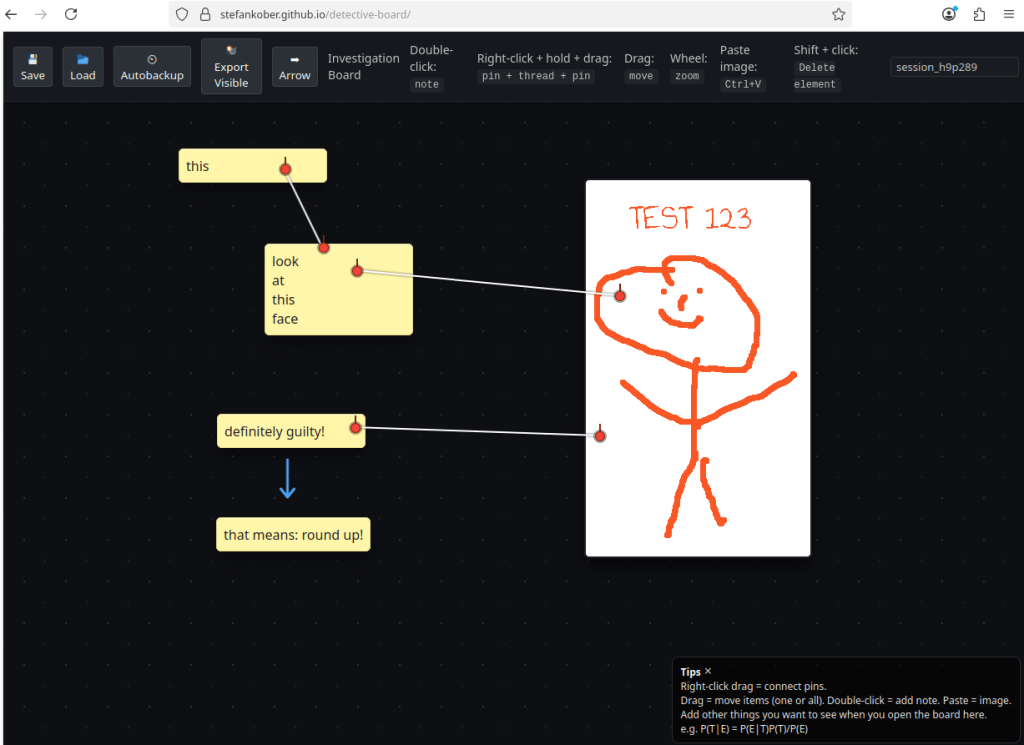
Stefan Kober built this sleek mindmap/whitebboard (GH) because they were fed up with how most note-taking apps make you think in straight lines. Real thinking isn’t linear — it’s messy (mine is indistinguishable from the remnants of a tornado in Kansas). One idea sparks another, which reminds you of something else, and before you know it, you’re connecting three completely different thoughts that somehow make sense together. But most apps want you to cram that chaos into tidy lists or folders (and hashtag the heck out of them), which just doesn’t feel right.
They tried everything — Logseq, Joplin, Draw.io, even plain text files in Vim. All solid tools, but none matched how their brain actually works. So they built this “detective board” app — basically an open canvas where you can drop notes, images, and links between them, without being forced into any structure.
It is refreshingly simple. Double-click to make a note. Right-click and drag to draw those red-string-style connections. Copy and paste an image straight from anywhere. Everything just floats in space — you can zoom, rearrange, group ideas, and watch your thoughts take shape. It feels like having an infinite corkboard for your brain.
The creator mentioned they’re mostly aphantasic — they can’t form mental images. So being able to literally see their thoughts and reference visuals next to their notes reflects how they really think. They use it for everything: investigating security incidents, digesting technical books, exploring big ideas that don’t fit neatly into a page.
It’s all local — no servers, no tracking, totally private. It auto-saves in your browser every minute and keeps the last ten versions just in case. You can export boards, save snapshots, whatever. It’s just one person saying, “this is how I think — maybe it’ll help you too.”
Always Something There To remind Me
We talked old-school leave the other day, so let’s dig into a cousin of it: a streamlined reminder system aptly named remind (SH-GL).
If you’ve ever been frustrated by the bloat and surveillance “features” of modern cloud calendars, there’s a tool from the before-times that deserves your attention: remind. First released in 1990, it’s a command-line calendar and alarm system that runs entirely on your local machine. No cloud, no accounts, no sync servers. All you have is elegant, scriptable control over your time in plain text.
remind is a perfect example of what the OG Unix philosophy stands for. Your calendar lives in .rem files, and are simple text documents you edit with vim, emacs, nano, or whatever editor you 💙 most. You can use one master file in ~/.reminders, or break things into tidy categories like work, personal, and birthdays, then include them all from a main file. Because everything’s text, you can throw your entire calendar into git, rsync it to a backup, or sync it across machines with Syncthing. It’s the kind of system that rewards curiosity: the deeper you explore the tool, the more coolness you find.
Installation was simple on my Macs (brew install remind), which gives you the latest version (currently 06.02.00 as of November 2025). There are packages for you Linux folks, as well. After that, you can start adding reminders like:
REM December 25 MSG Christmas
REM Mon MSG Weekly team meeting
REM Mon +30 MSG 30 days until big review
Want to see your upcoming week? remind -n ~/.reminders. Want a full month calendar view? remind -c ~/.reminders. Want to generate spifft PDF calendars? Pipe it through rem2pdf and sync it to your e-paper reader. The are old-school, and the output is precise, legible, and fast.
The creator just didn’t build a tool. There a whole domain-specific language for “time” that powers all the interactions. It has variables, conditionals, functions, even loops. You can make it calculate dates (“the second Monday of every month”), adjust for holidays, or skip weekends automatically. It understands Hebrew dates, moon phases, and complex recurrences that make Outlook weep (OK, that’s not hard to do). And when you want reminders to jump out at you, daemon mode (remind -z) can trigger whatever notification system you like—macOS pop-ups, terminal alerts, or even a custom script.
You can also make it part of your workflow, and have it run scripts to check new CVEs every Monday, remind you 30 days before the next BSides conference, or kick off a quarterly threat threat landscape review. If your day job involves shell scripts, text pipelines, or version control, remind feels less like a tool and more like an extension of your brain.
Despite being over three decades old, it’s surprisingly modern in spirit. It outputs clean text, HTML, PDF, or PostScript. It integrates with curses interfaces like Wyrd, web-based frontends, or even iCalendar converters if you insist on syncing with the outside world. It’s as private or as connected as you want it to be.
You won’t ever be nudged, tracked, or second-guessed. It tells you exactly what you asked for and nothing else. Once you get used to having your calendar in plain text, it’s hard to go back to clicking through ad-saturated, tracker-filled, javascript-bloated web apps.
How to Obsessively Tune WezTerm

There’s so much crunchy goodness in Rashil Gandhi’s WebTerm tweaking post that I refuse to even attempt to reduce any of it to a short ’splainer. If you use WezTerm (despite the results of the Unicode benchmarks we saw the other day 😞), this is a must read.
FIN
Remember, you can follow and interact with the full text of The Daily Drop’s free posts on:
- 🐘 Mastodon via
@dailydrop.hrbrmstr.dev@dailydrop.hrbrmstr.dev - 🦋 Bluesky via
https://bsky.app/profile/dailydrop.hrbrmstr.dev.web.brid.gy
☮️
 hrbrmstr's Daily Drop
Leave a comment