mlpack Gets Webbed Feet; Dash-ing Ducks; Magical Ducks
The time DoS is all too real this week, as both the need to make an overly produced quarterly readout presentation for work (with a Guardians of the Galaxy theme!) and crank out the monthly $WORK newsletter video killed the Thursday Drop.
However, if you are a DuckDB fan, this is yet-another DuckDB-focused Drop, and I am stunned at how the ecosystem continues to rapidly evolve and expand, especially through extensions. There have been some seriously cool additions since the last DuckDB-themed Drop!
TL;DR
(This is an LLM/GPT-generated summary of today’s Drop. This week, I’m (still) playing with Ollama’s “cloud” models for fun and for $WORK (free tier, so far), and gave gpt-oss:120b-cloud a go with the Zed task. Even with shunting context to the cloud and back, the response was almost instantaneous. They claim not to keep logs, context, or answers, but I need to dig into that a bit more.)
- mlpack C++ machine learning library becomes a DuckDB community extension, enabling ML models like AdaBoost and linear regression to be trained and used directly in SQL queries with no data movement or external pipelines (https://dirk.eddelbuettel.com/blog/2025/10/26/#duckdb-mlpack_0.0.2)
- Dash is an open-source DuckDB Community extension that integrates a full data exploration and visualization tool into DuckDB, allowing users to query data, build interactive dashboards with various chart types, and export results entirely within the browser (https://www.dash.builders/)
- magic is an experimental DuckDB Community extension that ports the libmagic library for file identification and classification, enabling users to identify both local and remote files directly through DuckDB queries (https://duckdb.org/community_extensions/extensions/magic)
mlpack Gets Webbed Feet

mlpack is a quietly powerful C++ machine learning library that’s been humming along quite nicely since 2011. It is purpose built for speed, correctness, and flexibility. The developers and maintainers applied academic rigor and engineering pragmatism to make a deep catalog of algorithms available without any (ugh) Python dependencies.
Thanks to Dirk Eddelbuettel (R folks reading this def should know who Dirk is) recently penned two posts:
- ML quacks: Combining duckdb and mlpack
- duckdb-mlpack 0.0.2: mlpack is now a duckdb community extension
announceing mlpack’s arrival as a DuckDB extension.
mlpack, being natively C++, slides right into the DuckDB extension ecosystem without translation layers or glue code (and because Dirk’s really good at making C/C++-based components available to ecosystems that support connectors to these lower-level libraries). The result is a frictionless bridge between machine learning and SQL analytics.
With duckdb-mlpack, we can train and use models like AdaBoost or linear regression directly in SQL, keeping everything in one place: the data, the model, and the analysis. You can train a model, store it in a table, and run predictions just as you would any query. That means no “pickled” objects, no external pipelines, and no runtime juggling. It’s efficient because there’s no data movement, it’s elegant because it leverages DuckDB’s extension system, and it’s accessible because it brings mlpack’s performance and algorithms to anyone who can write SQL.
This integration may also signal a somewhat deeper shift. Instead of exporting data to ML frameworks, the frameworks seem to be coming to where the data already lives. mlpack’s lean, high-performance C++ design makes it an ideal candidate for this new in-database ML world—free of vendor lock-in, cloud dependency, or language overhead.
We can now do serious ML work with the same immediacy and portability that made DuckDB so appealing in the first place, and I will be gleefully watching as more mlpack components are made available through this extension.
Dash-ing Ducks

Dash (GH + GH) is an open source DuckDB Community extension made by Paul Groß that bakes a data exploration and visualization tool right into DuckDB.
If you are a fan of GUIs-based dashboard builders, Dash lets you work with your data in a way that feels natural and powerful. You can work with anything DuckDB can access (it works with local DuckDB, DuckDB WASM, and MotherDuck), then explore it using an integrated SQL workbench where you can write and run queries right in the browser. Once your data is ready, you can build interactive dashboards filled with charts and visualizations, tweak their layout and appearance, and even export your results when you’re done.
Under the hood, Dash is built with the usual suspects. The frontend runs on Next.js and React. It uses Radix UI and Tailwind CSS for clean, accessible design. State is managed with Zustand, visualizations are handled by ECharts and Recharts, and the editing experience is enriched with EditorJS and the Monaco Editor. At present, Dash supports line, bar, area, scatter, (ugh) pie, and radar charts.
The Dash docs are clear and concise enough to warrant shunting you there to see how to build a fully interactive (yes, with dynamic inputs) Dashboard.
I will likely always gravitate to not using a GUI for making dashboards, but do not take that as a Dash detraction. It’s well thought out and also well crafted (and it is also just getting started). It took less than 30 seconds to create what you see in the section header (and that was before reading the docs). I do hope we’ll be able to change the syntax highlighting themes (that red is awful).
NOTE: You’ll need the latest DuckDB (1.4.1 as of this post) to install and use Dash.
Magical Ducks

magic (GH) is a highly experimental port of libmagic (that powers file UNIX utility) to a DuckDB Community extension. Said library and CLI utility looks at the headers (and some other bits) of files to help you identify/classify them. If there is a Drop reader who has never run file FILENAME, I will be shocked.
Carlo Piovesan packaged up version 5.45 of the magic library into the extension along with a statically compiled/embedded magic.mgc database. It’s currently not available for Windows and WASM contexts (I have been there when trying to do something similar with an R package), but I suspect that will not be the case for long.
One clever hack built-in (provided you LOAD https first) is that you can identify/classify remote files:

Unsurprisingly, it also works fine locally:
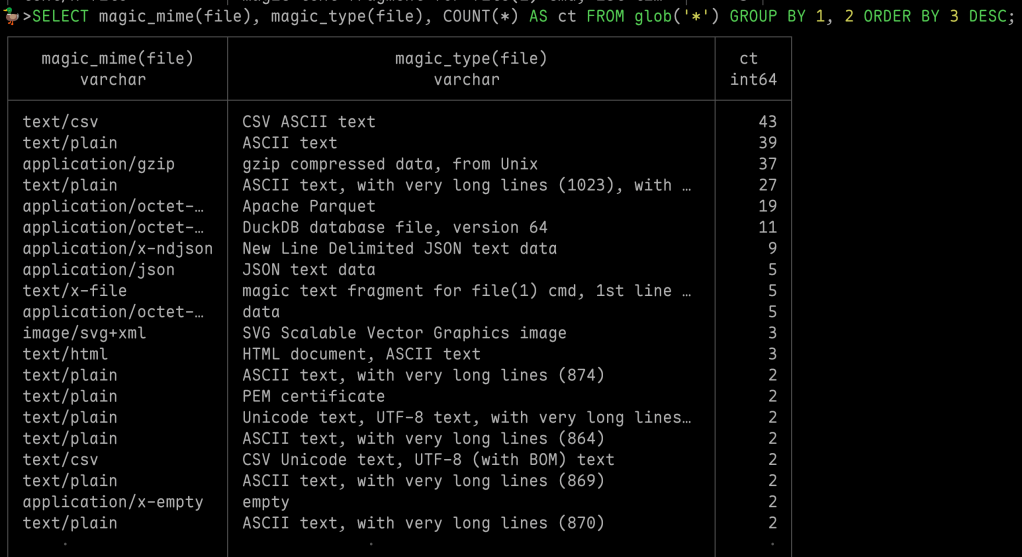
NOTE: I tried a glob on a fairly deeply nested filesystem (on an SSD) and ended up CTRL-C’ing the operation (sadly, patience is not a well-honed virtue). It’s not the fault of the extension, however, as time fd -x file was not exactly speedy: real: 11.76s | user: 30.69s | sys: 48.35s.
FIN
Remember, you can follow and interact with the full text of The Daily Drop’s free posts on:
- 🐘 Mastodon via
@dailydrop.hrbrmstr.dev@dailydrop.hrbrmstr.dev - 🦋 Bluesky via
https://bsky.app/profile/dailydrop.hrbrmstr.dev.web.brid.gy
☮️


 hrbrmstr's Daily Drop
Leave a comment