A Web Fot For DuckDB; Netquack; Ceci n’est pas une duck
Another installment of our occasional DuckDB-centric edition of the Drop, today.
NOTE: I’ll be in travel mode today, picking up #4 from UMaine for Spring Break, so wanted to take a moment, here, to pre-apologize for what my country might do today. Rumor has it, Trump is going to invoke the Alien Enemies Act of 1798. If he does, America truly returns to some of its darkest eras in the history of this fragile republic. I’ll have some content up this weekend explaining the situation if it does come to pass, with some notes on what Americans can do to limit the potential harms.
TL;DR
(This is an AI-generated summary of today’s Drop using Ollama + llama 3.2 and a custom prompt.)
- DuckDB 1.2.1 introduces a built-in web-based UI, offering features like interactive notebooks, database explorer, and result manipulation (https://duckdb.org/docs/stable/extensions/ui)
- Netquack, a DuckDB community extension, enables URL and domain analysis directly in SQL queries, supporting functions like extract_domain and integration with the Tranco list (https://duckdb.org/community_extensions/extensions/netquack.html)
- PSQL extension adds a pipe operator (|>) to DuckDB, allowing for more readable and sequential data transformations in SQL queries (https://duckdb.org/community_extensions/extensions/psql.html)
A Web Foot For DuckDB
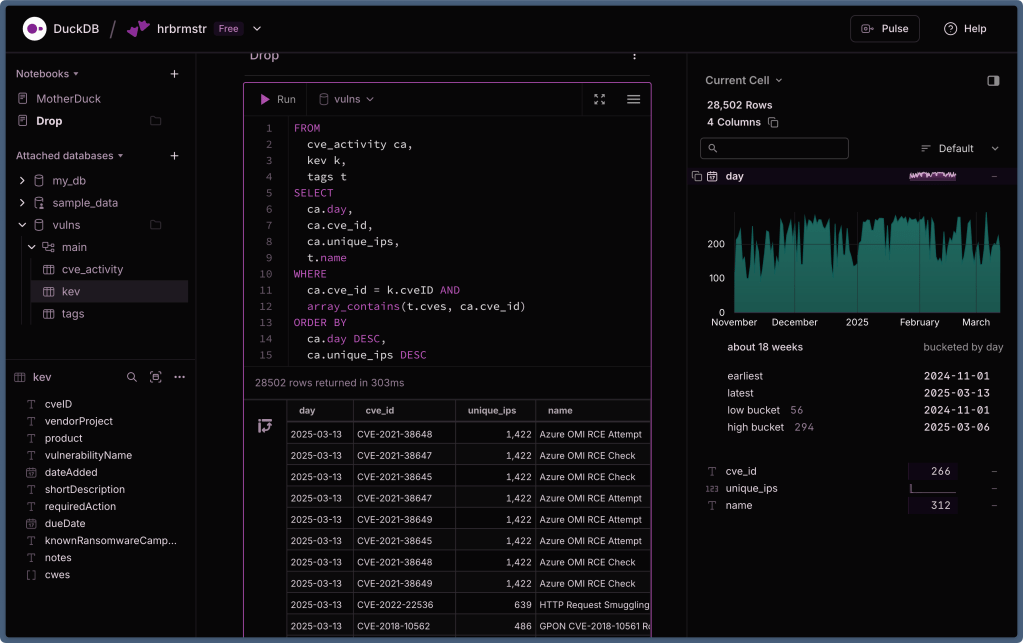
The DuckDB folks hav released version 1.2.1 featuring a built-in web-based user interface. If you’ve ever used MotherDuck (“cloud” DuckDB), the interface will be very familiar as both teams worked together to make this new extension and query interface available to local users.
DuckDB has more than earned its reputation as massivel useful analytics engine. While its command-line interface has served us all well with features like auto-complete and multi-line editing, not everyone is comfortable hacking SQL in a termainl or via some programming language. Various third-party UIs provide GUIs that support DuckDB, but the additional steps of selecting, installing, and configuring these tools create unnecessary friction.
If you have the latest DuckDB installed, all you need do is:
duckdb -ui
Alternatively, they can run the following SQL command from any DuckDB client:
CALL start_ui();
Both methods automatically install the UI extension if needed and open the interface in your default browser.
Here’s what’s in the tin:
- Interactive Notebooks: Organize your work into named notebooks with cells that can execute one or more SQL statements. The interface provides syntax highlighting and autocomplete to speed up query development.
- Database Explorer: The left panel displays all attached databases, including in-memory databases and any loaded files or URLs. Users can easily navigate through databases and schemas to explore tables and views.
- Table Summaries: Tapping a table provides detailed information including row count, column names, data types, and data profiles for each column. This feature accelerates data exploration and helps users understand their datasets without writing queries.
- Column Explorer: A dedicated panel shows summaries of query results, allowing users to gain deeper insights into individual columns.
- Result Manipulation: After running queries, we can sort, filter, and transform results using intuitive controls, making it easy to refine analysis without rewriting queries.
Normally being local-first, DuckDB itself means your data only leaks out if you do something daft and the same holds true for DuckDB UI. Data never leaves your computer unless you explicitly choose to connect to MotherDuck’s cloud service.
The UI is implemented as a DuckDB extension that embeds a localhost HTTP server. You can peruse this code on GitHub. This server provides both the browser application and an API for communication with DuckDB.
To optimize performance, results are returned in an efficient binary format that closely matches DuckDB’s in-memory representation. Server-sent events provide prompt notification of updates, creating a responsive experience that supports productive data analysis workflows.
The UI offers several configuration options:
- Change the local port (default is
4213) - Modify the remote URL for UI files
- Adjust the polling interval for database changes
These options can be set using SQL commands or environment variables, providing flexibility for different usage scenarios — full info on the extension’s documentation page.
This is a welcome addition to the DuckDBverse and should help make it more accessible to a broader range of analysts, data scientists (or have they all moved to wasting time with LLMs?), and coders in general.
The section header shows the local DuckDB UI working on a local DB but also connected to MotherDuck. If you’re an Arc user and also prefer dark mode (DarkDB?), you can grab my Arc Boost here: https://arc.net/boost/9F13B919-731A-4B4B-BA5D-C8307F07FA0F.
Netquack

Working with web data often involves extracting and analyzing domains, URLs, and paths—a process that traditionally requires moving your data between your database and specialized processing tools. The Netquack (I ended up having to do a mass find/replace due to mis-capitalizing the Q so much) community extension for DuckDB changes this by bringing these capabilities directly into SQL workflows. It lets us extract and manipulate components of URLs, domains, and web paths right inside your database queries.
Installing Netquack is straightforward using DuckDB’s extension system:
INSTALL netquack FROM community;
LOAD netquack;
If you’ve previously installed the extension and want to update to the newest version:
FORCE INSTALL netquack FROM community;
LOAD netquack;
There are instructions in the DuckDB help systems for enabling autoloading of extensions, but I prefer deliberate incantations that help show others — including your future self — intent.
A spiffy feature of Netquack is its ability to extract the main domain from URLs using the official Public Suffix List:
SELECT extract_domain('https://blog.subdomain.example.co.uk/articles/123') as domain;
-- Returns: example.co.uk
The extension downloads and maintains the Public Suffix List for you, but you can manually update it with:
SELECT update_suffixes();
Netquack also makes it simple to pull apart URLs into their constituent pieces:
Extract the host:
SELECT extract_host('https://blog.example.com/products?featured=true') as host;
-- Returns: blog.example.com
Extract the path:
SELECT extract_path('example.com/users/profile/settings') as path;
-- Returns: /users/profile/settings
Extract the URL scheme:
SELECT extract_schema('https://example.com') as schema;
-- Returns: https
The extension supports common schemes including http, https, ftp, mailto, tel, and sms.
Extract query parameters:
SELECT extract_query_string('shop.example.com/search?q=shoes&size=9&color=blue') as query;
-- Returns: q=shoes&size=9&color=blue
For more granular domain analysis, Netquack offers:
Extract the TLD (Top-Level Domain):
SELECT extract_tld('company.example.co.jp') as tld;
-- Returns: co.jp
Extract subdomains:
SELECT extract_subdomain('api.dev.example.com') as subdomain;
-- Returns: api.dev
Yet another spiffy feature of Netquack is its integration with the Tranco list, which ranks domains by popularity:
-- Update the Tranco list
SELECT update_tranco(true);

-- Get the ranking for a specific domain
SELECT get_tranco_rank('microsoft.com') as rank;
-- Returns: 2
Some of you are still thinking “so what?”.
Imagine you have a table of web server logs. With Netquack, you can easily analyze traffic patterns by domain:
FROM web_logs
SELECT
  extract_domain(url) as domain,
   COUNT(*) as visits
GROUP BY domain
ORDER BY visits DESC
LIMIT 10;
For cyber folks, identifying unusual subdomains can help detect potential phishing attempts (ok this is 100% a toy example, but I got to say “cyber”!):
SELECT
  url,
  extract_subdomain(url) as subdomain,
  LENGTH(extract_subdomain(url)) as subdomain_length
FROM suspicious_urls
WHERE subdomain_length > 20
ORDER BY subdomain_length DESC;
The Netquack folks are actively developing new features, including:
- Table functions for query parameter extraction
- More efficient storage for Tranco rankings
- GeoIP functionality
- IP address analysis tools
- Support for internationalized domain names (IDNs)
You can find more information about Netquack at the official DuckDB community extensions page.
Ceci n’est pas une duck

Traditional SQL can get pretty unweildy as can the modern SQL variant support by DuckDB. The same hold true for R where expression using nested parenthesis can be difficult to read, modify, and debug. R folks solved this initially via the {magrittr} pipe (%>%) and main R dev team baked a pipe |> right into the language. Thanks to Yannick Welsch, we now have pipes in SQL!
PSQL (GH) extends DuckDB’s SQL capabilities with a pipe operator (|>) that enables sequential data transformations. This lightweight extension brings the composability of piped languages like PRQL and Kusto to DuckDB while retaining the full power of SQL that data professionals already know.
The pipe operator lets us chain operations in a logical, top-to-bottom sequence that mirrors how we think about data transformations: “Take this dataset, then filter it, then select certain columns, then aggregate values…”
Consider this example query that analyzes invoice data (stolen from the README):
from 'https://raw.githubusercontent.com/ywelsch/duckdb-psql/main/example/invoices.csv' |>
where invoice_date >= date '1970-01-16' |>
select
  *,
  0.8 as transaction_fees,
  total - transaction_fees as income |>
where income > 1 |>
select
  customer_id,
  avg(total),
  sum(income) as sum_income,
  count() as ct
  group by customer_id |>
order by sum_income desc |>
limit 10 |>
as invoices
  join 'https://raw.githubusercontent.com/ywelsch/duckdb-psql/main/example/customers.csv'
    as customers
  on invoices.customer_id = customers.customer_id |>
select
  customer_id,
  last_name || ', ' || first_name as name,
  sum_income,
  version() as db_version;
This query starts with raw invoice data, applies filters, calculates derived columns, performs aggregations, sorts and limits results, joins with customer data, and finally outputs the desired fields. Each step is clearly demarcated by the pipe operator, making it easy to follow the data’s journey through the transformations.
The result is a clear table showing the top customers by income:
┌─────────────┬─────────────────────┬────────────┬────────────┐
│ customer_id │        name         │ sum_income │ db_version │
│    int64    │       varchar       │   double   │  varchar   │
├─────────────┼─────────────────────┼────────────┼────────────┤
│           6 │ Holý, Helena        │      43.83 │ v0.7.1     │
│           7 │ Gruber, Astrid      │      36.83 │ v0.7.1     │
│          24 │ Ralston, Frank      │      37.83 │ v0.7.1     │
│          25 │ Stevens, Victor     │      36.83 │ v0.7.1     │
│          26 │ Cunningham, Richard │      41.83 │ v0.7.1     │
│          28 │ Barnett, Julia      │      37.83 │ v0.7.1     │
│          37 │ Zimmermann, Fynn    │      37.83 │ v0.7.1     │
│          45 │ Kovács, Ladislav    │      39.83 │ v0.7.1     │
│          46 │ O'Reilly, Hugh      │      39.83 │ v0.7.1     │
│          57 │ Rojas, Luis         │      40.83 │ v0.7.1     │
└─────────────────────────────────────────────────────────────┘
PSQL also allows piped operations within subexpressions using a special syntax with (| to start and |) to end the pipeline (again, pilfered from the README):
create view invoices as (|
  from 'https://raw.githubusercontent.com/ywelsch/duckdb-psql/main/example/invoices.csv' |>
  where invoice_date >= date '1970-01-16' |>
  select
    0.8 as transaction_fees,
    total - transaction_fees as income
|);
This capability makes it easy to create modular building blocks that can be composed into more complex queries.
Rather than include more purloined piped program blocks, y’all can hit the README to see how this magic was made.
PSQL is still an experimental project with some limitations. It doesn’t have all the features of dedicated piped query languages, and its implementation using regex substitutions means it doesn’t fully understand SQL’s scoping rules. The special syntax for piped subexpressions doesn’t support arbitrary nesting, which might be limiting for highly complex queries.
However, these limitations are balanced by the fact that you retain all the power and expressivity of DuckDB’s SQL while gaining the readability benefits of piped syntax.
I’m not using this extension (hence the reliance on the README content), but I thought some of y’all might want to experiment with it.
FIN
Remember, you can follow and interact with the full text of The Daily Drop’s free posts on:
- 🐘 Mastodon via
@dailydrop.hrbrmstr.dev@dailydrop.hrbrmstr.dev - 🦋 Bluesky via
https://bsky.app/profile/dailydrop.hrbrmstr.dev.web.brid.gy
Also, refer to:
to see how to access a regularly updated database of all the Drops with extracted links, and full-text search capability. ☮️

 hrbrmstr's Daily Drop
Leave a comment