Rosé Pine; Catppuccin; Page Progress Without JavaScript
Back in January we covered Flexoki, and since then, I’ve been using it across various projects, IDEs and terminals. If you’re looking for something to help keep your mind off of gestures arms outward and wildly for a bit, while also improving the aesthetics of the places (terminal, IDE, web) you live, testing and tweaking theme configurations are a good place to start. So, today, we’ve a couple themes I haven’t seen bantered about much, but deserve some attention. There’s a theme-less third section for folks who have already settled on a fav theme and have no intention of switching anytime soon.
TL;DR
(This is an AI-generated summary of today’s Drop using Ollama + llama 3.2 and a custom prompt.)
- Rosé Pine is a thoughtfully crafted theme suite with three variants (Standard, Moon, Dawn) offering gentle, eye-friendly tones across 170+ applications (https://rosepinetheme.com/)
- Catppuccin provides four warm “flavors” (Latte, Frappé, Macchiato, Mocha) of pastel color themes with 26 colors each, focusing on balance and harmonic integration (https://github.com/catppuccin)
- Manuel Matuzovic demonstrates how to create a progress-indicating scroll-to-top button using modern CSS techniques like scroll-driven animations without JavaScript (https://matuzo.at/blog/2025/scroll-to-top-button)
Rosé Pine
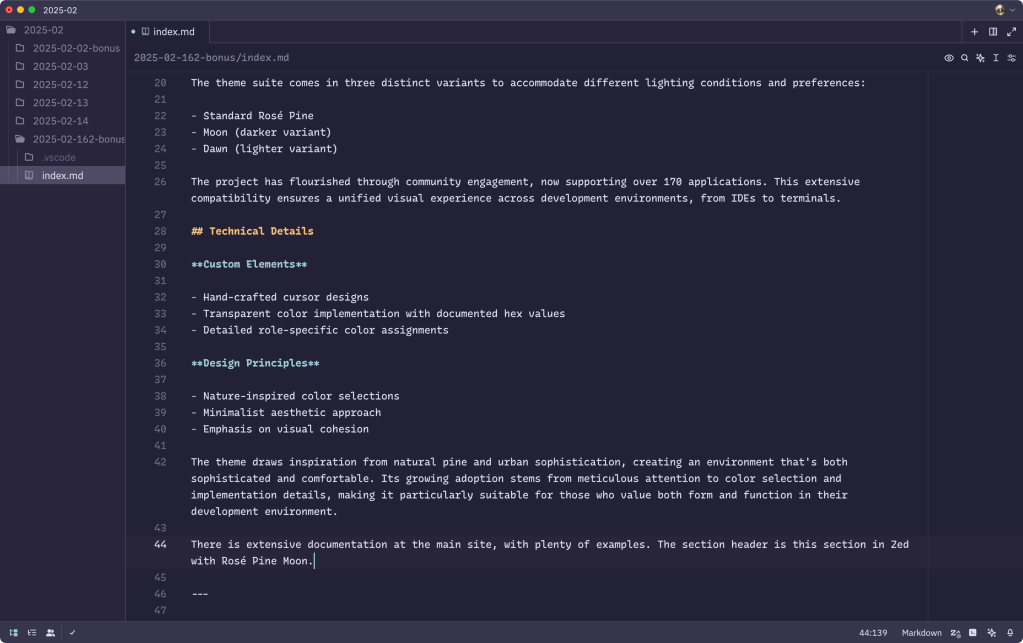
Rosé Pine is a thoughtfully crafted theme suite that offers a unified and 🤩 experience across various platforms, including IDEs, terminals, and CSS/web-oriented projects. The palette emphasizes gentle, eye-friendly tones that maintain clarity and readability while reducing visual fatigue during extended development sessions.
The theme suite comes in three distinct variants to accommodate different lighting conditions and preferences:
- Standard Rosé Pine
- Moon (darker variant)
- Dawn (lighter variant)
The project has flourished through community engagement, now supporting over 170 applications. This extensive compatibility ensures a unified visual experience across development environments, from IDEs to terminals.
Custom elements defined include:
- Hand-crafted cursor designs
- Transparent color implementation with documented hex values
- Detailed role-specific color assignments
The theme draws inspiration from natural pine and urban sophistication, creating an environment that’s both sophisticated and comfortable, with a deliberate minimalist approach. Its growing adoption stems from meticulous attention to color selection and implementation details, making it particularly suitable for those who value both form and function in their development environment.
There is extensive documentation at the main site, with plenty of examples. The section header is this section in Zed with Rosé Pine Moon.
Catppuccin
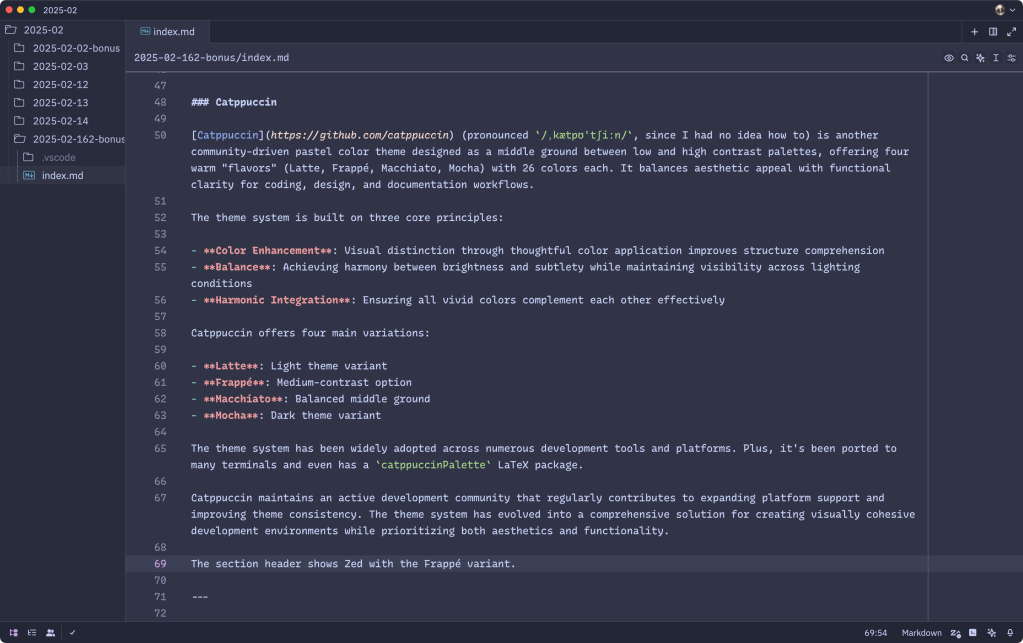
Catppuccin (pronounced /ˌkætpʊˈtʃiːn/, since I had no idea how to) is another community-driven pastel color theme designed as a middle ground between low and high contrast palettes, offering four warm “flavors” (Latte, Frappé, Macchiato, Mocha) with 26 colors each. It balances aesthetic appeal with functional clarity for coding, design, and documentation workflows.
The theme system is built on three core principles:
- Color Enhancement: Visual distinction through thoughtful color application improves structure comprehension
- Balance: Achieving harmony between brightness and subtlety while maintaining visibility across lighting conditions
- Harmonic Integration: Ensuring all vivid colors complement each other effectively
Catppuccin offers four main variations:
- Latte: Light theme variant
- Frappé: Medium-contrast option
- Macchiato: Balanced middle ground
- Mocha: Dark theme variant
The theme system has been widely adopted across numerous development tools and platforms. Plus, it’s been ported to many terminals and even has a catppuccinPalette LaTeX package.
Catppuccin maintains an active development community that regularly contributes to expanding platform support and improving theme consistency. The theme system has evolved into a comprehensive solution for creating visually cohesive development environments while prioritizing both aesthetics and functionality.
The section header shows Zed with the Frappé variant.
Page Progress Without JavaScript

Before we get to the resource, I’d like to divert us for a bit to talk about the governance model for Cascading Style Sheets (CSS), since that process fosters thoughtful innovation, like the feature we’re ultimately going to see.
The World Wide Web Consortium (W3C) maintains the CSS specifications through dedicated working groups. The CSS Working Group, which was formed in 1997 after splitting from the HTML Editorial Review Board, is responsible for developing and maintaining CSS standards.
The CSS Working Group follows a modular approach rather than creating single monolithic specifications. Each module defines a specific part of CSS and can progress through different levels independently.
There is no single “CSS version” in the traditional sense. Instead, CSS has levels, with each level building upon previous ones. Some key points about the current state:
- There is no “CSS Level 4” — individual modules can reach Level 4 or beyond, but CSS as a language no longer has overall levels (you may have seen copious use of “CSS Level 3” as you traipse around the web)
- The Working Group publishes “Snapshots” that collect stable modules and specifications that are ready for browser implementation (e.g., CSS Snapshot 2024)
- New features must go through rigorous evaluation for security, accessibility, and compatibility before being accepted
- Browser vendors must demonstrate implementation and interoperability before features become official standards
The process is intentionally slow and deliberate to ensure proper standardization and prevent potential issues with web compatibility.
As CSS improves with each module update, it often includes capabilities that we would have had to use JavaScript for.
“Building a progress-indicating scroll-to-top button in HTML and CSS” by Manuel Matuzovic caught my eye as it does something super cool without JavaScript. Manuel was inspired by a feature on The Needle Drop that fills up an arrow box to show your consumption process on a page (that arrow box is also a button that will return you to the top). Believe it or not, that can all be done in 100% CSS, now.
The button consists of a simple anchor tag pointing to the content ID, incorporating an SVG icon for visual feedback:
<a href="#content" class="back-to-top">
  <span>Back to top</span>
  <svg width="32" height="32" viewbox="0 0 24 24" aria-hidden="true">
    <path d="M5 12h14"/><path d="m12 5 7 7-7 7"/>
  </svg>
</a>
The implementation relies on several modern CSS techniques:
- Scroll-driven animations using the
scroll()timeline - Custom properties for progress tracking and arrow rotation
- Linear gradients for visual feedback
- Accessible text hiding while maintaining screen reader support
The button’s behavior is controlled through custom properties:
@property --progress {
  syntax: '<length-percentage>';
  inherits: false;
  initial-value: 0%;
}

@property --angle {
  syntax: '<angle>';
  inherits: true;
  initial-value: -90deg;
}
And, the implementation includes fallbacks for browsers without scroll-driven animation support. It also respects accessibility preferences through the prefers-reduced-motion media query for smooth scrolling behavior.
The solution further maintains accessibility by:
- Providing proper text alternatives for screen readers
- Using semantic HTML elements
- Including appropriate ARIA attributes
- Ensuring the button remains functional even without CSS support
The result is a sophisticated yet lightweight solution that enhances UX while maintaining broad browser compatibility and accessibility standards.
It’s super cool and you should 100% check it out, if only to distract you from IRL for just a few more precious minutes.
FIN
Remember, you can follow and interact with the full text of The Daily Drop’s free posts on:
- 🐘 Mastodon via
@dailydrop.hrbrmstr.dev@dailydrop.hrbrmstr.dev - 🦋 Bluesky via
https://bsky.app/profile/dailydrop.hrbrmstr.dev.web.brid.gy
Also, refer to:
to see how to access a regularly updated database of all the Drops with extracted links, and full-text search capability. ☮️
 hrbrmstr's Daily Drop
Leave a comment