xmq; Why?; Cosmotop
(The first “d" in Wednesday is such a waste of a byte.)
Big toss-up edition of the Drop, today, as I’m burning through the queue of things that had no other places to fit.
There’s not enough to dedicate a section to it, so I’ll just note here that Shiki — the astoundingly good source code pretty-printer — has had a 2.0 release that sets it up for some fun time in its 3.0 release. (You can read more about Shiki in this 2023 Drop).
Aside: In the wee hours of Tuesday, I started a project to track 47’s executive orders, memorandums, and proclamations and provide an English summary of the content with some guidance and notes. They’re going to try to use EOs (et al.) to bypass Congress, but the true intent seems to be to overwhelm folks with despair. Hopefully at least a few of the explanations will give folks some hope, since a large swath of the contents of almost every EO are going to face significant hurdles. I’ll be adding markdown conversions of the EOs soon.
TL;DR
(This is an AI-generated summary of today’s Drop using Ollama + llama 3.2 and a custom prompt.)
- XMQ is a tool that simplifies XML/HTML/JSON manipulation by using braces and parentheses instead of closing tags, offering features like syntax highlighting, bidirectional conversion, and XSLT transformations (https://libxmq.org/)
- The use of
^and$as line anchors in regular expressions originated from QED editor, where $ was first used to mark buffer end before Ken Thompson repurposed it for line endings in 1968 (https://buttondown.com/hillelwayne/archive/why-do-regexes-use-and-as-line-anchors/) - Cosmotop is a cross-platform system monitoring tool built on Cosmopolitan that works as a single binary across Linux, MacOS, Windows, FreeBSD, NetBSD, and OpenBSD systems (https://github.com/bjia56/cosmotop)
xmq

xmq (GH) is a focused tool and language that was created to improve the readability and editability of XML, HTML, and JSON data. By converting these formats into a more human-friendly representation, xmq facilitates easier data manipulation and configuration management.
XML and HTML are fairly verbose. xmq simplifies this verbosity by replacing traditional closing tags with braces and encapsulating attributes within parentheses. This structural modification reduces clutter and making it easier on the eyes.
For such a small tool it packs in quite a bit:
- Syntax Highlighting and Pretty Printing: It can render XML, HTML, and JSON files in color-coded, neatly formatted XMQ, enhancing clarity during reviews.
- Bidirectional Conversion: We can seamlessly convert files between XMQ and XML, HTML, or JSON formats, ensuring compatibility across different systems and applications.
- Integrated Paging and Browsing: For extensive documents,
xmqprovides built-in paging capabilities and can render content directly in the default web browser, streamlining the navigation of large datasets. - XSLT Transformations: The tool supports the application of XSLT transformations, enabling users to process and transform XML data efficiently.
- Entity Replacement: XMQ allows for the substitution of entities with other XMQ, XML, JSON, or quoted content, offering flexibility in data representation and manipulation. (This is a pretty cool feature IMO.)
An example or two is in order…
$ xmq package.json
_ {
    name    = cvesky
    private = true
    version = 0.4.1
    type    = module
    scripts {
        dev     = vite
        build   = 'vite build'
        preview = 'vite preview'
        start   = vite
        lint    = 'eslint src/**/*.js'
        format  = 'prettier --write "src/**/*.{js,css}"'
        analyze = vite-bundle-analyzer
    }
    dependencies {
        _(_ = @babel/core) = ^7.x
        _(_ = @observablehq/plot) = ^0.6.16
        _(_ = @types/d) = ^1.0.4
        d3                   = ^7.9.0
        date-fns             = ^4.1.0
        eslint               = ^8.x
        lit                  = ^3.2.1
        markdown-it          = ^14.1.0
        prettier             = ^3.x
        terser               = ^5.x
        vite                 = ^6.0.1
        vite-bundle-analyzer = ^0.x
        vite-plugin-pwa      = ^0.21.1
    }
    devDependencies {
        _(_ = @types/d) = ^1.0.4
        _(_ = @types/d3) = ^7.4.3
        typescript = ^5.7.2
        vite       = ^6.0.1
    }
}
In your own terminal, that output would also be in color, making very easy to read.
This:
$ curl --silent --location https://rud.is/b | xmq br
will convert the HTML to xmq‘s language and open a browser. This turns out to be a great way to peruse JSON data, too.
It has some fun sub-commands too:
 curl --silent --location https://rud.is/b | xmq statistics | xmq to-json | jq
{
  "_": "statistics",
  "size_source": 144117,
  "num_elements": 573,
  "size_element_names": 1619,
  "num_text_nodes": 315,
  "size_text_nodes": 36253,
  "num_attributes": 841,
  "size_attribute_names": 4482,
  "size_attribute_content": 26152,
  "num_comments": 26,
  "size_comments": 440,
  "size_doctype": 4,
  "num_cdata_nodes": 16,
  "size_cdata_nodes": 62875,
  "sum_meta": 32257,
  "sum_text": 36253
}
The xmq to-clines subcommand is a neat way to turn nested JSON (or XML/HTML) to a format with Observable Plot’s tree transform.
The README has a many more examples.
While the CLI tool is handy, the project is also a library, neatly tucked into xmq.h and xmq.c source files. Just add them to your project, link against the libxml2 library, and your app can natively support xmq.
CAUTION is also in order, however, as the tool can segfault on gnarly HTML.
This one is 100% going in the “install on every new system” bucket.
Why?
If you skipped past the TL;DR, you are most likely asking “Why, what?” right about now.
Before we get into the what, I do want to take a teensy bit to talk about “why“.
“Why” is a great question that I’m fairly certain most of us do not ask often enough.
It is an especially important question for processes, procedures, and rules we all follow in our $DAYJOBs. Without questioning why we’re performing some action, we tend to keep repeating potentially needless actions that waste precious time, energy, and resources.
It is also important to ask that question before casting judgement — or imposing punishment — on others. Knowing why someone is doing/did something will make each of us more empathetic, and put us in a much better position to render assistance (which should always be the goal).
Then there are situations like this section’s resource which asks a question for something the coders who read these Drops likely just “do”.
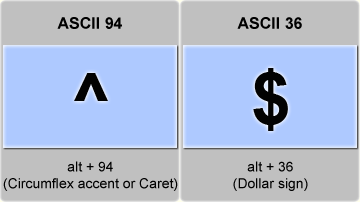
Hillel Wayne became curious as to why we use ^ and $ in regular expressions to mean the start and end of lines (respectively). It’s a great question, since — at least on my U.S. standard MacBook keyboard, ^ comes after $ in the number line.
As Wayne notes, the story begins with QED (Quick EDitor) (and it’s OG manual), where Butler Lampson and Peter Deutsch first used the $ symbol to represent “the last line in the buffer”. When Ken Thompson later implemented regular expressions in his version of QED around 1968, he adapted this existing convention, repurposing the $ symbol to mark the end of a line rather than the end of the buffer.
The reason for ^ is another matter, and I’ll implore you to visit Hillel’s post to get their take on it.
What’s really fun about this particular “why” is that — as the author notes at the end — we don’t have to speculate since the two folks responsible for the choices are still living humans. Hillel dropped them an email, and we’ll see if they reply.
cosmotop
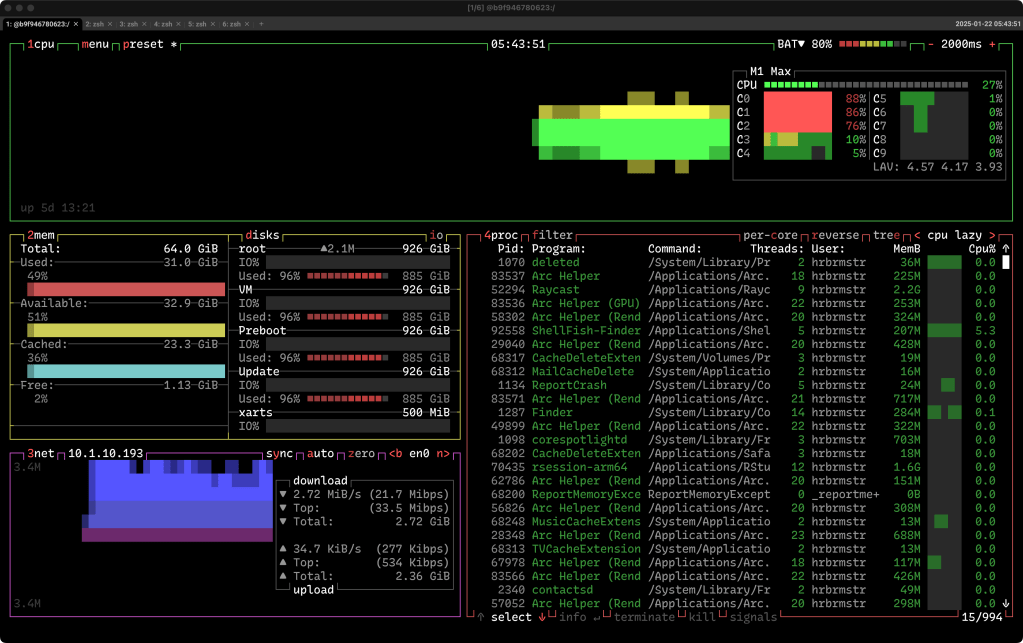
Cosmotop is a Cosmopolitan single-binary cross-platform system monitoring tool recently released by Brett Jia. It’s a fork of btop++, which we covered last year, so you can hit that to learn about btop‘s cruncy goodness.
Thanks to Cosmopolitan, you can carry around this single binary and run it on:
- Linux 2.6.18+ (x86_64 and aarch64)
- MacOS 13+ (x86_64 and aarch64)
- Windows 10+ (x86_64)
- FreeBSD 13+ (x86_64 and aarch64)
- NetBSD 10.0+ (x86_64)
- OpenBSD 7.3 (x86_64)
with zero effort.
It maintains config files in ~/.config/cosmotop/cosmotop.conf, which is automatically populated with default values on first run.
FIN
Remember, you can follow and interact with the full text of The Daily Drop’s free posts on:
- 🐘 Mastodon via
@dailydrop.hrbrmstr.dev@dailydrop.hrbrmstr.dev - 🦋 Bluesky via
https://bsky.app/profile/dailydrop.hrbrmstr.dev.web.brid.gy
Also, refer to:
to see how to access a regularly updated database of all the Drops with extracted links, and full-text search capability. ☮️
 hrbrmstr's Daily Drop
Leave a comment