Quacking In The [g]Sheets; My🦆Server; Feet-First 🦆 DB (a.k.a. “DuckDB HTTP Client Extension”)
My day outside of Reno started early, Friday, and we were chased by black helicopters (not joking), so — as expected — no Friday normal Drop.
But things are QUACKING in DuckDB land, and I just had to get a Bonus 🦆 Drop out about them before more hiking this weekend.
TL;DR
(This is an AI-generated summary of today’s Drop using Ollama + llama 3.2 and a custom Modelfile.)
- DuckDB GSheets extension enables direct integration with Google Sheets for reading and writing data through SQL, featuring OAuth authentication and basic query syntax (https://duckdb-gsheets.com/)
- MyDuck Server bridges MySQL and DuckDB by providing MySQL-compatible interface while storing data in DuckDB’s OLAP format, offering significant performance improvements (https://github.com/apecloud/myduckserver)
- DuckDB HTTP Client extension allows direct HTTP GET/POST requests within DuckDB queries, enabling integration with web APIs and immediate processing of response data (https://github.com/quackscience/duckdb-extension-httpclient)
Quacking In The [g]Sheets
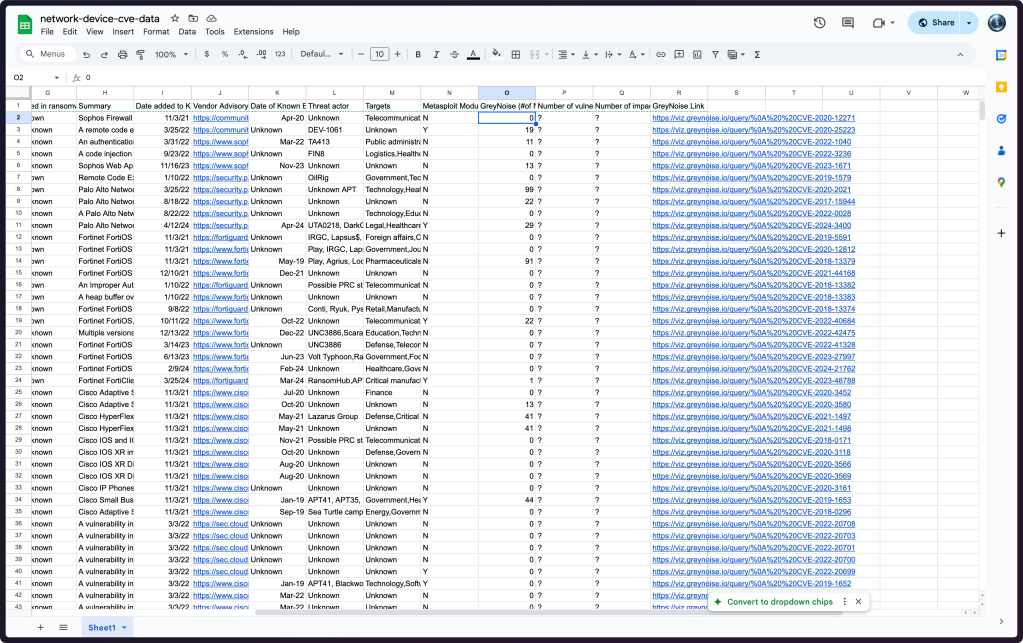
The DuckDB GSheets extension (GH) enables seamless integration between DuckDB’s analytical capabilities and Google Sheets, bridging a critical gap between collaborative spreadsheet workflows and robust data analysis.
The extension provides straightforward (though fairly basic, for now) SQL syntax for both reading and writing Google Sheets data. You can query sheets using either full URLs or spreadsheet IDs, with options to specify sheet names and handle header rows. Authentication can be handled through browser-based OAuth or via Google API access tokens.
If you work in an environment where domain experts collaborate with datascience/analysis teams, Google Sheets (et al.) often serves as an accessible interface for non-technical team members to maintain and update data that feeds into analytical workflows. For example, product managers can maintain feature flags, marketing teams can update campaign metadata, and operations teams can manage configuration data – all through the familiar spreadsheet interface rather than dealing with JSON, YAML, or raw text files.
Setting up the extension requires installing it from the community repository (you need to be on a fairly recent release of DuckDb for this to work):
INSTALL gsheets FROM community;
LOAD gsheets;
Basic usage patterns include:
-- Read from a sheet
FROM read_gsheet('spreadsheet_url_or_id');

-- Write to a sheet
COPY table_name TO 'spreadsheet_url_or_id' (FORMAT gsheet);
The section header image is from this gsheet which is (my public copy of) a “Database of network device CVEs” provided by Sophos from a five-year massively cool (but evil) hack of dozens of corporations around the globe. It is possible this sheet might be updated regularly, especially the “GreyNoise (#of Malicious IPs Scanning)” column (that’s my $WORK place). If that is the case it may make more sense to access it directly than to have some process to download it somewhere regularly.
I made a perma-copy of my OAuth’d access token:
LOAD gsheets;

CREATE PERSISTENT SECRET (
  TYPE gsheet,
  PROVIDER access_token,
  TOKEN 'yOUrToK3nH3re'
);
And, now we can look at the “schema”:
$ duckdb -json -c "
  LOAD gsheets;
  FROM read_gsheet(
    'https://docs.google.com/spreadsheets/d/1TbBX1YkZ4GED1qU7Owcp2AIiRhcGzLEAFCEopq7smMg/edit?gid=1482976550#gid=1482976550',
    sheet = 'Sheet1'
  )
  LIMIT 1
" | jq
[
  {
    "Vendor": "Sophos",
    "Title": "Sophos SFOS SQL Injection Vulnerability",
    "CVE": "CVE-2020-12271",
    "CVSS": 9.8,
    "Date of NVD publication": "4/27/20",
    "Date of vendor advisory": "Unknown",
    "Used in ransomware attacks?": "Known",
    "Summary": "Sophos Firewall operating system (SFOS) firmware contains a SQL injection vulnerability when configured with either the administration (HTTPS) service or the User Portal is exposed on the WAN zone. Successful exploitation may cause remote code execution to exfiltrate usernames and hashed passwords for the local device admin(s), portal admins, and user accounts used for remote access (but not external Active Directory or LDAP passwords).",
    "Date added to KEV Catalog": "11/3/21",
    "Vendor Advisory": "https://community.sophos.com/kb/en-us/135412",
    "Date of Known Exploitation": "Apr-20",
    "Threat actor": "Unknown",
    "Targets": "Telecommunication,Construction,Transportation,Education,Manufacturing,Auto,Airline,Pharmaceuticals,Retail,Insurance,Legal",
    "Metasploit Module": "N",
    "GreyNoise (#of Malicious IPs Scanning)": 0.0,
    "Number of vulnerable devices": "?",
    "Number of impacted devices": "?",
    "GreyNoise Link": "https://viz.greynoise.io/query/%0A%20%20CVE-2020-12271"
  }
]
And, perform normal ops on it:
$ duckdb -table -c "
LOAD gsheets;
FROM read_gsheet(
  'https://docs.google.com/spreadsheets/d/1TbBX1YkZ4GED1qU7Owcp2AIiRhcGzLEAFCEopq7smMg/edit?gid=1482976550#gid=1482976550',
  sheet='Sheet1'
)
SELECT
  Vendor,
  COUNT(Vendor) AS ct
GROUP BY
  Vendor
ORDER BY
  2 DESC
"
+---------------------+----+
|       Vendor        | ct |
+---------------------+----+
| Cisco               | 72 |
| D-Link              | 19 |
| Ivanti              | 18 |
| Citrix              | 16 |
| Fortinet            | 13 |
| SonicWall           | 10 |
| Zyxel               | 9  |
| NETGEAR             | 8  |
| Juniper             | 6  |
| F5                  | 6  |
| PANW                | 5  |
| Sophos              | 5  |
| DrayTek             | 3  |
| Tenda               | 3  |
| TP-Link             | 2  |
| MikroTik            | 2  |
| Dasan               | 2  |
| Check Point         | 1  |
| D-Link and TRENDnet | 1  |
| Barracuda           | 1  |
| Netis               | 1  |
| FatPipe             | 1  |
| Arcadyan            | 1  |
| Sumavision          | 1  |
+---------------------+----+
The extension has some notable constraints to consider:
- Google Sheets’ 1M cell limit per spreadsheet
- Data must start in cell A1
- Sheets must exist before writing to them
These limitations aside, the DuckDB GSheets extension will will (eventually) provide a robust bridge between collaborative data maintenance and analytical processing, making it easier for organizations to maintain their data workflows across technical and non-technical team members.
The code is very readable, but the extension is also a tad buggy at the moment (you may not always be able to get to a particular sheet, I have not debugged why, yet); so, this might be a good project to PR into if you have some specific functionality you need, but is presently missing, like support for a subset of the bonkers number of parameters you can use when reading CSV files in DuckDB.
My🦆Server

MyDuck Server is a nascent bridge between MySQL and DuckDB with a goal of enabling high-performance analytics while maintaining MySQL compatibility. It functions by storing data in DuckDB’s OLAP-optimized format while presenting a MySQL-compatible interface, allowing queries to execute [up to 1,000x] faster than traditional MySQL configurations.
The system operates through dual interfaces — a MySQL wire protocol on port 13306 (for traditional MySQL-style queries) and a PostgreSQL-compatible interface on port 15432. (for direct DuckDB SQL execution).
I’m including this mostly for visibility, since I do not run MySQL/MariaDB, and the README — while a tad verbose — is also not super helpful in terms of real examples.
If you are a MySQL/MariaDB shop, this might be something to keep on the radar.
Feet-First 🦆 DB (a.k.a. “DuckDB HTTP Client Extension”)

The DuckDB HTTP Client extension enables direct HTTP GET and POST requests from within DuckDB queries. After installing and loading via the community extensions repository, you can make HTTP requests that return results directly into DuckDB’s query processing pipeline.
By now, you should know how to install/load extensions:
INSTALL http_client FROM community;
LOAD http_client;
The extension provides two main functions: http_get() for GET requests and http_post() for POST requests with optional headers and parameters. The results are returned as structured data that can be further processed using DuckDB’s SQL capabilities.
The extension returns responses in a consistent format that includes:
- HTTP status code
- Response reason
- Response body (typically JSON)
- Response headers
The response data can be immediately parsed and transformed using DuckDB’s built-in JSON processing capabilities and integrated into larger analytical queries.
The README provides a practical example of this extension’s utility is its ability to interact with spatial data APIs. When combined with DuckDB’s spatial extension, you can fetch GeoJSON data via HTTP and directly process it as geometric objects. This enables seamless integration of remote spatial data sources into DuckDB analytical workflows.
We can show another one, though. Let’s say we want to use DuckDB to analyze a day’s worth of NVD CVE records.
We can grab all of the CVEs for one day and save a temp copy in memory as a table (this reduces the number of times we need to fetch from the API):
CREATE TABLE yesterday AS (
WITH
  __req AS (
    SELECT
      http_get(
        'https://services.nvd.nist.gov/rest/json/cves/2.0/?pubStartDate=2024-11-08T00:00:00.000&pubEndDate=2024-11-08T23:59:59.000'
      ) AS res
  ),
  __res AS (
    SELECT
      UNNEST( from_json(((res->>'body')::JSON)->'vulnerabilities', '["json"]') )
      AS cves
    FROM
      __req
  )

 FROM __res
);
We’ll look at that in a second, but be aware that some APIs paginate (NVD does at 2,000 records) and this extension won’t handle that, but you can work around it if you combine this method with some shell scripting.
What that query returns is an array of deeply nexted JSON records:
FROM yesterday LIMIT 3;
┌──────────────────────────────────────────────────────────────────────────────┐
│                                     cves                                     │
│                                     json                                     │
├──────────────────────────────────────────────────────────────────────────────┤
│ {"cve":{"id":"CVE-2024-47072","sourceIdentifier":"security-advisories@gith…  │
│ {"cve":{"id":"CVE-2024-51987","sourceIdentifier":"security-advisories@gith…  │
│ {"cve":{"id":"CVE-2024-51998","sourceIdentifier":"security-advisories@gith…  │
└──────────────────────────────────────────────────────────────────────────────┘
But DuckDB let’s us work with JSON pretty seamlessly.
It looks like the NVD contractors are milking their contract for all its worth:
FROM yesterday
SELECT
  cves->>'cve'->>'vulnStatus' AS vulnStatus,
  COUNT() AS ct,
  ROUND(COUNT() * 100.0 / SUM(COUNT()) OVER (), 2) AS pct
GROUP BY ALL;
┌─────────────────────┬───────┬────────┐
│     vulnStatus      │  ct   │  pct   │
│       varchar       │ int64 │ double │
├─────────────────────┼───────┼────────┤
│ Awaiting Analysis   │    83 │  65.87 │
│ Received            │    34 │  26.98 │
│ Undergoing Analysis │     9 │   7.14 │
└─────────────────────┴───────┴────────┘
You can add headers, and use getenv(var) to fill in things like API keys.
This is a super fun extension to play with!
FIN
Remember, you can follow and interact with the full text of The Daily Drop’s free posts on Mastodon via @dailydrop.hrbrmstr.dev@dailydrop.hrbrmstr.dev ☮️

 hrbrmstr's Daily Drop
Leave a comment